
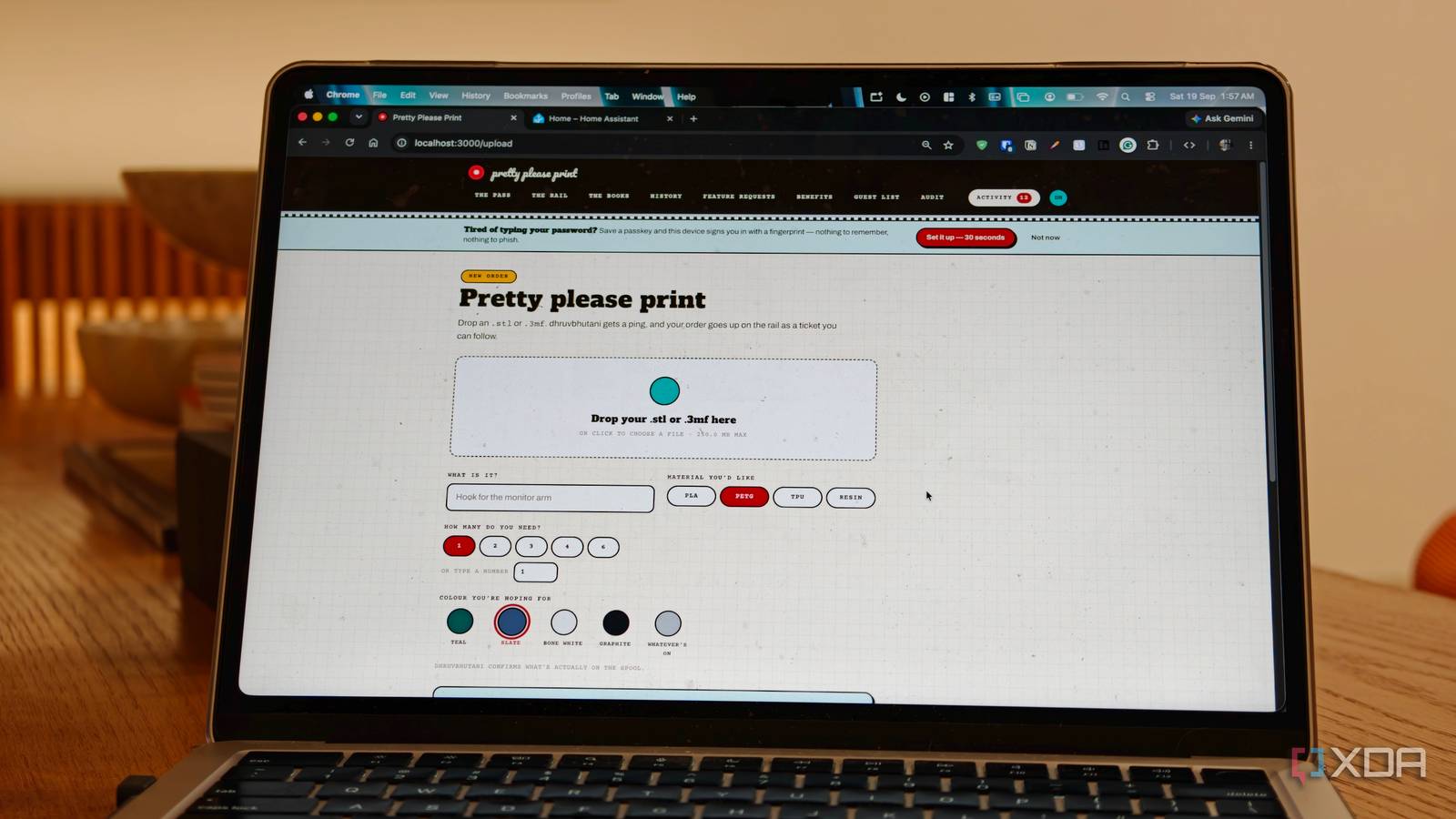
Published Sep 19, 2026, 11:00 AM EDT Dhruv Bhutani has been writing about consumer technology since 2008, offering deep insights into the personal technology landscape through features and opinion pieces. He writes for XDA-Developers, where he focuses on topics like productivity, networking, self-hosting, and more. Over the years, his work has also appeared in leading publications such as Android Police, Android Authority, CNET, PCMag, and more. Outside of his professional work, Dhruv is an avid fan of horror media spanning films and literature, enjoys fitness activities, collects vinyl records, and plays the guitar. Having a 3D printer is great, until everyone finds out that you have one. When my family, friends and friends' friends found out that I had a 3D printer, every small household problem became a printing request. Someone wants a stand, a toy for their kid, a replacement clip. Every day, there was a new request asking me if I could print something for them alongside a link for an STL file. I don't mind printing things for friends, of course. The problem is keeping track of all these requests. It's impossible to keep track of all these individual links, files, personal preferences for size and scale, or even color and material. That's until I installed a self-hosted 3D printing kiosk and request system. Dubbed Pretty Please Print, the software solved every single problem I faced by turning it into a small print kiosk for my family. I only wish I'd found this software earlier. Pretty Please Print makes family print requests easy to manage A 3D preview lets me check what I'm printing Credit: Installing Pretty Please Print doesn't take much more than a few minutes. The provided instructions are straightforward and more than enough to get the Docker app up and running quickly, and immediately it solves my biggest stress point with entertaining 3D printing requests. Before I deployed this app, anytime someone would share an STL file with me or a link, I'd save it somewhere and create a note of whatever their individual preferences were. If I was busy with work, that request would invariably get forgotten and soon enough I'd be dealing with a follow-up message asking me about the status of the print. Pretty Please Print turns handling third-party prints into a structured workflow. The self-hosted service exposes a beautiful front-end that is easy to understand and use. I now ask family members to upload the STL or 3MF file via the kiosk's upload function, add relevant instructions and submit it. The model is stored with the request and even gives a visual render so that the uploaders can see exactly what they are submitting for a print. Being able to see the actual geometry is a great way to avoid the wrong uploads going up. Not just visualize, the tool even lets you rotate it in 3D space so that I have a better idea of what I'm being asked to print before I send it to the slicer. Elsewhere, there's the notes field and granular selection of filaments. The notes field comes in handy when I'm dealing with small items that need to be printed in larger quantities, but also when someone wants me to increase the size of an object. The fact of the matter is that a 3D print is rarely a drop an STL and print affair. It invariably needs a few tweaks before it is ready to go to the slicer. A structured workflow keeps my print queue manageable I always know what needs to be printed next The other part that I love about the app is the structured approach to workflows. A request starts as, well, a request which then moves to Accepted once I've decided to print it. Once it's in process, I move it to Printing and then finally Delivery. Of course, I can also decline a print and give a reason. Once the job is finished, it moves out of the queue but remains in the history. That might sound like a lot of steps, but that granularity is what ensures that I stay on track. Plus, it gives me a much cleaner view of what actually needs my attention at that moment. There's another advantage to this setup. Assuming I haven't started printing something, the requestor can go in and withdraw a request if needed. Perhaps the design has changed, or the person just doesn't need the print anymore. Instead of flooding my inbox with messages, they can just head on into the app, cancel the request or reupload a fresh file. The last feature I've come to appreciate a lot is the built-in history. My printer gets a lot of use, and I'm not particularly good at keeping track of all the STL files. This software makes finding the original model a breeze. I can easily scroll through my completed requests, and find the exact model and associated notes with ease. For prints and tasks that I repeat often, this is extremely helpful. Better control over my friends and family 3D printing queue 3D printing isn't particularly difficult and, to be fair, I love printing out things for family and friends. What's not is the friction that comes with coordinating between people. Pretty Please Print gives those requests a home. My family can easily submit what they want, include the details I need and check the status without having to ask me every time. I get a single queue and a record of everything that has been printed. It's made coordinating prints between friends and family members much easier, and it's become a part of my permanent self-hosted stack.
My family's endless 3D printing requests taught me why a print kiosk is essential
Full Article
Original Source
Read the full article at Xda-developers →KhanList aggregates and links to publicly available news content. We do not host full articles from third-party sources. Always verify important information with original sources.