
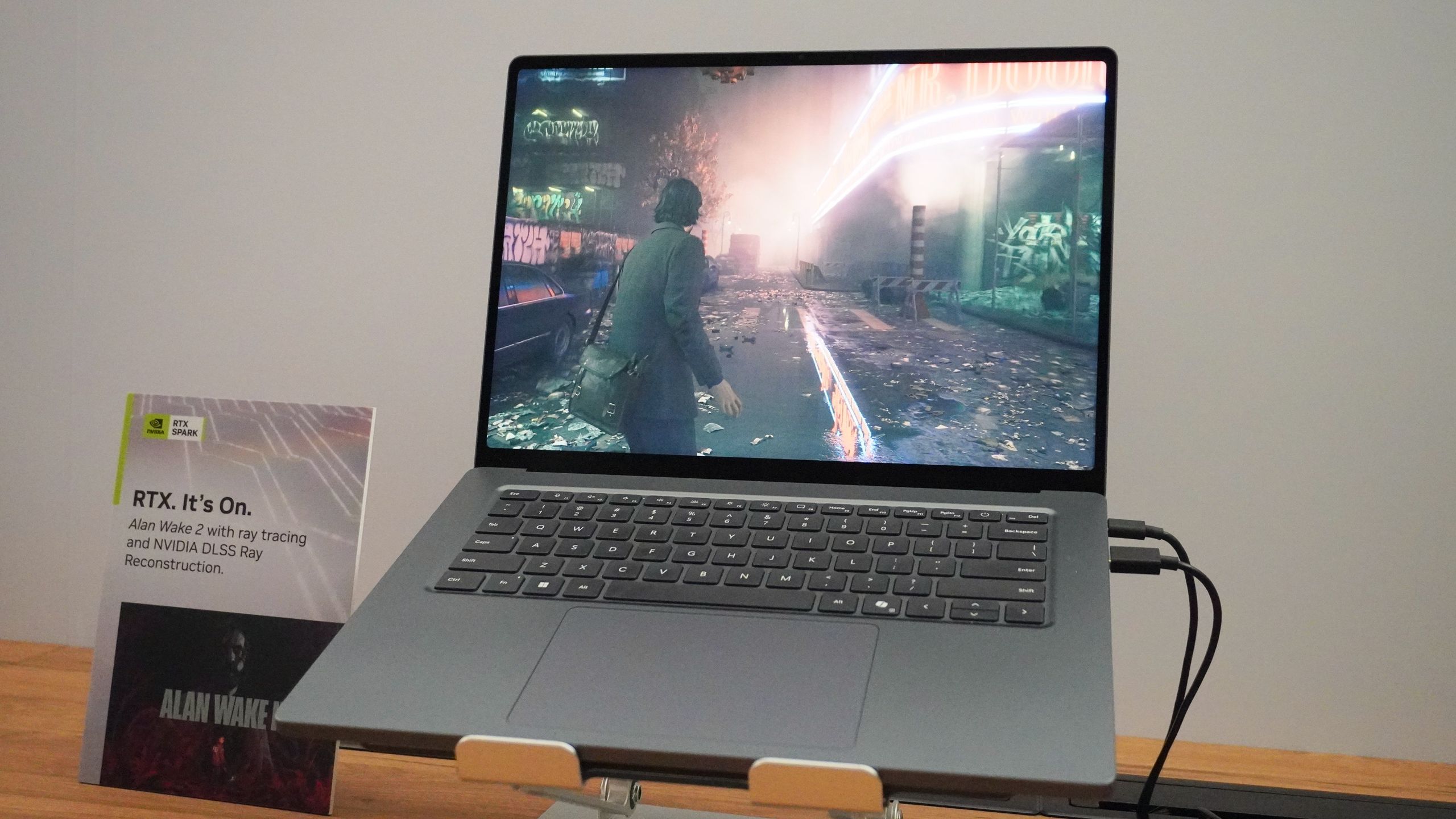
(Image credit: Future) The Microsoft Surface Laptop Ultra is real and promises to be a powerhouse. Powered by an Nvidia RTX Spark chip, this 15-inch laptop is built for local AI and 3D graphics. Though its starting price of $2,599 is steep for average users, “prosumers” could certainly benefit from what this laptop aims to deliver.Of course, this raises a question for the folks the Surface Laptop Ultra is marketed to: why shouldn’t you get a MacBook Pro instead? It’s a fair question, especially since Microsoft wasn’t shy about comparing its latest laptop to Apple’s flagship notebook during the Microsoft Surface event. Jensen Huang says Nvidia and Microsoft have “reinvented the computer as we know it,” but can the Surface Laptop Ultra do anything the MacBook Pro can’t?While we haven’t yet had meaningful hands-on time with the Surface Laptop Ultra, we have enough information to make some preliminary comparisons between the devices. So, should you get the Surface Laptop Ultra or a MacBook Pro M5 Pro? Read on for all the details!Microsoft Surface Laptop Ultra vs. MacBook Pro M5 Pro: Specs Swipe to scroll horizontally Header Cell - Column 0 Microsoft Surface Laptop Ultra MacBook Pro 14-inch M5 Pro (starting) MacBook Pro 16-inch M5 Pro (starting) Price $2,599 $2,499 $2,999 Display 15-inch PixelSense Ultra display (3270 x 2180) | 120Hz 14.2 Liquid Retina XDR (3024 x 1964) | 120Hz 16.2 Liquid Retina XDR (3,456 x 2,234) | 120Hz Chip Nvidia RTX Spark N1X (5120-core GPU and 18-core CPU) M5 Pro (18-core CPU, 20-core GPU) M5 Pro (18-core CPU, 20-core GPU) Memory 24GB 24GB 24GB Storage 512GB 1TB 1TB Battery life 15 hours video, 12 hours web browsing (claimed) 24 hours (rated) 24 hours (rated) Ports 3x USB-C/USB4, 1x DisplayPort 2.1, 1x HDMI 2.1, 1x USB-A, 1x SD card reader, 1x 3.5mm headphone jack 3x Thunderbolt 5, 1x HDMI, 1x SD card slot, 1x headphone jack, 1x MagSafe charging port 3x Thunderbolt 5, 1x HDMI, 1x SD card slot, 1x headphone jack, 1x MagSafe charging port Connectivity Wi-Fi 7, Bluetooth 5.4 Wi-Fi 7, Bluetooth 6 Wi-Fi 7, Bluetooth 6 Colors Platinum, Nightfall Silver, Space Black Silver, Space Black Dimensions 12.9 x 9.4 x 0.7 inches 12.31 x 8.71 x 0.61 inches 14.0 x 9.7 x 0.6 inches Weight 4.4 pounds 3.4 pounds 4.7 pounds Microsoft Surface Laptop Ultra vs. MacBook Pro M5 Pro: Price (Image credit: Microsoft)Though the Surface Laptop Ultra isn’t as expensive as we feared, even the entry-level model commands a steep price—comparable to the M5 Pro MacBook Pro.Over on Microsoft’s online store, you can buy the Surface Laptop Ultra starting at $2,599. This model packs an RTX Spark N1X chip with a 5120 GPU and 18-core CPU, 24GB of unified memory, and a 512GB SSD. You can pre-order it now and get it as soon as October 16. Interestingly enough, you can trade in your MacBook Pro and get up to $1,000 cash back on the Surface Laptop Ultra.The next model, which packs the more powerful RTX Spark N1X chip with a 6144-core GPU and a 20-core CPU, along with 32GB of memory and a 1TB SSD, starts at $3,699. The product page lists various configurations, with the highest-end model, featuring 128GB of RAM and a 1TB SSD, costing an eye-watering $5,899.Conversely, the 14-inch MacBook Pro with the M5 Pro chip packing a 15-core CPU/16-core GPU, 24GB of unified memory, and a 1TB SSD starts at $2,499. The 16-inch model starts at $2,999 with the same M5 Pro chip, memory, and storage.Get instant access to breaking news, the hottest reviews, great deals and helpful tips.For $200 more, you can get a 14-inch model with an M5 Pro chip featuring an 18-core CPU and a 20-core GPU. If you have money to burn, you can configure the 14-inch MacBook Pro with an M5 Max chip (18-core CPU/40-core GPU), 128GB of RAM, and a 2TB SSD for $6,699. This laptop can top out at $9,699 if you get an 8TB SSD.To be clear, both the Surface Laptop Ultra and MacBook Pro are pricey machines and can get even more expensive when you opt for higher-end components. Yes, the MacBook Pro can shatter your bank account, but if we just look at starting prices, Apple’s powerful notebook is $100 less than Microsoft’s.Microsoft Surface Laptop Ultra vs. MacBook Pro M5 Pro: Design (Image credit: Future)Our own Jason England went hands-on with the Surface Laptop Ultra at Computex and got another look during Microsoft’s Surface event. He says the 15-inch laptop feels as premium as a MacBook Pro, with a similar-feeling keyboard and a massive touchpad. Based on what I saw during the livestream, you could certainly mistake the Surface Laptop Ultra for a MacBook Pro.Getting into some specifics, the Surface Laptop Ultra measures 12.9 x 9.4 x 0.7 inches and weighs 4.4 pounds. Jason says the laptop is “impressively light” and that it has good weight distribution when you hold it. As with the MacBook Pro, it’s easy to open the Surface Laptop Ultra’s lid with one hand.One of the most interesting features of Microsoft’s laptop is that, according to Microsoft, it has the world’s first built-in magnetic USB-C charging port. While I won’t dispute that, it’s clearly inspired by Apple’s MagSafe charger on MacBooks. According to Jason, the USB-C port survives the trip test.Since the 14-inch MacBook Pro measures 12.31 x 8.71 x 0.61 inches and weighs 3.4 pounds, it’s smaller and lighter than the Surface Laptop Ultra. However, the Microsoft laptop is smaller and lighter than the 16-inch MacBook Pro, which measures 14.0 x 9.7 x 0.6 inches and weighs 4.7 pounds.Microsoft is clearly inspired by the MacBook Pro, which isn’t a bad thing given how Apple’s laptop is arguably the gold standard for premium notebook design. So in that sense, both are likely equal here, though we’ll want more hands-on testing before rendering a verdict.Microsoft Surface Laptop Ultra vs. MacBook Pro M5 Pro: Display (Image credit: Future)We didn’t get a lot of info on the Surface Laptop Ultra’s display, but it seems to have the basics of what you’d expect from a premium laptop. As with design, it also seems this laptop’s display will be comparable to that of a MacBook Pro.The Surface Laptop Ultra has a 15-inch PixelSense Ultra touchscreen display, which is a mini-LED. It has a screen resolution of 3270 x 2180 pixels, an aspect ratio of 3:2, and a refresh rate of up to 120Hz. I know those are a lot of numbers, but even without having gone eyes-on with it, I can tell that this display should deliver a sharp and vivid image.Conversely, the 14-inch MacBook Pro M5 Pro has a 14.2-inch Liquid Retina XDR display (Apple’s name for mini-LED). It has a sharp 3024 x 1964 resolution and a smooth 120Hz refresh rate. Even if it’s not an OLED panel, I’ve always found the image quality pleasing to the eye, with the bold colors and nice contrast levels.We’ll need to get the Surface Laptop Ultra into our testing lab to see what it can do, but given how it’s mini-LED like the MacBook Pro, I expect excellent image quality overall.Microsoft Surface Laptop Ultra vs. MacBook Pro M5 Pro: Performance (Image credit: Tom's Guide/Nvidia/Apple/Shutterstock)Microsoft is promising a lot with the Surface Laptop Ultra, at least for developers, creators, and AI engineers. The Nvidia RTX Spark chip powering the laptop has up to 6,144 GPU cores, an Nvidia Grace CPU with up to 20 cores, and up to 128GB of unified memory. Thanks to that, Microsoft says it can run AI models with more than 120 billion parameters locally, with up to 1 petaflop of AI performance.When Jason tested the RTX Spark itself, he said there’s a lot to gain from the massive local models that can change how you interact with your computer — from it being a tool that lies idle when not in use to an active assistant. This was a point Microsoft kept coming back to during the Surface event. If you’re someone who feels constrained when using laptops not expressly built for local AI, the Surface Laptop Ultra and other RTX Spark machines could be a huge game changer.Given the power of Nvidia’s chip, it should also be a gaming powerhouse. During the event, we saw a brief glimpse of Gears of War: E-Day running at 60 frames per second. I was able to wring better performance from this game when I played it on the RTX 5080-powered Razer Blade 18, with frames in the 120s. Still, I won’t complain about games running at 60 fps. I expect games can run even better when specifically optimized for RTX Spark.The 16-inch MacBook Pro M5 Pro I tested is among the most powerful laptops ever. In nearly every metric, it far exceeded the competition — as you can read in my full MacBook Pro M5 Pro review. I can’t vouch for its AI capabilities since I didn’t run any local models during testing, but given that many folks use MacBook Pros to run LLMs locally, it’s a solid machine for that purpose. It can even run graphically demanding games as well as some dedicated gaming PCs, so long as those games have been optimized for Apple Silicon.Microsoft Surface Laptop Ultra vs. MacBook Pro M5 Pro: OutlookI’ll need to fully test the Microsoft Surface Laptop Ultra before deciding whether or not it’s better than a MacBook Pro. However, based on what we know, I have an idea of who this machine is and isn’t designed for.If you mostly use laptops for browsing the web, watching streaming videos, and light work in Google Docs, neither laptop is for you, as they’re way overpowered and overpriced for your needs. If you want a laptop for the basics, the $799 Dell XPS 13 or $699 MacBook Neo won’t let you down, as both are reasonably priced and have premium-like features.What about if you’re a gamer? It’s still too early to see how games run on RTX Spark systems in general, but if that’s your primary focus, then you’re likely better off with one of the best gaming laptops or even one of the best gaming PCs, especially with how much the Surface Laptop Pro can cost. And given how Macs don’t yet enjoy the same robust gaming support as PCs, the same applies there. Neither of these machines is designed for hardcore gamers.Since most of the Surface event focused on local AI agents, it’s not hard to tell who the Surface Laptop Ultra is designed for. So if you’re an AI developer who wants a laptop expressly built for that task, the Surface Laptop Ultra should suffice. However, we’ll need to do some hands-on testing to see if Microsoft’s laptop can handle local AI tasks better than a MacBook Pro — or the newly released Mac Studio M5 Ultra that’s also built for local AI. Follow Tom's Guide on Google News and add us as a preferred source to get our up-to-date news, analysis, and reviews in your feeds. More from Tom's GuideI spoke to Nvidia CEO Jensen Huang about RTX SparkI gamed for 250 hours on AMD Radeon RX 9070 GREThe MSI Claw 8 EX AI+ leaves ROG Xbox Ally in the dust Tony is a computing writer at Tom’s Guide covering laptops, tablets, Windows, and iOS. During his off-hours, Tony enjoys reading comic books, playing video games, reading speculative fiction novels, and spending too much time on X/Twitter. His non-nerdy pursuits involve attending Hard Rock/Heavy Metal concerts and going to NYC bars with friends and colleagues. His work has appeared in publications such as Laptop Mag, PC Mag, and various independent gaming sites.
Microsoft Surface Laptop Ultra vs. MacBook Pro M5 Pro: The biggest differences explained
Full Article
Original Source
Read the full article at Tomsguide →KhanList aggregates and links to publicly available news content. We do not host full articles from third-party sources. Always verify important information with original sources.