
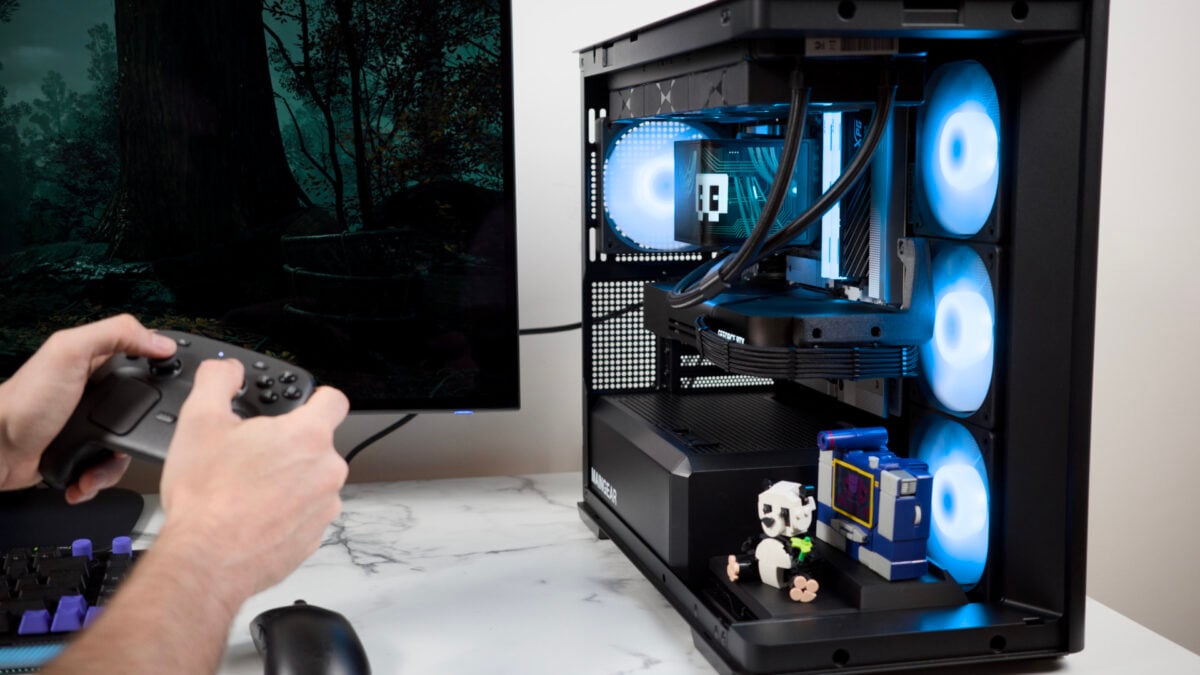
Out of all pre-built PC makers out there right now, Maingear can claim to sit apart for two main reasons. Firstly, their gaming-ready pre-configs always contain some modicum of extra flair with a lack of snaking cables gumming up your case. The other is price. You pay for every inch of pretty PC you get. It means you’d damn well better get one that looks the absolute best—the most personal of the bunch and the easiest to use. It’s meaningful that I can say the Maingear Zero is my favorite pre-config that the company has put out over the last two years. It has the elegance of a mid-sized desktop tower that won’t dominate your desk. It performs well, runs quietly, and damn me if it isn’t so easy to get in there to root around all the wire-free components. Maingear Zero (2026) The Maingear Zero with its curved desktop case looks great, runs silent, and makes it so agonizing to realize it costs as much as it does. Curved case is beautiful and easy to open Great cable management Addition of a stand for your toys Runs quiet and cool Excellent performance with top specs Limited top I/O Occasional coil whine issue mATX motherboard has limited slots High price for peak specs The Micro-ATX (mATX) motherboard may have fewer slots than a bigger, more robust PC can allow, but this PC gets everything else right. The cooling is on point. The case is hassle-free. And—more to the point—it just looks elegant. The addition of a stage for your toys or Lego figures creates a more personalized desktop experience that doesn’t disrupt the standard appeal of a fishbowl-type PC case. PC prices today are so high that I have to sit here and appreciate a machine that would cost buyers $6,500 for the model with top-end specs. This “Zero Champion” variant comes with an AMD Ryzen 7 9850X3D CPU and an Nvidia GeForce RTX 5090 GPU, but that’s still an insane asking price. The “Emerald” PC starts at a more reasonable $2,800. That version comes with the RTX 5070 and an Intel Core Ultra 5 250K Plus, the mid-range CPU debuted for this year. If you want to go for AMD, a model with the Ryzen 7 7800X3D costs $3,000. Either way, you only have a choice of Nvidia GPUs (though you’ll likely end up with the sleek Founders Edition variant). Curved glass fishbowl PCs mean you’ll always have a chance to glimpse your prized components. © Kyle Barr / Gizmodo It’s still extremely expensive no matter how you slice it. Zero costs a premium that rises above other pre-built PCs. Still, if I took these same components stuffed into my review unit, doing my damndest to source lower-priced parts, I still would end up paying close to $7,700. The RTX 5090 itself is so overpriced it costs more than $5,090 in some online retailers. That’s how screwed PC prices have become. If you have that money, congratulations. If you don’t, then at least know that Maingear’s config is excellent in almost every way I could test. An essentially flawless case design Two pull tabs make it easy to remove the curved glass panel. © Matthew Wille / Gizmodo Fishbowl PCs are certainly striking in person. Like the iBuyPower Trace X PC I reviewed earlier this year, the curved glass adds an extra element of gravitas to your desktop. After all, I love looking at my components and the blinking lights, like staring into the bowls of an Enterprise-class starship that I just happen to comprehend. The Zero PC has a sleek look that’s balanced with the asymmetry built into the nature of the motherboard and cable design. The last few Maingear PCs I’ve reviewed all have the typical shoebox design with either a single- or dual-glass panel. For all that, you would imagine the Zero is the harder one to access, but in this case it’s the exact opposite. This year’s revised MG-1 PC included a side panel that was aggravating in the extreme. It wouldn’t seat correctly no matter how many times you’d try it. Last year’s Maingear Rush required you to angle the glass panels just right in order to get them situated. Smart cable management makes the braided power cable slide up and around the GPU toward the back of the case. © Kyle Barr / Gizmodo The new Zero model comes with screws attached to both the glass and side panel. Thankfully you can leave those screws aside after the first time you remove them. The matte black side panel comes with pressure-fit sockets that attach with no issue. The top panel comes off with those same pins, revealing two tabs that allow you to lift up the glass pane without smudging up your PC. It’s such an obvious and simple solution, but it’s so, so welcome. This new Zero is technically a revised version of previous models from 2024, but with the curved glass instead of the triangular panel design. Maingear’s revised Zero desktop is still technically a mid-sized tower, though it measures in slightly smaller than other similar builds. Its base measures 16.57 by 9.29 inches, and it stacks up a little over 18 inches tall. I never had an issue placing the PC on my desks at my work office or at home, and the size doesn’t change much about where you locate it. It won’t fit cleanly into all but the largest TV stands if you hope to turn a Maingear Zero into an ultra-powerful homemade Steam Machine (and in that case, you’d also need an AMD GPU to go along with it, since SteamOS still doesn’t play nice with Nvidia graphics cards). A desktop that’s also a diorama stage A little stage for your favorite Legos or other toys. © Kyle Barr / Gizmodo All this extra attention to the case means it’s so much easier to access those internals. Most Maingear Zero PCs ship with a 360mm AIO CPU cooler, though my unit—one of the preorder variety—came with a TRYX Panorama SE AIO cooler with its slick programmable curved display. Otherwise, there’s not too much RGB going on inside save for the fans. While some RGB-fueled gamers may think the case looks subdued, I would say it seems just about “dued.” As for ports, the case includes a headphone jack, a single USB-C, and two USB-A ports. I would have liked to see one more USB-C and the whole selection better spaced apart for any massive dongle you intend to plug in. The motherboard’s I/O makes up for it, at least to some degree. The MSI Pro B850M-A WiFi PZ contains a solid suite of USB alongside HMDI output and even the pink, blue, and green analog audio and mic outputs, just in case you have an old headset that you refuse to get rid of. If you don’t want to spend $50 on these components, you can just print your own. © Kyle Barr / Gizmodo Maingear goes a step further by allowing you to occupy some of that empty space with some of your toys. The company provided me with an extra 3D-printed shelf for some action figures or Labubus as well as a Lego mount, allowing you to build a structure to fit inside your PC. The shelf isn’t as big as you may think. It’s barely wide enough to fit two statues on the same plinth. Also, if your PC sports one of the larger GPUs, you’ll be naturally restricted in the height of whatever toy you lay down. Maingear sells these platforms for $50 on top of the price for the PC, but you could also print your own. The CAD files are available for free if you have the means to print. All your connections, made easy The MG-RC connectors allow you to ignore the front panel entirely, except when you want to install new components. © Kyle Barr / Gizmodo Maingear’s bread and butter is its MG-RC connections that move all your motherboard’s power, light, and SATA ports to the rear of the board. It just makes more sense, as it means you no longer have to remove your GPU or cooler to allow easier access to every single pin connection. The more times I’ve used it, the more I’ve come to appreciate it. Even better, I found the company’s cable management was better this time than it was with the MG-1, even with a smaller case. The only two cables you’ll still find in front are the AIO and the GPU’s power cable. Maingear snakes the 12VHPWR from its Nvidia GPUs around the curve of the Founder’s Edition side, just underneath its 3D-printed mounting bracket. The top panel pops off, which is how you’ll access the tabs for the glass panel. © Kyle Barr / Gizmodo This looks clean, though I have to point out that the bracket is screwed in, and it may make upgrading later more of a pain that it needs to be. Why you’d be upgrading from an RTX 5090 anytime soon is a question I’d best leave to anybody actually able to afford this ludicrously expensive PC. Don’t expect any of those supposed “Super” RTX 50-series variants until next year, if at all. Similarly, if you were thinking of changing out any components, the PSU is situated underneath a heat shield, tucked away so tight it would either require removing the shield or employing child labor to get their peewee hands into the proverbial spinning jenny to dislodge your connections. A solid USB selection plus a few surprises. © Kyle Barr / Gizmodo Minute nitpicks aside, the case is an easy-to-comprehend system, made easier without all the cables clogging up the interior. However, this PC may not be the one you want if you plan to do more than gaming. The mATX motherboard, in this case the MSI Pro B850M-A WiFi PZ, supports four PCI-e x16 slots, one of which is already occupied by the GPU (and an RTX 5090 Founder’s Edition is fat enough to take up more than one slot). It also supports one extra M.2 Gen 5 slot and two open DIMM slots. If you hoped to plug in a SATA drive, you’ll have to find your own space for it. This is clearly a gaming-focused PC. And with that in mind, it certainly hits the mark. No nonsense, all performance You can expect the highest-end config to crush performance, while the case still maintains a stable temperature throughout. © Kyle Barr / Gizmodo Part of the reason I keep agreeing to review Maingear PCs despite their premium cost is that you don’t have to deal with the bullshit you normally do if you order from one of the larger PC OEMs, like HP with its Omen Max 45L. There are no signs of bloatware. It’s just a clean PC experience. It means you can get into your games that much quicker without trying to root out all the extra unnecessary software. You don’t have to hear it from me. You already know a PC with AMD’s current best gaming CPU, the Ryzen 7 9850X3D, and the RTX 5090 would be able to smash through benchmarks. More importantly, it hits all the right notes for PC gaming in 2026 and doesn’t make a ruckus—or at least—most of the time. I wish the USB-A ports were better spaced apart. © Kyle Barr / Gizmodo The Zero PC case runs with three intake fans on the side, with the AIO fans blowing air up and out alongside the one rear-facing fan. The fans are tuned well, based on my tests, with no components reaching dangerous temperatures after hours of benchmarking and gaming. This fan setup would normally create a negative pressure environment, with more air going out than coming in. However, the fan speeds are tuned in a way that keeps the air moving in the right direction. In terms of actual performance metrics, the Ryzen 7 9850X3D isn’t the best CPU out there for all non-gaming tasks. The AMD Ryzen 9 9950X3D2 Dual Edition currently takes the cake for consumer-level performance in other applications like 3D modeling or intensive rendering. Maingear doesn’t supply its AM5 PCs with anything more than the Ryzen 7 class. That being said, it’s incredible how gamers receive little to no benefit from any more CPU cores in the vast majority of games. Just try getting your hands in there. © Kyle Barr / Gizmodo For instance, the Maingear Zero underperformed the Maingear MG-1’s Ryzen 9 9950X3D2 CPU by more than 50% in tests like Geekbench 6 CPU benchmarks and Cinebench 2026 rendering benchmarks. In real-time graphics rendering tests like 3D Mark Speed Way and Steel Nomad, the two PCs were essentially on par. In gaming scenarios with titles like Forza Horizon 6 or Horizon Zero Dawn Remastered, the Zero was just one to five fps behind its higher-end counterpart at both 4K and 1080p resolutions. One thing to note is that, under load, the PC does tend to pick up a whine that can be distracting if your PC is sitting close while you game. This is likely a form of coil whine that seems to be coming from the motherboard. It only occurred a few times when first loading into a demanding game, and it was sporadic enough I wasn’t about to knock the PC fully for the distracting noise. The RAM question These two sticks alone may cost you more than $500 in today’s market. © Kyle Barr / Gizmodo My Maingear Zero review model shipped with 32GB of dual-channel XPG RAM. Though the specs page for the Zero reference 6,000 MT/s speeds, my RAM sticks actually worked out to 4,800 MT/s. I didn’t actually see any major performance hit with lower-speed RAM compared to other pre-configured desktops. I’ve used it recently, but it’s one of those things to mention; consider that the cost of memory is so bad right now. Maingear said back when it first announced these PCs that it would supply each PC with Kingsoton FURY brand DDR5 memory “when available.” Maingear also has a BYO RAM program where you can get some money off your PC if you ship them your own memory sticks they can shove into the tower—making sure to test that everything’s ship-shape before sending. © Kyle Barr / Gizmodo That’s the question confronting everybody buying a PC today: how to do it inexpensively. Unfortunately, there are very few resources available. Buying a pre-configured PC that can support the latest DDR5 memory standard is often more economical than buying your parts individually. And that’s a giant shame. All I can say is, if you were already planning to spend a boatload of money, you may as well buy the machine that works. Thankfully, the Maingear Zero ticks all the boxes and looks good doing it.
Maingear Zero (2026) Review: PC Gaming Bliss With a Price Tag to Make You Cry
Full Article
Original Source
Read the full article at Gizmodo →KhanList aggregates and links to publicly available news content. We do not host full articles from third-party sources. Always verify important information with original sources.