
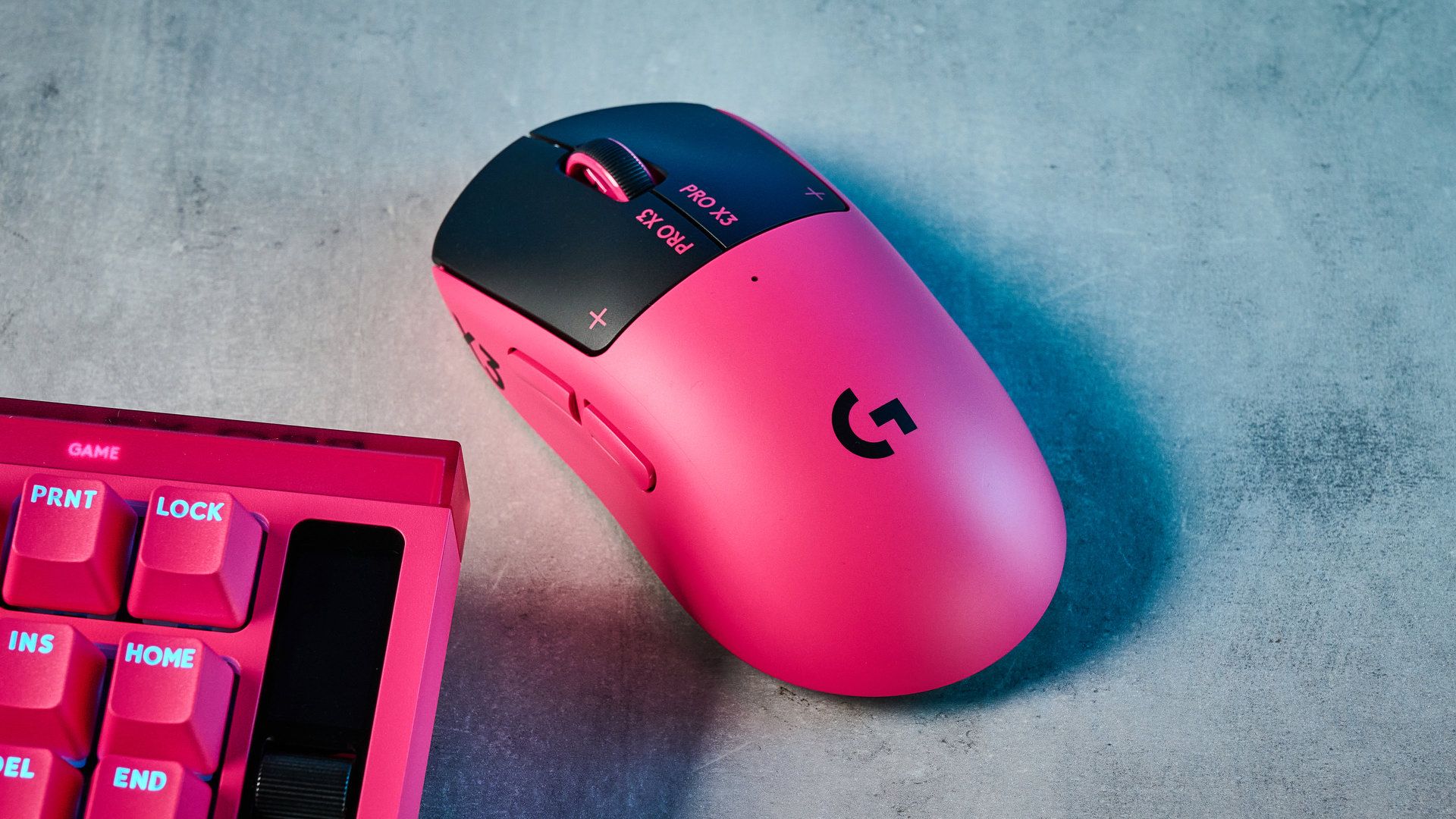
Tom's Guide Verdict If you want a competitive advantage on clicks, then the Logitech G Pro X3 SuperStrike’s magnetic HITS switches are where your money needs to go. Short actuation and rapid trigger make this a demon in the clicks, and ideal for FPS and MOBA players. It’s lightweight, customizable and available in an awesome pink colorway. Annoyingly, Logitech still hasn’t fitted a DPI switch and there’s only a symmetrical version. It feels like there’s not been much innovation since the X2 SuperStrike either, and the additional features found on recent rivals may suit you better. Reasons to buy +Quickest clicks in the game +Ultra sensitive and 8K polling +Lightweight and flickable +Highly customizable +Pink colorway looks rad Reasons to avoid -No onboard DPI switch -No ergonomic version -Features a little behind rivals Why you can trust Tom's Guide Our writers and editors spend hours analyzing and reviewing products, services, and apps to help find what's best for you. Find out more about how we test, analyze, and rate. How much does a click per second matter? Turns out quite a bit, if you’re a competitive gamer. That extra click per second is the difference between firing off one or two shots on a semi-automatic weapon, potentially giving you a competitive advantage.That’s where the Logitech G Pro X3 SuperStrike comes in. On the surface, it’s a fairly typical competition gaming mouse: lightweight, fairly unergonomic, with two buttons on the top and two on the side. This mouse, however, like its predecessor, has some handy tech within. Specifically, magnetic switches under the mouse buttons, which allow adjustable click actuation and rapid trigger.So should you buy this mouse? Admittedly, it isn’t perfect. There’s no ergonomic variant available, no onboard DPI switch, and rivals have the edge in key areas. But the Logi is still doubtless one of the best gaming mice around. Find out more in my full Logitech G Pro X3 SuperStrike review.Latest Videos FromTom's GuideLogitech G Pro X3 SuperStrike review: Cheat sheetWhat is it? Logitech’s latest elite esports mouseWho is it for? Competitive gamers, especially FPS and MOBA playersWhat does it cost? $199 / $169What’s good? The quick, haptic clicks with rapid trigger, plus the lightweight design and customization optionsWhat’s not? There’s no DPI button or ergonomic version, and (clicks aside) rivals offer more features for less moneyLogitech G Pro X3 SuperStrike review: Specs Swipe to scroll horizontally Price $199 / $169 Max DPI 48,000 Polling rate 8,000Hz Buttons 5 Size 4.92 x 2.5 x 1.57 inches Weight 61g / 2.1 ounces Colors Black; magenta Body material Plastic Design Right-handed symmetrical Operating system Windows, macOS Connectivity 2.4GHz; wired Battery Rechargeable Battery life (rated) Up to 135 hours Lighting No Logitech G Pro X3 SuperStrike review: The upsThe Logitech Pro X3 SuperStrike is an elite gaming mouse through and through, packing adjustable click switches, rapid trigger and 8K polling. It’s lightweight, customizable and looks rather fetching in hot pink.Elite click performance (Image credit: Future)Core to the SuperStrike’s performance are its HITS switches. They’re magnetic, like you’d find in one of the best gaming keyboards (including the Logitech G X2 Pro Rapid keyboard released at the same time). They offer customizable haptic feedback, which is neat — honestly, I don’t find this too beneficial, but it sure feels good.Adjustable actuation Image 1 of 2 (Image credit: Logitech / Future) More importantly, the switches open up adjustable actuation for LMB and RMB, meaning ultra fast, responsive clicks. The downside is unwanted clicks, leading to accidental shots in games like Counter-Strike 2.I got used to the increased sensitivity pretty fast though, so this wasn’t a problem for long. The upside is ultra quick click registry, which is ideal for FPS players — that millisecond of time you get over an enemy using typical optical switches can be the difference between you headshotting them, or them you.Tom's Guide: Direct to Your InboxGet instant access to breaking news, the hottest reviews, great deals and helpful tips.Logi's G Hub software features an actuation test to see how much faster you'll click using the HITS switches versus traditional optical or mechanical switches. My result was 17ms faster. Competitive players will probably see even more of a difference, and it could be enough to have potentially game-changing results.Rapid triggerMy favorite feature, though, is rapid trigger — after actuating, the switch doesn’t need to reset like a mechanical switch would in order to actuate again. This means you can spam repeat inputs without resetting the mouse button, which is ideal for MOBA players. In theory, this speeds up your repeat clicking versus non-rapid-trigger switches. (Image credit: Logitech / Future)Tom's Guide reviews gaming platformThe difference for me was subtle, but I still noticed it straight away. I took back to back tests on cpstest.org, which averages clicks over 30 seconds. My overall average clicks per second (CPS) were more or less the same over 30 seconds on the SuperStrike versus the SteelSeries Rival Pro (optical switches, with no rapid trigger). This is because over 30 seconds, my fingers tired and I slowed down (I’m no MOBA player).Importantly, though, my realtime click speeds in the opening few seconds went from just over 6CPS (Rival Pro) to 7CPS (SuperStrike). When initially opening up on a semi-automatic weapon, that means I’m getting an extra click per second on the SuperStrike, and therefore an extra shot — a big advantage in a 1v1.I found this especially useful for semi-auto or high recoil weapons on Counter-Strike 2 and Wardogs, like the AK47. Firing single shots or short bursts controls recoil better — being able to chain more of those together in quick succession helped me shoot more frequently and accurately, scoring more kills than I usually would. I went from my usual upper-mid scoreboards on Counter-Strike 2 to top three. That’s a result.Rapid quick succession clicks are also obviously ideal for MOBA players who need to spam clicks constantly, but I’m lacking the joint health for that these days.Ultra sensitive The SuperStrike tops out at 48,000 DPI and 8,000Hz polling, all adjustable in G Hub. (Image credit: Logitech / Future)When it comes to keyboards, I stand by my position that 8,000Hz polling is snake oil. In a competition mouse, though, it’s vital. A mouse moves incredibly quickly and accurately. Greater data transfer is therefore required to ensure no latency, and that every tiny movement or adjustment is translated properly so that your cursor lands exactly where it’s supposed to.Thankfully, the SuperStrike packs 8K polling, which is as fast as it gets these days, giving you peace of mind about all the above (well… almost — as I’ll discuss in the cons). The SuperStrike’s sensitivity also maxes out at 48,000 DPI, which is extremely fast, enabling rapid movement.Lightweight and flickable (Image credit: Future)The Pro X3 SuperStrike weighs 61g or 2.1 ounces, which is the same as its predecessor, the Logitech G Pro X2 SuperStrike. Compare that to other elite mice and the SuperStrike starts to look a little heavy. Swipe to scroll horizontally Mouse Weight in g (grams) Acceleration in G (g-force) Price Logitech G Pro X3 SuperStrike 61g 90G $199 / $169 Logitech G Pro X2 SuperStrike 61g 88G $169 / £159 Logitech G Pro X SuperLight 2 60g 88G $159 / $139 SteelSeries Rival/Sensei Pro 53g 70G $179 / £169 SteelSeries Rival/Sensei Mini 49g 70G $179 / £169 Razer DeathAdder V4 Pro 56g 85G $169 / £169 Razer Viper V4 Pro 49g 90G $159 / £159 It doesn’t feel like it, though. The SuperStrike also has up to 90G of acceleration (up from 88G in the prior model), meaning more cursor movement from less hand movement — that’s greater than the 70G acceleration of the Rival/Sensei Pro, which can counteract the weight difference between the two. If you want the lowest weight combined with the highest acceleration, though, check out the Razer Viper V4 Pro and 49g + 90G acceleration.Of course, this will kinda depend on preference. Some players prefer a little extra weight in their hand. And besides, I’ve found the SuperStrike adequately lightweight and flickable.Fairly customizable (Image credit: Logitech / Future)As I’ll cover below, I think Logitech is lagging behind software-wise. That said, the SuperStrike is still a highly customizable mouse, so praise where it’s due.The G Hub software is fairly slick and reliable, and lets you customize lots of aspects. You can change actuation, enable and tweak rapid trigger, assign binds and macros, and tailor DPI and poll rates. That’s all you really need, although I’d appreciate a few more nice-to-haves.Importantly, you can set custom configs in addition to the range of per-genre presets. This is vital for me, as I like to bind both side buttons to crouch and prone, which differs per game.Decent battery life (Image credit: Future)The SuperStrike offers up to 135 hours of battery life. Of course, that’s an ‘up to,’ and polling at 8K, you can forget anything near that. It’s a little short of the Viper V4 Pro’s 180 hours, and, in my opinion, pales in comparison to the zero-downtime system in the Rival/Sensei Pro. But safe to say the SuperStrike’s battery life has been long enough for me to not have to think about it much.That hot pink The Logitech G Pro X3 SuperStrike alongside the Pro X2 Rapid keyboard and Pro X3 Lightspeed headset. (Image credit: Future)I know looks don’t really matter, but damn do I find it refreshing to see mice that aren’t just available in black or white. I’m a huge fan of the green Razer Viper V4 Pro and the two orange Fnatic-collabs mice — the Lamzu Maya 8K ($119) and Sony Inzone Mouse-A ($149). Likewise, I absolutely love the SuperStrike in hot pink, especially when paired with the Pro X2 Rapid keyboard.Weirdly, Logitech hasn’t yet released a white variant of the Pro X3 SuperStrike, despite releasing it alongside the Pro X2 Rapid keyboard and Pro X2 Lightspeed headset — both of which come in black, white and the same hot magenta. If you want an all-white trio, you’re out of luck, unless you go for the last-gen X2 SuperStrike.Logitech G Pro X3 SuperStrike review: The downsI mostly love the Logitech G Pro X3 SuperStrike. However, it’s available in symmetrical guise only and there’s no onboard DPI switch. I also think SteelSeries has a couple of legs up over the SuperStrike with its latest elite mouse.Symmetrical only I prefer the ergonomic shape of my SteelSeries Rival Pro. This will come down to preference and grip type, but it's a shame to see no ergonomic option offered. (Image credit: Future)If, like me, you’re a palm gripper, you may well prefer an ergonomic design. Unfortunately, the SuperStrike only comes in symmetrical guise, which tends to benefit claw and finger grip styles.Obviously, those are just general rules, so mileage may vary. However, after playing with the SuperStrike for a week instead of my ergonomic mouse, I’ve noticed some pain and stiffness in my right wrist and pinky finger. If you want a cutting edge ergo mouse, check out the SteelSeries Rival Pro or Razer DeathAdder V4 Pro.No onboard DPI switch The button on the base is a power slider only. Many other mice use this as a DPI toggle once the power is on. A very frustrating (repeated) missed trick from Logitech. (Image credit: Future)We had this problem with Logi’s last generation of gaming mice, the X2 SuperStrike and X Pro SuperLight 2 — there’s no onboard DPI switch. I get that it’s tricky to fit one on the body of a competition mouse, but come on… just put one on the base like SteelSeries and Razer.So what happens when you want to switch DPI in game? Logitech seriously expects you to a) keep G Hub running while gaming; and b) either switch apps in game to change DPI, or remap one of your two precious side buttons to DPI switch. Come on. Sort it out, Logitech.Falling behind the Rival? The G Pro X3 SuperStrike uses a 2.4GHz dongle for wireless 8K connection. (Image credit: Future)As great as adjustable actuation and rapid trigger may be, elsewhere I think the SuperStrike is a tier (okay, maybe half a tier) below recent rivals. Hear me out.SteelSeries’ Rival and Sensei Pro use UWB 6GHz connection instead of the typical 2.4GHz used on the SuperStrike, Viper V4 Pro and, well, virtually all other peripherals. This reduces connection dropouts caused by your mouse hunting for a free 2.4GHz lane, resulting in (theoretically) greater accuracy. I’d love to see more elite mice use this tech — imagine the SuperStrike’s buttons with UWB! Here's an illustration of the potential benefit of UWB, courtesy of SteelSeries. Notice those left-hand dead zones caused by hunting for free 2.4GHz lanes. (Image credit: SteelSeries)I also find Logitech’s software features and companion app pretty basic versus my Rival Pro. There’s no angle snapping, no acceleration curve customization, no separate click and sensor polling. You get all of this on SteelSeries’ GG. To be fair, though, I much prefer using G Hub to Razer’s Synapse, which I’m really not a fan of.I also prefer the zero-downtime battery life of the Rival Pro. I’ve already had to use the SuperStrike while wired charging, which is something I never have to do with the dual swappable batteries of my SteelSeries. I suppose, in short, the SuperStrike feels simply like a minor improvement on an old formula, while other brands are trying harder to innovate, yet at $199 / $169 the SuperStrike is the most expensive of all the competition.Logitech G Pro X3 SuperStrike review: Verdict (Image credit: Future)I’ll admit, competition at the top is fierce. There’s not much separating the elite esports mice these days. All the top contenders are super light, super sensitive and super fast — the Pro X3 SuperStrike is no different.As I mentioned above, though, it kinda feels like Logitech has rested on its laurels somewhat since the Pro X2 SuperStrike and failed to address the issues with that mouse, or to build on it in any different, innovative way. It’s for that reason I’m scoring this lower than the recent SteelSeries Rival Pro, which, while not as fast clicks-wise, offers loads of cool features to make up for that and puts itself ahead.In the end, though, it’ll come down to the features most important to you. If you value that edge on click speed above all else, the Pro X3 SuperStrike is easily top dawg. Senior Editor, Reviews & Cameras Peter is a Senior Editor at Tom's Guide, heading up the site's Reviews team and Cameras section. As a writer, he covers topics including tech, photography, gaming, hardware, motoring and food & drink. Outside of work, he's an avid photographer, specialising in architectural and portrait photography. When he's not snapping away on his beloved Fujifilm camera, he can usually be found telling everyone about his greyhounds, riding his motorcycle, squeezing as many FPS as possible out of PC games, and perfecting his espresso shots. You must confirm your public display name before commenting Please logout and then login again, you will then be prompted to enter your display name.
Logitech’s latest esports mouse clicks faster and gets you more kills — what happened to my scoreboards after a week gaming
Full Article
Original Source
Read the full article at Tomsguide →KhanList aggregates and links to publicly available news content. We do not host full articles from third-party sources. Always verify important information with original sources.