
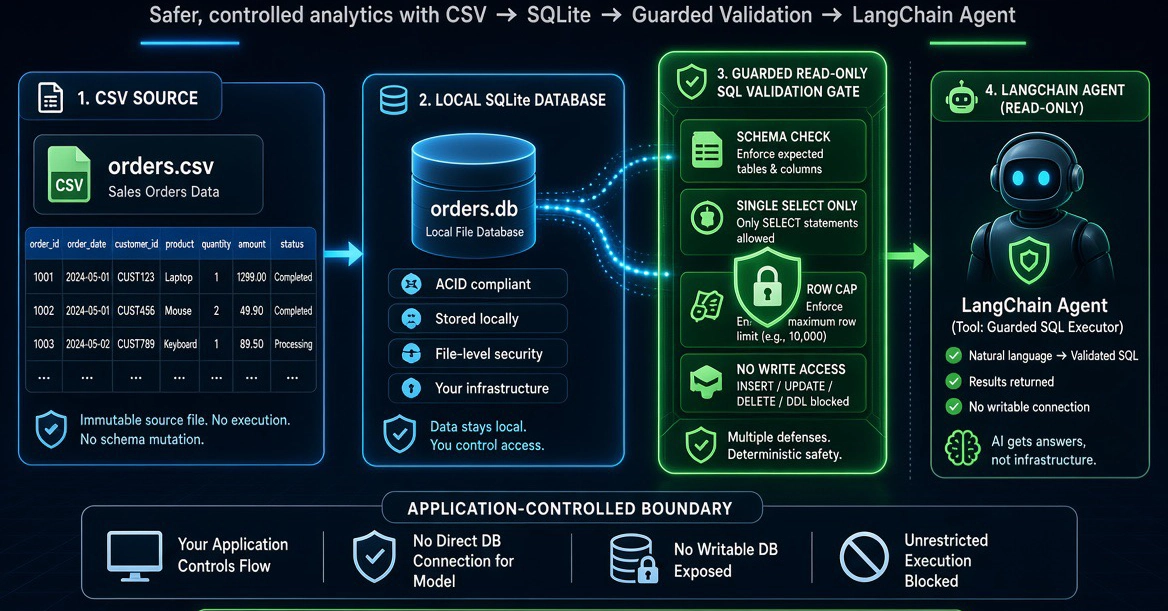
🚀 Technical Briefing: This tutorial is part of our deep-dive series on Agentic Workflows at Gate of AI. For the full technical breakdown, interactive code sandbox, and the native Arabic translation, visit the original article here. Build a deterministic CSV-to-SQLite analytics foundation with guarded, read-only SQL. It is designed as a safe boundary that a LangChain-style agent can call after its framework and model integration have been verified against current official documentation. What this tutorial does—and does not verify The supplied research context identifies the general pattern of using LangChain agents with external tools and the broader use case of asking questions about CSV data. It does not provide trusted, current documentation for a particular LangChain release, OpenAI model, package API, tracing product, or web framework. For that reason, this tutorial deliberately does not present unverified agent-framework code as production-ready. Instead, you will build the deterministic portion that should remain under application control regardless of which model or orchestration framework you select later. The project creates a CSV file, imports it into a local SQLite database, describes the approved schema, validates one read-only SQL statement at a time, opens the database in read-only mode for analytics queries, caps returned rows, and tests the important non-model behavior. This separation matters. A language model may help choose a tool and formulate a question, but it should not receive a writable database connection, a shell function, unrestricted Python execution, or secrets. Your application should retain control of CSV ingestion, database access, query limits, authorization, logging policy, and the definition of approved business metrics. Prerequisites and project layout This example uses Python 3.10 or later and only the Python standard library for the runnable application. SQLite is accessed through Python’s built-in sqlite3 module. Install pytest separately if you want to run the tests. mkdir csv-sqlite-analytics cd csv-sqlite-analytics python -m venv .venv # macOS and Linux source .venv/bin/activate # Windows PowerShell # .\.venv\Scripts\Activate.ps1 python -m pip install --upgrade pip python -m pip install pytest mkdir data tests Create four files: sample_data.py, database.py, app.py, and tests/test_database.py. The command-line program accepts guarded SQL in this version. A future agent adapter can translate natural-language questions into SQL, but it must call the same validation and execution boundary shown here. Step 1: Create a repeatable CSV file A deterministic sample makes the behavior easy to inspect and test. The sample has order identifiers, regions, statuses, categories, quantities, prices, and totals. It is demonstration data only; replace it with a reviewed export only after removing fields that your users and application should not access. from __future__ import annotations import csv from pathlib import Path ORDERS = [ ["ORD-1001", "2026-01-05", "North", "Enterprise", "Analytics", "completed", 3, 1200.00], ["ORD-1002", "2026-01-06", "South", "SMB", "Support", "completed", 8, 150.00], ["ORD-1003", "2026-01-07", "West", "Enterprise", "Security", "completed", 2, 2500.00], ["ORD-1004", "2026-01-08", "East", "Mid-Market", "Analytics", "pending", 4, 900.00], ["ORD-1005", "2026-01-09", "North", "SMB", "Support", "completed", 12, 125.00], ["ORD-1006", "2026-01-11", "West", "Enterprise", "Analytics", "completed", 5, 1450.00], ["ORD-1007", "2026-01-13", "South", "Mid-Market", "Security", "cancelled", 1, 2200.00], ["ORD-1008", "2026-01-15", "East", "SMB", "Support", "completed", 6, 175.00], ["ORD-1009", "2026-01-18", "North", "Mid-Market", "Analytics", "completed", 7, 980.00], ["ORD-1010", "2026-01-21", "West", "SMB", "Security", "completed", 2, 2400.00], ["ORD-1011", "2026-01-25", "East", "Enterprise", "Analytics", "completed", 4, 1600.00], ["ORD-1012", "2026-01-28", "South", "Mid-Market", "Support", "pending", 10, 140.00], ] def create_sample_csv(destination: Path) -> None: destination.parent.mkdir(parents=True, exist_ok=True) with destination.open("w", newline="", encoding="utf-8") as file: writer = csv.writer(file) writer.writerow([ "order_id", "order_date", "region", "customer_segment", "product_category", "status", "quantity", "unit_price", "order_total", ]) for order_id, order_date, region, segment, category, status, quantity, unit_price in ORDERS: writer.writerow([ order_id, order_date, region, segment, category, status, quantity, f"{unit_price:.2f}", f"{quantity * unit_price:.2f}", ]) if __name__ == "__main__": create_sample_csv(Path("data/orders.csv")) print("Created data/orders.csv with 12 records.") Run python sample_data.py. The standard CSV writer is preferable to hand-built comma-separated strings because it correctly escapes values containing commas, quotes, or line breaks. Step 2: Import CSV data into SQLite The importer below normalizes CSV headers into safe database identifiers, creates an orders table, and uses parameterized inserts for values. Imported fields are stored as text. This conservative representation avoids unwanted coercion of values such as identifiers with leading zeroes. Numeric analysis explicitly casts appropriate fields to REAL. from __future__ import annotations import csv import re import sqlite3 from pathlib import Path from typing import Any TABLE_NAME = "orders" IDENTIFIER = re.compile(r"^[A-Za-z_][A-Za-z0-9_]*$") def normalize_identifier(value: str, used: set[str]) -> str: name = re.sub(r"[^A-Za-z0-9_]", "_", value.strip().lower()) name = re.sub(r"_+", "_", name).strip("_") or "column" if name[0].isdigit(): name = f"column_{name}" candidate = name suffix = 2 while candidate in used: candidate = f"{name}_{suffix}" suffix += 1 used.add(candidate) return candidate def quote_identifier(identifier: str) -> str: if not IDENTIFIER.fullmatch(identifier): raise ValueError(f"Unsafe identifier: {identifier!r}") return f'"{identifier}"' def load_csv_into_sqlite(csv_path: Path, sqlite_path: Path) -> list[str]: if not csv_path.exists(): raise FileNotFoundError(f"CSV file does not exist: {csv_path}") with csv_path.open("r", newline="", encoding="utf-8-sig") as file: reader = csv.DictReader(file) if not reader.fieldnames: raise ValueError("CSV must have a header row.") source_headers = list(reader.fieldnames) used: set[str] = set() columns = [normalize_identifier(header, used) for header in source_headers] rows = list(reader) if not rows: raise ValueError("CSV must contain at least one data row.") sqlite_path.parent.mkdir(parents=True, exist_ok=True) with sqlite3.connect(sqlite_path) as connection: table = quote_identifier(TABLE_NAME) connection.execute(f"DROP TABLE IF EXISTS {table}") definitions = ", ".join(f"{quote_identifier(column)} TEXT" for column in columns) connection.execute(f"CREATE TABLE {table} ({definitions})") insert_columns = ", ".join(quote_identifier(column) for column in columns) placeholders = ", ".join("?" for _ in columns) statement = f"INSERT INTO {table} ({insert_columns}) VALUES ({placeholders})" values = [tuple(row.get(header, "").strip() for header in source_headers) for row in rows] connection.executemany(statement, values) return columns def get_schema(sqlite_path: Path) -> dict[str, Any]: with sqlite3.connect(sqlite_path) as connection: connection.row_factory = sqlite3.Row columns = connection.execute("PRAGMA table_info(orders)").fetchall() count = connection.execute("SELECT COUNT(*) AS total FROM orders").fetchone()["total"] return { "table_name": TABLE_NAME, "row_count": count, "columns": [{"name": row["name"], "type": row["type"]} for row in columns], } The identifier check is important because SQL parameters protect values, not SQL identifiers such as column names. Headers are normalized before being used to build SQL. Values, meanwhile, are sent through parameterized inserts rather than string interpolation. Step 3: Add a guarded read-only query boundary The following program is the application boundary an agent should call. It rejects comments, semicolons, recursive queries, non-read-only starting keywords, and listed administrative or write operations. It also opens the database through a SQLite read-only URI and fetches no more than 100 visible rows. The URI is a second protective layer: even if validation is changed incorrectly, the query connection is not intended for writes. from __future__ import annotations import json import re import sqlite3 from pathlib import Path from urllib.parse import quote from database import get_schema, load_csv_into_sqlite MAX_ROWS = 100 FORBIDDEN = re.compile( r"\b(INSERT|UPDATE|DELETE|DROP|ALTER|CREATE|REPLACE|VACUUM|ATTACH|DETACH|" r"PRAGMA|REINDEX|ANALYZE|BEGIN|COMMIT|ROLLBACK|SAVEPOINT|RELEASE)\b", re.IGNORECASE, ) def validate_read_only_sql(sql: str) -> str: candidate = sql.strip() if not candidate: raise ValueError("Query cannot be empty.") if len(candidate) > 4000: raise ValueError("Query exceeds 4000 characters.") if ";" in candidate or "--" in candidate or "/*" in candidate or "*/" in candidate: raise ValueError("Comments and multiple statements are not allowed.") normalized = re.sub(r"\s+", " ", candidate).upper() if not (normalized.startswith("SELECT ") or normalized.startswith("WITH ")): raise ValueError("Only SELECT or WITH queries are allowed.") if "WITH RECURSIVE" in normalized or FORBIDDEN.search(candidate): raise ValueError("Query contains a disallowed SQL operation.") return candidate def run_query(sqlite_path: Path, sql: str) -> dict[str, object]: safe_sql = validate_read_only_sql(sql) uri = f"file:{quote(str(sqlite_path.resolve()))}?mode=ro" with sqlite3.connect(uri, uri=True) as connection: connection.row_factory = sqlite3.Row cursor = connection.execute(safe_sql) rows = cursor.fetchmany(MAX_ROWS + 1) return { "row_count_returned": min(len(rows), MAX_ROWS), "truncated": len(rows) > MAX_ROWS, "rows": [dict(row) for row in rows[:MAX_ROWS]], } def main() -> None: csv_path = Path("data/orders.csv") sqlite_path = Path("data/orders.sqlite3") load_csv_into_sqlite(csv_path, sqlite_path) print(json.dumps(get_schema(sqlite_path), indent=2)) print("Enter read-only SQL, /schema, or /quit.") while True: try: request = input("SQL> ").strip() except (EOFError, KeyboardInterrupt): print("\nGoodbye.") return if request.lower() in {"/quit", "/exit"}: print("Goodbye.") return if request.lower() == "/schema": print(json.dumps(get_schema(sqlite_path), indent=2)) continue try: print(json.dumps(run_query(sqlite_path, request), indent=2)) except (ValueError, sqlite3.Error) as error: print(f"Rejected or invalid query: {error}") if __name__ == "__main__": main() Save this file as app.py and run python app.py. Then enter the following query: SELECT product_category, ROUND(SUM(CAST(order_total AS REAL)), 2) AS completed_revenue FROM orders WHERE status = 'completed' GROUP BY product_category ORDER BY completed_revenue DESC LIMIT 1 The explicit cast prevents text ordering and aggregation from being confused with numeric analysis. The result is also scoped to completed records, which is one possible definition of realized revenue in this sample. A real organization must document its own metric definitions; a query cannot resolve ambiguity about booked, invoiced, collected, gross, net, refunded, or recognized revenue. Step 4: Test the boundary before adding an AI agent Tests should exercise the ingestion and query guardrails without a model call. This makes failures fast to reproduce and keeps safety behavior independent of prompt wording or model output. from pathlib import Path import pytest from app import run_query, validate_read_only_sql from database import get_schema, load_csv_into_sqlite from sample_data import create_sample_csv def test_load_and_schema(tmp_path: Path) -> None: csv_path = tmp_path / "orders.csv" sqlite_path = tmp_path / "orders.sqlite3" create_sample_csv(csv_path) load_csv_into_sqlite(csv_path, sqlite_path) schema = get_schema(sqlite_path) assert schema["table_name"] == "orders" assert schema["row_count"] == 12 assert any(column["name"] == "order_total" for column in schema["columns"]) def test_aggregate_query(tmp_path: Path) -> None: csv_path = tmp_path / "orders.csv" sqlite_path = tmp_path / "orders.sqlite3" create_sample_csv(csv_path) load_csv_into_sqlite(csv_path, sqlite_path) result = run_query(sqlite_path, "SELECT region, COUNT(*) AS n FROM orders GROUP BY region") assert result["truncated"] is False assert result["row_count_returned"] == 4 @pytest.mark.parametrize("sql", [ "DELETE FROM orders", "DROP TABLE orders", "SELECT * FROM orders; DELETE FROM orders", "SELECT * FROM orders -- comment", "WITH RECURSIVE n(x) AS (SELECT 1) SELECT x FROM n", ]) def test_disallowed_sql(sql: str) -> None: with pytest.raises(ValueError): validate_read_only_sql(sql) Run pytest -q. If a disallowed statement begins to pass, stop and review the change before adding further features. A permissive boundary is not a presentation issue; it changes what the application can do with a model-generated request. How to connect this to LangChain responsibly When you have current official documentation for the exact LangChain release you plan to deploy, expose two narrow functions as tools: one that returns get_schema() and one that accepts SQL and calls run_query(). The model-facing tool description should state that orders is the approved table, source columns are text, numeric calculations require explicit casts, and list-style requests should use a limit. Do not give the agent a raw SQLite connection, filesystem access, arbitrary Python execution, or a function that can modify the database. Do not place API keys in prompts, tool descriptions, CSV values, or logs. Maintain a bounded conversation history and require the agent to use the query tool for factual numerical answers rather than inventing figures. Before using organizational data, review each column and remove data that is unnecessary for the analytics task. For any GCC or Middle East deployment, confirm the applicable organizational requirements for access, retention, residency, and handling of personal or confidential data with the relevant legal, security, and data-governance teams. A local SQLite demonstration does not establish production compliance. Next steps The next technical step is not to add more autonomy; it is to add control. Create an approved data dictionary, document metric definitions, allowlist tables and columns, and record sanitized query metadata such as request ID, execution time, row count, truncation status, and error category. Do not record secrets or unrestricted raw sensitive values. For a production analytics store, use a database identity that has access only to approved reporting views and apply authorization before a query reaches the database. Keep result-size limits, query budgets, and a regression suite containing valid aggregations, missing-column requests, empty results, ambiguous terms, and attempted prompt-injection text in dataset fields. This foundation is intentionally modest: deterministic software prepares and protects data, while an agent framework—once independently verified and version-pinned—can supply the conversational layer. That division keeps the important access and safety decisions in code you can inspect and test.
LangChain CSV SQLite Analytics: Safer AI Foundation
Full Article
Original Source
Read the full article at Dev →KhanList aggregates and links to publicly available news content. We do not host full articles from third-party sources. Always verify important information with original sources.