
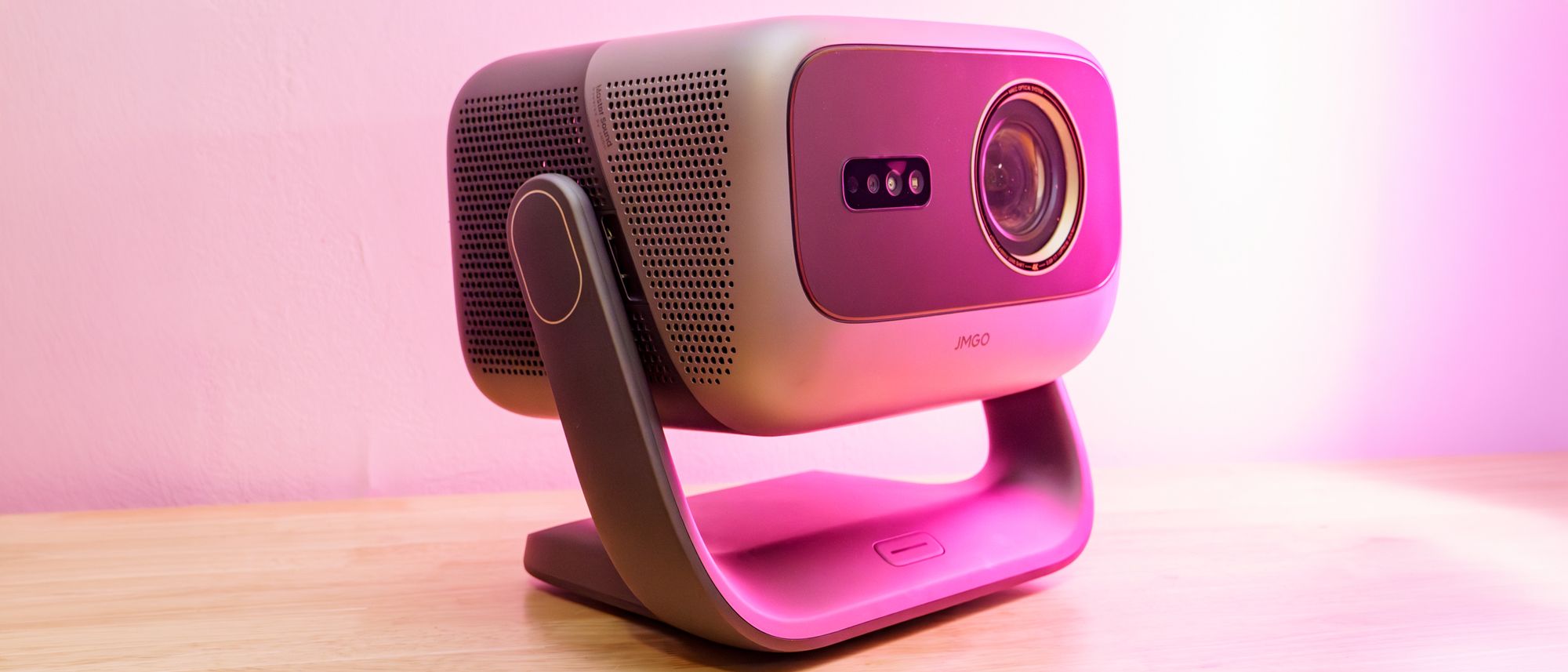
Tom's Guide Verdict The JMGO N3 Ultimate pumps stunning color and brightness through very flexible optics, making it a killer projector when ideal theater conditions aren’t possible. It also works great for gaming, but it lacks some of the finesse of rivals such as the Valerion VisionMaster Max or Xgimi Titan Noir Reasons to buy +Vivid, extremely bright projection +Zoom and lens shift are very flexible +Great video and gaming performance Reasons to avoid -Very few ports -Black level could be lower -Underwhelming speakers Why you can trust Tom's Guide Our writers and editors spend hours analyzing and reviewing products, services, and apps to help find what's best for you. Find out more about how we test, analyze, and rate. Jump To: Pricing & availability Design Performance Test results Audio Gaming Smart TV Interface Remote Verdict JMGO N3 Ultimate: SpecsPrice: $2999 Resolution: 4K Lumens: 5800 ISO Audio: 2x12.5W Light: RGB Laser Projection: 0.47" DLP Screen size: 40-300 inches HDR: HDR10, HLG, Dolby Vision Refresh Rate: 60Hz/240Hz Ports: 2x HDMI 2.1 (1x eARC), 1x USB-A Smart TV Software: Google TV Size: 12.14 x 9.05 x 10.79 inches Weight: 15.32 lbs Lifespan: n/aThe JMGO N3 Ultimate continues the brand's efforts to make better and better projectors within the constraints of an almost unchanging form factor. In fact, it’s hard to tell this new one apart from its predecessors. That almost makes it more impressive that JMGO has packed in so many upgrades. This model has motors in its gimbal stand for remote adjustment, extensive optical zoom and lens shift, and enough laser to simply blast out light while also enjoying VRR support.All that packed into a $2,999 package is something of a steal. It may be more than the Xgimi Horizon 20 Pro, but JMGO drowns that thing in brightness and tops it in contrast, too. Among the best projectors we’ve tested, the N3 Ultimate has rivals in the Xgimi Titan Noir line and Valerion VisionMaster Max, which offer superb black levels, but when ambient lighting can’t be eliminated, the JMGO N3 Ultimate will be hard to beat.JMGO N3 Ultimate review: Pricing and availabilityThe JMGO N3 Ultimate launched in mid-2026, and it landed with a $2,999 price tag. For a projector with its capabilities, that’s an exceedingly reasonable price.Latest Videos FromTom's GuideJMGO is no stranger to significant discounts either. During my testing, I’ve seen the JMGO N3 Ultimate on sale for as much as $600 off. JMGO also offered a lot of bundle deals if you need a tall stand, 3D glasses, or a projection screen to go with the projector.JMGO N3 Ultimate review: DesignJMGO hasn’t been one for shaking up its designs. Looking at the JMGO N3 Ultimate, it’d be easy to mistake it for even the JMGO N1 Ultra. It still has the signature gimbal stand with a power button on the base and a two-tone chassis with two different shell sections, and JMGO still can’t get the seam between those to line up cleanly at the top. (Image credit: Tom's Guide)This generation, the gimbal stand is considerably advanced. It has motorized control built into both its rotational and vertical axes, letting you shift its orientation remotely. One lingering downside to this design is that the base of the stand has no levelling feet. So you might be able to square the projection away easily enough, but it may appear rotated slightly if you set the N3 Ultimate on an un-level surface. In one case, this left me to stuff a wedge of paper underneath one side. (Image credit: Tom's Guide)You can, of course, use digital correction to sort out rotation issues, but that’d be a shame to do since the JMGO N3 Ultimate has excellent hardware for optical adjustment this generation. The N3 Ultimate has zoom to let it go from a 0.88:1 throw ratio to as far as 1.7:1. That gives it a much wider range than the Xgimi Horizon 20 Pro, though not quite as much as the Hisense XR10. JGMO tops this off with considerable horizontal (53% in either direction) and vertical lens shift (130% in either direction).Tom's Guide: Direct to Your InboxGet instant access to breaking news, the hottest reviews, great deals and helpful tips.This range of zoom and lens shift is awesome for flexibility in setting up the projector. You basically can pick where you want to project to, and if you set the N3 Ultimate anywhere close to a decent spot (heck, even pretty off-center spots will do), you can use the zoom and lens shift to get a perfectly squared image without any digital adjustments that would crop away some of that 4K picture. Well, at least you can get it almost perfect if you don’t need to level the projector. (Image credit: Tom's Guide)The JMGO N3 Ultimate shifts its ports away from the rear of the main projector housing to instead fit at the back of the base. JMGO is still stingy with its connections, though. The N3 Ultimate only gets two HDMI 2.1 ports (one with eARC) and a USB port. (Image credit: Tom's Guide)The rear of the main projector housing is now solely dedicated to cooling. The sides of the projector can pull in fresh air while the rear pumps it all out. It does a good job, too. N3 Ultimate makes a lot of light in a fairly small chassis and manages to do so without the fans getting noticeably loud even when you sit at just arm’s length from the projector. (Image credit: Tom's Guide)As with prior models, the JMGO N3 Ultimate comes with a foam carrying case that can hold the projector, power supply, and remote. It’s a convenient way to gather and protect everything when you’re moving the projector from place to place, but I wouldn’t count on it to handle much abuse or even rough handling, as the plastic clips that keep it closed are fairly flimsy.JMGO N3 Ultimate review: PerformanceThe JMGO N3 Ultimate looks great, but its staggering brightness levels and slightly elevated black floor make it a better match for brighter viewing environments. Since its black levels don’t bottom out very low, you’ll pretty much always see some of the light it’s casting in a very dark room, and that can be distracting. Competing projectors like the Xgimi Titan Noir and Valerion VisionMaster Max do a much better job clamping those black levels down for dark room viewing. (Image credit: Tom's Guide)It’s far less distracting if you’re viewing bright content, as your eyes will adjust to the brightness and turn the dark areas perceptually black. When you have a little light on in your viewing space, the black floor becomes less of an issue and the extreme brightness of the JMGO N3 Ultimate becomes a key advantage. This thing is incredibly bright. Most content can still look great even with some ambient light. Bright enough content can stand up even to overhead lighting in a well-lit room (just avoid sunlight). (Image credit: Tom's Guide)With the RGB lasers offering extreme gamut coverage, bright and colorful content like “The Super Mario Galaxy Movie” is simply stunning. Princess Rosalina’s fight near the start is a splendid showcase of the color and explosive lighting with her magic effects dazzling the screen. (Image credit: Tom's Guide)In some picture modes, the JMGO N3 Ultimate uses a dynamic black level, dimming down for dark scenes and ramping up for brighter scenes. It’s not fast enough, though. When video jumps between bright and dark shots, it’s possible to see the projector shifting its illuminance. In the opening to “Blade Runner 2049,” the camera jumps from bright outdoor shots to dark interiors; the projector quickly tries to dim itself for those dark interior shots but lags behind the cuts. It’s a little jarring, but gradual shifts are not as distracting. (Image credit: Tom's Guide)Like most of its competition, the JMGO N3 Ultimate uses extensive motion smoothing by default. This works out well enough for panning shots, but it introduces heavy artifacting in most other motion and becomes a serious distraction. Motion looks better with this MEMC setting turned off, though some panning shots will stutter. I’ve found the Low setting looked decent without too much artifacting. JMGO doesn’t include a dedicated 24p/Film mode, unfortunately. (Image credit: Tom's Guide)Like other DLP projectors, the JMGO N3 Ultimate displays colors in sequence, and this can create some visible artifacts that look like a rainbow to the eyes. Some projectors have gotten pretty good at diminishing this effect. The JMGO N3 Ultimate’s DLP rainbow effect isn’t horrendous, but I find it noticeable from time to time, especially on subtitles or large white areas of the projection.JMGO N3 Ultimate review: Test results Swipe to scroll horizontally Row 0 - Cell 0 JMGO N3 Ultimate Hisense XR10 Xgimi Horizon 20 Pro Anker Nebula X1 Hisense C2 Ultra JMGO N1S Ultimate Brightness (ANSI lumens): 5215 6842 3540 3491 3231 2583 Contrast (FOFO): 2271:1 2432:1 1257:1 1311:1 1330:1 1401:1 Contrast (checkerboard): 94:1 95:1 71:1 45:1 82:1 73:1 sRGB coverage: 99.8% 100% 100% 100% 100% 100% DCI-P3 coverage: 94% 92% 92% 92% 96% 97% Input lag (default): 126ms 23ms 100ms 154ms 50ms 144ms Input lag (gaming mode): 51ms 24ms 49ms 50ms 51ms 47ms Lifespan: n/a 25,000 hours n/a 30000 hours 25000 hours 30000 hours MSRP: $2,999 $6,999 $2,499 $2,999 $2,999 $2,799 Street price: $2,399 $5,499 $1,619 $2,199 $2,299 $1,499 The brightness and vivid color of the JMGO N3 Ultimate is plain to see, but objective measurements confirmed its quality. I used a Spyder X2 Ultra colorimeter and 1.1-gain matte white projection screen for color testing and a lux meter for brightness and contrast testing, and the JMGO N3 Ultimate delivers. (Image credit: Tom's Guide)With a full white screen and an ANSI lumen measurement pattern, I saw the JMGO N3 Ultimate hit 5,215 lumens. That may be a bit shy of its rated brightness, but it was with a picture profile that didn’t introduce horribly skewed color or extra fan noise. Displaying an evenly black and white checkerboard pattern, the projector offered 93.9:1 contrast ratio at full brightness and a better 115:1 ratio at its minimum brightness, which is on the high end of what I’ve seen from projectors. (Image credit: Tom's Guide)For a more extreme case, I measure the brightness of white boxes in the corners against the black level at the center of the projection. This produced a solid 480:1 contrast ratio. To assess the ideal contrast possible in a highly light-controlled room, I use the same test pattern to measure the white levels, then I block most of the projection with black velvet, only letting the center of the projection shine through a hole in the fabric. I then measure the black point of the projected light coming through the hole. In this setup, the JMGO N3 Ultimate hit a respectable 2,270:1 contrast ratio. (Image credit: Tom's Guide)Using the colorimeter and projection screen, I measured the JMGO N3 Ultimate’s color at 99.8% coverage of the sRGB color space, 94% of DCI-P3, and 92% of BT.2020. This is a great result, especially when considering there’s less precision in measuring the color gamut of reflected light as opposed to the direct light coming from a monitor or TV.JMGO N3 Ultimate review: AudioThe speakers on the JMGO N3 Ultimate are nothing to get excited about. While they might deliver stereo sound, you’re only likely to get a real sense of that separation if you’re sitting directly in front or behind the projector. (Image credit: Tom's Guide)The speakers are fine for small room listening, and they’ll do in a pinch if you’re in a slightly larger room and everyone is quiet. If you want explosive, powerful home theater sound, the JMGO N3 Ultimate won’t cut it. There’s a little punch to the bass, but not deep thunder. (Image credit: Tom's Guide)Given this, you’ll likely be forced to use one of the two HDMI ports for eARC as it’s the only quality audio output. There’s no optical audio or even a 3.5mm jack, so your options are limited for connecting to one of the best soundbars. You can send audio over Bluetooth, but that’ll come with its own drawbacks.JMGO N3 Ultimate review: GamingThe JMGO N3 Ultimate is very well cut out for gaming. With its optical adjustments, you can be sure you’re getting a crisp image that lets you see the little details you might need. If you’ve ever strained your eyes trying to figure out what you’re looking at in a game because the visuals were too dark, this is where the high brightness level helps. (Image credit: Tom's Guide)By default, the projector has some noticeable latency. I measured 126ms between a 120Hz OLED and the projector running at its default settings. Turning on Game Mode cut that down nicely to 51ms.That was comfortable for 4K/60Hz gaming, but the JMGO N3 Ultimate can still go further. It can drop down to 1080p and ramp up to 240Hz with VRR support, at which point I measured no latency at all behind the OLED display. A photo taken of both displays with a 1/1000-second shutter speed captured both displaying the exact same count on a millisecond counter. (Image credit: Tom's Guide)To minimize lag, you won’t be able to use keystone or digital image adaptations, but even keeping these enabled saw just 50ms of latency. At this level, I was still comfortably able to keep up with the frantic pacing of combat in Hades 2 and successfully make my way through the first phase of the fight with Chronos.Without the High Refresh Rate and VRR settings enabled, you’ll get crisper visuals, but you won’t get a 240Hz refresh rate and risk screen tearing. Latency still feels reduced by sending the projector 240 frames per second, but it skips many of them without that former setting.JMGO N3 Ultimate review: Smart TV InterfaceYou get standard Google TV with the JMGO N3 Ultimate. This gives you access to a massive assortment of streaming services and other apps. The JMGO N3 Ultimate can be a little slow to navigate after it boots up, but once it’s been running for a minute, it tends to feel quite responsive. (Image credit: Tom's Guide)JMGO isn’t doing much special on top of Google TV. It has its own Projector settings menu where all of the important controls for focus, keystone, zoom and the like are conveniently gathered. Smartly, it’s the first option in the full settings menu, since it’s hard to do much else if the projection is askew or out of focus. Tucked in here are a few of the projectors' niftier features, including a wall color adaptation that calibrates the projection to compensate for non-white walls. I ran it against a piece of pink insulation, and it noticeably reduced the pink material’s effect on the white areas of the projection.There’s also a tool for spatial memory, which lets you save projection settings for different setups/spaces and then quickly re-apply them. When shifting the projector back and forth between my office and living room, this was a handy way to quickly dial it back to ideal settings. That said, manual adjustments to the gimbal can confuse it, and it won’t correct the direction it’s facing if you set it down wrong, which all takes some of the smarts out of that feature.JMGO N3 Ultimate review: RemoteThe remote that comes with the JMGO N3 Ultimate is compact and simple, perhaps too much so. You get your standard circular navigation ring, and underneath that is the home, back, and voice assistant buttons that you’ll find with any Google TV device. Tucked into the middle of those is a pill-shaped volume control that’s easy enough to feel out in the dark, though you won’t have to since all of those controls (except the navigation ring) have backlighting. (Image credit: Tom's Guide)Beyond those controls, you get a power button in the top left corner and a shortcut to “Free TV” in that top right corner that launches Google TV Freeplay. Lower down, you get shortcuts to Prime Video, Netflix, and YouTube. A fourth custom shortcut button lets you set a custom app or Google Home device to access with it. A few extra shortcut buttons would have been nice. Plenty of other projector remotes have additional control shortcuts, like to picture and sound modes, and many further differentiates between full settings and a more focused menu. The lack here makes diving into specific settings a bit more tedious. The lack of a mute button is also annoying. (Image credit: Tom's Guide)The JMGO N3 Ultimate has one special button tied to its unique gimbal stand. Holding this button activates the motorized gimbal and a gyroscope in the remote, and then moving the remote will correspondingly move the projector. It’s a neat trick useful for quick adjustments, though ultimately isn’t precise enough to avoid needing further fine-tuned adjustments.JMGO N3 Ultimate review: VerdictThe JGMO N3 Ultimate is a stunner. From the jump, it offers flexible optics that ensure you can get a near-perfect projection even if you plunk it down almost randomly. Its RGB laser light source pumps out stunningly bright visuals that can simply drip in color, and its contrast is strong.The JGMO N3 Ultimate commands a high price, but not an unreasonable one (especially with frequent discounts) considering the prices of the massive TVs it would replace. With its portability, it’s also much easier to bring for a movie night in the yard or at a friend's place than a competing TV. You’re also going to want to bring along an extra speaker if you want the audio to match the quality of the video.If you’re outfitting a pitch black home theater, I’d look to the Valerion VisionMaster Max or Xgimi Titan Noir instead, which offer much better black floors. In any other conditions, the N3 Ultimate can look exceptional, especially if you’re trying to combat a bit of ambient light. Over the last several years, Mark has been tasked as a writer, an editor, and a manager, interacting with published content from all angles. He is intimately familiar with the editorial process from the inception of an article idea, through the iterative process, past publishing, and down the road into performance analysis. You must confirm your public display name before commenting Please logout and then login again, you will then be prompted to enter your display name.
JMGO N3 Ultimate review: A mighty projector to battle ambient light and inconvenient placement
Full Article
Original Source
Read the full article at Tomsguide →KhanList aggregates and links to publicly available news content. We do not host full articles from third-party sources. Always verify important information with original sources.