
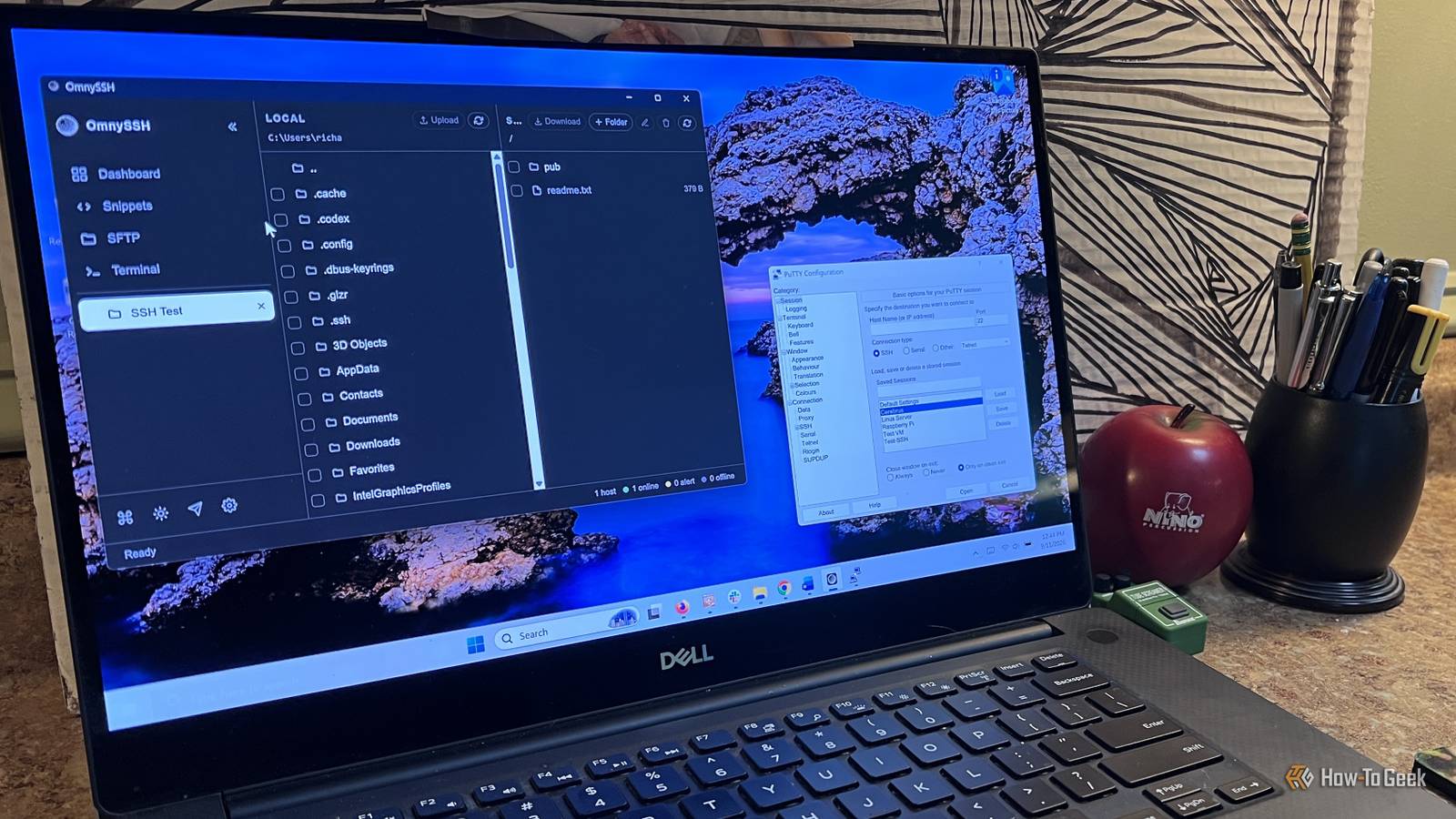
Published Sep 13, 2026, 7:00 AM EDT Rich Hein is a veteran technology journalist with more than two decades covering developer, consumer and enterprise topics. Rich's career has been dedicated to service journalism, connecting readers to content that informs and delights. Previously, Rich was vice president and editor-in-chief for Simpler Media Group, director of audience development for IDG and editor/writer for sites like CIO.com, ComputerWorld, CodeGuru and other tech-centric publications. He's received numerous accolades, including the IDG Summit and Azbee awards and has been covered by Medium for his work in audience development. When not at his desk, Rich lives in Daytona Beach with his wife and three dogs. He enjoys playing guitar, surfing and staying abreast of the latest in tech. I've used PuTTY for years. It's a great program that has lasted this long because it does one thing really well. When I need to connect to another computer over SSH, PuTTY gets the job done without a lot of extra stuff getting in the way. I know how it works, I trust it, and I've never had much reason to replace it. The problem is that an SSH connection is only part of what I usually need. Once I'm connected, there are other things I want to do that PuTTY simply wasn't built for. Over time, that meant adding other programs and tools to fill in the gaps. It worked, but what started as a simple SSH connection gradually turned into a collection of separate tools I had to keep around to manage the same servers. OmnySSH puts my terminal, file transfers, and server monitoring in one window My old setup depended on several separate tools My old setup worked, but it was spread across several programs. PuTTY handled the terminal, PuTTYgen handled key generation, and WinSCP handled file transfers. If I wanted to check memory, disk space, or system load, I usually did that from the terminal with separate commands. OmnySSH pulls most of that into one application. Once I connect to a server, I have the terminal, an SFTP file manager, server stats, saved hosts, and connection settings in the same place. The built-in SFTP browser made the biggest difference WinSCP and FileZilla have been my usual choices for moving files between Windows and a remote server. With OmnySSH, I can browse the local and remote file systems from the same connection without opening another program. The monitoring view is useful for the same reason. Instead of running commands just to check memory or disk usage, I can see that information at a glance. I still have the terminal when I need it, but I'm spending less time jumping between different tools. Managing several connections is where OmnySSH really pulled ahead Tabs make multiple servers much easier to manage PuTTY works fine when I’m connecting to one server, but things get messy once I have several sessions open. Each connection gets its own window, and after a while I’m clicking around the taskbar trying to remember which one is which. OmnySSH keeps those sessions in tabs inside the same window. I can move between servers without losing track of what I’m doing, and the connection I need is always visible at the top. It feels much closer to working in a web browser than managing a pile of separate terminal windows. Saved connections are easier to keep organized PuTTY supports saved sessions, so this isn’t something OmnySSH invented. The difference is how everything is presented. My saved hosts are right in the main interface, where I can see them and open a connection without digging through another dialog. That matters to me as my number of servers grows. Instead of remembering addresses or sorting through separate PuTTY windows, I have one place to keep the systems I connect to regularly and jump between them when I need to. OmnySSH makes more sense if SSH is only part of what you do PuTTY is still enough for plenty of people If all you need is an SSH terminal once in a while, I’m not sure OmnySSH gives you a compelling reason to switch. PuTTY already does that job extremely well, and there isn’t much benefit to changing. OmnySSH starts to make more sense when SSH is only one part of the job. If you regularly transfer files, keep several server connections saved, or want a quick look at system resources while you’re connected, having those tools in the same application saves some hassle. That’s the point where it started feeling like a better way to manage the systems I connect to. There are still reasons I’m keeping PuTTY around Some of it is just muscle memory I’ve used PuTTY for so long that I don’t really have to think about it anymore. I know where the settings are, I know how saved sessions behave, and I know what to expect when I open it. That kind of familiarity is hard to replace, especially with a tool I’ve relied on for years. PuTTY is also still useful when I just want a quick SSH connection and nothing else. It opens fast and stays out of the way. It does exactly what I expect it to do and nothing else. OmnySSH has become the better fit for the way I manage servers now, but I don’t see much reason to uninstall something that still works this well. OmnySSH earned a permanent spot in my toolkit I’m still keeping PuTTY installed, but OmnySSH is the app I expect to use more often from here on out. It handles more of what I need once I connect to a server without making me bounce between separate programs. PuTTY still has a place when I want something fast and familiar, but for anything beyond a basic SSH session, OmnySSH is now the better fit for me.
I’ve used PuTTY for years, but this open-source SSH app replaced my 3-tool setup
Full Article
Original Source
Read the full article at Howtogeek →KhanList aggregates and links to publicly available news content. We do not host full articles from third-party sources. Always verify important information with original sources.