
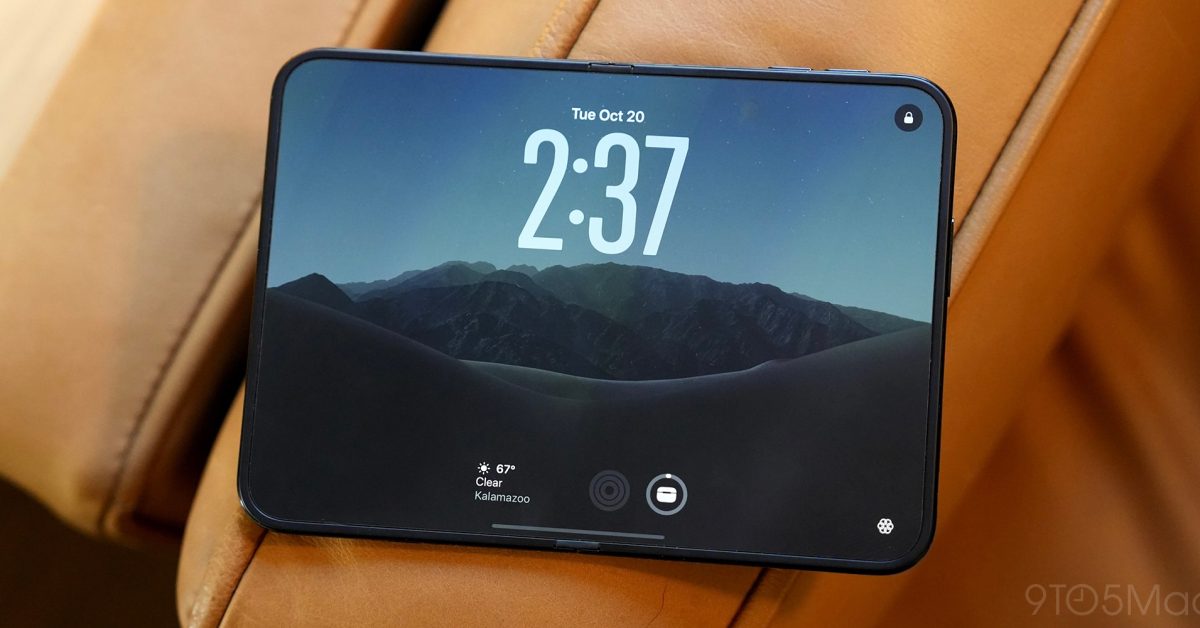
The iPhone Duo is the biggest change to the iPhone’s form factor in its nearly 20-year history. It combines a compact, notebook-style design with an iPad-like inner display. It might look a little awkward, but that’s for good reason. I’ve spent the last week using the iPhone Duo. Here’s everything you need to know about Apple’s first foldable iPhone. 9to5Mac’s iPhone Duo review is sponsored by Craft: Craft will be available and fully optimized for iPhone Duo from day one! But that’s not all – the latest updates bring a ton of improvements across all platforms, making Craft smoother and more powerful than ever on iPhone, iPad, and Mac. If you’re looking for a productivity tool with beautifully designed, fully native apps across the Apple ecosystem, look no further! Check out Craft now and use code 9to5Mac40 for 40% off! Table of contentsDesignOuter displayInner displayMinimizing the creaseUsing the inner displaySoftwareIt’s iOS 27AppsMore iPad, pleaseTouch ID vs Face IDCamerasOdds and endsBattery lifeSpeakersMagSafePerformanceNo Action button9to5Mac Take Design In my iPhone 18 Pro review last month, I wrote that the iPhone 18 Pro Max was right at the edge of what I was willing to carry in terms of weight. The iPhone Duo weighs 254 grams, five grams more than the iPhone 18 Pro Max. But one key difference is weight distribution. Despite being slightly heavier, I find the iPhone Duo significantly more comfortable to hold than the iPhone 18 Pro Max. The iPhone Duo is shorter and squatter, which makes a big difference in how it feels in my hand. That said, the iPhone Duo is heavy, and I start to feel it in my wrist when using it one-handed for extended periods. Still, I find it more manageable than the iPhone 18 Pro Max. The other aspect of the iPhone Duo’s size is thickness. When closed, the iPhone Duo measures 11.3mm thick, making it about 29% thicker than the iPhone 18 Pro and Pro Max. Unfold it, however, and it’s just 5.2mm thick. That’s even thinner than the iPhone Air, which measures 5.64mm. Then, we have the overall footprint — which I think is particularly notable for the pocketability conversation. When folded, the iPhone Duo measures 117.8mm tall and 84.1mm wide. That makes it 45.6mm shorter than the iPhone 18 Pro Max, but just 6.1mm wider. Despite its added thickness and weight, I’ve found the iPhone Duo surprisingly comfortable to carry in my pockets. Its shorter, wider footprint makes a bigger difference than I expected. And then, of course, you can take the iPhone Duo out of your pocket and unfold it to reveal that massive 7.6-inch display. That extra weight and thickness is well worth the trade-off. The iPhone Duo’s hinge is what makes that folding and unfolding possible. Apple says the hinge is made up of more than 100 individual components, with a variable torque system that adjusts resistance as you open and close the device. There’s an integrated magnet system that keeps the two sides securely closed. Unfolding the iPhone Duo is very much a two-handed operation. The hinge has enough resistance, and the two halves fit together securely enough that you really need both hands to open it comfortably. When I first unboxed the iPhone Duo, I instinctively wanted to baby it. I was worried about breaking something. It’s a weird sensation to repeatedly fold and unfold an iPhone. That’s not because it didn’t feel durable; it just goes against nearly 20 years of how we’ve used an iPhone. But after a day or so, I just … stopped thinking about the hinge — and I mean that as a compliment. I’m already treating it like any other iPhone. The hinge can also hold the iPhone Duo steady at various angles, enabling “seated” and “tent” configurations. This lets you prop up the iPhone Duo on a table to watch videos, take FaceTime calls, or use StandBy, without needing a separate stand or accessory. iPhone Duo features a completely revamped StandBy experience that works without being plugged in. I’ve loved propping it up alongside my MacBook at the coffee shop. Apple uses Grade 5 titanium for the iPhone Duo’s frame, with a polished, mirror-like finish. The iPhone Duo is available in Night Sky and Star White. My review unit is Night Sky, a dark blue Apple probably would’ve called midnight a few years ago. It’s nothing particularly exciting, but it shifts between dark blue and black in different lighting. The iPhone Duo is also IP68-rated for dust and water resistance, like every other iPhone Apple sells today. I didn’t test this, but I’ll take Apple’s word. All of this comes together to make the iPhone Duo the most versatile iPhone that Apple sells, without compromising durability. On paper, some aspects of the iPhone Duo’s design sound unappealing — it’s thicker and heavier than I’d normally accept from an iPhone. But it’s hard to overstate just how impressive the whole thing feels in practice. The hinge feels fantastic, the smaller footprint makes it surprisingly easy to carry, and you can unfold it into a 7.6-inch display. It’s an incredible piece of engineering, and even after a week, I’m still impressed by how well the entire package comes together. Outer display The iPhone Duo’s outer display measures 5.4 inches diagonally with the same 1.4:1 aspect ratio as the inner display. On paper, that 5.4-inch outer display sounds small. I’ve seen a lot of people compare it to the iPhone 12/13 mini, which had a 5.4-inch display. It’s a fair comparison on paper, but it doesn’t translate to the real world because of the different aspect ratio. Thanks to its aspect ratio, Apple says the Duo’s outer display has 90% of the screen area of the iPhone 18 Pro. The iPhone Duo’s squatter, wider form factor feels very different from any other iPhone. The wider proportions give you more horizontal space to work with, but significantly less vertical space than a traditional iPhone (including the aforementioned iPhone mini). Grab your passport and imagine it runs iOS. That’s the best way to describe the form factor. For a right-handed person, the iPhone Duo is a delight to use one-handed. I can comfortably reach all corners and edges, unlike my iPhone 18 Pro, where I have to stretch to reach the top-left corner. Typing on the iPhone Duo’s outer screen is very pleasant. Given its shorter design, the keyboard does take up just a little under half of the total screen area. I’ve found both two-handed and one-handed swipe typing to be comfortable. But while I’m right-handed, I’ve made a point of using my iPhone Duo in my left hand as much as possible, since I’ve seen a lot of left-handed people worried about the right-aligned software controls on iPhone Duo. It’s definitely not as comfortable as using it with my right hand. You’ll struggle to reach the top-right corner to pull down Control Center, but the controls lower down on the right side are still mostly reachable. The iPhone Duo’s outer display has been great for quick interactions like responding to texts and emails, checking items off a shopping list, and jotting down thoughts in the Notes app. It literally feels like I’m pulling a small, physical notebook out of my pocket. The outer display has also been excellent for other things, like extended social media scrolling and reading. Those things are undeniably better on the larger inner display (obviously), but if you can’t or don’t want to unfold the iPhone Duo, I don’t feel constrained by the outer display. But the awkwardness of the iPhone’s 5.4-inch outer display shows up in Safari. The web simply isn’t optimized for this form factor. I’ll talk more about this later, but the right-aligned controls on iPhone Duo eat into the usable screen real estate in Safari especially. It’s easy to find yourself on a Safari webpage where you can’t see anything but a cookie popup or newsletter banner. Granted, you can’t really blame Apple for that. It’s clear the modern web isn’t optimized for such a small, squat form factor. Once you get to a long-form article, reading in Safari on the outer display is pleasant. Getting there can be a bit annoying, depending on the website design. I can see why Apple chose the design it did for Safari on the iPhone Duo. I don’t think overlapping the controls with the website would’ve made sense. Still, scrolling in Safari is one of the best examples of something that’s better on the inner screen. Ultimately, one thing I was worried about going into my time with the iPhone Duo was that using the outer display would feel like a “last resort.” I worried I’d only want to use it if I was in a situation where unfolding to the larger inner screen wasn’t an option. This hasn’t been the case. Inner display Minimizing the crease There are two aspects to Apple’s work on the iPhone Duo’s crease. First, there’s minimizing the crease itself. The iPhone Duo’s 7.6-inch inner display is a classic example of Apple’s engineering work at its best. It’s made of more than 10 ultra-thin layers, each designed to balance durability and flexibility for folding. At the surface, there’s a scratch-resistant coating and a nano-textured polymer layer that Apple says is up to 40% stiffer than competing materials. Underneath, high-strength glass sits above and below the OLED panel, using special adhesives that let the layers slide against one another as the display folds. Finally, a titanium plate underneath provides additional structural support. Apple compares the way the layers move to the pages of a book, which helps explain how the display can repeatedly bend without putting excessive stress on any individual layer. The second aspect is reducing the visibility of the crease that is there. To do that, Apple is returning to a familiar friend: nano-texture. We’ve seen Apple’s nano-texture on several products in recent years, including the iPad Pro and MacBook Pro. Beyond serving as a matte finish and offering the usual benefits of nano-texture, it plays a central role in reducing crease visibility. One way it minimizes crease visibility is by diffusing reflected light. In an interview, Tom Marieb, Apple’s VP of hardware, explained that the “specularity” of traditional glossy displays makes it “very easy to pick up topology differences.” The nano-texture finish counteracts that on iPhone Duo by diffusing light and preventing the mirror-like reflections you get from a glossy display. Over the long term, the nano-texture finish will also be more forgiving of topology changes. I’ve only used the iPhone Duo for a week, so I can’t speak to that long-term durability. In an interview with @angietutorials on TikTok, Kate Bergeron, Apple VP of Hardware Engineering, explained that the matte display coating is replaceable. I don’t think Apple expects iPhone Duo users to replace that cover layer because of crease visibility. Instead, it’s a repairability benefit. If the inner display is damaged, that cover layer can be replaced (for a surprisingly low price), without having to replace the entire display. So, how does the iPhone Duo’s inner display fare in real-world use? 9to5Mac’s iPhone Duo review is sponsored by Craft: Craft will be available and fully optimized for iPhone Duo from day one! But that’s not all – the latest updates bring a ton of improvements across all platforms, making Craft smoother and more powerful than ever on iPhone, iPad, and Mac. If you’re looking for a productivity tool with beautifully designed, fully native apps across the Apple ecosystem, look no further! Check out Craft now and use code 9to5Mac40 for 40% off! Using the inner display Crease visibility Put plainly, all that work Apple did to minimize crease visibility pays off. Here’s the best way I can think of explaining it: anyone who says the iPhone Duo’s crease is invisible is misleading you. Even Apple doesn’t say that. It talks about the work it’s done to reduce the crease’s visibility, but nowhere does it claim the crease is invisible. At the same time, anyone who says the iPhone Duo’s crease is visible enough to be a problem is similarly misleading you. The iPhone Duo’s crease isn’t visible when you use the device head-on in most lighting conditions. Yes, you can photograph the iPhone Duo at unflattering angles and clearly see the crease. People aren’t using the iPhone Duo at those angles, though. The only time I could really see the crease during normal use was in brighter lighting, like sunlight, while looking at darker user interfaces, like a black loading screen or video frame. The combination of bright lights and darker software seems to be a perfect storm that accentuates the iPhone Duo’s crease. The difference is between being able to see the crease when you’re looking for it and actually noticing it when you’re using the iPhone Duo. In my experience, the latter almost never happens. You can feel the crease when using the iPhone Duo’s touchscreen, especially in portrait mode while scrolling webpages or social media. It is more noticeable than seeing the crease, but it’s still not a problem once you get used to it. Beyond minimizing the crease, iPhone Duo’s nano-texture coating provides all the same benefits as nano-texture on other Apple products. It reduces glare and gives the screen a paper-like feel. It’s very similar to my 11-inch iPad Pro with a nano-texture display. The matte coating feels nice to the touch, though fingerprints are a bit harder to remove than on a normal glossy screen. Another unique aspect of the iPhone Duo’s inner display is its under-screen FaceTime camera (more on that below). I’ve been impressed by how well the FaceTime camera blends in with the display. You can tell it’s there, but it’s not distracting when you’re looking straight on. There’s also a really nice animation where it shrinks down into itself after you finish using it. Form factor When you unfold the iPhone Duo, you’re presented with a 7.6-inch display. By screen area, Apple says the iPhone Duo’s display is 50% larger than the iPhone 18 Pro Max’s, 80% larger than the iPhone 18 Pro’s, and the largest display ever on an iPhone. Unfolding the iPhone Duo and seeing that inner display is a remarkable experience. You’re taking a passport-sized device and unfolding it into what’s basically an iPad mini. Even after a week of using the iPhone Duo, that “wow factor” hasn’t worn off. The iPhone Duo’s inner display has a 1.4:1 aspect ratio, giving it a wider, more rectangular shape than other foldables on the market. I’ve never found the taller, squarer shape of foldables like the Samsung Galaxy Z Fold 8 Ultra appealing. It’s essentially taping two normal-sized smartphones together for what I think is an unwieldy experience. The foldable aspect feels like an afterthought, whereas on the iPhone Duo it’s a key part of the experience. If you’ve used an iPad, you’ll feel right at home when using the iPhone Duo’s inner display. It makes for a very natural experience when watching video with minimal letterboxing. The book-style design also bodes well for reading, browsing the web, and scrolling social media. In my week with the iPhone Duo, I’ve found myself using the outer display when out and about, running errands. I’m using it basically like a normal iPhone. When I’m stationary, whether at home or at a coffee shop, I unfold it to use the larger screen. I think this comes down to ergonomics. The iPhone Duo’s 7.6-inch inner display is simply too large to use comfortably one-handed, and it’s not particularly practical while walking around a grocery store. The outer display is much better suited for those situations. I’m watching considerably more video on my iPhone Duo than I have on any previous iPhone. Compared to my iPhone 18 Pro, the added screen real estate makes it more enticing. From a productivity standpoint, I can get more done with the iPhone Duo. Navigating WordPress is much easier than on an iPhone 18 Pro. I can see the full WordPress interface, rather than the awkward, long-and-tall mobile version that requires much more tapping between menus. In the Mail app, I get a proper two-pane interface, so I can scroll my inbox on the left and read full emails on the right. It makes the triage process much easier. With Split View (more on that below), I can put Notes on one side and Safari on the other to prepare show notes for a podcast on iPhone Duo, rather than grabbing a Mac or an iPad. The iPhone Duo gives you two very different experiences depending on what you’re doing. That’s what has surprised me most about it. I’m not going out of my way to find reasons to use the larger display. Those reasons have come naturally. Software It’s iOS 27 Amid all the rumors about iPhone Duo, there were many questions about its software and apps. Would it run iOS when folded and iPadOS when unfolded? Would it run a hybrid operating system? Would it run iOS but with iPad apps? Ultimately, all of that was a waste of time. Instead, iPhone Duo runs the same iOS 27 foundation as every other iPhone, but with some key changes to accommodate the different screen sizes and aspect ratio. It’s not just normal iOS stretched (or shrunken) for the iPhone Duo’s screens. The biggest change is that iOS 27 on the iPhone Duo moves many familiar navigation controls from the bottom to the right side of the interface. Using the Music app as an example, the navigation bar with things like “New” and “Library” now appears in a right-hand sidebar rather than at the bottom. Controls that normally appear at the top, such as the playlist button and three-dot menu in the Music app, have also shifted to the right-hand sidebar. The changes go beyond just individual apps. On the Home Screen, the dock has been moved to the right-hand side. The status bar icons, like the time, Wi-Fi icon, and cellular bars (now dots), are in the upper-right corner above the dock. The interface is adaptable, too. If you use the iPhone Duo unfolded and in portrait orientation, the dock and in-app navigation bars shift back to the bottom like “normal” iOS. After a few days, Apple’s interface changes to accommodate the iPhone Duo’s form factor start to feel natural. They account for the shorter, wider aspect ratio; the smaller outer display; and the larger inner display. Typing on the inner display while in portrait orientation is very natural. In landscape mode, you have to stretch a little bit, but it’s still doable for me. The fluidity between all of it is fantastic. No matter how I held the iPhone Duo, UI elements were exactly where I expected them to be. There’s also that gorgeous software transition when you unfold or fold the iPhone Duo. The iPhone Duo also supports Split View when unfolded—a first for any iPhone. You can place two apps side by side, or two windows from the same app. It’s the most powerful multitasking has ever been on an iPhone. Being able to put Safari on one side and Notes on the other has been a huge productivity boost for me on iPhone. You can also pin a video to the top part of the screen, and use another app below it. That app will morph to fill the size of the display below it. Apps Speaking of apps, we need to talk about the different ways apps behave on the iPhone Duo. First, all of Apple’s pre-installed apps have been updated to take full advantage of the iPhone Duo’s two displays. This includes proper right-aligned controls that float alongside the content as you scroll in apps like News, Maps, Music, and Reminders. The second part of the app story is third-party apps, which gets a bit more complicated. Every existing iPhone app works on iPhone Duo. This means that any iPhone app you have today will run on iPhone Duo. From here, there are basically three tiers. First, apps built with the iOS 26 SDK or earlier don’t take full advantage of iPhone Duo. The example above shows the MLB app running on iPhone Duo. In landscape mode, it has large black bars on either side of the app. In portrait orientation, it runs floating in the center, surrounded by letterboxing on all sides. You can then zoom in like you can when running an iPhone app on iPad. If the app supports landscape mode, you can also manually switch between portrait and landscape interfaces, as shown in the Google Docs screenshots above. Second, there are apps built with the iOS 27 SDK. These apps resize to fill most of the inner display, but leave space along the right edge for the status bar. The above screenshots show the Reddit app running on the iPhone Duo: Here’s what YouTube looks like: And here is what X looks like: Finally, there are apps built with the iOS 27.1 SDK or later. These apps can be fully optimized for iPhone Duo, using the entire inner and outer displays. In just the week I’ve had the iPhone Duo, developers big and small have rolled out a ton of apps fully optimized for iPhone Duo. There is a huge difference between using an app updated for iPhone Duo and one that isn’t. Going forward, I think proper iPhone Duo support will be a deciding factor when I choose which apps to use. If I’m choosing between two apps that do the same thing and only one is optimized for the iPhone Duo, I’ll choose that one. I’ve tried a ton of third-party apps with iPhone Duo support over the last week, and below are some of my favorites. Callsheet NetNewsWire Threads Mercury Weather Overcast Instagram Carrot Weather Finalist Dark Noise More iPad, please I wish there were more iPadOS elements sprinkled throughout the iPhone Duo’s software. It’s great having Split View, but I wish there was an iPadOS-like way to drag and drop apps into that Split View interface. Slide Over also seems like a piece of low-hanging fruit. There are places where iOS isn’t doing enough to take full advantage of that 7.6-inch inner display. For comparison, the iPad mini has an 8.3-inch display, and it runs the full iPadOS interface. Even the previous generation 7.9-inch iPad mini got the full iPadOS experience at the time. One of my favorite things about using an iPad is that websites (mostly) treat Safari as a desktop-class browser. That’s not the case on iPhone Duo, where you sometimes get the awkward mobile layout even when browsing on the unfolded inner display. This doesn’t always happen (hence my WordPress example earlier), but I wish it were closer to the desktop-class iPad experience. To be clear, I don’t think the iPhone Duo should run iPadOS. I think going all-in on iOS was the right decision. I just want iOS to do more in certain areas to really show off the benefits of the bigger screen. Right now, I sometimes have to fight to get iOS to recognize I’m using an iPhone with a 7.6-inch display. Touch ID vs Face ID Perhaps the biggest trade-off with the iPhone Duo is that it uses Touch ID instead of Face ID. Flagship iPhones have used Face ID since the iPhone X in 2017, so this is a big change. iPhone Duo has Touch ID integrated into the side button. I’ve added both my thumbs and index fingers, so it’s easy to unlock the iPhone Duo no matter how I’m holding it. It also supports “Rest to Open,” so you can authenticate with Touch ID and keep your finger on the side button to unlock it automatically. I think switching from Face ID to Touch ID has been the hardest thing to get used to on iPhone Duo. I’ve become so accustomed to just looking at my iPhone to unlock it. Having to deliberately reach for the side button feels like a step backward, even though Touch ID works quickly and reliably. One benefit I have enjoyed: Touch ID is a lot easier to use when your iPhone is lying flat on a table. Instead of picking up your iPhone to unlock it with Face ID, you can rest your finger on the Touch ID sensor and to glance at your locked notifications. iPhone Duo also supports Apple Watch unlock. If you enable this feature, you can swipe up on your iPhone Duo’s lock screen, and it will automatically unlock if you’re wearing your Apple Watch (so long as your Apple Watch has a passcode on it and is unlocked). I used my iPhone Duo without Apple Watch unlock enabled for the first few days to get a feel for what it’s like to use an iPhone with Touch ID for the first time in nearly a decade. Ultimately, I turned on Apple Watch unlock, and it does make the experience significantly better. Finally, because iPhone Duo doesn’t have Face ID, it also doesn’t have any Attention Aware features. On Face ID-enabled iPhones, your iPhone will check for attention before dimming the display, expanding a notification when locked, or lowering the volume of some alerts. Of all those features, I really miss being able to glance at my iPhone and have my notifications automatically expand. Ultimately, Touch ID works just fine on the iPhone Duo. It takes a while to get used to, but Apple Watch unlock helps quite a bit. I assume Face ID is on the shortlist of features for future iPhone Duo generations. Cameras Despite being Apple’s most expensive iPhone, the iPhone Duo does not have its most powerful camera system. On paper, many of the Main camera specs are similar to the iPhone Air and iPhone 17, but Apple emphasizes that it designed the camera specifically for the iPhone Duo’s ultra-thin form factor. Here’s how the iPhone Duo’s camera hardware compares to some of Apple’s other recent iPhones: SpecificationiPhone DuoiPhone 17iPhone AiriPhone 18 ProMain camera48MP48MP48MP48MPMain focal length26mm26mm26mm24mmMain apertureƒ/1.6ƒ/1.6ƒ/1.6Variable ƒ/1.48–ƒ/4Main OISSensor-shiftSensor-shiftSensor-shift2nd-gen sensor-shiftUltra Wide48MP48MPNone48MPDedicated telephotoNoneNoneNone48MP, 4xOptical-quality zoom0.5x, 1x, 2x0.5x, 1x, 2x1x, 2x0.5x, 1x, 2x, 4x, 8xRear 4K Dolby VisionUp to 120 fpsUp to 60 fpsUp to 60 fpsUp to 120 fpsProRAWNoNoNoYes The iPhone Duo also features a 48MP Fusion Ultra Wide camera, which is the same camera found in the iPhone 18 Pro. Its specifications also match the Ultra Wide camera on the regular iPhone 17. I’ve found the Main camera on iPhone Duo to perform just as well as the camera on the iPhone Air I’ve been using as my primary iPhone for the past year. It’s a notch below the iPhone 18 Pro, but it’s not a dramatic difference. Here are some comparison shots between the iPhone Duo (left) and iPhone 18 Pro (right): iPhone Duo (left) and iPhone 18 Pro (right) iPhone Duo (left) and iPhone 18 Pro (right) iPhone Duo (left) and iPhone 18 Pro (right) iPhone Duo (left) and iPhone 18 Pro (right) The iPhone Duo also features a 12MP Center Stage camera on its outer display. That’s a step down from the 18MP Center Stage camera found on the iPhone 17, iPhone Air, and iPhone 18 Pro. You still get features like automatic framing and Dual Capture, but the Duo uses a lower-resolution camera with a smaller ƒ/2.2 aperture. But that’s not all. The iPhone Duo actually has one more camera: a FaceTime camera located underneath the inner display. The FaceTime camera itself is nothing to write home about, but it does get the job done for FaceTime calls. Apple hasn’t disclosed the resolution of the under-display FaceTime camera, but it supports Center Stage and 1080p video recording. If I’m on a video call or just taking a quick selfie, the under-display FaceTime camera is perfectly adequate. For anything more demanding, I’d choose a different camera. But that’s one of the most unique things about the iPhone Duo’s form factor. You can use the 48MP rear cameras to take selfies. By unfolding the device and flipping it around, you can use the outer display as a live viewfinder while taking pictures with the higher-quality Main or Ultra Wide cameras. This means you can frame your shot and see exactly what the cameras see, without relying on the dedicated front-facing camera. The same concept also works when someone else is taking your picture. With a feature Apple calls Duo Preview, the outer display shows a live preview of the shot, letting you check your framing and adjust your pose while the person behind the camera takes the photo. The iPhone Duo also features Smart Take, which uses on-device AI to automatically capture a photo when everyone is posed and ready. You can prop the iPhone Duo up on a surface, activate Smart Take, and step into the frame without having to race against a timer. Ultimately, the iPhone Duo isn’t the best camera Apple sells today. It’s a very good camera, but it’s not on the same level as the iPhone 18 Pro. That said, the versatile form factor of the iPhone Duo opens it up to new ways to use the camera hardware. As someone who used the iPhone Air up until the iPhone 18 Pro’s launch last month, I’m pretty used to life without a telephoto camera. I’d absolutely prefer having one, but it’s a tradeoff I’m willing to accept for the other benefits of the iPhone Duo’s form factor. Odds and ends Battery life Here’s what Apple says about the iPhone Duo’s battery life: Video playback on the outer display: Up to 44 hours Video playback on the inner display: Up to 31 hours Typical mixed use: Up to 24 hours That “typical use” number is based on a “combination of passive and active use of a variety of applications, including but not limited to messaging, photos, music, social media, video streaming, games, web browsing, and navigation.” For iPhone Duo, the number also assumes you use both screens equally. The iPhone Duo features a unique dual-battery architecture, with one battery in each half of the device to maximize capacity. Apple uses custom silicon and software algorithms to manage charging, discharging, and balancing between the two batteries. This lets them operate as essentially a single battery. In my testing, the iPhone Duo has more than enough battery life to last me through a normal day. I can take it off the charger, use it normally throughout the day, and have around 20% remaining by the end of the day. I haven’t done any formal battery testing, but I’d estimate that around 60% of my usage has been on the inner display, with the remaining 40% on the outer display. Speakers Apple says it optimized the iPhone Duo’s speaker placement and audio tuning to deliver Spatial Audio no matter how you hold the device. That includes using it fully open, closed, or partially folded in seated and tent configurations. I do think the iPhone Duo’s speakers leave a little bit to be desired. I wasn’t overly impressed with the speaker quality, and I think there’s a notable disparity compared with the iPhone 18 Pro. The iPhone Duo’s speakers sound thinner and quieter to my ears. MagSafe The iPhone Duo features MagSafe support, despite early rumors to the contrary. Existing MagSafe stands and chargers should work with the iPhone Duo. I’ve tested it with charging stands from Twelve South and Belkin so far, and haven’t had any problems. MagSafe accessories like wallets and batteries, however, are a different story. Because the iPhone Duo is shorter than a normal iPhone, these accessories will likely hang off the bottom. This includes my beloved MagSafe Wallet straight from Apple. I suspect third-party options will pop up soon, but right now the options are pretty limited. Performance The iPhone Duo is powered by Apple’s A20 Pro chip, the same chip found in the iPhone 18 Pro and Pro Max. In my testing, performance has been essentially identical to the iPhone 18 Pro. Everything feels fast and fluid, including using Split View on the inner display. Apple has also developed a custom thermal architecture for the iPhone Duo, including a vapor chamber and flexible graphite to help dissipate heat across its two halves. I do think the iPhone Duo runs a bit hotter than the iPhone 18 Pro, but not in a way that impacts performance. For a deeper dive into A20 Pro performance, I have a bunch of charts in my iPhone 18 Pro review. No Action button The iPhone Duo doesn’t have an Action button, but it does have a Camera Control. I’d gladly swap them if given the option, and I imagine most people would agree. I’ve become accustomed to using the Action button to quickly open my AI app of choice, so its absence on the iPhone Duo is disappointing. 9to5Mac Take Foldable smartphones have been around for years in various shapes and sizes. When most people think of foldables, I think they picture form factors like the Galaxy Z Fold 8 Ultra, which looks a lot more like a “normal” smartphone that happens to unfold. The iPhone Duo doesn’t look anything like a “normal” smartphone. It’s awkward and weird on the surface, and that will turn some people off. But as soon as you unfold the iPhone Duo, it expands into an iPad-like device that is instantly recognizable. After a week with the iPhone Duo, I’m convinced that this form factor represents the future of the iPhone. There’s something special about a compact, notebook-like iPhone that unfolds into a tablet-like experience, and it just makes sense once you start using it. Importantly, neither screen feels compromised. I’ve been repeatedly surprised by how capable the outer display is compared to what I expected. That said, the iPhone Duo is a first-generation product, and it comes with trade-offs. From a hardware perspective, most people will notice two things: it has Touch ID rather than Face ID, and it lacks a telephoto camera. I also think there are aspects of the software experience that need to catch up to the hardware. Apple’s overarching software philosophy is on the right track, but there are places where iOS could do more to take advantage of the larger inner display. At $1,999, the iPhone Duo is an expensive proposition, especially when you consider the features you’re giving up compared to the iPhone 18 Pro. For most people, a traditional iPhone is still the practical purchase right now. But over time, I think that calculation will change. The iPhone Duo is a glimpse at the future of the iPhone, and that future is foldable. Must-have iPhone Duo accessories Apple Pencil (USB-C) Apple 40W Dynamic Power Adapter with 60W Max Apple iPhone Duo Folio with Kickstand Beats USB-C to USB-C Woven Cables TwelveSouth HiRise 3 Deluxe MagSafe Stand Follow Chance: Threads, X, and Instagram Thanks to Craft for sponsoring our iPhone Duo review: Craft will be available and fully optimized for iPhone Duo from day one! But that’s not all – the latest updates bring a ton of improvements across all platforms, making Craft smoother and more powerful than ever on iPhone, iPad, and Mac. If you’re looking for a productivity tool with beautifully designed, fully native apps across the Apple ecosystem, look no further! Check out Craft now and use code 9to5Mac40 for 40% off! FTC: We use income earning auto affiliate links. More.
iPhone Duo review: The future is foldable
Full Article
Original Source
Read the full article at 9to5mac →KhanList aggregates and links to publicly available news content. We do not host full articles from third-party sources. Always verify important information with original sources.