
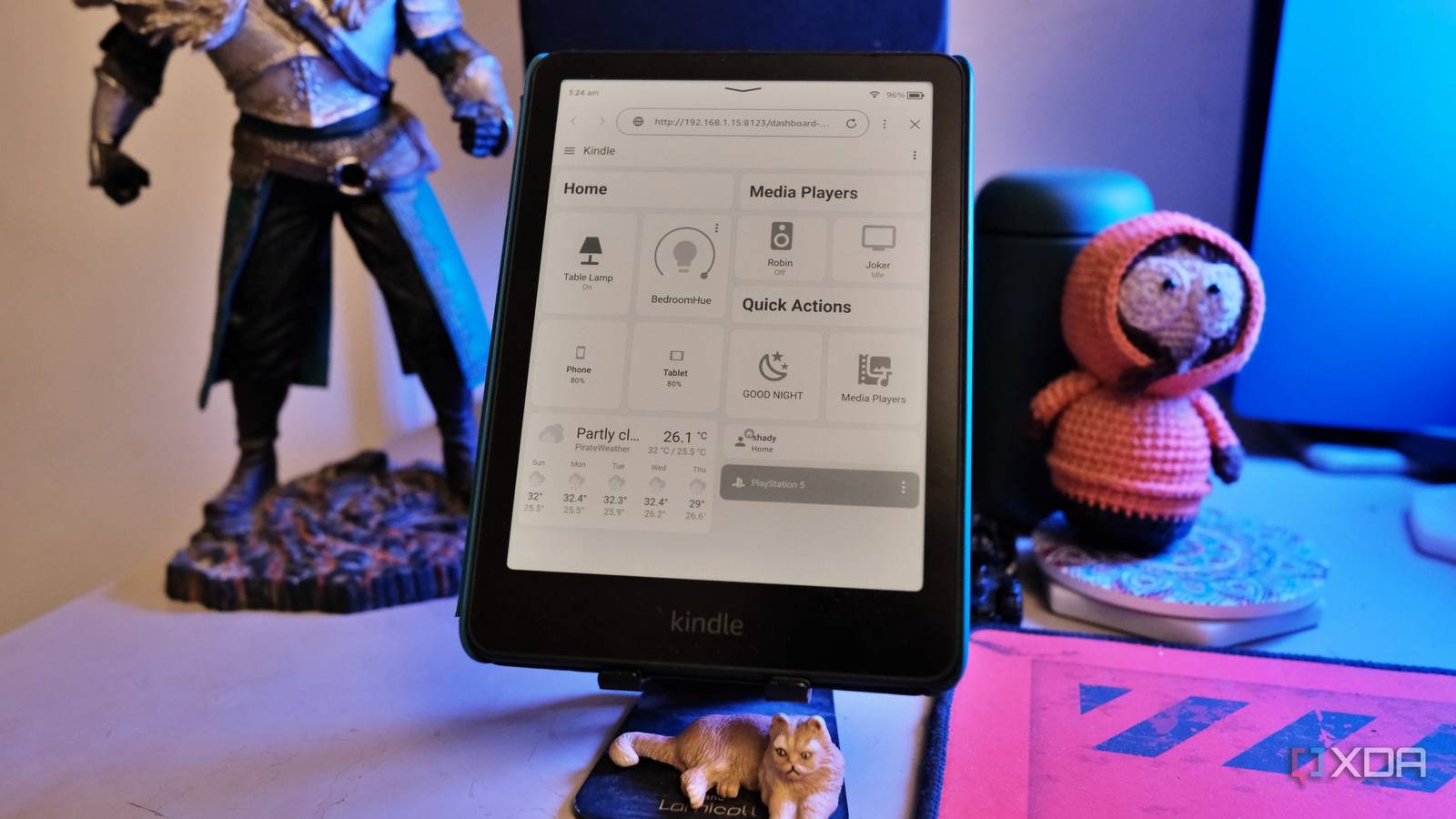
Published Aug 31, 2026, 11:01 AM EDT Samir Makwana is a technology journalist and editor from India since past 18 years and his work appears on MakeUseOf, HowToGeek, GSMArena, BGR, GuidingTech, The Inquisitr, TechInAsia, TechWiser, and others. He has written news, features, and gadget reviews for national technology media publications. His passion is to help people with their technology problems and gadget purchases. For that, he has worked for some of the biggest international technology publications, covering news, explainers, how-to guides, listicles, and product-buying guides. He has worked as an editor and managed teams since 2015. His expertise broadly covers computers, smartphones, game consoles, headphones, smart home products, browsers, and apps. A few months ago, I turned my old Kindle Paperwhite into a Home Assistant dashboard. I used the Kindle SmartHome Dashboard project, a jailbreak, and a WebSocket proxy to get around Kindle’s slow WebKit browser. That setup was running on my desk the entire time until I woke up to my Kindle updating automatically. I ended up selling that Kindle a while back and picked up a Paperwhite 12th Gen. When I tried putting the same setup on it, none of it worked. That’s how I lost the jailbreak. The community-developed apps, such as KOReader and KUAL, stopped working along with their extensions. Earlier this month, I used the new Véra jailbreak on my Paperwhite 12th Gen, and it worked. Many extensions and apps weren’t working, but I still managed to turn my Kindle into a Home Assistant dashboard for my desk. Growing the dashboard beyond the original setup Adding small quality-of-life fixes I always wanted to add a few basic things to the Home Assistant dashboard view on my old Kindle. Something that goes beyond lights, smart TVs, Apple TVs, and PS5s. I wanted to include buttons I can toggle on or off from the Kindle’s screen. The weather widget on the dashboard was also on my to-do list. Enabling a few things, like deploying Tailscale, that function outside the dashboard made the Kindle handy. I put it on a simple phone stand on my desk, which sounds trivial to mention. However, that makes it easy to move between rooms whenever necessary. These improvements weren’t strictly necessary, but they made my Kindle feel more like a fixture than a hack with workarounds. Kindle Paperwhite Signature Edition Screen 7-inch Storage 32GB Battery Up to 12 weeks Touch input was the biggest missing thing I tried to fix Viewing screenshots of buttons that do nothing wasn’t wise Using a tablet as a Home Assistant dashboard did raise my expectations. The jailbroken Kindle’s Web App Framework is a real web app environment. The touch input isn’t really off the table. It certainly isn’t like using a normal tablet. You can tap to fire a webhook back to Home Assistant in other builds that offer real control. My Kindle dashboard doesn’t let me do that exactly. Or that’s what I thought. The initial build only displayed the bedroom light's state as a button on the dashboard. I couldn’t perform an input to change the state. Simply put, I couldn’t switch the lights on or off. That drove me to explore and try out community-built projects to evaluate the possibilities. The software stack is fragile in ways I hadn’t imagined Every update kept taking down the dashboard The large Kindle developers community maintains several projects with some restraints. Projects like the Kindle SmartHome Dashboard are typically built around specific Kindle hardware and software. Automatic firmware updates tend to break functionality. That broke KOReader and KUAL on my Kindle. I removed them, jailbroked my Kindle again, and installed KOReader. The KindleModding community warns that KUAL won’t work. While looking for options, I stumbled upon KUAL Next, which picks up where KUAL leaves off. However, it too is a work in progress and doesn’t support all extensions. I spent an entire weekend trying out different ways to bring my Home Assistant dashboard to Kindle. The most common way to view the HA dashboard on Kindle was to show screenshots. That required me to run a local server or a Docker container that takes a screenshot of the HA dashboard and shows it on the Kindle. This approach lacks interactivity. I can’t tap a button to turn off the TV or lights. Getting my previously tried projects to run on the 12th Gen Paperwhite is where things fell apart. I explored Mesquite-related projects to get a Web App Framework (WAF) up and running for the HA dashboard. After hours of troubleshooting, I found that Mesquite launched successfully and even opened a full-screen dashboard window. But the window never actually displayed. The newer firmware runs its real interface through a modern app layer, which is completely different. The old WAF approach still technically works. Yet, the firmware doesn’t show anything it creates. Avoid updating your Kindle’s firmware if you want to try out other projects. Another community project aimed at running a Chromium-based browser on Kindle to launch the HA dashboard. That project was developed and tested on specific firmware and Kindle models. No matter how much I tried tweaking things, it wouldn’t run on my Kindle. Running a smart home dashboard in a browser Ghosting lingers around a bit longer than you’d like That’s why I tried a different approach: loading Home Assistant’s own web frontend directly into Kindle’s browser. It’s the same browser I tried to route around with the WebSocket proxy. I still needed the Vera jailbreak to install KOReader and use its built-in option that keeps the screen from sleeping. Without that, the browser tab threw a screensaver-related error. E-Ink still doesn’t drain the battery the way an LCD does, and the Paperwhite’s front light means I can glance at it in a dark room without the harsh glow that a phone or tablet screen throws off. Near-constant refreshing in the browser does leave some ghosting behind. It becomes more noticeable on tiles that carry a lot of text and icons, like the weather widget. That’s why I often manually perform a full-screen refresh to clear the screen and get a fresh view of the tiles on the dashboard. The state changes from the HA dashboard aren’t instant. It takes about half a second to reflect on the dashboard view in the Kindle’s browser. The lag between something happening in Home Assistant and the Kindle is real. I’m okay with checking if the light is on. It's not really helpful to check on something right away. Old Kindle as a smart home dashboard has some caveats I set out to use a real app on Kindle. Instead, I ended up with a browser tab. I spent a full weekend trying to get proper touch control working. But the current firmware ruled it out. Even as a pure status display, checking the Kindle beats unlocking my phone every time. I won’t pretend, but the ghosting and the lag are real. Glancing at a dashboard that’s just sitting on my desk makes it worth getting it working. If your old Kindle isn’t doing anything and is just sitting in a drawer, it’s still worth turning into a smart home dashboard. Expect some jailbreak troubleshooting since the firmware can undo the whole setup without warning.
I'm using my old Kindle as a Home Assistant display, and it changed how I control my smart home
Full Article
Original Source
Read the full article at Xda-developers →KhanList aggregates and links to publicly available news content. We do not host full articles from third-party sources. Always verify important information with original sources.