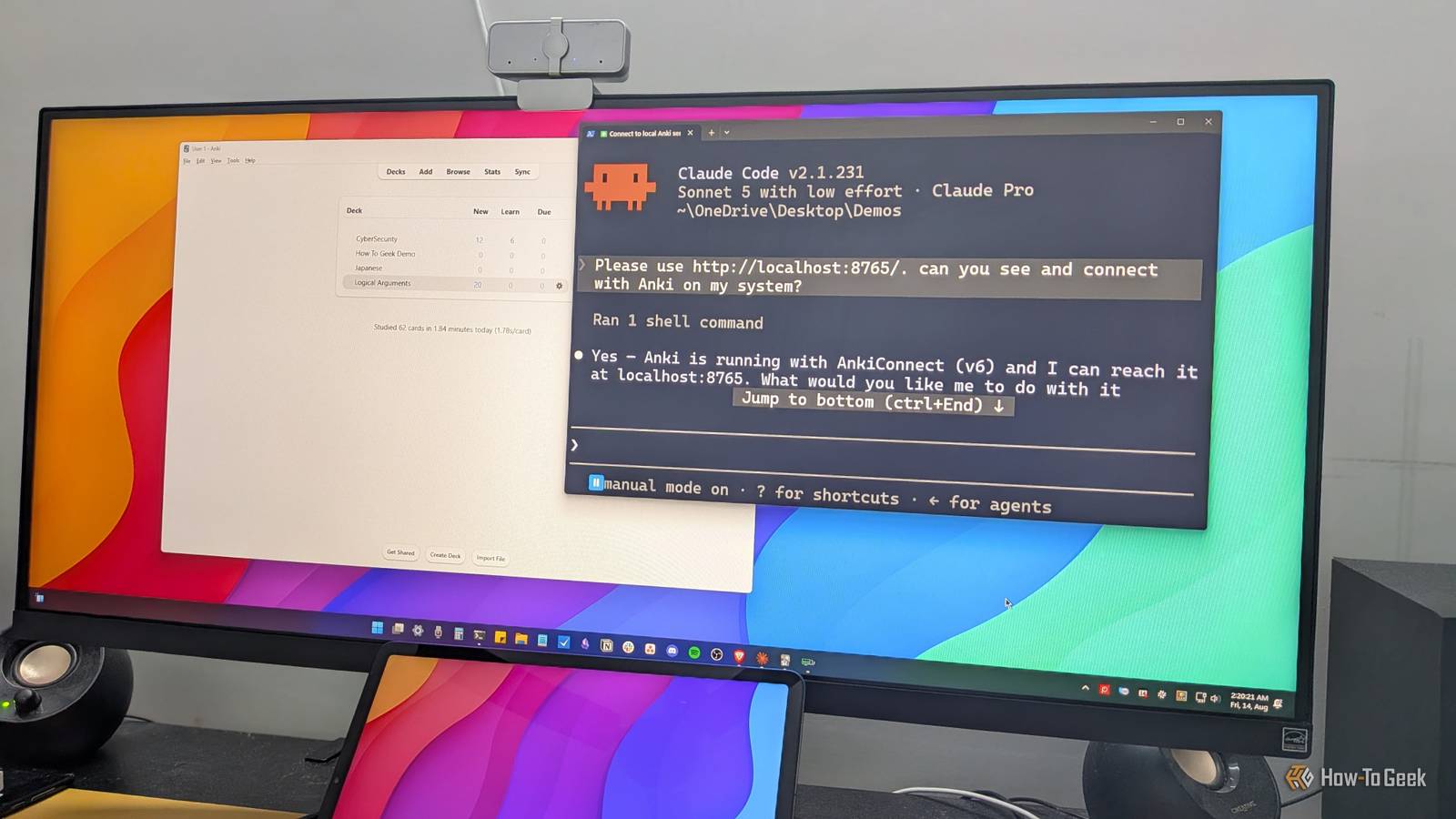
Published Aug 16, 2026, 2:30 PM EDT Dibakar Ghosh is a tech journalist at How-To Geek, where he focuses on Linux, Windows, and productivity tools. His goal is simple—help readers at every skill level get more done with the tech they use every day. He began his writing career in 2016 with WordPress tutorials, later moving into digital marketing, where he spent years reviewing complex tools for marketers. His work has also appeared on Authority Hacker, where he’s shared in-depth guides on digital workflows and online productivity. That experience now shapes his journalism, blending analytical depth with practical, real-world advice. When he’s not writing or testing software, Dibakar is usually watching movies or playing video games. He’s a huge Christopher Nolan fan and a strong proponent of the theater experience. In gaming, he has sunk hundreds of hours into Insomniac’s Spider-Man series, Returnal, Prototype, Darksiders, and Final Fantasy titles. I've always found flashcards to be one of the most fun and engaging ways to learn new things. The idea of quizzing yourself and getting instant feedback just by flipping a card strikes an elegant balance between simplicity and effectiveness. Now, if you're like me and also enjoy flashcards, you probably know about Anki—it’s one of the most popular student apps out there. And while it’s really powerful, setting it up can be a huge hassle, which keeps many students from creating personalized quiz decks tailored to their specific needs. But now, with Claude, you can automate that entire process. Here’s how it works. What are Anki flashcards In case you’re not already familiar with this popular app Anki is a free and open-source flashcard app. You create cards with a question on one side and the answer on the other, group related cards into decks, and then quiz yourself. Say you're learning Japanese—you could make a card with the English word "mother" on the front and “okāsan,” the Japanese equivalent, on the back. During a quiz session, the front of the card appears, you try to recall the answer in your head, and then flip the card to check yourself—it’s as simple as that. Now, what makes Anki better than other flashcard apps is its spaced repetition algorithm. Every time you answer a card, you rate how difficult it was to recall. Cards you find easy show up less often in future sessions, while cards you struggle with keep coming back. The idea is to spend your energy on the concepts that haven't stuck yet, forcing you to recall them repeatedly until they're cemented into long-term memory, whereas the stuff you already know only surfaces occasionally to keep it fresh. If you’ve used it, you’d know that it’s a really powerful and effective tool. The biggest problem with using Anki The gap between wanting a deck and actually having one As efficient as Anki is at automating the quizzing side—it’s equally frustrating on the card-creation side. The quality of your retention depends heavily on the quality of your cards. Going back to the Japanese example, I could just put "mother" on one side and “okāsan” on the other and call it a day. But that’s a weak card compared with one that has “mother” on one side and the word “okāsan” with an audio file of the exact pronunciation on the other. Alternatively, let’s say I’m learning the names of specific places or items. In that case, one side could have a picture of the thing, while the other has its name and pronunciation. Now, Anki allows you to create these feature-rich cards complete with rich text, detailed formatting, images, audio snippets, and even extra attachments. The problem is that you have to set everything up yourself. As such, building a simple deck with 20 or so cards, complete with all the necessary images and audio attachments, can easily eat up an entire afternoon. This is why many people using Anki download decks other people have made instead of building their own. However, if you ask me, learning is personal, and nothing beats having a deck that’s fine-tuned to the specific things you want to learn and have difficulty remembering. And, as it stands, building such a personalized deck can be a chore that many people end up procrastinating on. How Claude solves this problem Automate the boring stuff with LLMs You can connect Claude with Anki and just tell it to create the cards for you. You can specify the themes along with the concepts you find hard to understand, and it’ll do the rest. You can even feed it the necessary attachments or have it search the web for relevant images and audio clips and include them in the cards. In fact, you can just talk with Claude about what you want—you don’t even have to type it—and it can take care of the rest. Sure, it’s not zero effort, but doing a messy voice dump beats typing on a keyboard and having to click through different menus. As such, if you’ve always hated the experience of creating custom flashcards in Anki, Claude can make the entire process much easier. How to connect Claude with Anki The first thing you need to do is install an add-on called AnkiConnect, which exposes Anki’s functionality through a local HTTP API. To do this, you click on Tools > Add-ons and then Get Add-ons > Browser Add-ons from the new dialog box. This is going to open a new webpage. Now search for AnkiConnect, open it, and you should find its 10-digit code. Copy and paste it into the Install Add-on dialog box, and AnkiConnect should install on your system. You can check if it’s installed by visiting http://localhost:8765/ in your browser. AnkiConnect exposes its API on this local address while Anki is running. Now, Claude can connect to Anki through this API and make changes to it, including creating and editing cards and entire decks. That said, the regular Claude web app or even Claude Cowork through the desktop app won’t be able to make this connection without you setting up an MCP server first. As such, my recommendation is to use Claude Code. Since it already opens in your system’s terminal, it can interact with Anki by directly querying the API endpoint through your terminal. Always point Claude Code to http://localhost:8765/ and ask it to check whether the endpoint is accessible. If you just tell it to connect to Anki, it may not know where to find AnkiConnect and say that it can’t. How to use Claude Code with Anki The simplest way to use Claude Code with Anki is by having it build you a deck from scratch. For example, since I'm learning Japanese at a beginner level, I can ask for double-sided cards with the English word on one side and the Japanese word on the other, organized into subjects—20 common nouns, 20 animals, 20 things, 20 places, and 20 common numbers. Claude Code intelligently handles all of it, with no fancy prompting, and delivers the complete deck in a matter of minutes. However, Claude is building all of these cards based on its own knowledge. A better way to do it is to bring in your own data. Ideally, you would collect all your study material—PDFs, notes, and even YouTube video transcripts with URLs and timestamps—and dump them into a folder. Since Claude Code has direct access to your file system, just open it inside that folder and it can see everything. Once it has access to your study material, ask it to interview you with 20–25 questions so that it can understand how well you understand these concepts. I’d strongly recommend using a more capable model like Opus for this bit so it can extract as much insight as possible from your answers. Once the interview is done, have it analyze what you actually struggled with and create multimedia flashcards in Anki based specifically on those weaknesses. If there are images or PDFs in the folder, it can embed material from them into the cards. If you shared video transcripts with timestamps, it can pull from those too. That completely automates the card-creation process—and you end up with a personalized deck of media-rich flashcards targeting your actual weak spots. I really wish this system was there back when I was in college I genuinely wish something like this Claude + Anki setup existed back when I was in school and college. My coursework involved a ton of memorization, and this is easily one of the best systems I've ever come across for memorizing things. That said, learning never stops, and as you can see from the screenshots, I'm currently using this setup to learn Japanese and cybersecurity concepts.
I used Claude to build Anki flashcards—and it's the future of learning
Full Article
Original Source
Read the full article at Howtogeek →KhanList aggregates and links to publicly available news content. We do not host full articles from third-party sources. Always verify important information with original sources.