
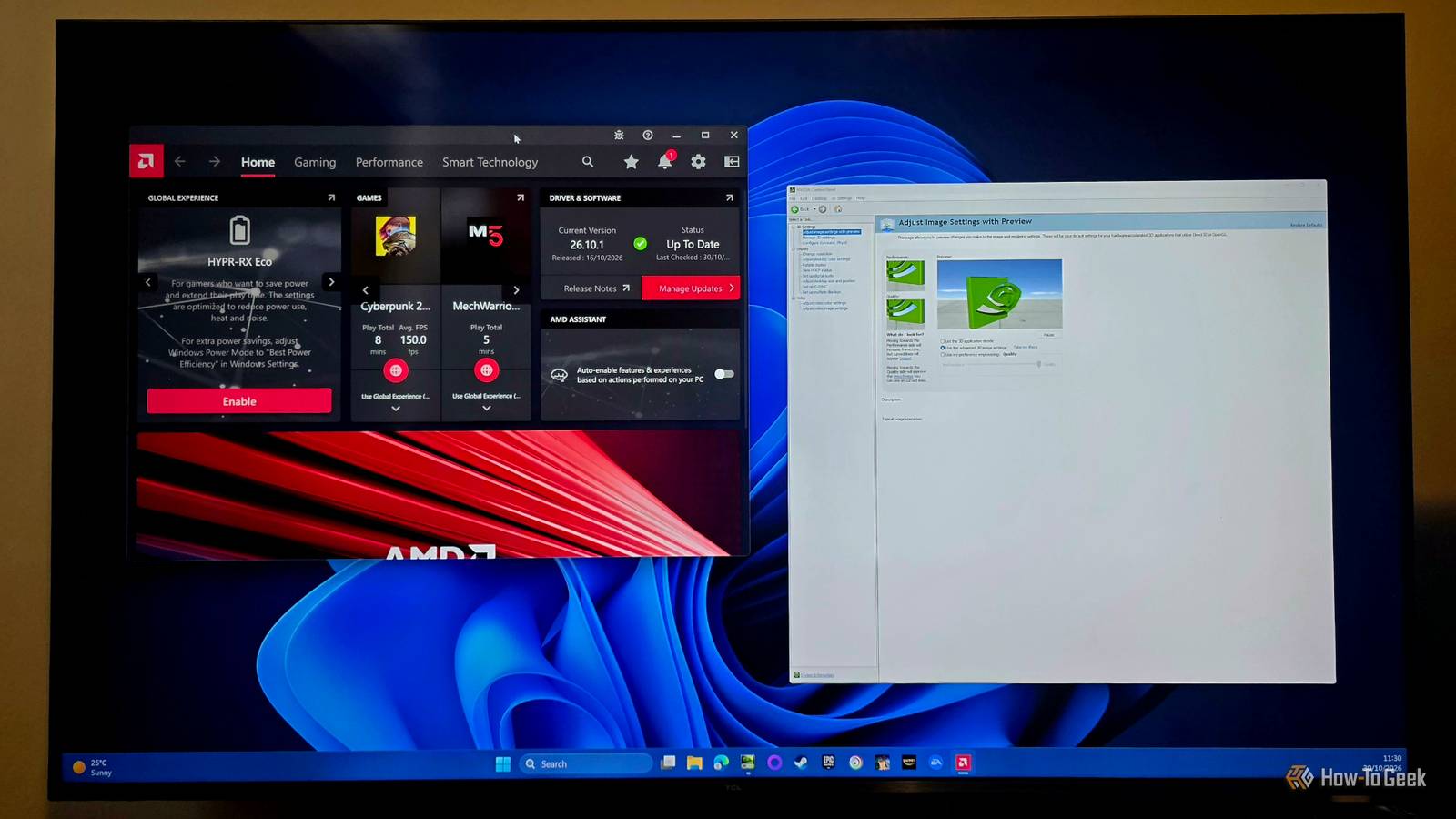
Published Nov 4, 2026, 11:30 AM EST Sydney Butler is a technology writer with over 20 years of experience as a freelance PC technician and system builder and over a decade as a professional writer. He's worked for more than a decade in user education. On How-To Geek, he writes commerce content, guides, opinions, and specializes in editing hardware and cutting edge technology articles. Sydney started working as a freelance computer technician around the age of 13, before which he was in charge of running the computer center for his school. (He also ran LAN gaming tournaments when the teachers weren't looking!) His interests include VR, PC, Mac, gaming, 3D printing, consumer electronics, the web, and privacy. He holds a Master of Arts degree in Research Psychology with a minor in media and technology studies. His masters dissertation examined the potential for social media to spread misinformation. Outside of How-To Geek, he hosted the Online Tech Tips YouTube Channel, and wrote for Online Tech Tips, Switching to Mac, and Helpdesk Geek. Sydney also wrote for Expert Reviews UK. He also has bylines at 9to5Mac, 9to5Google, 9to5Toys, Tom's Hardware, MakeTechEasier, and Laptop Mag. To paraphrase the great Dr. Peter Venkman, most people probably think about running two GPUs from different manufacturers at the same time, on the same computer as "... dogs and cats living together ... MASS HYSTERIA!" But, the truth is more complicated than that. After all, laptops use multiple GPUs from different vendors all the time, and that seems to work, so why not desktop systems? As it happens, I've found myself in a situation where I'm using an AMD iGPU and an NVIDIA dedicated graphics card at the same time. It sounds crazy, but let me explain. My weird little setup made this arrangement necessary It will make sense in a second Until recently, my main gaming PC was a hefty workstation laptop with a beefy i9 processor, and a desktop-class RTX 4060, which did indeed benchmark even better than some stock desktop models. However, I'd been planning to save up for a desktop PC with plans to sell the laptop afterward to defray the costs. However, as luck would have it, someone in my area was in need of a laptop and willing to trade it for their desktop. After assessing each machine, we decided it was a fair trade, and now I have a Ryzen 7700 and RTX 4070 Super desktop system as the basis of my return to desktop PC gaming. The thing is, I was running my laptop permanently plugged in (with the battery limited to just 40% to prevent aging) and hooked up to two displays. One is my 4K mini-LED TV and the other my Sun Microsystems CRT. I use the CRT for all my retro gaming on PC, but obviously I needed a VGA adapter to make that work. I was using a mini-DP to VGA adapter with the laptop but, wouldn't you know it, the budget motherboard my desktop came with had a VGA port! This is pretty odd to see these days, but in this case, it seemed like an opportunity to reduce the number of adapters between my computer and my CRT to zero. The only problem is that the VGA port in question is, of course, wired directly to the Radeon iGPU in my CPU. Given the old DOS games I play on my CRT, the performance of the iGPU was still extremely overkill for the 85Hz CRT. The main concern I had was how running both the iGPU and dGPU together would go, if I could get them both to work at all. Activating both is a breeze Just a single BIOS screen away It turns out I had nothing to worry about. It was as simple as ensuring the iGPU was toggled to the "on" position in the UEFI menu, and while I was there, I also reduced the iGPUs' reserved VRAM (which comes out of system RAM) to 512MB. If the iGPU ever needs more memory than it's been allocated, Windows will just dynamically give it more. So, even though I have 32GB of the stuff, I don't want to reserve any more of it than I have to. I hooked up my CRT to the VGA port, and my TV to the HDMI output on my RTX 4070 Super, and it just worked. Windows treats it exactly the same as a dual-monitor setup running from the same GPU. When I want to play retro games, I just use the Win + P shortcut to toggle which displays should be active. When I'm "working," I use them in extended mode, with the CRT acting as an auxiliary screen for messaging or media. The software stacks run side-by-side with no issues Best of frenemies, it seems You know how when you change from an AMD to an NVIDIA GPU, the advice is always to use the DDU utility to remove all remnants of the AMD software, so that it doesn't have any chance of interfering? So you can understand the trepidation of having both AMD Adrenalin and NVIDIA's app actively running at the same time, much less just stored on the same disk. You know what? They both stay in their respective lanes. So far, I have never seen the AMD overlay appear on the wrong screen, or vice versa. When in extended mode, they hand off to each other without me being any the wiser. Even better, games displayed via the iGPU can still use the NVIDIA GPU for rendering. Since my computer is in high-performance power mode all the time, it automatically uses the RTX 4070 Super to render 3D games. So when I play Cyberpunk on the CRT (an experience I recommend, even if just for a laugh) I don't have to worry about the two measly compute units on the AMD iGPU choking. The only issue I ran into was with Google Chrome on the AMD GPU, which would crash the driver. The answer was disabling hardware acceleration in Google Chrome. So far, so good What was a tentative experiment is now my permanent setup. At least until I decide to upgrade the bargain-basement motherboard my current desktop has. It's not likely a better AM5 board will have the VGA connector, in which case I'll have to go back to a dongle. Until then, I'm going to have my cake and eat it too.
I use an NVIDIA and AMD GPU in a single PC to power a setup that spans computer history
Full Article
Original Source
Read the full article at Howtogeek →KhanList aggregates and links to publicly available news content. We do not host full articles from third-party sources. Always verify important information with original sources.