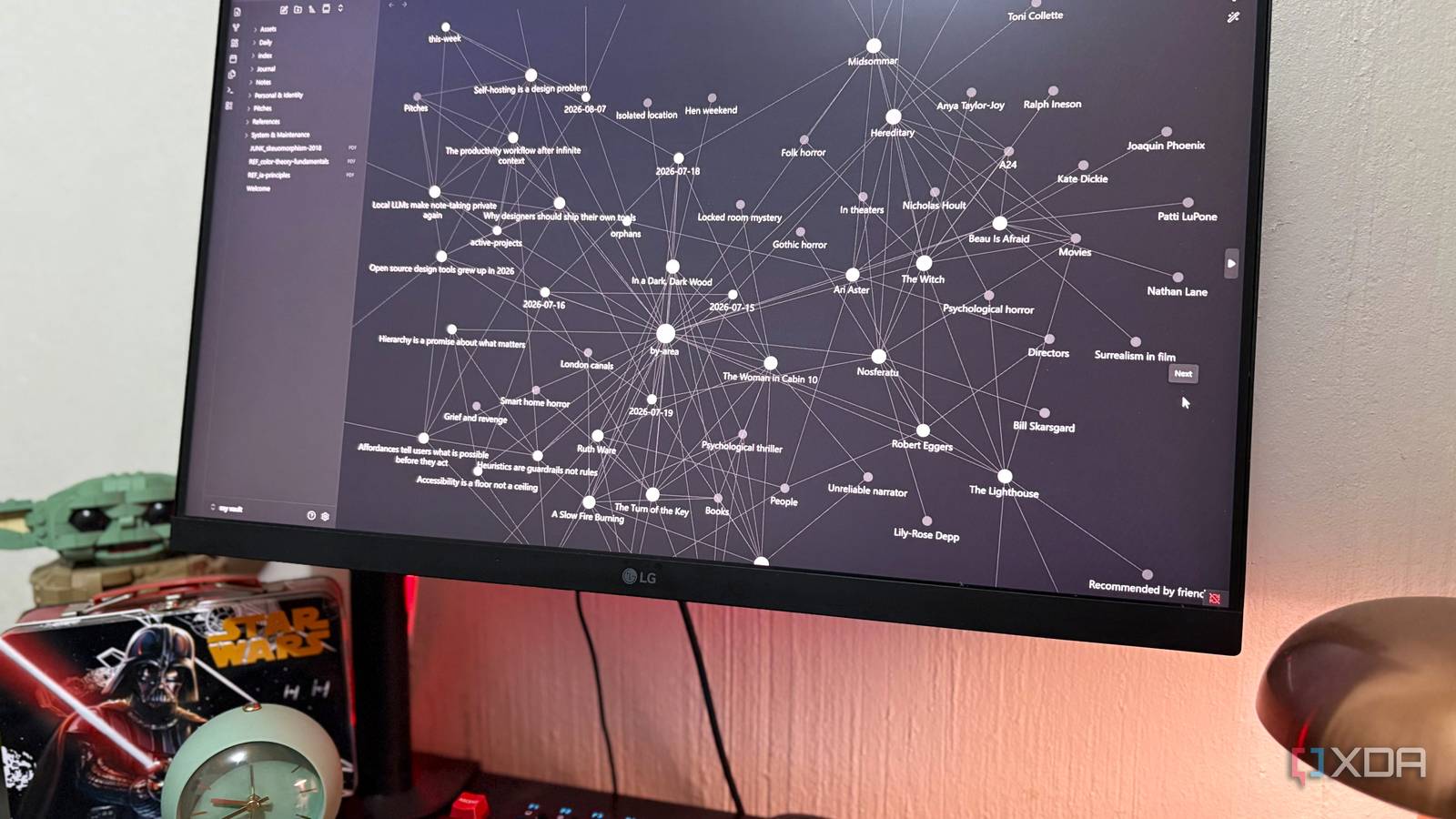
Published Aug 13, 2026, 5:30 PM EDT Nolen began their writing career in 2019, with three years dedicated to editing the Creative section at MakeUseOf. Their expertise lies at the crossroads of technology and creativity, covering areas like photography, video editing, and graphic design. Outside of work, you'll often find Nolen diving into a good book, writing their own stories, or playing video games. It's no secret that Obsidian vaults can get pretty messy, and I'm especially prone to that. This is amplified even more by the fact that I have three separate vaults. And with every new one, I tell myself this is going to be the one I stay on top of, but somehow just end up in the same place. My attempts at trying to keep things organized show up with the little folders scattered here and there, but I just end up with a long list of unfiled notes at the root. Plugins like Bases and Dataview can build dashboards on top of the mess to help you file through things better. But they need query syntax and quite a bit of manual upkeep. So, I decided to make my own dashboard by putting Claude Code in the vault and letting it go to work. All it took was a couple of setup prompts and now I have my own project manager inside Obsidian, without any plugins. Setting up the one folder that runs the whole vault A control center of plain markdown The first thing I did was point Claude at this vault and tell it to crawl the vault and report back before doing anything. This is important because you need to give the agent enough context so it knows what it's working with and can make informed decisions. In my case, it came back with a full map, legacy prefix files at the root, folder-based stuff I've added later on, an empty folder, and a note detailing that two organizational eras hadn't been reconciled. Then it came time for the folder. If you want to set up something similar, you can call it whatever you want - I called mine /index/. I won't go into the exact prompt I used because it's pretty long and is only really applicable to my vault and workflow, but I basically told Claude to make a SKILL.md with some basic reading and writing instructions, the config that holds my rules, and five dashboards, namely active-projects, stalled, this-week, by-area, and orphans. Again, specific to my case, because I told it to populate those dashboards based on what's actually in my vault, so create the files that apply to your workflow. Now, I have a bunch of dashboards that are just markdown files with no plugin dependence; active-projects, for example, is literally just a note with a table in it, listing every file with an active status, columns for last-touched and current-stage, and wikilinks pointing at actual notes. Claude also flagged several assumptions it had made while setting this up, such as the stall threshold at 14 days, so I had to ask it to change it to 30 days because 14 was just a little too aggressive, I need larger windows to make the dashboard less noisy. I don't have to babysit my new dashboard What actually happens when I work inside it Most of the value of this comes from adding new stuff throughout the week. Once I've got some new notes and content in Obsidian, which of course automatically lands in my vault, I'll prompt Claude "regenerate the dashboard" and Claude re-scans everything, catches what changed, and returns a diff of which files it amended. On one of the regenerations, it actually caught a filename collision that Obsidian created that I wasn't aware of - it auto-appended a "1" to a note during the save conflict, which would have broken every wikilink pointing to the original. Another issue it caught was the way I typed my dates - I typed "18/08/2026" and it asked whether I meant 18 August or 8 June, which could have had the dashboard wrong for months to come if it didn't ask. There's also the interactive aspect. Yes, Obsidian has the Copilot plugin, but the thing is, I'm already paying for Claude, so I'm getting paid-tier AI in my notes by pointing it directly at the vault instead. It's really that simple. So when I want actual analysis and not just a link, I ask questions like "what's stalled and why". Claude gives me a table of stalled files, specific reasons for each one, and a pattern it notices in all of them. Simple, but super useful. Adding a frontmatter field like "deadline: 18/08/2026" to a note means it automatically shows up in the "this-week" .md on the next regenerate. And this also means no manual maintenance. The config.md is also a readable rulebook I can actually argue with. So if a dashboard is showing the wrong things, I can edit the config, prompt a regenerate, and the rules automatically update. Making this agentic instead of tweaking it manually multiple times a week makes the initial setup worth it. How this changes the Obsidian workflow itself The dashboards are just markdown, after all Because my dashboards are just plain markdown, they render whenever Obsidian renders, so they'll show up the same in pinned tabs, split panes, the sidebar, on mobile (if you have sync turned on), the graph view, and so on. There's nothing platform-specific about it, or even plugin-specific, which is exactly the point. The wikilinks in the dashboards turn what would be a static list into a realistic jumping-off point inside the Obsidian app itself, just like any other note with links. So clicking a file in my stalled.md dashboard will open the actual note in a new tab or side pane. This means my dashboards are navigational instead of just data hubs. Graph view is pretty cool, it's where the whole thing becomes visible. My /index/ folder sit at the center and is connected to everything, which is proof that this folder is the hub that the vault now runs through every single time I edit or create something in the app. And because SKILL.md and config.md are readable files instead of proprietary plugin settings, the system documents itself. I could hand this vault to anyone, they'd figure out how it works just by opening these two files, and can easily swap out my information for theirs. No need to sync plugins or learn query syntax. A quick setup with a huge payoff I think it ended up being less about replacing plugins and more about the vault having something that reads it back to me. Bases can technically do a lot of what the dashboards do, but they don't have the context of what's actually going on and don't make your notes interactive. Obsidian OS Windows, macOS, Linux, iOS, iPadOS, Android Individual pricing Free normally; $4/month for Obsidian Sync
I turned Obsidian into a full project manager by adding one folder to my vault
Full Article
Original Source
Read the full article at Xda-developers →KhanList aggregates and links to publicly available news content. We do not host full articles from third-party sources. Always verify important information with original sources.