
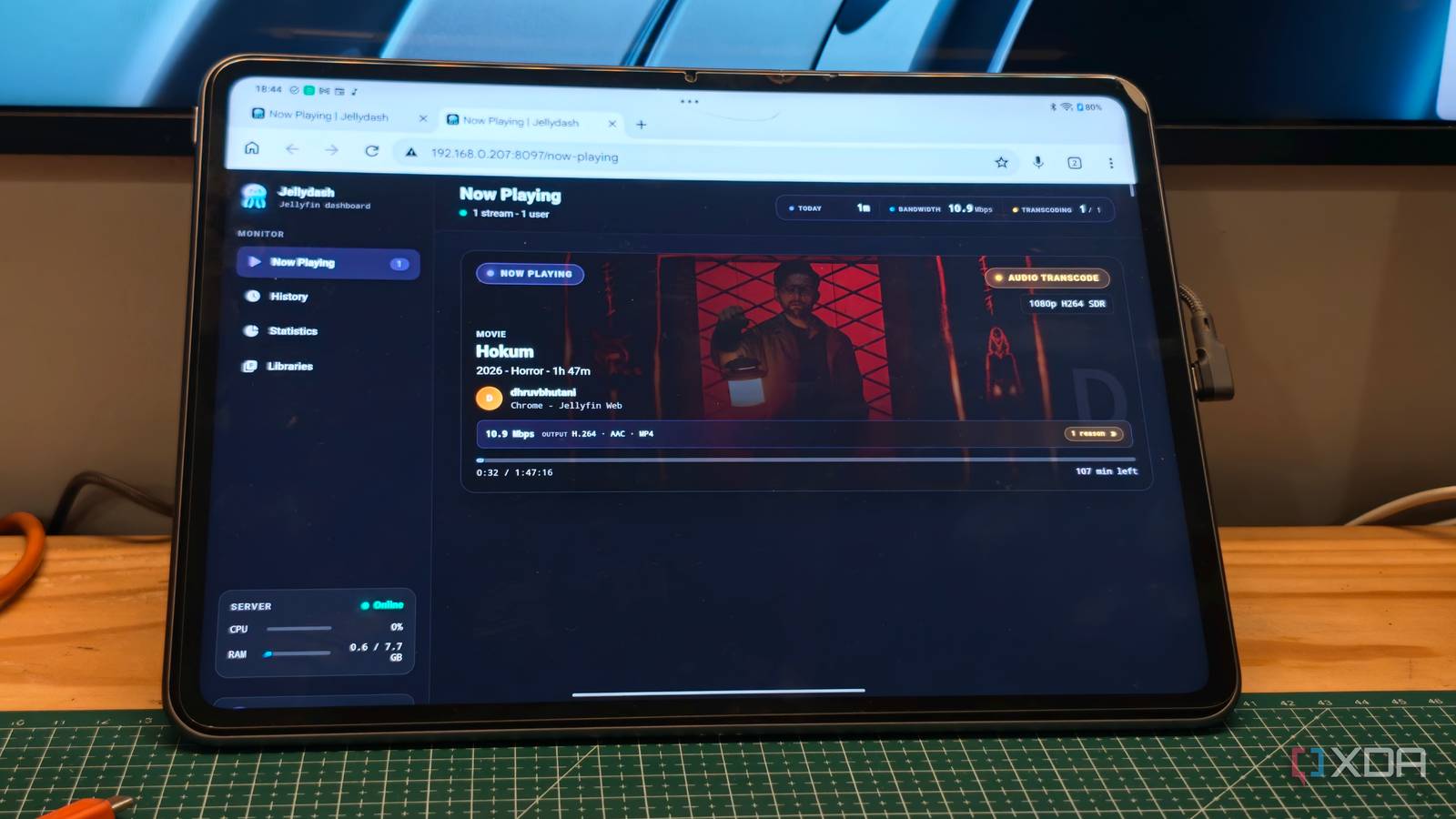
Published Aug 29, 2026, 1:00 PM EDT Dhruv Bhutani has been writing about consumer technology since 2008, offering deep insights into the personal technology landscape through features and opinion pieces. He writes for XDA-Developers, where he focuses on topics like productivity, networking, self-hosting, and more. Over the years, his work has also appeared in leading publications such as Android Police, Android Authority, CNET, PCMag, and more. Outside of his professional work, Dhruv is an avid fan of horror media spanning films and literature, enjoys fitness activities, collects vinyl records, and plays the guitar. Running a Jellyfin powered media server means that often enough I have to keep an eye on what the server is doing. Since my NAS doubles as my home server, if something grinds to a halt, diagnosing the issue is essential. Is someone watching something? Is a file being transcoded unnecessarily? The fact is that I end up opening Jellyfin's admin panel more than I would expect. There has to be a better way. Turns out, I'm not the only one facing the issue. While looking for a solution, I came across an open-source app called Jellydash that lets me turn my old Android tablet into a permanent Jellyfin monitor. The app gives me a dedicated screen for live playback, history, and server usage, so I can keep tabs on what's happening on my server in real time. It's effectively PlexDash, but for your Jellyfin server, and I love it. The Now Playing screen gives me everything I need at a glance See active streams and playback details without opening Jellyfin The most useful part of Jellydash for me is the Now Playing screen, of course. You can save the app as a PWA or bookmark, and at a glance it shows everything you need to know about what's happening on your Jellyfin server. I use it on my Android tablet to see what someone is watching, and how the stream is being delivered. For every active stream on my server, Jellydash displays the current user, poster artwork, playback progress, the quality that the media is being streamed in, and the playback method. That in itself is useful information. But beyond that, Jellydash gives me specific information on whether the media is being played directly, remixed, or transcoded. That's essential information when the goal is to figure out why a particular stream might be buffering. A single glance at the dashboard can tell me exactly what's happening. But that's not my only use case. I have quite a few people tapped into my server, and I prefer having an overview of what my server is up to. So, I keep the dashboard open on an Android tablet kept near my workstation. I don't have to actively open anything. The moment someone starts streaming, it just pops up on the dashboard. Most days, I don't even have to interact with it. Jellyseerr integration and notifications add another layer of utility Credit: Let's assume that your system is robust enough that you never really need to diagnose issues. Jellydash still has some interesting features that would be of use to you. Chief among those is the history view. It lets me get an overview of what people have been watching. I can even filter by user. Look, I'm not trying to spy on the users on my server. Knowing whether everyone has already watched a piece of content or hasn't watched it at all helps me make a more informed decision when I'm clearing out the server to make more space. The statistics page takes things further. It shows me watch times, users, devices, clients, codecs, and more. I'm pretty open to giving friends access to my Jellyfin server. However, if a month in I don't see the user streaming much or at all, I tend to remove them. Jellydash's statistics page makes it easy to track those details. It's not a serious analytics tool, but it gives you enough information to handle daily server maintenance. I also like that Jellydash gives me a nicely designed space to keep an eye on what's happening, all without opening the Jellyfin webpage on my computer. Elsewhere, Jellydash even taps into Jellyseerr. I don't really use that feature all that much since my server is mostly built around my Blu-ray and DVD collection; however, having one-stop access to recent media requests and the current status can be pretty nifty if that's your use case. Since Jellydash supports notifications via Telegram, Discord webhooks, and more, you can even choose to be notified any time someone requests a new movie or starts watching something. Together, the app makes the perfect second screen for managing your entire Jellyfin media stack from one spot. Set-and-forget dashboard for all your Jellyfin needs The best part of running Jellyfin and Jellydash is that it's largely set-and-forget. When I'm at my work desk, I'll usually pop open my Android tablet and tap a button to launch the Jellydash webpage. Immediately, it gives me a live status of my server setup. There's no action needed. Anytime something streams, it shows up right there, complete with any and all information I might need. Everything else is optional, and the interface reflects that. Other than a small pop-up showing recently added movies, the dashboard stays largely clutter-free until something starts playing. It's not essential, but it's certainly made managing and keeping an eye on the Jellyfin server much easier than it used to be. Jellydash Jellydash is a monitoring dashboard for Jellyfin servers that can be installed as a PWA on tablets.
I turned an old Android tablet into a Jellyfin monitoring dashboard, and now I barely touch my server
Full Article
Original Source
Read the full article at Xda-developers →KhanList aggregates and links to publicly available news content. We do not host full articles from third-party sources. Always verify important information with original sources.