
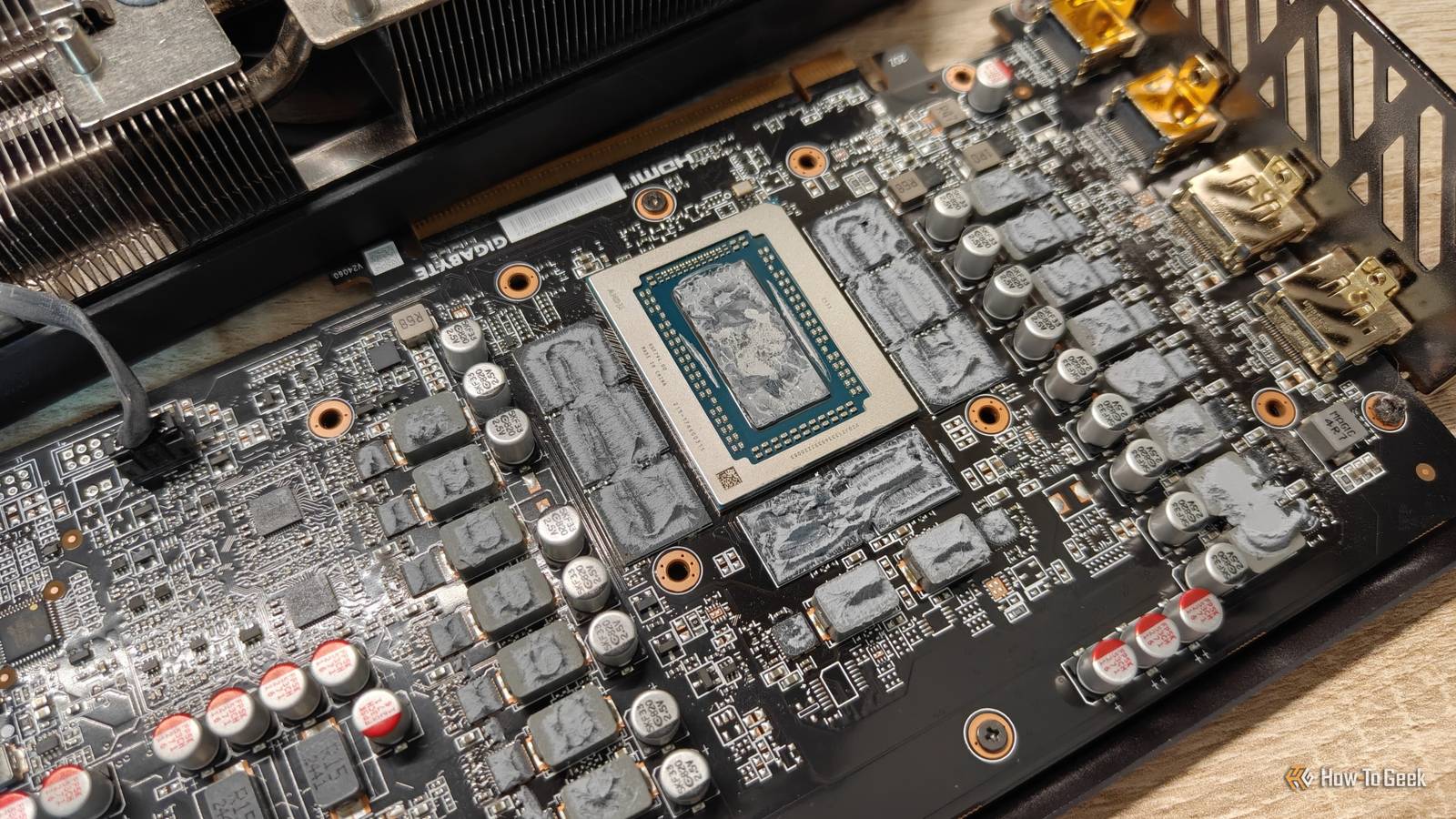
Published Sep 24, 2026, 7:30 AM EDT Ismar is a Senior Author at How-To Geek. He previously worked as a writer, editor, and general manager at a content agency before joining the team in 2023. He began his writing career in 2021 after completing a BA in English Language and Literature. Beyond How-To Geek, Ismar has contributed to Red Stag Fulfillment and Authority Hacker. He has also worked on various SEO projects to help clients improve their search visibility. Ismar has been around Windows PCs since the age of three, so friends and family naturally chose him as the resident tech support. His projects often involve tinkering, such as disassembling mechanical keyboards and gaming mice to mod his beloved gear. He also enjoys pushing hardware to the max through overclocking while staying on a reasonable budget. An avid gamer, Ismar has logged thousands of hours across various genres, including first-person shooters, RPGs, racing games, and roguelites. When he is not at his desk, he is probably exploring other people’s phones to discover their quirks and features or experimenting with the latest AI tools. In his free time, Ismar enjoys spending time with his wife, working out at the gym, playing guitar and bass, cooking gourmet meals, and traveling. Above all else, he’s a proud cat owner. I bought a Gigabyte RX 9070 XT Gaming OC on the last day of December last year, and the card developed a high hotspot temperature after just a few weeks of use. The GPU hotspot regularly reached around 100°C while gaming, ramping the fans up to their maximum. I wasn't too happy about it, but I didn't want to go through the hassle of returning the card or fixing a "new" card on day one. I did some research online and learned that my specific Gigabyte model used traditional thermal paste, which isn't ideal for a powerful GPU that generates a ton of heat. After eight months of putting up with it, I finally decided to open up and fix the card, and the problem was exactly what I expected. GPU hotspots are more important than you might think The GPU core temperature doesn't paint the whole picture A graphics card can get pretty toasty during gaming. This is completely normal, as a card can draw hundreds of watts of electricity, which ultimately converts into heat inside the card. However, there's a big difference between normal operating temperatures and the issue that I was facing. To understand what I mean, allow me to give you a quick explainer on GPU hotspots. The GPU die on a graphics card is the processor that does all the calculations required to render graphics. Unlike a typical desktop CPU, it doesn't have an integrated heat spreader, which is the metal piece that sits on top and, well, spreads heat. Instead, it's just a highly polished piece of ultra-pure silicon. It's a different material than the cooler's contact plate, which is usually made of copper, nickel, or some other highly conductive alloy. Whatever metal it is, it expands and contracts at a different rate than the silicon as their temperatures change. When conventional thermal paste is used to transfer heat from the GPU die to the cooler, these microscopic movements can cause the paste to squeeze out, stretch, and shear. Over time, the paste can migrate away from parts of the GPU die, including the areas around the hottest measured point, which is known as the GPU hotspot. This phenomenon is known as thermal pump-out — and it's exactly what was happening to my graphics card. I opened my GPU and found exactly what I suspected The teardown begins A hot-running graphics card is one thing, but the real problem is when the GPU core and hotspot have a huge gap, which we refer to as the hotspot-to-core delta. If the hotspot-to-core delta is consistently around 30°C or higher (the exact value varies from GPU to GPU), it's a strong reason to investigate the thermal interface for pump-out. While I love taking stuff apart, you don't actually have to tear apart your graphics card to check if it's suffering from pump-out. Download a GPU stress test like OCCT and monitor your GPU core and hotspot temperatures. My tests showed a whopping 50°C temperature delta with the stock thermal paste! In fact, I saw the GPU hotspot peak at over 110°C while gaming with a mild overclock, but since the graphics card's fans were always running at maximum speed, the rest of the GPU core and the memory chips stayed fairly cool. So, I decided to take apart my still-under-warranty graphics card, which only took a few minutes. I removed all the visible screws on the back and gently pried the cooler away, being careful not to pull too hard and end up tearing a piece of the card away with it. I immediately shone a flashlight on the bare GPU die and discovered exactly what I suspected: the center of the GPU die was as dry as a bone. Instead of looking wet, the paste had a flaky, waxy texture, which is what you might see on a CPU or laptop that's a decade old. New paste fixed the temperatures, but not my concerns The hotspot dropped immediately I didn't want to go through a painful return process, have no card for a few weeks, and then just replace it with another card that's going to suffer from the same issue. I took the card apart with the intention of fixing the issue, at least temporarily until the paste dries out. Luckily for me, I picked up the amazing new Arctic MX-7 thermal paste earlier this year, which is actually formulated to resist thermal pump-out. Because of that, it's currently my favorite thermal paste, and I recommend it to everyone, especially because of its affordable price point. After thoroughly cleaning my GPU die and heatsink with rubbing alcohol and cotton swabs, I applied a generous amount of paste to the center of the die and re-mounted the heatsink, being careful not to disturb the thermal putty on the VRMs and VRAM. I did a 10-minute OCCT run and immediately saw a drastic drop in hotspot temperature, accompanied by much quieter fans. The maximum temperature delta between the core and hotspot was now just 27°C, with the average being a couple of degrees lower. The memory and GPU core itself ran a few degrees warmer than before, but this was simply because the fans weren't immediately maxing out according to the fan curve. Needless to say, my project was a massive success. Phase-change pads are the best solution for GPUs The safest long-term bet Although the Arctic MX-7 and some other thermal pastes can resist pump-out, there's actually a better solution for direct-die cooling: phase-change pads. Pads like the Honeywell PTM7950 (which is what I picked up) and Thermal Grizzly PhaseSheet use a special phase-change thermal interface material that's solid at room temperature but softens as it warms up, allowing it to fill microscopic imperfections for good thermal contact. Even when softened, it retains high viscosity and cohesion, which makes it exceptionally resistant to being squeezed out and suffering from pump-out. Phase-change pads work well for direct-die cooling, which is why many graphics card brands have switched to them for GPU dies. I was just unlucky enough to buy one of the few AMD RX 9070 XT variants that don't use one. Since I wanted my fix to be permanent, I decided to take apart the graphics card again and replace my fresh thermal paste with this phase-change pad. I also wanted to change the thermal putty while I was at it. I replaced my fresh paste with a phase-change pad to prevent pump-out Not taking any chances I picked up a 30mm×30mm sheet of Honeywell PTM7950 off AliExpress for just a few bucks, and I also got some CX H1300 thermal putty while I was at it, just to be safe and replace the potentially contaminated thermal putty (which turned out not to have been necessary). So, I cleaned up my graphics card and heatsink as best I could by scraping off the original thermal putty and gently cleaning everything with cotton swabs and rubbing alcohol. Before installing the Honeywell PTM7950, I popped it in the freezer for 15 minutes, as suggested on forums, to make it easier to cut to size and handle. When I was done cleaning and applying my new thermal putty, I took the phase-change pad out of the freezer, cut it to shape while allowing some overhang (it's not electrically conductive, so it doesn't matter if it overflows), peeled off the protective plastic, and gently centered it on the die. I re-mounted the heatsink, reinstalled my card, and gave the Honeywell PTM7950 a few heating-cooling cycles over a few days of gaming and testing before measuring the final temperatures. This allows the phase-change pad to fully settle in and fill any potential air gaps. Unlike thermal paste that can dry out over time, phase-change pads can also settle in slightly with repeated heating and cooling. These were the temperatures I measured using Honeywell PTM7950 and my new thermal putty on the VRMs and VRAM. As you can see, it's within the margin of error compared to fresh thermal paste. This is pretty much what I was expecting, as the real benefit of phase-change pads is their longevity, not better performance. If I wanted maximum performance, I'd have to switch to liquid metal, and that's a risk I'm just not willing to take with a card I spent my hard-earned cash on. Phase-change pads are the best DIY solution for enthusiasts Phase-change thermal pads are pretty cool (pun intended). They're also fairly affordable. You can pick up a 40×80mm Honeywell PTM7950 pad for around $17 on Amazon, and it's enough to cover several dies. My 30×30mm pad only set me back around $5, and it was enough for my graphics card, mini PC, and laptop. While phase-change pads don't necessarily perform as well as thermal pastes, especially on a CPU with an IHS, their durability is next-level, and you can definitely use one with your CPU if you want zero maintenance.
I took apart my 8-month-old $750 GPU to fix a factory defect no one talks about
Full Article
Original Source
Read the full article at Howtogeek →KhanList aggregates and links to publicly available news content. We do not host full articles from third-party sources. Always verify important information with original sources.