
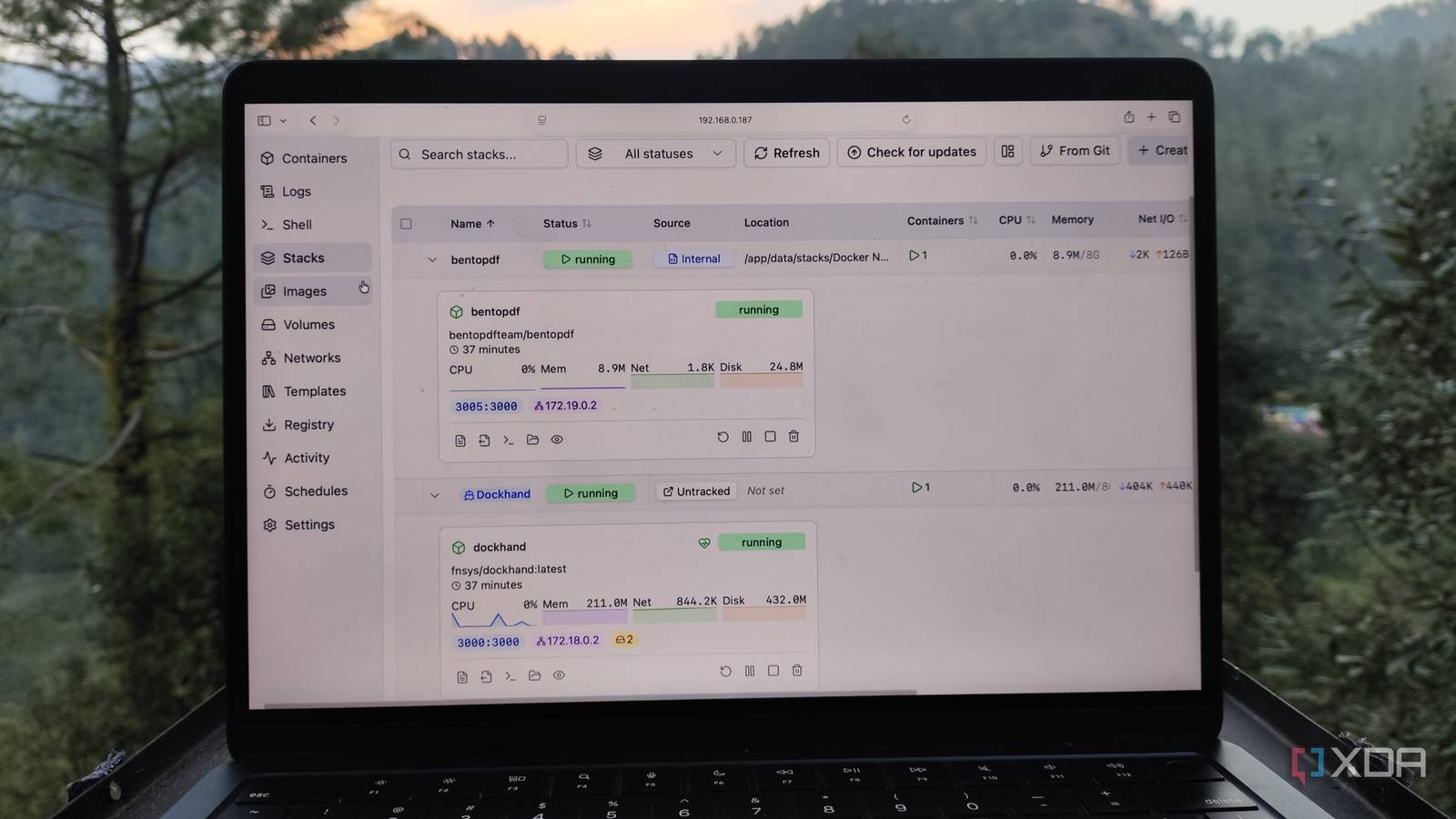
Published Oct 10, 2026, 12:30 PM EDT Ayush Pande is a PC hardware and gaming writer. When he's not working on a new article, you can find him with his head stuck inside a PC or tinkering with a server operating system. Besides computing, his interests include spending hours in long RPGs, yelling at his friends in co-op games, and practicing guitar. As much as I believe it’s good to familiarize yourself with Docker commands as a beginner, menu-based web UIs are simply better for controlling containers when you’ve got dozens of FOSS environments scattered across a bunch of workstations. With most folks recommending Portainer as the management UI for Docker, it’s what I went with during my early self-hosting days, and it worked well for a long time. But as I started tinkering with advanced tools, Portainer’s interface started to feel rather clunky, and I decided to move on to greener pastures for my Docker projects. That said, I still considered it a rock-solid web interface and wouldn’t hesitate to recommend it to beginners. Sadly, Portainer decided to go Kubernetes-first for its upcoming 3.0 release, and with rival platforms becoming significantly more intuitive for consumer-tier home labs, Portainer just isn’t worth using for Docker-only setups. Portainer 3.0’s Kubernetes-first approach isn’t ideal for my home lab K8s is neat, but I stick to simple Docker environments One of my biggest reasons for loving Portainer was its support for different container runtimes and orchestration platforms, as I could use Podman, Kubernetes, and other tools to deploy my FOSS apps instead of just sticking to Docker. However, I continue to use Docker for certain tools and services, and Portainer 3.0’s update plans just don’t jibe well with me. After all, Portainer 3.0 will move its codebase to K8s instead of sticking to Docker, while the current 2.45 LTS release would remain the last version focusing on its older Docker-heavy stack. Now, I’ll admit that Kubernetes is a fantastic orchestration platform if you’re into clusters with auto-scaling, self-healing, and load-balancing features. In fact, I used to keep a mixed Raspberry Pi SBC cluster specifically so I could mess around with Kubernetes via Portainer’s web UI. But it’s not quite something I’d prefer to use with my essential services, as I’d rather not spend hours trying to troubleshoot failed K8s environments. Sure, I could still use Portainer 2.45 LTS for my Docker setup, but the fact that it won’t receive any new features from the 3.0 release leaves a bad taste in my mouth. And even if I do switch to Portainer 3.0 from 2.45 CE, many of the upcoming features would be restricted to Kubernetes, anyway. Speaking of Portainer CE… Credit where it’s due, you can use Portainer 3.0 for free on up to three nodes Another point of contention with Portainer’s upcoming release for the home lab community is the fact that the 3.0 release won’t be available for the Community Edition. But to be fair, it’s still possible to access Portainer 3.0 without paying a dime. You see, Portainer lets you enroll for a free license for up to three instances, and since this plan isn’t going away with the 3.0 release, you don’t necessarily have to pay thousands of bucks just to get the new update. While I do appreciate Portainer letting home labbers access the 3.0 release, switching to a free license isn’t really possible for my setup. After all, I’ve got Docker nodes on a bunch of VMs and bare-metal systems, and I often install it and run some container benchmarks on new hardware. So, I’d either have to constantly migrate the license to make up for the 3-node cap, or spend a lot of money on a premium plan. Dockhand is by far my favorite Portainer alternative It has every tool I could ever want, and then some I’ve worked with my fair share of Portainer alternatives, but Dockhand impressed me right from the get-go. All the essential container management tools, including logs, shell, storage volumes, and network settings, are available directly on the side panel, so I don’t need to go through a cascade of menus just to troubleshoot a container or two. Dockhand also has a series of templates for common Docker tools, and spinning up new environments from Compose files is a piece of cake thanks to its Stack tab. Plus, I also adore how neatly Dockhand organizes my FOSS apps, their metrics, and common management actions within the Containers tab. Unlike Portainer’s free license, I don’t have to worry about going over the 3-node limit while pairing my new Docker instances with Dockhand. Dockhand can even scan my images for new releases, and I can give it the A-OK to spin up new containers with the freshly-pulled images. I often grab container images forked by third-party devs when the official image doesn’t work on certain experimental systems, and Dockhand’s vulnerability analysis tools are a welcome addition for these projects. Combine that with Dockhand’s automated schedules and support for external notifications, and you can see why I recommend it over Portainer. Still, it’s not the only Portainer alternative out there If Dockhand doesn’t suit your fancy, there are plenty of other management UIs that can provide the same QoL features for your Docker workstation. Komodo is a fine Portainer alternative, and it’s actually easier to use for Compose deployments than Dockhand. Arcane and Dockge also have their perks, and you can always look into UmbrelOS or ZimaOS if you want a full-on OS for your containerization experiments. Dockhand
I stopped recommending Portainer as a Docker UI after its recent update policy, and moved to this simple tool instead
Full Article
Original Source
Read the full article at Xda-developers →KhanList aggregates and links to publicly available news content. We do not host full articles from third-party sources. Always verify important information with original sources.