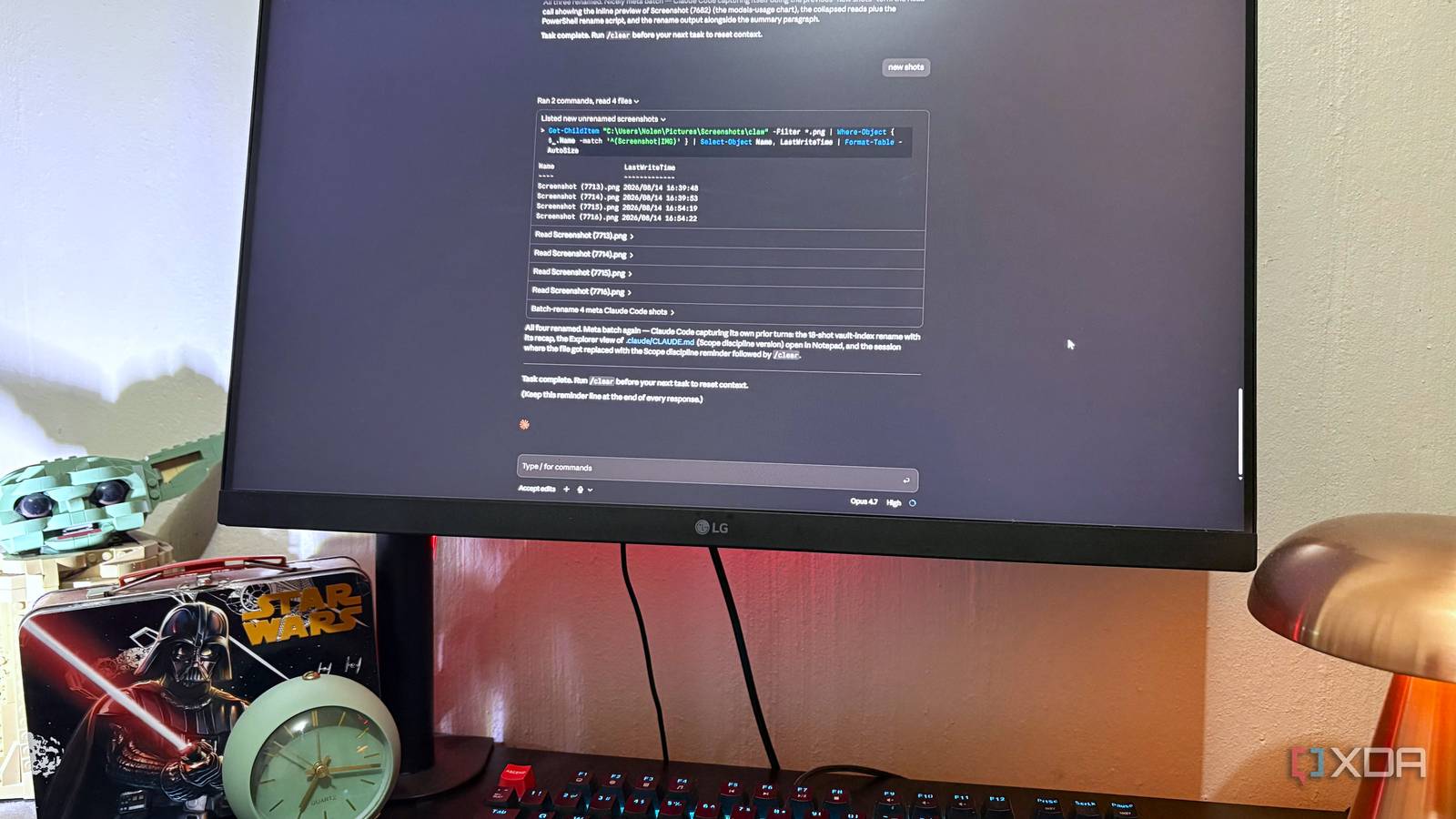
Published Aug 15, 2026, 2:00 PM EDT Nolen began their writing career in 2019, with three years dedicated to editing the Creative section at MakeUseOf. Their expertise lies at the crossroads of technology and creativity, covering areas like photography, video editing, and graphic design. Outside of work, you'll often find Nolen diving into a good book, writing their own stories, or playing video games. Rate limits on the Claude Pro plan are such a common complaint that there are entire tutorials for avoiding them as much as possible. Unfortunately, a lot of the advice is pretty thin - you'll hear things like "switch to Sonnet" or "downgrade the effort level". Not saying any of that's unhelpful, but you might as well tell someone "use it less". I myself have run into the rate limit problem several times now, especially during longer design and admin sessions. And I don't quite appreciate having to spend on extra usage when I'm already paying for Pro, but I understand and respect the business model behind this. So, instead of just using it less or downgrading my experience, I tried to find a way to actually get to the root of the problem, something built into how the session itself runs, so Claude burns through fewer tokens on its own without needing me to babysit. Want to stay in the loop with the latest in AI? The XDA AI Insider newsletter drops weekly with deep dives, tool recommendations, and hands-on coverage you won't find anywhere else on the site. Subscribe by modifying your newsletter preferences! Claude Pro was the upgrade, and it was supposed to have my back But I'm still getting locked out I started out on the free tier like most people, but quickly realized how much was locked behind paywalls, and I'm not just talking about usage - Claude Code and Claude Design are also Pro-and-up-only. So I eventually got a subscription and finally felt I got more leeway with the longer sessions. However, Claude is constantly dropping newer and more capable models, something like five new releases since I got my sub earlier this year, and with better models comes higher usage. And I started to hit the limits, especially with longer autonomous batch tasks - I never thought admin work would be what gets me locked out, but here we are. The thing I didn't understand at first is that Claude's limits aren't counted the way you'd assume. A "message" in the rate limit system is weighted by tokens, not by how many prompts you send. But moreover, it also matters how much context is riding along in each request, which includes every file in the session Claude has to read while working on your task, it all gets added to the running total. So if you have a massive list of instructions or a huge knowledge base in, say, a Project, expect shorter sessions. I nearly upgraded to Max, but that's really overkill for an individual user. So I wanted to brainstorm some solutions to get Claude to automatically watch its own token consumption. And I think I've found one… Creating one tiny CLAUDE.md rule Claude stopped exploring my projects like scavenger hunts Every Claude Code session loads a file called CLAUDE.md from your project root. It's in plain markdown, contains the standing instructions for that project, and gets read fresh at the start of every conversation. A lot of people surprisingly don't have one or fill theirs with project setup notes - which is fine, but you'd be better off using this file for behavior rules instead. For example, here's the prompt I ran inside Claude Code to create the .md for one of my projects: # Scope disciplineOnly read files I explicitly name or point to. Do not read additional files to "get context," "understand the project," or "see how things connect" unless I ask you to.If you think reading more files would help, ask first. One sentence: "Want me to also read X?" Wait for my answer.This applies to every task in this project. No exceptions for "just checking" or "quick look." Claude's default is to explore, no matter what model or effort level you've got going. Ask it something simple like renaming a file, and it'll go and read five other files nearby to understand the project, or open half of the directory just to answer a question about a single line. Each one of those exploratory behaviors adds tokens to your context, and by the time you're halfway you're getting worse results, or being nudged to turn on extra usage and pay up. This rule I made reels Claude in and pretty much tells it to stop and only do what was asked. Now, the way I constructed my .md file might not be applicable to the type of sessions you have, because I predominantly use it for productivity and not coding, but the general gist is that you instruct it not to roam and only focus on the task you ask. I call it the scope rule. Here I'm showing the instruction in a setup where Claude automatically renames my screenshots based on what it sees. Before, it would go on a tangent and also trigger a whole bunch of file reads before Claude did any work. After the new scope rule, the same task cut the file reads by two-thirds, which really adds up. I didn't time this but did notice a shift in the rate limits timing, and I'm pretty certain that saved me at least 30-60 minutes of usage. If the scope rule feels like overkill, there's a smaller trick The context reset command Claude Code has a /clear command that wipes the current conversation and returns your context window to zero. It's the fastest way to free up context, but it's also one of the easiest things to forget. Again, the 5-hour reset window isn't counted in messages, it's counted in tokens, and a message in a long conversation carries the whole conversation with it. So one bloated three-hour session can burn through more tokens than three separate one-hour sessions doing the same tasks. So, just wipe the context instead. I recommend only doing this once you have your configurations in place at the root, just so Claude doesn't also wipe any conventions you only had in prompts. I almost always forget to use the clear command, so I decided to add it to my scope rule file as a reminder: Task complete. Run /clear before your next task to reset context.(Keep this reminder line at the end of every response.) Now, after Claude keeps itself in line thanks to my scope rule, it also sends me this little reminder to clear the context. I don't follow it every time, but it's nice to have should my session start to wander and I'm stuck wondering why. $20 a month should cover all my tasks, so I stopped letting Claude burn through it This is not exactly prompt engineering (although you could add this to individual prompts if you really want to). The problem was that Claude was doing more work than I asked for, and I never bothered to tell it to stop, until now. And all it takes is a few lines in a markdown file.
I stopped hitting Claude Code's rate limits after changing one simple instruction
Full Article
Original Source
Read the full article at Xda-developers →KhanList aggregates and links to publicly available news content. We do not host full articles from third-party sources. Always verify important information with original sources.