
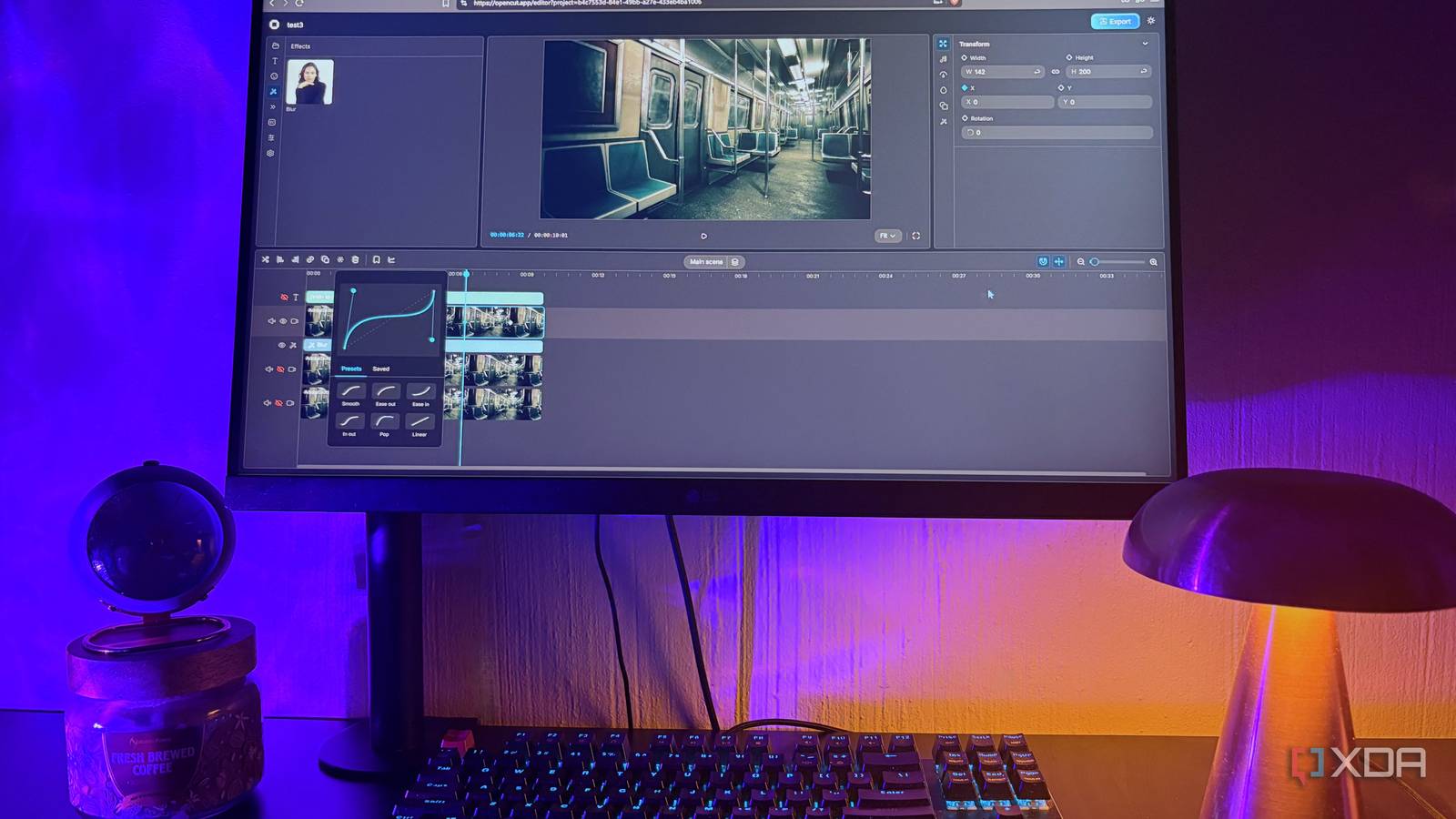
Published Sep 24, 2026, 5:30 PM EDT Nolen began their writing career in 2019, with three years dedicated to editing the Creative section at MakeUseOf. Their expertise lies at the crossroads of technology and creativity, covering areas like photography, video editing, and graphic design. Outside of work, you'll often find Nolen diving into a good book, writing their own stories, or playing video games. Free video editors almost always come with some sort of catch. The most annoying one is probably a watermark stamped on the export because you often only find out after doing the edit. CapCut used to be the easy answer for quick edits, but more of its basics are now paywalled. Premiere Pro is the opposite of that - it's a fantastic editor but paying Adobe every month to stitch clips together is a waste of subscription. An open-source editor that runs entirely in a browser tab caught my attention lately, called OpenCut. So I spent a session editing some clips in it. Here's why this editor is worth considering if CapCut has become too restrictive for you or if Premiere is a little overboard… What is OpenCut? There's a browser version and a GitHub rewrite OpenCut is a free video editor, and its GitHub page is pretty upfront about its philosophy since it's tagged as the open-source CapCut alternative. Its pitch is a bit of a dig at CapCut paywalling its basic features, though it also emphasizes privacy, with the promise that your content stays on your device. It's sitting at over 80k stars on GitHub at the time of writing, which is quite a lot for a project still in beta. The fact that it's primarily browser-based is one of the reasons I was drawn to it, so it wasn't yet another bulky piece of software to install. Browsers can do a lot more than in terms of editing tools than they get credit for. OpenCut exports through WebCodecs, the browser's own built-in video encoding, and the April update swapped the old WebGL renderer for a Rust compositor compiled to WebAssembly, so the rendering is fast compiled code running on your GPU. Browser-based usually means your footage gets uploaded somewhere, but OpenCut never uploads your video or audio, and even auto captions run on-device, with no account involved at all. So their promise on privacy does seem to hold up. Here's the part where it can get a little confusing though: opencut.app runs the classic version, labeled early beta, and the team says that's the one to reach for today. The GitHub repo is a ground-up rewrite now, with plugins and an MCP server on the roadmap, which you can't use yet. The classic code was archived back in May, and self-hosting it means Bun, Docker, and environment files, which is a lot of setup for an editor you can just open in your browser, to be honest. So I recommend just going to the browser version for now. What editing in OpenCut actually looks like It's more than a quick trimming tool Getting media in the editor is just drag and drop, though you can paste images and clips straight from your clipboard too, which I find pretty handy when I use screenshots in a tutorial video. Projects also save locally in the browser as you work. The timeline has a lot of structure. Everything hangs off one main video track, and the other tracks are organized around it so you can't accidentally drop audio where a clip should go. It also has ripple editing, as well as bookmarks that can hold notes and color labels, which is nice for roughing out scenes before you've cut them. The nerdy little detail I actually like is how it counts time, in integer ticks at 120,000 per second. That number divides evenly into standard frame rates, including awkward ones like 23.976 and 29.97, so cuts land on the frame instead of drifting over a long edit. Canvas size is whatever width and height you type in, and you can put a blurred background behind vertical clips on a wide frame (the one CapCut trick everyone seems to use). When it comes to animation, it's pretty impressive for a browser tab. There's a graph editor for keyframe curves with bezier handles you drag to shape the easing, plus X and Y position animate separately, which I'd honestly associate more with After Effects than with a website. Masks come in preset shapes with feather and stroke controls on all of them. The Effects are a little thin, so I mainly rely on Blur for now. The text controls are also quite plentiful. You get over 1,000 fonts and number fields that take math and click-drag scrubbing. Captions can be auto-transcribed or pulled in from a transcript file you already have. On the audio side, there's volume and speed control, the speed one with a maintain pitch option so voices don't chipmunk, and the waveforms are RMS-based now which means it matches how the human ear actually perceives loudness - this is actually pretty advanced for a browser editor given most comprehensive editors don't even have it at all. Export gives you MP4 or WebM with an audio toggle, across four quality presets, and there's no watermark. You can also grab a single frame as a PNG for thumbnails. The trade-off for editing in a browser tab Where OpenCut still feels like a beta I would say that transitions are probably the biggest thing missing. There aren't any yet, and the effects are still just blur. The rewrite roadmap does list transitions and filters as being on the way, along with element grouping and a much bigger effects library, but because the classic code is archived, those will likely arrive with the rewrite rather than as updates in the version I'm currently using. As much as I love the convenience of browser-based tools, the trade-off is where your projects live. They're stored in the browser's IndexedDB, so clearing site data or running low on storage can affect recovery, and they won't follow you to another device. A Premiere project is a file on a drive I can back up and move around. The CapCut alternative that keeps your footage on your machine What I keep coming back to is how little OpenCut asks of you before you're actually cutting something. It's such an easy reach for quick edits as well as a little more advanced animations. Plugins and a bigger effects library wouldn't hurt, so I guess I'll just have to wait for those. OpenCut
I started editing my videos with this free open-source CapCut alternative, and my workflow got faster
Full Article
Original Source
Read the full article at Xda-developers →KhanList aggregates and links to publicly available news content. We do not host full articles from third-party sources. Always verify important information with original sources.