
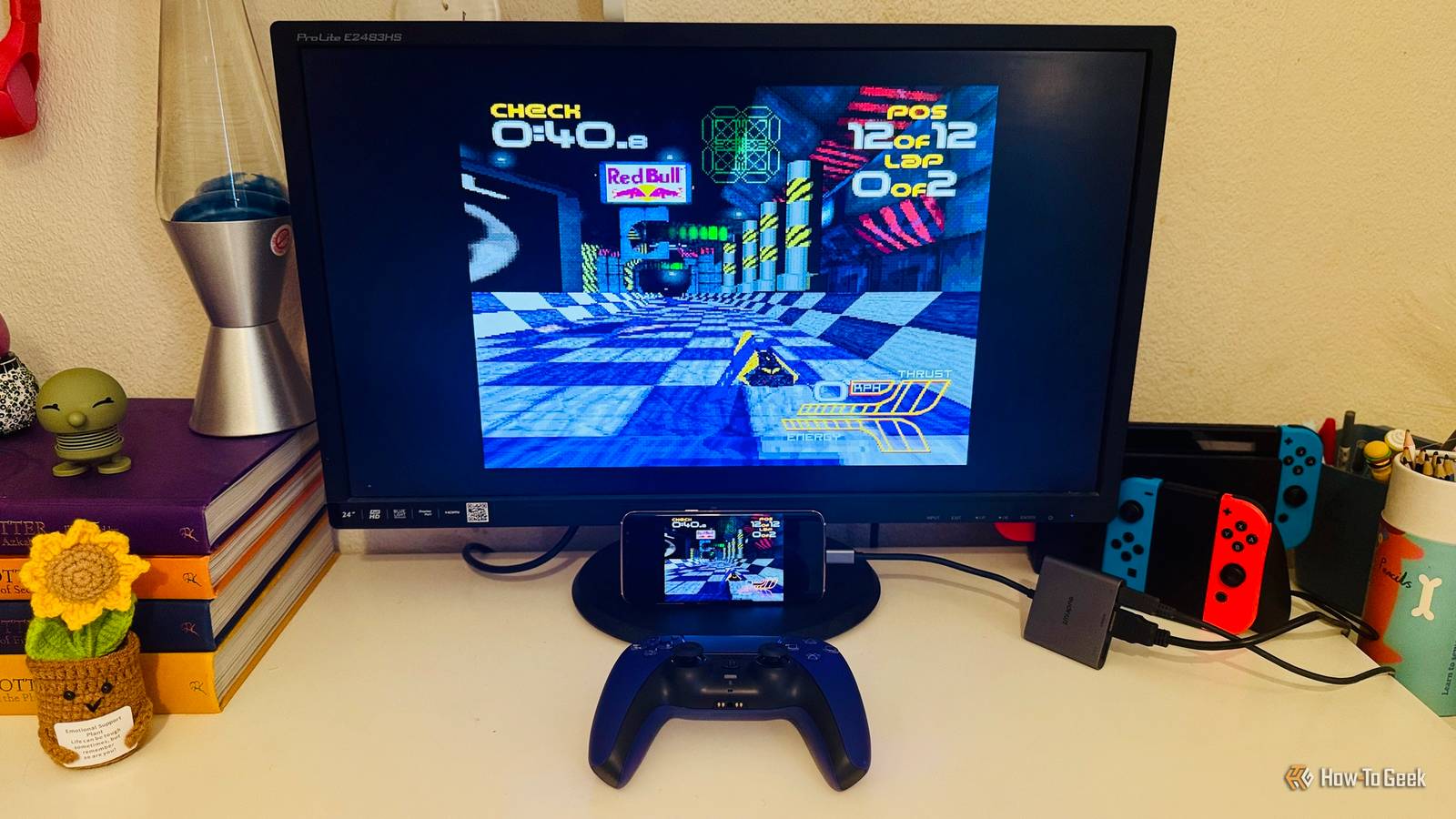
Published Sep 12, 2026, 1:30 PM EDT Adam has a degree in Engineering and has a life-long interest in technology. He has been writing for over a decade for various print and online publications, with a focus on consumer tech. He joined How-To Geek in 2024 while working at Pocket-lint. As well as being a long-term fan of Apple products, he also has a strong interest in smart home tech, running a Home Assistant server at home to automate all his smart home devices. He believes that the ideal smart home should work with minimal interaction from the user, with automations running as if by magic rather than requiring you to push buttons on a control panel. You can find more of his work on Muck Rack. A colleague recently went to see The Prodigy live, and it made me nostalgic about my old PlayStation. Wipeout 2097 was one of the first games I owned for the console, and the song Firestarter still makes me think of the futuristic racing game. I really want to play it again, but instead of setting up RetroPie on a Raspberry Pi, I used an old phone. An old Samsung Galaxy phone had most of the hardware I needed The Samsung Galaxy S8 makes a surprisingly capable console Credit: Adam Davidson / How-To Geek All my Raspberry Pis are in use for other projects, so I couldn't set up RetroPie on any of them. I wondered if there was another way to set up an emulation station for old games. There are plenty of emulation apps for phones, so I thought I could use an old phone for the job. My old Samsung Galaxy S8 was just what I needed. It has enough under the hood to comfortably emulate PS1 games, and there are emulation apps available that it can run. The issue was getting the game onto a big screen so I didn't have to play it on a tiny phone screen. The solution was incredibly simple. Unlike some Android phones, the Samsung Galaxy S8 has USB-C video output, so all I needed was a compatible USB-C to HDMI adapter to bridge my phone and the monitor. The best part is that the adapter has a port for external power, which can charge the Galaxy S8 while it's connected to the adapter. I could also pair my PS5 controller with the phone over Bluetooth and use it as a controller for the games. RetroArch turns the phone into an emulation system One Android app handles the games and controllers Credit: Adam Davidson / How-To Geek With all the hardware in place, I just needed something to run the game. The RetroArch app was exactly what I needed. You can install different emulator cores for different systems and load ROMs for the games. My Samsung Galaxy S8 is surprisingly capable for its age, with an Exynos 8895 processor and 4 GB of RAM. That's more than enough to emulate games from systems such as the NES, SNES, Genesis, and PS1, and is capable of emulating many N64, Dreamcast, and PSP games, too. I still had the disc image for Wipeout 2097 that I'd ripped from the original CD, and RetroArch would allow me to play it on the S8. I installed a core for PS1 emulation and copied the disc image to the phone. I launched the game and got it running. I could play it using the overlay controls in RetroArch, but it was fairly awkward to use. I was ready to try it on a bigger screen. RetroArch doesn't include any games, so you'll need to provide your own ROMs or disc images. Copyright laws vary by country, and owning the original game doesn't necessarily make it legal to download a ROM from the internet. You should check the laws for your locale and only use game files you're legally entitled to use. HDMI screen mirroring was far better than DeX Full-screen video and sound through the monitor I connected the USB-C to HDMI adapter to my monitor with an HDMI cable and plugged the adapter into the phone's charging port. This initially opened Samsung DeX, a feature that gives you a desktop-style interface when you connect your phone to an external display. I could navigate the interface using the PS5 controller, but I couldn't find a way to open the app folder to launch RetroArch. A notification on the phone gave me the option to use screen mirroring instead of DeX, so I tapped the notification and switched to screen mirroring. This was far better; RetroArch was now mirrored directly to the monitor instead of running inside the DeX desktop. With the phone in landscape orientation, the monitor displayed the mirrored phone at the full height of the display, with the phone’s audio playing through the monitor’s speakers without any additional configuration. My PS5 controller works, but it took some configuration Bluetooth pairing was the easy part Credit: Adam Davidson / How-To Geek The final step was to get the PS5 controller working properly with RetroArch. It was simple enough to connect; holding down the PS and Create buttons put the controller in pairing mode, and it connected easily through the S8's Bluetooth settings. The problem was that the button mapping didn’t match the controls in the game. I couldn't get the game to start because I needed to press the Start button, and none of the buttons on the controller seemed to work. In RetroArch, you can use the Set All Controls menu to map each button on the controller. Even after doing this the first time, some of the buttons didn't match what Wipeout was expecting, so I remapped them again to match the game. I was finally ready to play, and it was worth the wait. The game played great on the S8, and the controller was responsive without any obvious lag. I had a blast reliving an old game, and now that I've got it set up, it will be easy to play other games on the same setup. There's more than one way to skin a cat I'd never really considered using a phone as a way to emulate games on a monitor; I'd always assumed mobile emulation meant putting up with a tiny screen. While RetroPie is more focused on making it simple to load and play games, using the S8 was easier to set up; all I really needed to do was attach an adapter and make a few configuration changes.
I skipped RetroPie and turned an old Samsung phone into a TV-connectable emulation station
Full Article
Original Source
Read the full article at Howtogeek →KhanList aggregates and links to publicly available news content. We do not host full articles from third-party sources. Always verify important information with original sources.