
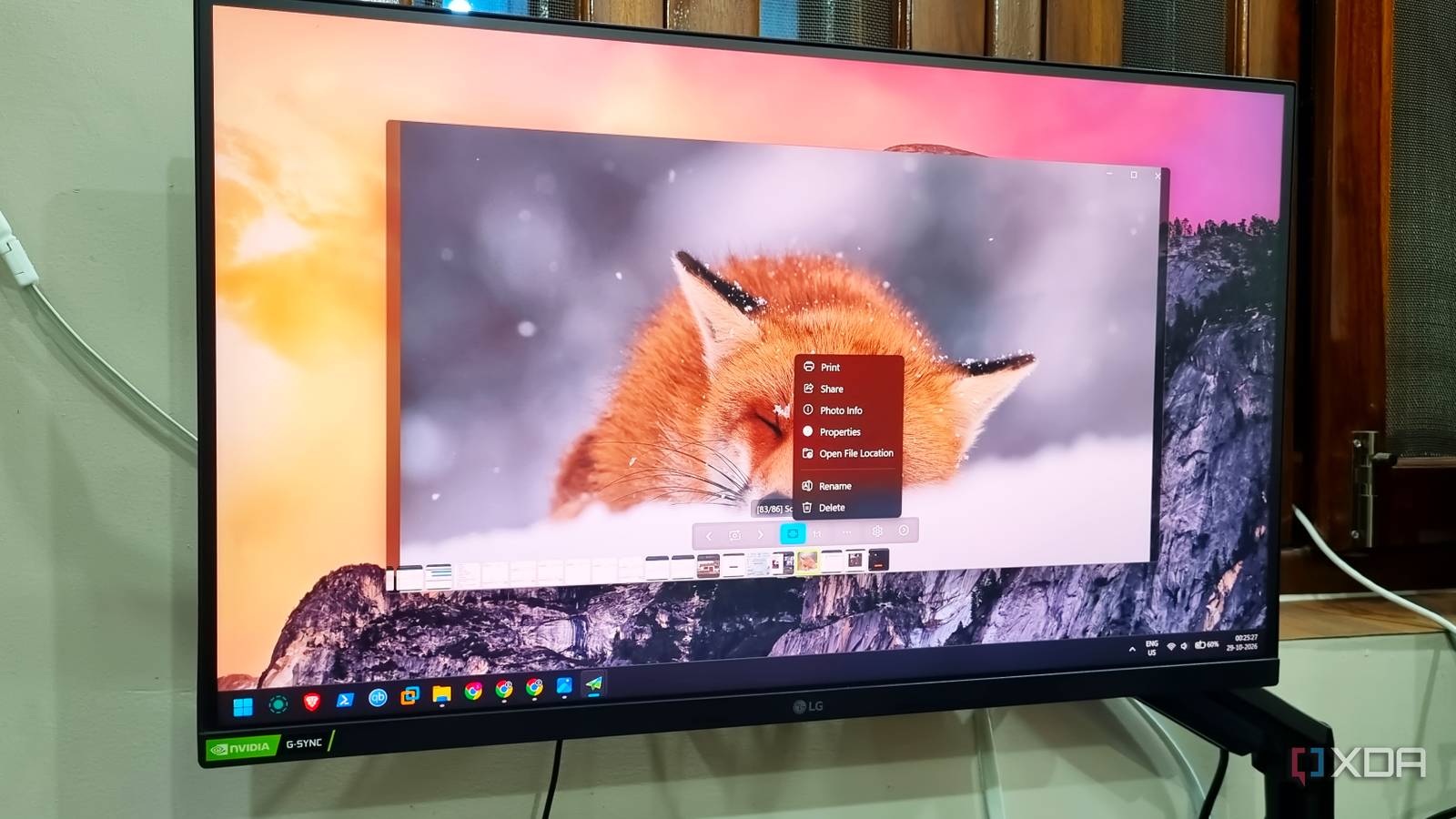
Published Oct 29, 2026, 6:01 AM EDT Abhishek is an author at XDA who covers computing. He has loved computers since he got the Lenovo G570 in 2012. Abhishek holds a master's degree in computer applications and began his writing career in 2018. He loves writing how-to articles, listicles, and informational posts on popular operating systems and web services. He closely follows the Windows Insider program and tests new Insider builds to discover upcoming experimental features and upgrades. His past work includes long-term collaborations with reputed publications like Tom's Hardware, and Windows Latest. When not writing anything, he is busy watching new episodes of One Piece or searching for something binge-worthy. Native Windows apps have never been my favorite. Some exceptions, like the Snipping Tool, do much more than a simple screenshot app. However, I don't feel the same about the Photos app, which seems irrelevant for my use case. Windows’ legacy image viewer was a much simpler tool compared to what Photos has become. It now includes image sync from OneDrive and iCloud, minor edits, and some AI magic that doesn't impress me. So I switched to an open-source image viewer that's faster and has no clutter. I've been using it for a few weeks and highly recommend it if you crave a responsive image viewer that doesn't try to be the jack of all trades. The Photos app seems directionless I miss the old days Windows has always had a native image viewer that could open the most common image file types. But I switched to Picasa because it was a much better option, with a cool full-screen view and some editing tools. I outgrew its editing suite and switched to other powerful options, but Picasa remained on my PC for a long time. Google axed the tool after a few years, and then I returned to the native tool once again. By then, Microsoft Photos had emerged and was an average app. However, the current version of the app seems to have lost its focus. I just want a photo viewer that can display local image files and nothing else. But the app now has editing features and an AI background remover. For basic resizing, cropping, and edits, I prefer Paint. I cannot understand why Photos apps need to have a minor, unimpressive set of edit features as well. If Microsoft actually wanted to make the tool useful, they could have added a blur feature with a selection tool. Paint can already remove backgrounds, erase and blend selected image areas, and support layers. Even the image browsing and viewing experience is sluggish in the Photos app when you open a large image folder. Cycling through images lags noticeably, and it supports fewer formats than you'd expect. I don't love the cloud storage browsing feature either, as it slows the app even more than needed. Trying an open-source image viewer FlyPhotos understands the fundamentals There’s no shortage of free image viewing and editing apps. Even the open-source segment has a few, but I like FlyPhotos more. Earlier, I tried using IrfanView for images and documents, but its UI seems extremely dated compared to current standards. FlyPhotos cannot match its feature set, and I don’t mind. IrfanView is an all-in-one graphic viewer and converter suite, unlike a dedicated image viewer. The first thing I noticed about FlyPhotos was how quickly it loaded and displayed images. I could cycle through a large folder with hundreds of images without any visible loading icons. My screenshot folder tends to bloat easily due to the experiments I do every day. Browsing this folder feels like a breeze in FlyPhotos. Compared to the Photos app, its UI is a stark contrast. FlyPhotos loads a transparent background that reminds me of Picasa. It’s a personal preference and looks better than the native Windows solution. The viewer window has fewer distracting elements, and you get the move forward or backward, fit to the window, rotate, settings, and cache status buttons. Microsoft Photos adds image edit and share options at the top, which are just useless at this point. It's good that it doesn’t show the Gallery option in the preview window. Rich format support and customization Mold it to your requirements A smooth image viewing experience is just one perk of switching to FlyPhotos. I'm in awe of the rich customization features that try to offer maximum freedom to the user. Don't like a UI element? You can remove it from the preview window. Want a few more image-related stats? There's an option to add it to the preview window. Not happy with the current theme or background effect? FlyPhotos can switch between multiple background options. The Photos app cannot compete in the customization segment with FlyPhotos. There's a single settings page with very limited UI tweaks. You can't make advanced UI tweaks beyond removing the iCloud option and switching themes. FlyPhotos can even define startup options, letting you force the app to launch full screen or return to the previous state. There are some advanced options, like RAW format support and the ability to launch multiple windows. The app uses Windows Inbuilt Imaging Component (WIC) codecs to support multiple image formats and even has PSD and a few other niche formats. You can navigate the UI with the keyboard or mouse, and there's a dedicated settings page to check and change the controls. One thing that might bother you is the overall memory usage, because FlyPhotos uses more than 300MB. The Photos app doesn't use this much memory, and if you have a very underpowered system, it all might not work well. FlyPhotos offers better performance at the cost of slightly higher resource requirements, but that's not a problem for my PC. I'm more interested in an image viewer that can handle a wide range of files. It doesn't display ads or require an email account to work, and stays away from integrating AI into every feature. Replace the default Photos app The Photos app cannot match my favorite open-source tool's performance and customization, which is why I ditched the native app. Photos app tries to add image editing and cloud file support in the app, but makes no effort to improve the lackluster areas. FlyPhotos ditches this bloated concept and focuses only on image-viewing features. It has a few features like PSD and RAW support, which is good for designers, for such a look at these niche file formats. I didn't see any ads or promotions while using the GitHub version. But some users complain about these issues with the Microsoft Store version, so skip that. FlyPhotos A free, open-source image viewer alternative to the Microsoft Photos app with superior performance.
I replaced the bloated Photos app on Windows with a free open-source viewer, and images open instantly now
Full Article
Original Source
Read the full article at Xda-developers →KhanList aggregates and links to publicly available news content. We do not host full articles from third-party sources. Always verify important information with original sources.