
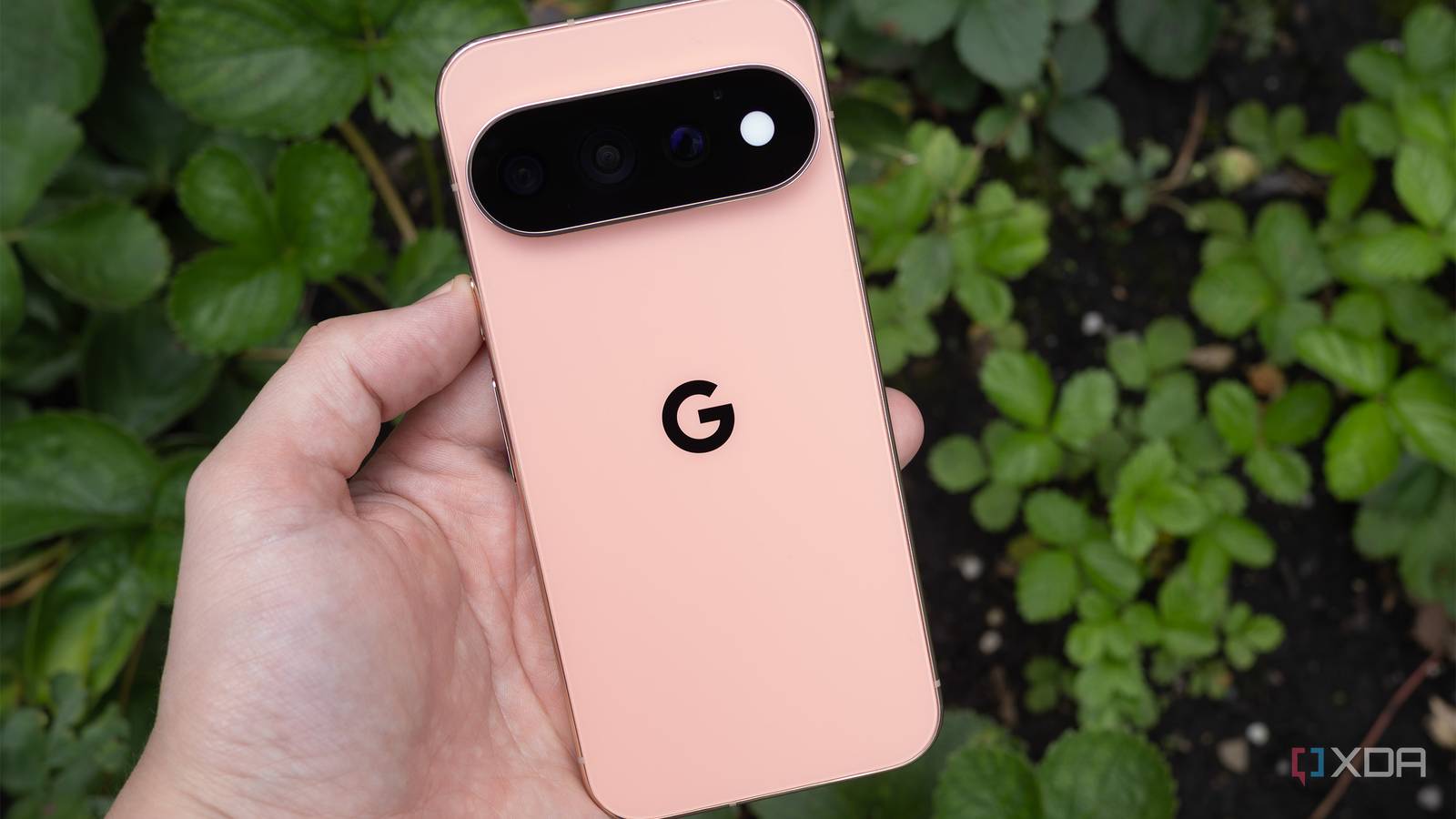
Published Sep 4, 2026, 1:30 PM EDT There just really isn't much new this year. I feel like I've written this several times in my past few Pixel Pro reviews, but this year in particular, the Pixel 11 Pro is nearly identical to the Pixel 10 Pro. Seriously, it's kind of wild. The phone features a very similar camera setup and a design that's pretty much identical to its predecessor's. There's even a notable hardware downgrade: the base storage Pixel 11 Pro drops from 16GB to 12GB of RAM. Oh, and there's a cool new notification light Google calls the HiLight, but unfortunately, it's pretty limited in what it can do right now. Still, the Pixel 11 Pro is an all-around solid smartphone most people will be happy with. That said, the this-is-the-exact-same-phone-as-last-year argument is very real, so if you're using a Pixel 9 Pro or Pixel 10 Pro, skipping the Pixel 11 Pro is a good idea because there isn't much to get excited about this year. Google sent XDA the Pixel 11 Pro for review. It did not have any input on the contents of this article. This review is primarily focused on the Pixel 11 Pro. Google Pixel 11 Pro 8/10 Brand Google SoC Google Tensor G6 Display 6.3-inch Super Actua display RAM 12 or 16GB Pros & Cons Great-looking design Solid camera performance Not much of an upgrade over last year Gemini's Proactive Assistance isn't very reliable Pixel 11 Pro pricing, specs, and availability Let's unpack the differences between the Pixel 11 Pro and the larger Pixel 11 Pro XL. First off, the Pixel 11 Pro features a 6.3-inch LTPO OLED with 2856×1280-pixel resolution (495 ppi), while the Pixel 11 Pro XL features a 6.8-inch LTPO OLED with 2992×1344-pixel resolution (486 ppi). On the battery front, the Pixel 11 Pro packs a 4,850 mAh cell, while the Pixel 11 Pro XL features a 5,115 mAh cell. Lastly, the Pixel 11 Pro includes 30W wired charging, while the Pixel 11 Pro XL features 45W wired charging. Both devices feature 12GB of RAM with 256GB of storage, a downgrade from the 16GB found across last year's Pro lineup. However, the 512GB and 1TB Pixel 11 Pro models still include 16GB of RAM. At the same time, the base model Pixel 11 Pro is $100 more than last year at $1,100, while the base Pixel 11 Pro XL starts at $1,300. On the camera side, the Pixel 11 Pro features an f/1.68 50-megapixel main shooter, an f/1.7 48-megapixel ultrawide, and an f/2.8 48-megapixel telephoto lens. The selfie shooter comes in at f/2.2 42-megapixel. The key upgrade this year is the larger 1/1.95-inch telephoto sensor, which features 30% better light sensitivity, alongside the more efficient 1/1.3-inch main sensor. Lastly, the Pixel 11 Pro and Pixel 11 Pro XL feature Google's new Tensor G6 chip. Pixel 11 Pro Brand Google SoC Google Tensor G6 Display 6.3-inch Super Actua display RAM 12 or 16GB Storage 256GB, 512GB, or 1TB Battery 4850 mAh Ports USB-C 3.2 Dimensions 6.0 in (height) x 2.8 in (width) x 0.3 in (depth) Weight 7.2 oz IP Rating IP68 Colors Canyon, Olive, Fog, Obsidian Operating System Android 17 Display dimensions 20:9 Display resolution 1280 x 2856 Wi-Fi connectivity Wi-Fi 7 Bluetooth Bluetooth v6 Year of release 2,026 The Pixel 11 Pro looks a lot like the Pixel 10 Pro This year's key design change is adding a dash of style to the camera bar The best way to illustrate how similar the Pixel 11 Pro and Pixel 10 Pro look is that even after several weeks with Google's latest flagship phone, I still frequently get the phones confused. The Pixel 11 Pro features the same glossy aluminum sides, which is a bummer because I prefer the base Pixel 11's lower-key matte sides, though there is finally a matte option (more on this later). The big change this year is that the camera bar is 40% thinner and, instead of aluminum, it's made entirely of glass. This gives the phone a cleaner, more uniform appearance, but it's also a fingerprint magnet. Additionally, the new HiLight multicolor notification light sits around the flash within the camera bar on the right side. The smaller camera bar makes the phone sit a bit more flush on a table. It still has some movement to it, though. Overall, I like the subtle design changes to the camera bar this year, but they aren't significant. In fact, I bet a lot of people won't even notice them. Still, the Pixel 11 Pro is an overall great-looking smartphone despite looking pretty much identical to the Pixel 10 Pro. This year's colors include Canyon, Olive, Fog, and Obsidian. I don't necessarily dislike the Canyon color you'll see throughout this review, but Olive is definitely more my vibe. That said, I appreciate that Obsidian is entirely matte this year because it solves my key complaint about the Pixel 11 Pro's shiny, smudge-attracting aluminum edges. Even the camera bar is matte, which is a nice touch. The Tensor G6 still isn't a performance monster It's absolutely fine, though The Tensor chip has a reputation for underperforming compared to Apple's and Qualcomm's respective smartphone chips. However, over the years, I've never had a real performance problem with any Pixel device that features Google's CPU. It's been more than powerful enough to handle pretty much anything I throw at it, whether it's gaming, editing photos with Lightroom CC, or just doom-scrolling the internet. On paper, the Tensor G6 offers a 10-15% performance boost over the G5, and in my experience, that seems accurate. Over the past few weeks with the Pixel 11 Pro, I haven't encountered a single bout of lag. In terms of Geekbench 6 scores, the Pixel 11 Pro's Tensor G6 hits 2,666 single-core and 7,275 multi-core. The average user will be very happy with the Pixel 11 Pro's hardware performance. On another note, Google sent me the 512GB model to review, so I don't know for sure whether the 12GB of RAM featured in the base storage configuration noticeably affects the phone's performance. I'd like to think it only slightly limits multitasking, but I'm not certain. Still, it's disappointing that Google has downgraded the base-level Pixel 11 Pro's specs while also increasing its cost. I know the RAMpocalyse is a thing, but it would have been great to see Google swallow the cost. HiLight is very disappointing The feature holds so much potential I like the Pixel 11 Pro's HiLight feature — I really do — but unfortunately, it just isn't very useful right now. The multicolored LED ring that sits inside the flash glows different colors when you receive phone calls, and when you're speaking with Gemini, but only when it's face down on a table. If you assumed you'd be able to use HiLight to triage messages and other notifications like I did, you're about to be bummed out. At least right now, HiLight can only record phone calls and work with Gemini — that's it. Will more features come down the line? Hopefully, but we don't really know. I'd like to see Google release a developer API and third-party HiLight compatibility become widespread. It's a cool throwback idea with a lot of potential, but as it stands, it's pretty useless and an all-around disappointment. Remember the old-school BlackBerry 8300's colorful flashing indicator light? I used to use it to mark text messages from specific contacts that are important to me, and it would be great to do the same with the Pixel 11 Pro. This year's key upgrades are on the camera side The improvements are pretty minor As is the case every year, Google has improved this Pixel 11 Pro's camera array and also added new software features. First up, there's Magic Capture, an AI-powered feature that automatically pulls the best photos and videos from a shooting session. In my experience, it works surprisingly well and automatically selects a decent array of photos and videos. It still takes some manual control, though. For Magic Capture to work well, you'll need to keep your subject in the frame. I prefer to shoot videos and photos myself, but I can see Magic Capture coming in handy for anyone who wants the best content delivered right away. For example, I might use it at some point to quickly snap photos or videos of my son to share with my family. In that kind of situation, you want a solid shot, but it doesn't have to be perfect, since you're just sharing it with those close to you, and the situation is too chaotic to curate what you just snapped manually. All you need to do is point your phone at what you want to shoot and press capture. This year, there are also Camera Looks, which are Google's take on Apple's Photography Styles. Unlike with the iPhone, I already like the Pixel's stock photo look, but it's great that this extra image customization option is available, and I've come to appreciate the Natural and the Shadows Camera Look. Like with Photographic Styles, you can also create a custom look that better fits the photography vibe you're going for, including adjustments to Contrast, Highlights, Shadows, Vibrance, Tint, and more. Main 0.5x, 1x, 2x, 5x, 10x, 30x, 120x Google says the main f/1.68 50-megapixel Pixel 11 Pro camera sensor is new, but it's the same 1/1.3-inch size, and as far as I can tell, the image quality is pretty much identical to the Pixel 10 Pro's primary shooter. The key upgrade this year is the 1/1.95-inch telephoto sensor, which captures more light. Photos shot with the telephoto lens are brighter, less noisy, and, in many cases, clearer. The quality upgrade isn't substantial, though. Google has also increased the Pixel 10 Pro's 100x Pro Zoom to 120x. Like last year, Pro Zoom works fine as long as you don't push the zoom too far (under 30x seems to be the sweet spot), but if you snap a more detailed image with text, its edges get out of whack, and the text looks garbled unless it's very bold (like in the images above). Night Sight is faster this year, too. This is a welcome quality-of-life update that actually got me using Night Sight consistently for the first time. Overall, the Pixel 11 Pro snaps great images, just like the Pixel 10 Pro, and, as far as smartphone cameras go, it remains one of my favorites. AI takes center stage, again Proactive Assistance is useful for simple tasks. The Pixel 11 Pro's Proactive Assistance sounds great on paper. I really like the concept of Gemini offering contextual suggestions, but over the past few weeks with the phone, it just hasn't shown up very often. I had a very similar experience with Now Nudge on the Galaxy S26 Ultra and also Magic Cue with the Pixel 10 Pro. I likely need to continue using the phone more for Proactive Assistance to really kick in (I plan to update this review with more impressions). Still, I like the idea of Gemini suggesting open calendar times when making plans with friends or family. I don't exactly buy that Gemini will be able to handle more complicated tasks like making dinner reservations, but I'm happy to be proven wrong. Even then, I'm not sure if I'd really want to trust Gemini with a task like this, and I'd likely end up checking the reservation manually anyway. It's worth noting that for most third-party apps, you'll need to enable Proactive Assistance in the Settings app manually. Should you buy the Pixel 11 Pro? You should buy the Pixel 11 Pro if: You're using a Pixel 9 or earlier. You're looking for an all-around great high-end smartphone. You should not buy the Pixel 11 Pro if: You already own the Pixel 10 Pro. If you were expecting a substantial update. It's tough to unpack the Pixel 11 Pro because it's a very solid smartphone that performs excellently and snaps great photos. Google's out-of-the-box, more true-to-life take on photography is still my preference over any other device out there. Unfortunately, there just isn't much new with the tech giant's latest flagship. While I appreciate the subtle design changes, the Pixel 11 Pro looks nearly identical to the Pixel 10 Pro, and on the camera side, the telephoto sensor upgrade isn't that notable. HiLight is also a big missed opportunity for Google that I hope the tech giant fixes in future updates. Then there's the RAM downgrade with the base storage model, which, any way you look at it, is a disappointment. With all of this in mind, the Pixel 11 Pro is still a great device that most people will be happy with. Like with so many incremental smartphone upgrades, it really comes down to which device you're using now. If you're thinking of picking up a Pixel for the first time, now is a great time to jump in. At the same time, if you're using a Pixel 9 or 10, there isn't much to get excited about here, though those with earlier Pixel devices will definitely be happy with the Pixel 11 Pro. Google Pixel 11 Pro 8/10 Brand Google SoC Google Tensor G6 Display 6.3-inch Super Actua display RAM 12 or 16GB
I like almost everything about the Pixel 11 Pro, but Google played it way too safe
Full Article
Original Source
Read the full article at Xda-developers →KhanList aggregates and links to publicly available news content. We do not host full articles from third-party sources. Always verify important information with original sources.