
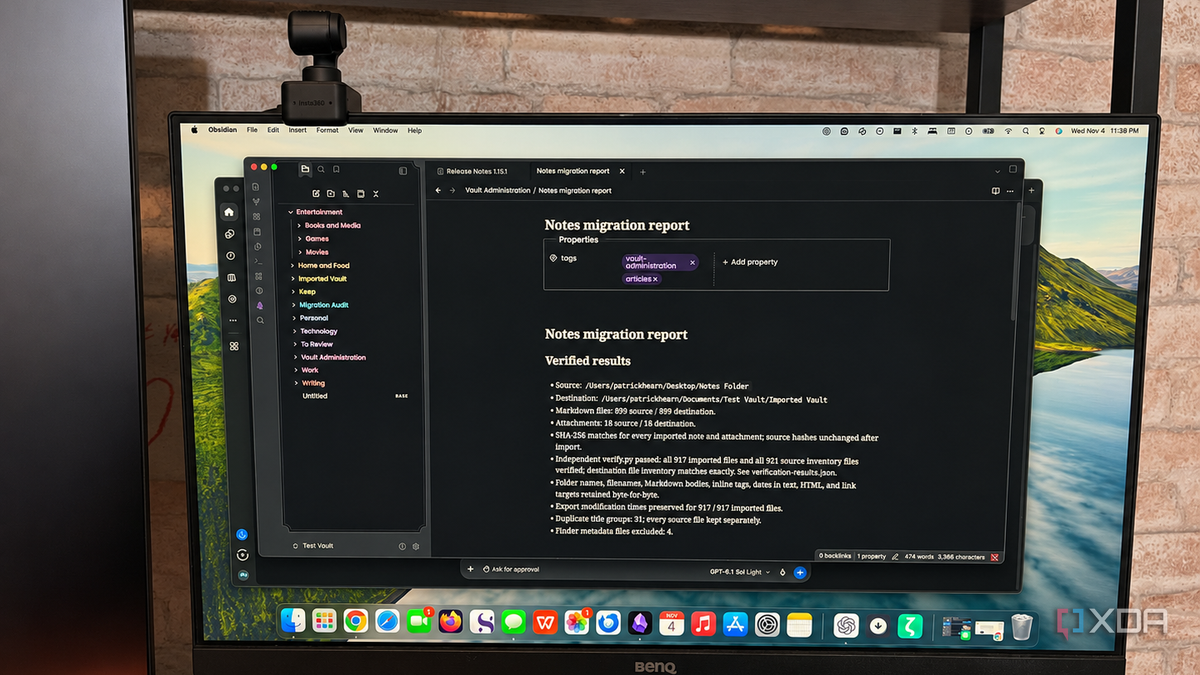
Published Nov 6, 2026, 10:31 AM EST Patrick is a seasoned writer with more than a decade of experience, specializing in any and all things tech. His work has been featured on platforms like CNET, Yahoo, Xfinity, and many other outlets. When not typing away, he can be found with his nose in a book. Moving between note-taking apps isn't an easy decision, especially since many don't offer a way to transfer your notes between them. Apple Notes is one of the worst offenders on that front. I have eight years of notes stored in Apple Notes, and yet I can't easily bulk export them. I also have notes in other apps, like Evernote and Google Keep. I wanted to gather all of my assorted notes from over the years into a single Obsidian vault, but I didn't want to do it myself. And while Obsidian does have the outstanding Importer plugin, I wanted to automatically sort and add tags to the imported notes based on their content. For that, I turned to Codex. ChatGPT's agentic model imported the notes directly into Obsidian for me, and it didn't lose a single file. The notes appeared in my vault with proper tags, organized and sorted according to subject. What's most surprising is how quickly Codex accomplished the task. It processed roughly 1,000 notes in about ten minutes and delivered a report at the end that flagged which notes it couldn't reliably categorize. The report showed how many notes it imported, and I verified its accuracy with a Python script. Overall, the process was much easier than anticipated, and it was a better choice than using Obsidian's Importer plugin. Codex organized my notes instead of just moving the mess Organizing those by hand would have taken forever The thing about transferring years of notes is that it took years to put them together. For many of the notes, I don't remember the context when I wrote them. It's like looking at a cipher without the key. Codex interpreted the notes and took its best guess at the subject, organizing and sorting them into specific folders with the proper tags. It didn't always get everything right — for example, I found a note that was a long-forgotten story idea grouped with a bunch of notes on computer settings — but more often than not, it was spot-on. Moving the notes into Obsidian was only half the battle. By organizing them, Codex saved me hours of work sorting through everything. Tags mean I can quickly find related, relevant notes without manually clicking through folders. I could give instructions instead of building a workflow I do love a good workflow, but I don't always want to take the time to build one. I could tell Obsidian to import those notes, and then use another plugin like Linter to mass-tag them, but they would still be disorganized and not grouped by folder. And given that Linter is a somewhat complicated plugin, it comes with potential risks to the entire vault if I mess up. For users who are less comfortable working with something like that, Codex offers an easy alternative. I can simply tell it what I want to accomplish, and as long as I've pointed it at the correct folders and granted the proper permissions, Codex can do the work on its own. Aside from manually exporting the notes from their respective sources — Apple Notes through the Exporter app, Keep through Google Takeaway, Evernote through tedious manual labor — Codex handled everything else. I just told it where to go and what to do, and it handled it all for me. Once it finished importing things, I noticed a few hiccups (like repeated text in a couple of notes) that I asked it to clean up, and it did so without changing the context. It identified the notes that still needed human review It did most of the work, but gave me the final word Codex wasn't able to make sense of everything. It couldn't place 83 notes, and after reviewing them, it makes perfect sense why they couldn't be categorized. Some were total gibberish, while others were random notes with no cohesion whatsoever. In fact, one was a puzzle from Skyrim I had quickly noted down in my phone during one of my many previous playthroughs. A few of them are passwords, but I have no idea what they're for — just random strings of characters. I appreciated the honesty, especially since I've had too many LLMs try to carry out a task they weren't sure how to complete. I'd rather manually sort through a few notes than end up with unexplained, out-of-place additions to my vault. It also gave me a chance to rediscover notes from years ago, and I found a few gems hidden among the grocery and to-do lists. A little direction saved me hours of work This was my first time experimenting with agentic AI. I've used ChatGPT, Claude, Gemini, and other applications through the web browser, but I've never given it control of a task like this before. The process surprised and impressed me, and it strikes me as the best possible use for artificial intelligence. Other agents, like Claude Code, can accomplish the same goal. You can even set up a local LLM for more privacy and control to handle administrative tasks like this. Codex Codex is OpenAI's coding agent.
I let an AI agent migrate my notes from three different apps into Obsidian, and nothing got lost
Full Article
Original Source
Read the full article at Xda-developers →KhanList aggregates and links to publicly available news content. We do not host full articles from third-party sources. Always verify important information with original sources.