
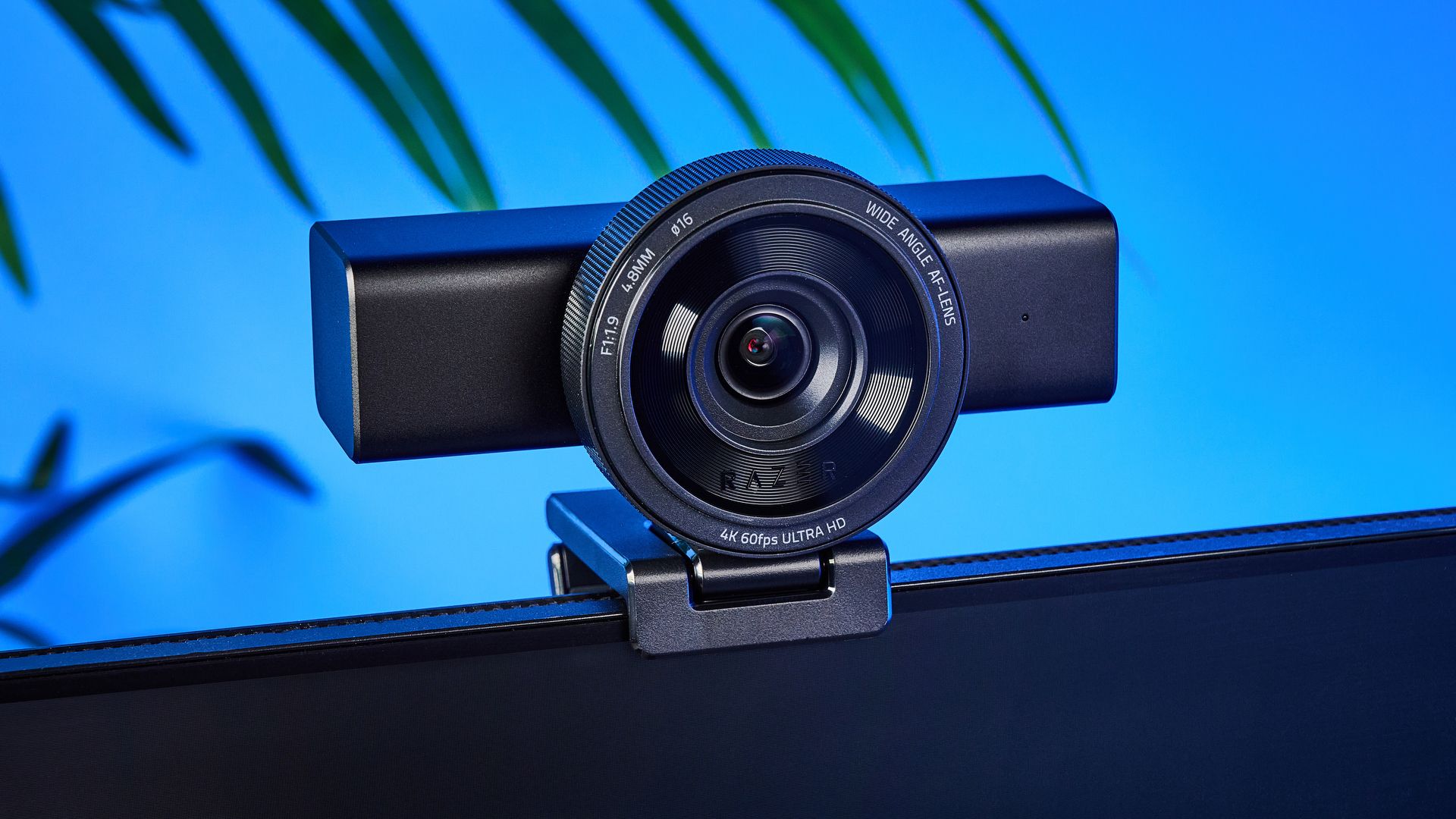
Tom's Guide Verdict The Razer Kiyo V2 Pro is an outstanding webcam that isn’t limited to just answering video calls — it’s a serious content creation tool that hopes to do away with having a separate camera for streaming. Boasting smooth 4K/60fps video and capable of capturing detailed, sharp images, the Kiyo V2 Pro gives you little to complain about. Low-light performance is impressive, as is the premium build quality. Its settings are highly adjustable, too, via user-friendly companion apps. It’s the ideal webcam for content creation in 2026. Reasons to buy +Premium build quality +Beautiful 4K/60fps video +Sharp, detailed images +Impressive low-light performance +Detailed companion apps Reasons to avoid -A gimbal would’ve been nice -No built-in mic -Expensive (but worth it) Why you can trust Tom's Guide Our writers and editors spend hours analyzing and reviewing products, services, and apps to help find what's best for you. Find out more about how we test, analyze, and rate. Say goodbye to tedious streaming setups: the Razer Kiyo V2 Pro is the only “camera” you’ll need on your desk. This webcam boasts smooth 4K/60fps video as well as crisp, detailed images. Low-light performance is outstanding, as is the extensive customization offered by its dual companion apps. Oh, and it’s built beautifully, too.What I love about the Kiyo V2 Pro is that it comes with a free lifetime license for Camo Studio Pro, which makes creating pro-grade video accessible to everyone. While a gimbal and internal mic would’ve been nice, they’re very minor drawbacks that are overshadowed by everything else on offer. If you can afford it, Razer’s webcam is one of the easiest peripherals to recommend.To find out if this is the best webcam for you, read my full Razer Kiyo V2 Pro review to find out.Latest Videos FromTom's GuideRazer Kiyo V2 Pro review: Cheat sheetWhat is it? A 4K/60fps webcam that functions as an all-in-one content creation toolWho is it for? Professional content creators and streamersHow much does it cost? It ain’t cheap — the Razer Kiyo V2 Pro is available for $299 / £279What do we like? The premium build quality, beautiful images and video, impressive low-light performance, and detailed companion softwareWhat don’t we like? The lack of a gimbal and expensive price tagRazer Kiyo V2 Pro review: Specs Swipe to scroll horizontally Price $299 / £279 Dimensions 3.3 x 3.2 x 5.2 inches Weight 13.4 ounces Sensor 8.3MP Sony Starvis 2 Aperture f/1.9 Focal length 24mm (full frame equivalent) Field of view 86° Max video resolution 4K/60fps Zoom 4x digital Exposure compensation ±3 EV ISO 100-6400 Microphone No Operating system Windows, macOS Razer Kiyo V2 Pro review: The upsThe Razer Kiyo V2 Pro is built well, offers extensive customization, and above all, boasts incredible image quality, 4K/60fps video, and low-light performance.Built like a tank (Image credit: Tom's Guide)The Razer Kiyo V2 Pro is built exceptionally well, and it’s a chonky boi. Its matte finish plastic chassis and housing offers a solid, weighty feel. It’s resistant to fingerprints, too, which is great news for anyone who’s easily turned off by them. I think the webcam looks premium and classy, thanks to minimal branding.Measuring 3.3 x 3.2 x 5.2 inches and weighing 13.4 ounces, the Kiyo V2 Pro is much bigger than the likes of the Obsbot Tiny 2 ($299) and the Insta360 Link 2 Pro ($249). But to ensure its weight doesn’t tip it off your monitor’s edge, the Kiyo V2 Pro features a sturdy L-shaped mount with rubber-coated grips. The grips ensure your monitor’s bezels don’t suffer from any scruffs, while also keeping the webcam in place. (Image credit: Tom's Guide)If you find the webcam is too big to place on top of your monitor or laptop, fret not: there’s a standard universal tripod thread on the bottom of the mounting clip. You can place the webcam on a tripod if needed, and this plays well into the fact that Razer advertises the Kiyo V2 Pro as a professional content creation tool.Tom's Guide: Direct to Your InboxGet instant access to breaking news, the hottest reviews, great deals and helpful tips.When you aren’t using the webcam, you can simply twist the notched ring located around the lens to activate the privacy shutter. That’s a nice touch, and gives the Kiyo V2 Pro a leg-up over the Elgato Facecam Pro ($299) which doesn’t have one.Stellar image and video quality (Image credit: Tom's Guide)If you want to look your best, the Razer Kiyo V2 Pro is a no-brainer. Under the hood, you’ll find an 8.3MP Sony Starvis 2 sensor, while the lens has a 24mm (full frame equivalent) focal length and an 86° field of view. That makes it wide enough to capture a lot of the scene, and there’s a 4x digital zoom available if you don’t want to show the entirety of your studio space to your audience. Image 1 of 4 Taken using a Razer Kiyo V2 Pro. (Image credit: Nikita Achanta / Tom's Guide) The Kiyo V2 Pro’s image quality is nothing short of stellar. The first and third images in the gallery above were taken using Razer’s webcam, and the second and fourth using the MacBook Air M2’s built-in one. The images taken through the Kiyo V2 Pro look much more pleasing to the eye, and true to life.I love how warm the colors look, and my skintone is accurate. The posters in the background also look more detailed, and the webcam has added a slight background bokeh, too, which gives the images some depth. In comparison, the MacBook webcam photos look washed out and flat.In addition to that, the Kiyo V2 Pro boasts impressive video specs. Just like theElgato Facecam Pro, you get 4K/60fps for buttery smooth motion. In comparison, the Obsbot Tiny 2 is limited to 4K/30fps, as is the pricier Obsbot Tiny 3 ($349). I jumped on a quick video call with my partner, and she said that there were no jitters or stuttering, and that I appeared “a lot more detailed than through the MacBook’s webcam.”I also found the Kiyo V2 Pro’s auto-tracking very effective in my testing. The webcam was quick to focus on me, as you can see in the video above.And before you ask: no, my name isn't actually John Appleseed (and that isn't my email address). If you choose one of the text overlays within Camo Studio Pro, one of the Kiyo V2 Pro's companion apps, that's the default text the software adds to show you an example of what you can do. I'll talk about the software in detail very shortly.Impressive low-light performance Image 1 of 2 Taken using a Razer Kiyo V2 Pro. (Image credit: Nikita Achanta / Tom's Guide) More often than not, webcams with small sensors struggle in dimly lit environments because their sensors aren’t big enough to let an adequate amount of light in. Not the Razer Kiyo V2 Pro which boasts solid low-light performance.Via its companion apps (more on them shortly), it also features one-click noise reduction and one-click image enhancement. The latter is especially useful in low-light conditions (as well as environments with mixed color temperatures and backlit setups) as it uses AI to automatically adjust exposure, resulting in the best possible image.The first photo in the gallery above was taken with the Kiyo V2 Pro, and the second with the MacBook Air M2’s built-in webcam, with my laptop’s screen lighting up my face. I much prefer the first shot. My features look more defined, and you can even make out the posters in the background. The second shot, in comparison, looks quite dull and you can’t even see my hair. Also, the first image is nowhere near as noisy as the second one.Extensive customization Image 1 of 4 (Image credit: Razer / Tom's Guide) To use the Razer Kiyo V2 Pro to the best of its ability, you’ll need to download two software suites. One is Razer’s own Synapse, which is your one-stop shop for all of the brand’s peripherals. Synapse gives you a lot of control over the webcam’s optics and shooting settings, enabling you to adjust shutter speed, ISO, white balance, exposure, and the 4x digital zoom. You can also adjust auto-framing and tracking via Synapse. Image 1 of 6 (Image credit: Razer / Tom's Guide) Then there’s Camo Studio Pro, available on both macOS and Windows. Razer includes a free lifetime license when you purchase the Kiyo V2 Pro, and it’s worth downloading the app if you want to make pro-grade videos. Through Camo Studio Pro, you can add a virtual green screen and lower-thirds, finetune the autofocus, adjust the frame, and add bokeh or background blur. There are sliders for adjusting contrast, brightness, gamma, too, as well as one-click noise reduction, among other things. You can trigger emojis with your hands, too!A standout feature of Camo Studio Pro and the Kiyo V2 Pro is Backlight Compensation. Selecting this makes automatic adjustments to the scene, and it spreads the light evenly across the subject, as you can see in the video above. There are big windows right behind me in the office, so it’s a feature I’ve really enjoyed using.Razer Kiyo V2 Pro review: The downsThere’s a lot to love about the Razer Kiyo V2 Pro, and very little to not. There’s no built-in mic and a gimbal would have been nice, but those aren’t dealbreakers. It’s pricey, but still cheaper than a new vlogging camera.A gimbal would have been nice (Image credit: Tom's Guide)Though the Razer Kiyo V2 Pro features auto-framing, it lacks a gimbal, so it can’t move a whole lot to keep you in frame. Unlike the Insta360 Link 2 Pro whose gimbal makes it easier to record top-down videos, you’ll have to make a lot more effort to do the same through the Kiyo V2 Pro. Given the webcam’s premium price, the addition of a gimbal would have been much appreciated, especially when the Obsbot Tiny 2 does so for the same money.No built-in mic (Image credit: Tom's Guide)The Razer Kiyo V2 Pro doesn’t feature a built-in microphone which isn’t necessarily a drawback. This is a professional webcam or content creation tool aimed at streamers and creators — that’s also why there’s no mic on the Elgato Facecam Pro. If you’re serious about creating professional content, you should be using one of the best microphones anyway, like the Shure MV6 ($149).Quite expensive (Image credit: Tom's Guide)This is more of a pre-purchase consideration rather than an outright dealbreaker: the Razer Kiyo V2 Pro is an expensive webcam. It has a retail price of $299 / £279 at Amazon, making it doubly as expensive as the non-pro Razer Kiyo V2 ($149), and just as pricey as the Elgato Facecam Pro ($299).But the Kiyo V2 Pro isn’t just a regular webcam like, say, the ones from Insta360. It’s a content creation tool, and it’s advertised as an all-in-one package for those who want to create professional-looking content. Sure, it does everything a regular webcam does so you can use it to answer work calls, but it’s also got the tech for streaming and capturing videos. Essentially, you don’t need to buy a separate vlogging camera, like the Sony ZV-1F ($499), as the Kiyo V2 Pro should more than suffice.Razer Kiyo V2 Pro review: Verdict (Image credit: Tom's Guide)It’s extremely easy to recommend the Razer Kiyo V2 Pro to content creators, professionals, and anyone who can afford it, really. It captures buttery smooth 4K/60fps video as well as detailed images with true-to-life colors, and impressive low-light performance. The webcam comes with a lifetime license for Camo Studio Pro which makes customization easy, and helps you create professional-grade content.While it would have been nice to have a gimbal, it feels like a small complaint in the grand scheme of things. There’s no built-in mic either, but most pros will be using an external microphone anyway. So, with practically no glaring issues that make me want to pull my hair out, Razer’s made my job very easy to do — and the Kiyo V2 Pro is simply stunning. Nikita is a Senior Writer on the Reviews team at Tom's Guide. She's a lifelong gaming and photography enthusiast, always on the lookout for the latest tech. Having worked as a Sub Editor and Writer for Canon EMEA, she has interviewed photographers from all over the world and working in different genres.When she’s not working, Nikita can usually be found sinking hours into RPGs on her PS5, flying a drone (she's a licensed drone pilot), at a concert, or watching F1. Her work has appeared in several publications including Motor Sport Magazine, NME, Marriott Bonvoy, The Independent, and Metro. You can follow her photography account on Instagram here. You must confirm your public display name before commenting Please logout and then login again, you will then be prompted to enter your display name.
I just tested the Razer Kiyo V2 Pro — and it’s a powerful 4K webcam that doubles as a serious content creation tool
Full Article
Original Source
Read the full article at Tomsguide →KhanList aggregates and links to publicly available news content. We do not host full articles from third-party sources. Always verify important information with original sources.