
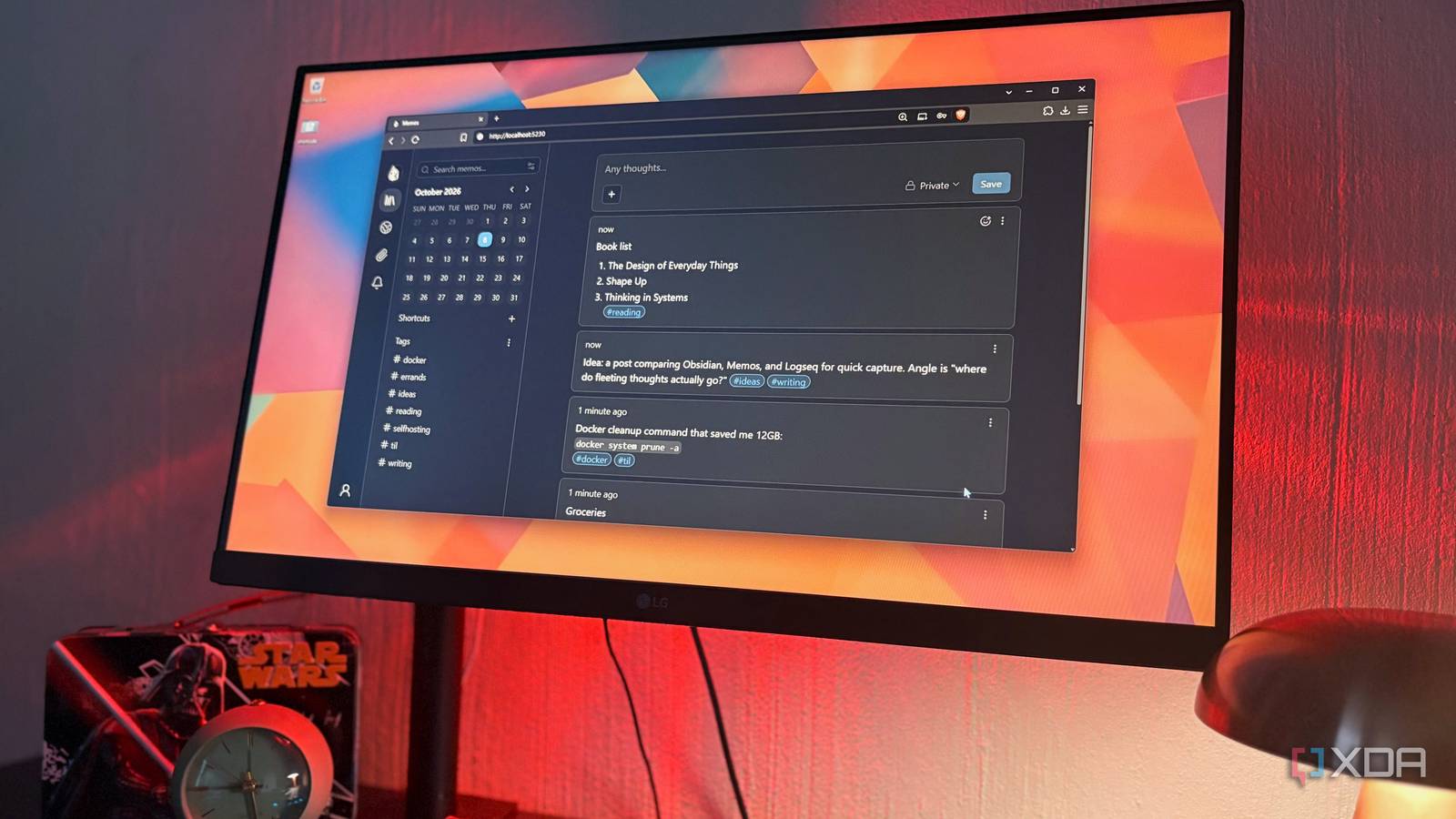
Published Oct 9, 2026, 10:30 AM EDT Nolen began their writing career in 2019, with three years dedicated to editing the Creative section at MakeUseOf. Their expertise lies at the crossroads of technology and creativity, covering areas like photography, video editing, and graphic design. Outside of work, you'll often find Nolen diving into a good book, writing their own stories, or playing video games. All-in-one productivity apps are a pretty easy sell. Tools like Notion, OneNote, and even the bigger Microsoft 365 bundle all promise to give you one place for basically everything you'd want to keep track of, and it genuinely works for plenty of people. The problem is, the app can get more complex than it's worth - and I don't mean difficult to understand, but just a lot to navigate. Every new update seems to bring another panel or a new AI button, and at some point, opening this whole workspace just to check a task or write a quick note is a little overboard. Meanwhile, small single-purpose tools have been sitting there the whole time, and a good number of them are open source and free to host yourself. They tend to only do one job, but they do them well. Espanso handles my templates and snippets It types the boring stuff for me Espanso is a text expander, which means it watches for short triggers you type and swaps them out for whatever text you've attached to them. Type :sig, for example, and your full email signature will show up in the editor instead. Federico Terzi built it in Rust and released it as open source, there's also no server to set up for it. It runs locally on Windows, macOS, or Linux, and your snippets live in plain config files on your computer. These config files may put some people off because you have to edit YAML instead of clicking around a settings menu. But it's really just plain text. And Espanso has ready-made packages if you'd rather not write your own. Basically, this replaced template pages I used to default to in Notion, often the ones I'd copy out of manually whenever I needed them. Espanso works in pretty much any app, so the same snippets show up in my CMS as in my browser. Forms will probably be what I recommend to check out first - one trigger pops up a little box with fields to fill in before it pastes anything, which is handy for stuff that's mostly the same but not quite. You can also just Alt + Space to open the search bar and look it up from there. Espanso Memos became my quick-capture inbox Type a thought and leave Memos is an open-source notes app built on the idea that you get your thoughts out of your head quickly, and own the notes. You host it yourself, and it's a very tiny tool at around 30MB. You won't be asked to pick a notebook or a folder first, the app just opens up to a text block where you can start writing and add your notes as your thoughts pop up. It's very similar to Google Keep, actually, except your notes aren't cards and instead get stacked in a vertical timeline. Everything gets saved as Markdown, which is already a plus over proprietary tools like OneNote and Notion. The current stable version, 0.30, rebuilt the Markdown editor and added tag completion and a focus mode. There's an official web clipper now too, for Chrome and Firefox, that saves pages or selected text straight into your instance. This took over the scratch page I had in Notion, which was honestly just a dumping ground that buried itself. In Memos, it's much faster and easier to tag things as you type, and that's about all the organizing you need here. The tags collect in the sidebar so I can filter by them later. There's also a little calendar in there that shows which days you wrote, so it's easier to find notes from the past. Memos The PDF and image tweaks I used to need a whole suite for OmniTools is a self-hosted web app made by a developer who goes by iib0011, and it's basically a big drawer of small utilities. There are more than a hundred tools in there - most people use it for the PDF toolkit, but there's also a basic image editor, text editor, data converters, and way more. There's no paid tier and the Docker image is only about 35MB. This is the tool that can take over most of the Microsoft 365 chores. For example, I needed a handful of pages out of a 192-page PDF recently, and the split tool pulled them out in a few seconds. Before this, that meant opening a full PDF app or uploading the file to some random converter site covered in ads, and hoping it didn't hang onto a copy. Every tool uses the same layout, with your input on the left and the result sitting next to it, so jumping from compressing a PDF to resizing an image doesn't require you to learn a new feature set. You don't even have to browse the categories, just type what you need in the search bar up top. OmniTools Glance replaced the dashboards I kept rebuilding All the feeds I check on one screen Glance is a self-hosted dashboard that pulls a bunch of feeds into one page. It's open source and ships as a single Go binary under 15MB. The setup happens in one YAML file where you pick from a long list of widgets - if the ones you want don't exist, the custom API widget can pull JSON from basically anywhere and display it, and version 0.8 added a to-do widget as well. This can replace any home page or dashboard-style page you have to constantly rebuild in Notion with embeds and linked databases. My Glance page is mostly news, the weather, and a release feed for repos I like to keep an eye on. Since the entire thing basically runs on the YAML file, you can customize the aesthetic however you want. Glance Small specialized tools for the jobs I actually do every day These four little tools probably wouldn't win in a feature comparison against Notion or Microsoft, but that's exactly why I like them. They handle the stuff I actually reach for every day, they're quick, easy to navigate, and far more private, too. If you're curious but don't feel like dealing with Docker, Espanso is probably the easiest place to start, since it installs like a regular app. The other three run in containers, but it only takes a minute to set them up.
I gave up on all-in-one productivity apps, and these small tools replaced them better
Full Article
Original Source
Read the full article at Xda-developers →KhanList aggregates and links to publicly available news content. We do not host full articles from third-party sources. Always verify important information with original sources.