
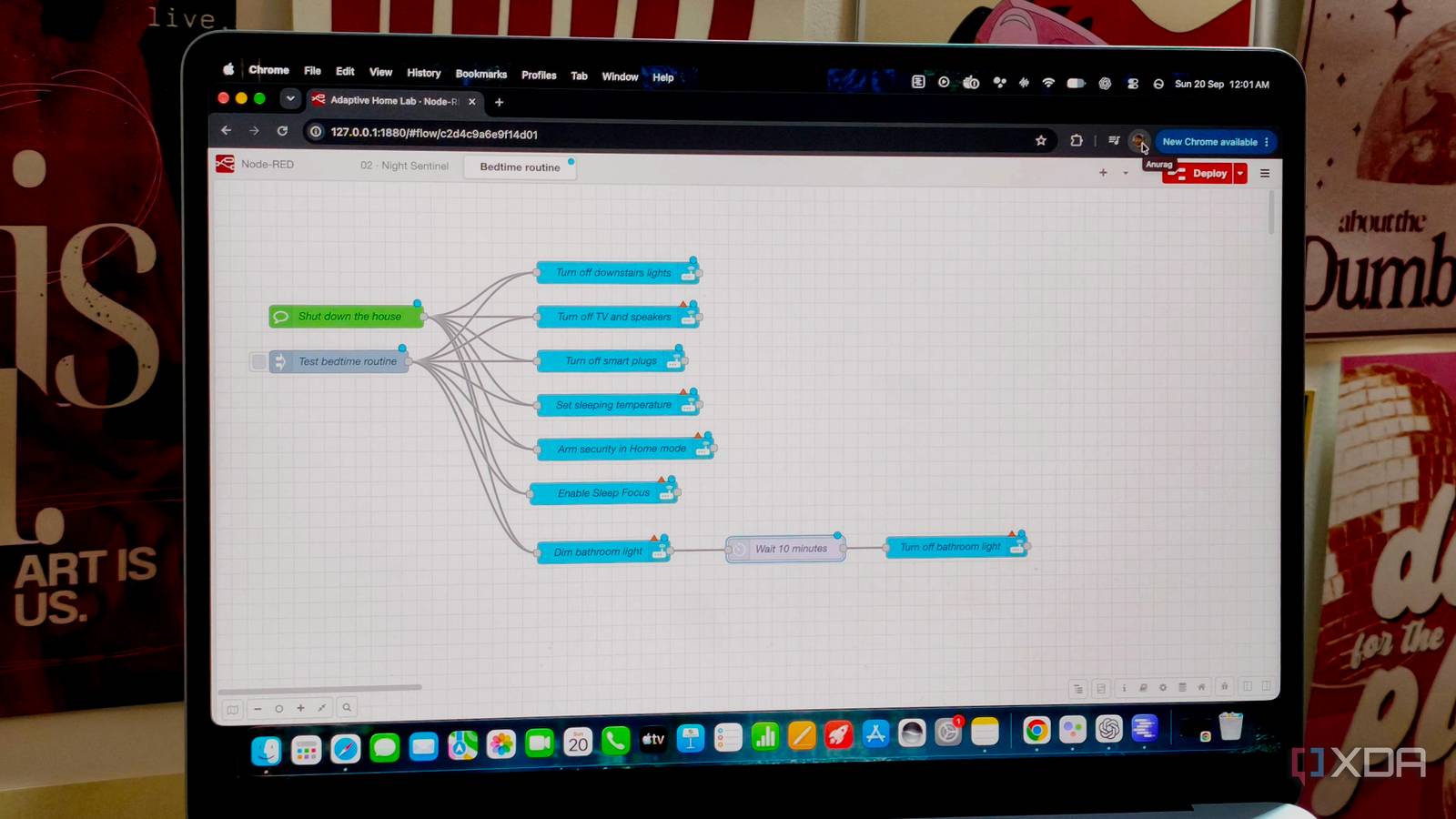
Published Sep 20, 2026, 5:00 PM EDT Anurag is an experienced journalist and author who’s been covering tech for the past 5 years, with a focus on Windows, Android, and Apple. He’s written for sites like Android Police, Neowin, Dexerto, and MakeTechEasier. Anurag’s always pumped about tech and loves getting his hands on the latest gadgets. When he's not procrastinating, you’ll probably find him catching the newest movies in theaters or scrolling through Twitter from his bed. My smart home already controls most of the devices I use around the house, including the downstairs lights, TV, speakers, smart plugs, thermostat, and more. Yet when I was done for the night, I still handled each part separately. I had to switch everything off, change the temperature, arm the house, and enable Sleep Focus on my phone. I eventually rolled those actions into a single bedtime routine. Now I can say “shut down the house” and have the TV and speakers switch off, the thermostat adjust, the security system arm, and the bathroom light stay dim for another five or ten minutes before turning off. I built the routine around the devices I already own, although you could extend the same idea to smart locks, blinds, contact sensors, or anything else connected to your platform. Getting rid of goodnight chores Putting the “good” back in “goodnight” My bedtime setup starts with the devices already available in my smart home platform. The lights, media devices, smart plugs, thermostat, and security system can all be controlled from the same place, so I don’t need to jump between their individual apps. I split the routine into immediate and delayed actions. Most of the house shuts down as soon as the command runs, but the bathroom light stays on at a low brightness for another five or ten minutes. I keep the morning reset separate since I don’t always need to reverse every bedtime action in exactly the same way. Sleep Focus is also dependent on what your phone and smart home platform support, so you may need phone-side automation to include it. I use Home Assistant linked with Node-RED to build my automations, but you can use any platform that can see your devices, run several actions from one trigger, and add delays where needed. The trigger itself can come from a smart speaker, phone shortcut, dashboard, NFC tag, or physical smart button. Your version can also be much smaller than mine. A couple of connected lights and a smart plug are enough to make the idea useful. If you have more hardware, you can close the blinds, lock-supported doors, change the ceiling fan speed, pause a robot vacuum, or check contact sensors before the house shuts down. I built the routine in Node-RED You can use any other automation tool as well I keep the devices in Home Assistant and build the actual sequence in Node-RED. This is much easier to manage once an automation does more than turn a couple of devices on or off. The flow begins with a trigger from Home Assistant. Your voice assistant can call a Home Assistant script or toggle a helper, which Node-RED can watch for a state change. If you use Home Assistant Assist, the Sentence node can also listen for a specific phrase such as “shut down the house” and start the flow directly. From there, I split the flow into the actions that should happen immediately and those that need to wait. Home Assistant Action nodes handle the device controls, so I can target individual entities, groups, or entire areas. The bathroom light follows its own branch — it drops to a low brightness, passes through a delay node, and then switches off after five or ten minutes. I keep the morning reset in another flow rather than leaving the bedtime automation running until the next day. You’ll also need a different approach for the Sleep Focus because it’s a phone setting rather than a regular Home Assistant entity. Depending on your phone, you can use the Home Assistant companion app, a phone-side automation, or a shortcut that Home Assistant triggers as part of the flow. I would keep this separate from the main device actions until it works reliably on its own. Just don’t automate the trigger itself That part has to come from you I could schedule the bedtime flow to run at the same time every night, but I don’t want the TV, lights, or thermostat changing simply because the clock has reached a certain hour. A schedule can’t possibly know whether you’re ready for bed, still using the room, or have someone over. My trigger command, “Shut down the house”, only runs the flow when I ask for it, and the phrase is specific enough that it shouldn’t come up during a normal conversation. If you don’t want to use voice control, the same idea works with any manual trigger that is convenient at bedtime. I also avoid toggle actions in this flow. It can flip a device from its current state, which creates a problem if the voice assistant submits the command twice. Instead, make each node tell Home Assistant exactly what to do. If the routine runs again, it repeats those commands without turning anything back on. Build complex home automations If you have a decent number of smart home devices, you can set up plenty of automations. I understand that figuring out what you can automate and which devices you can combine can be tricky. However, there are tools that can help. For example, AI Automation Suggester recommends automations based on the devices you already own. You can also use Claude Code, Codex, or any general-purpose AI assistant to write the automations for you.
I gave my smart home a bedtime button, and it actually makes every night a little bit easier
Full Article
Original Source
Read the full article at Xda-developers →KhanList aggregates and links to publicly available news content. We do not host full articles from third-party sources. Always verify important information with original sources.