
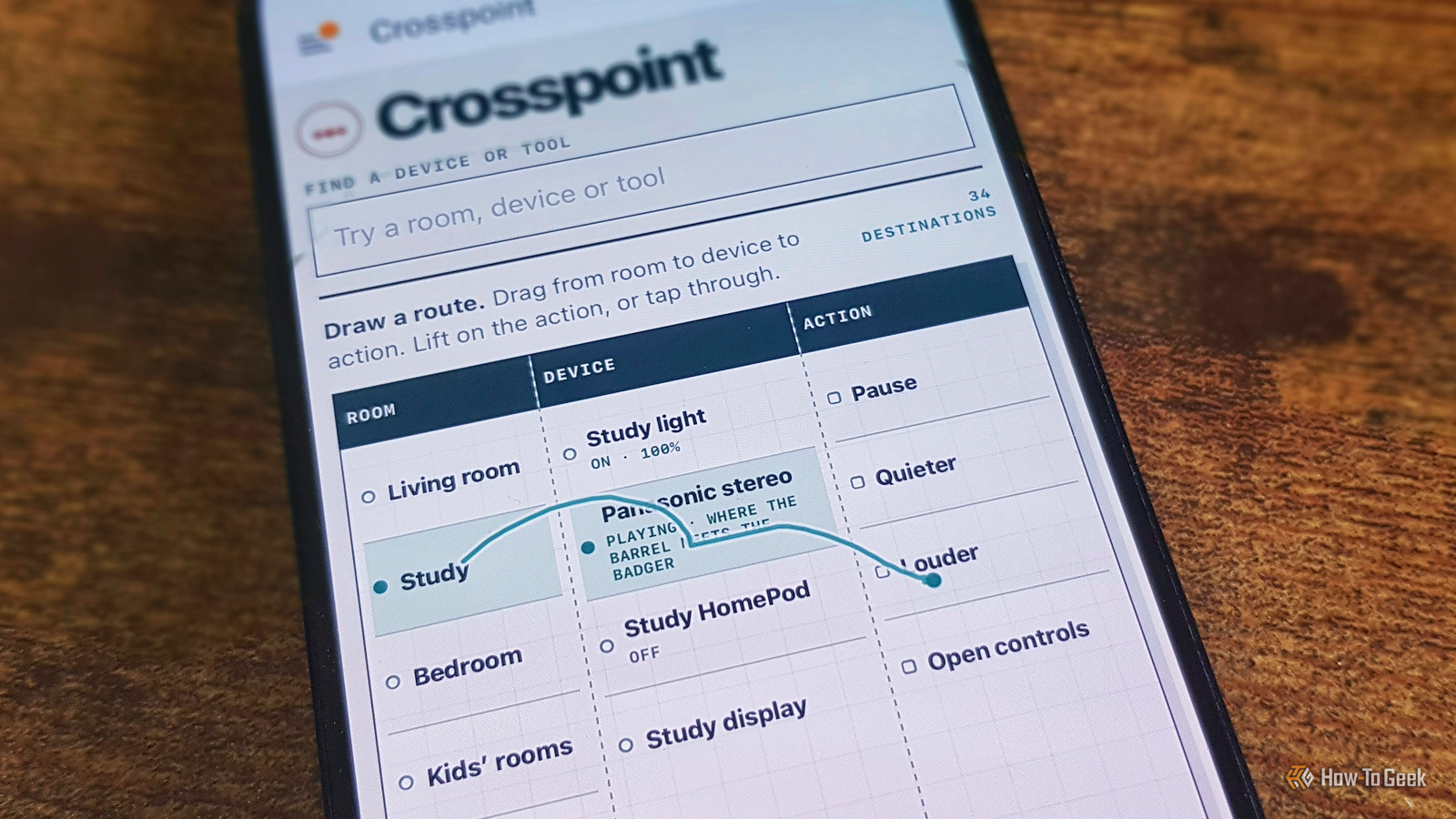
Published Nov 18, 2026, 6:30 PM EST Adam has a degree in Engineering and has a life-long interest in technology. He has been writing for over a decade for various print and online publications, with a focus on consumer tech. He joined How-To Geek in 2024 while working at Pocket-lint. As well as being a long-term fan of Apple products, he also has a strong interest in smart home tech, running a Home Assistant server at home to automate all his smart home devices. He believes that the ideal smart home should work with minimal interaction from the user, with automations running as if by magic rather than requiring you to push buttons on a control panel. You can find more of his work on Muck Rack. If you take a look at the Home Assistant subreddit, you'll find post after post of people showing off their dashboards. This was a thing long before vibe-coding, but it seems to have become even more prevalent now that you can just ask an AI chatbot to design and build a dashboard for you. The problem is that almost all of these dashboards look the same. They're all very pretty, but they're usually overly cluttered, not very user-friendly, and every one has that telltale AI look. I decided to see if I could get ChatGPT's Codex to build me a dashboard that was genuinely different, and after a lot of effort, that's exactly what it did. Codex started by focusing on what it thought mattered The first attempt was too fixated on one issue To make this happen, I set up the Home Assistant Model Context Protocol (MCP) tool that allows AI tools to read and write to Home Assistant. This can expose a lot of data about your smart home to a tool that processes everything in the cloud, so you need to think carefully about exactly what you're willing to expose. For the sake of this article, I took one for the team and gave Codex fairly broad access. I asked it to examine my devices and entities, my automations, and anything else it needed, and to come up with a dashboard that only included the devices that I often control manually. I also gave it explicit instructions to use full creative freedom to create something new and original that didn't just look like every other dashboard on Reddit. The first try was disappointing. Codex found my elaborate set of automations that track and try to mitigate the risk of mold in my home, which can be a real issue in our old and damp house. Its first attempt was a fairly generic dashboard with a massive section devoted to the mold risk, and very little else. The second and third attempts weren't much better They weren't dashboards I'd ever be likely to use I explained the problem with this first attempt: it was too fixated on a single aspect of my smart home, and it was still a fairly generic dashboard. Codex had another try, but the next version was a dashboard that mostly just showed the upcoming stages of various automations, which wasn't much use at all. The third attempt was a little more interesting. It added the two controls that I use most evenings (the bedside lamp and the electric blanket) as permanent controls on the dashboard and featured a list of outstanding issues for me to resolve. This wasn't really a dashboard; it was more of an information screen, but it did at least look a little different. The fourth attempt was at least a little different Codex tried to bring some originality I explained the problems with the previous two efforts and asked Codex to come up with a completely original, innovative, and cool way of presenting dashboard controls and data that absolutely must not just be a collection of button cards. Codex tried something new, focusing on the idea of showing my video doorbell feed as if it were behind the shutter of a camera. Other sections, such as lights, heating, and audio, were different lenses that could change the controls that appear on the dashboard. It was a slightly different idea, but it was still, in essence, just a collection of dashboard controls given an overarching theme. It still didn't feel new or exciting. The final dashboard was something genuinely new I've never seen a dashboard that works this way before I was on the verge of giving up, since my Codex plan usage was almost reaching its limit, but I decided to give it one more chance. I explained that the previous attempt was just cards and buttons with a theme and asked it to come up with something that had never been seen before in the history of the universe. The dashboard it built was something that I've genuinely never seen in Home Assistant. Other people may have come up with something similar, but if they have, I've never come across the idea. The concept of the dashboard is that you control devices by dragging out a line from a room to a device to an action. For example, if I start my route at the Study, it then populates the Device column with a curated list of devices in that room. I carry on dragging the line through one of those devices, such as the light, and the Actions column brings up options such as "Turn off" and "Set to 20%," as well as an option to open the full light controls. The available actions change depending on the current state of the device. The entire thing is done by drawing a route with the mouse or trackpad on a computer or by dragging my finger on my phone. It's simple to do and intuitive to use. It may have taken some effort, but Codex finally managed to fulfill the brief, although whether I'll end up using the dashboard in the long term remains to be seen. AI tools can do a lot, but they're still not great at original ideas This experiment confirmed something that I've thought for a while. AI chatbots and coding agents are great at implementation, but pretty poor at coming up with original ideas. It's probably why you see so many almost identical smart home dashboards or home screen launchers for rooted TVs all over Reddit. If you want a truly original idea, you may be better off trying to think of one for yourself.
I gave Codex free rein to build a Home Assistant dashboard, and it came up with something I've never seen
Full Article
Original Source
Read the full article at Howtogeek →KhanList aggregates and links to publicly available news content. We do not host full articles from third-party sources. Always verify important information with original sources.