
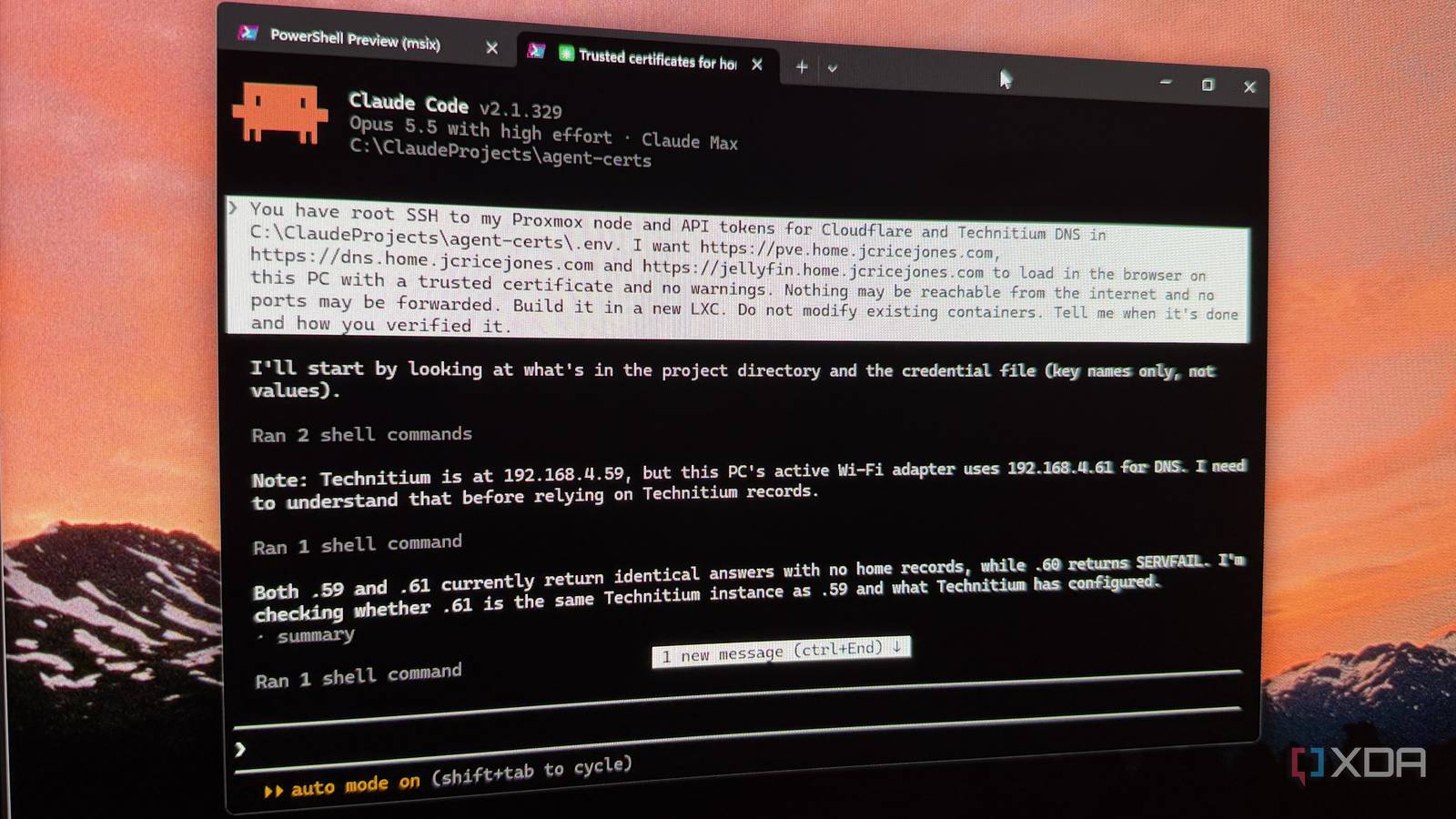
Published Nov 20, 2026, 4:00 PM EST Maker, meme-r, and unabashed geek, Joe has been writing about technology since starting his career in 2018 at KnowTechie. He's covered everything from Apple to apps and crowdfunding and loves getting to the bottom of complicated topics. In that time, he's also written for SlashGear and numerous corporate clients before finding his home at XDA in the spring of 2023. He was the kid who took apart every toy to see how it worked, even if it didn't exactly go back together afterward. That's given him a solid background for explaining how complex systems work together, and he promises he's gotten better at the putting things back together stage since then. Back in September, getting trusted HTTPS certificates onto my home lab ate the best part of a weekend. I had Claude helping in a chat window the whole time, and I still spent hours copying commands into a terminal, pasting errors back, and fighting the DNS challenge that proves you own a domain when none of your services face the internet. It worked in the end, and Caddy replaced the reverse proxy config I dreaded. So I wondered what would happen if I cut myself out of the loop. Same job, new subdomain, but this time Claude Code would run the commands on my Proxmox server itself. It took 20 minutes. I also learned exactly how much of that I should take on trust. I didn't exactly give Claude Code a lot to go on An SSH key, two API tokens, and a short paragraph of instructions "Access" sounds scarier than it was, although it was still plenty. Claude Code got root SSH to my Proxmox node, a Cloudflare API token that could edit DNS records on one domain and nothing else, and an API token for Technitium, which is still the best local DNS tool you can deploy. I've connected Claude to my Proxmox cluster through MCP before, but I left those servers out this time, so there was no special tooling involved, just a shell and two keys in a file. The prompt named the outcome and left the method alone. I wanted three addresses under a new home. subdomain, for the Proxmox dashboard, the Technitium dashboard, and Jellyfin, to load in the browser on my PC with a trusted certificate and no warnings. Then I added three limits: nothing reachable from the internet, build it in a new container, and do not modify existing containers. That last sentence mattered more than anything else I typed. I had to block its skills before the test meant anything My first attempt lasted about a minute. Claude Code loaded a skill I'd written that maps my home lab, followed it to my lab notes, and started reading the note from September's build. That's smart behavior, and it's also the answer sheet. To be fair, you could argue that's the point of keeping notes. But I wanted to know what access alone was worth, so I stopped the session and tried renaming my skills folder, which didn't work because the skills sync straight back from my account on launch. Starting the session with claude --disallowedTools "Skill" did the trick, and the permissions screen confirmed the block before I pasted the prompt again. Twenty minutes later, my Proxmox login had a padlock And a new container, a wildcard certificate, and a working console I sent the prompt at 11:17 pm. Claude Code's first report came back 14 minutes and 34 seconds later by its own timer, and at 11:37 pm I had "Connection is secure" on my Proxmox dashboard in Chrome, with a virtual machine's console running through the new address. Twenty minutes, start to padlock. In that time it built a new container running nginx and certbot, got a wildcard certificate from Let's Encrypt using the DNS challenge through Cloudflare, created the DNS zone on my Technitium cluster, and put a firewall on the container that only accepts web traffic from my own network. My own check afterward agreed with its report: all three names resolved privately, had no public record, and served a certificate Windows trusts. It skipped Caddy, and the hard parts of my weekend never showed up Here's where I have to admit my test was designed around the wrong tool. I'd planned five traps based on September, and three of them only exist if you use Caddy. Its stock package doesn't include the Cloudflare DNS module, and its check that the challenge record has gone live gets tangled with how my eero mesh intercepts DNS. Claude Code never met any of that, because it picked certbot instead. Its script created the record, waited 30 seconds, and let Let's Encrypt do the checking. The one trap that did apply was whether it would test against Let's Encrypt's staging servers before asking for a real certificate, and it did that without being told. The problems it did hit weren't the ones I planned for It still had a bumpy ride, just a short one. Its firewall rules didn't load the first time, and it noticed because it read the active ruleset back instead of assuming. The file holding the Cloudflare token came out five bytes longer than it expected, and its remote commands broke on PowerShell's quoting twice, so it moved the logic into script files on the server. My favorite catch came after every check had already passed. The new container had picked up a public IPv6 address on its own, which it said would answer pings from the internet, and Claude Code went back and closed that off. I wouldn't have thought to look. It never asked my permission, and my only input was a typo Zero approval prompts, one blocked command I didn't approve a single action during the run. The session was in auto mode, which is now Claude Code's default, with the stock rules, and a new container, a DNS zone, and a certificate all went through without a prompt. If that makes you a little uneasy, good, because it should. Auto mode did block one command. Claude Code wanted to read the first and last few bytes of that Cloudflare token file to find the stray characters, and the block came back marked as unauthorized access. It didn't argue. It said it wouldn't inspect a secret file, then rewrote the file through a script that strips the junk on the way in. The only line it wouldn't cross was the one I wrote Jellyfin is the address that didn't fully work, and it wasn't Claude Code's fault. Without any hint from me, it turned out my Jellyfin container hasn't started since November 8 because its config passes through an AMD graphics device, and I've temporarily moved my Proxmox drives into an Intel box. The fix it proposed was to remove one line, which meant editing an existing container, so it stopped and asked. And then I flubbed it. I typed a single "n" into the wrong window, meaning to log a note in my timer script, and Claude Code read it as "no" and left Jellyfin alone. So the one decision a human made in the whole run was a typo. Jellyfin's address still got its trusted certificate, with a polite error page behind it. I'd hand Claude Code the keys again, with a tighter prompt The September and November versions of this job both had Claude behind them. What changed was that I stopped being the slow, error-prone cable between the chat window and the terminal, and a weekend became 20 minutes. That time excludes my prep, which included discovering that my server didn't trust my SSH key yet. What kept it safe wasn't a permission system, because nothing prompted me. It was a scoped token, a default that refused to peek at a secret, and "do not modify existing containers" in the prompt. Everything it built was additive, so tearing it down the same night took a few minutes, although its own rollback list left out the notes it had saved about my network on my PC. If you try this, write your limits down first, and ask for the evidence behind anything in the report you plan to rely on.
I gave Claude Code access to my Proxmox server, and it set up in 20 minutes what took me a weekend
Full Article
Original Source
Read the full article at Xda-developers →KhanList aggregates and links to publicly available news content. We do not host full articles from third-party sources. Always verify important information with original sources.