
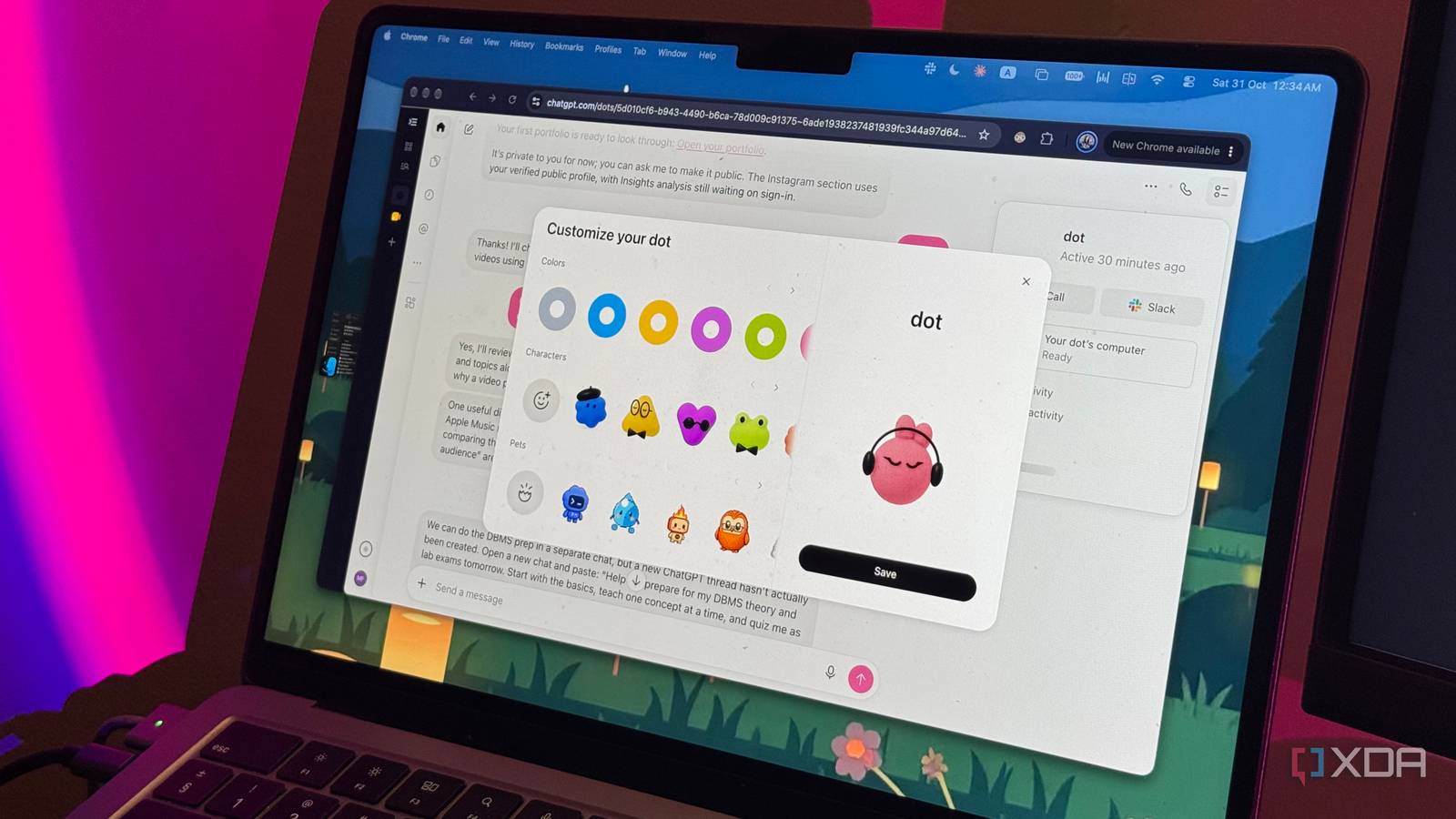
Right now, the AI trend every company seems to be jumping on are always-on AI assistants that don't just wait around for you to give them instructions. OpenClaw helped kick off the craze for always-on AI assistants earlier this year. It wasn't long before major AI companies began experimenting with their own takes on the concept. Anthropic introduced Claude Dispatch, Meta launched Muse, and OpenAI eventually joined the party with ChatGPT Dots at its DevDay conference in September. I've been testing Dots for the last two weeks or so, and I've taken the bold step of connecting it to a bunch of tools I rely on daily. Turns out, the promise of having an AI assistant that proactively helps you without being asked isn't as far-fetched as I initially thought. So, what even are ChatGPT Dots? Think ChatGPT, but with a mind of its own OpenAI describes Dots as always-on AI agents powered by GPT-6 Astra. Think of them as personal AI assistants that don't just sit around waiting for you to give them instructions. Instead, they can proactively look for ways to help you, keep track of ongoing tasks, and even get work done without you having to ask. Dots can connect to the apps and services you already rely on through OpenAI's ecosystem of plugins. Once connected, they can keep an eye on what's happening across these apps, flag things that might need your attention, and help you stay on top of your responsibilities. They also learn your preferences over time, so ideally, the longer you work with your Dot, the better it gets at understanding what matters to you. Note: Dots are currently limited to select paid plans, including ChatGPT Pro, which starts at a whopping $100 per month! OpenAI provided me with complimentary access to ChatGPT Pro to test the feature, but had no editorial input or influence over this article. All opinions expressed are my own. Each Dot also gets its own cloud computer and browser, which means it can take on more complicated tasks without relying on your own device. You can assign it multiple projects, let it work on them simultaneously, and even close ChatGPT entirely while it continues working in the background. You can also view its computer to see what it's doing, or take over the controls yourself when needed. Getting Dots connected to my digital life was surprisingly easy A few clicks later, I had a personal assistant The concept behind OpenClaw was so well-received for a good reason. Beyond the privacy concerns, though, one of its biggest drawbacks, especially when it first went viral, was the technical barrier to getting started. You needed to be comfortable running terminal commands, configuring AI models, and setting up integrations before you could really start using it. Sure, none of this was necessarily impossible for someone with a technical background, but it wasn't exactly the kind of tool an average person could just open and start using, either. Dots eliminates much of this friction. If you're comfortable using ChatGPT for your everyday tasks, you can set up a Dot and begin using it. I'd argue that it's even simpler than that! ChatGPT essentially walks you through the entire process. You give your Dot a name, customize its appearance, and choose which apps and services you want it to access. I connected mine to Gmail, Google Calendar, Asana, Slack, Notion, Outlook, and a few other tools I rely on daily. The entire process took just a few minutes, and there were no terminal commands, API keys, or complicated configurations to worry about. What I particularly like is how approachable OpenAI has made the entire experience. From the adorable little characters you can customize to the fact that interacting with your Dot feels just like having a regular ChatGPT conversation, there's very little about it that feels intimidating. Dots started helping before I even asked Dots understood the assignment before I gave it one One of the biggest selling points of Dots is that they don't necessarily need you to tell them what to do. They're designed to proactively look for ways to help, and while I was initially a little skeptical about how useful that would actually be, it turned out to be one of my favorite things about the entire experience. Before I'd even gotten around to assigning my Dot anything specific to monitor, it managed to surprise me. Let's just say I made a financial mistake that could've turned into a pretty expensive mess, a mere 40 minutes before I was supposed to leave for an exam. Perfect timing, right? Naturally, I went into full panic mode. I turned to ChatGPT to find every customer support email address and phone number I could possibly use to get the transaction reversed. After sending an email and eventually getting through to customer support over the phone, there wasn't much else I could do. I had an exam to get to, so I put my phone away and hoped for the best. When I finally got back, I noticed a notification from my Dot. It had spotted a response from customer support in my Gmail inbox, realized it was good news, and decided to let me know. Mind you, I hadn't asked it to monitor the situation, check for replies, or even explained much about what had happened in the first place. Yes, I could've absolutely opened Gmail and read the email myself. In fact, that was the first thing I was going to do when I checked my phone, before I saw Dots' message. However, that's precisely what made this feel so different from using a regular AI chatbot. I wasn't the one initiating the interaction. Just as an actual assistant would have done, Dots recognized that something important had happened and took the initiative to bring it to my attention without me having to ask. It didn't just stop there! Even after I had received a positive response from one customer support agent, Dots made sure to continue keeping me in the loop. At one point, there was some conflicting information from two customer support agents, and my Dot flagged that, too. What impressed me even more is what happened as I was writing this article, when I made another withdrawal from the same account. Dots remembered the previous incident and proactively messaged me to check whether I'd actually intended to make this one. I hadn't asked it to keep an eye on my future transactions, either! Another example happened when Dots noticed an email from my college about an upcoming tuition fee deadline. I'm supposed to be traveling next week, and the deadline happens to clash with the day I'm flying out. Missing it would mean paying a pretty hefty late fee. Now, here's the funny part. I actually missed my tuition deadline last semester because I was traveling and ended up having to pay the late fee. So, having my Dot bring this to my attention before I made the same mistake again was genuinely helpful. These might seem like relatively small things, but I think that's precisely what makes the proactive element so useful. Some tasks take much longer with Dots Dots takes longer, but I don't always mind One thing I noticed pretty quickly is that Dots isn't particularly fast. Even tasks that a regular ChatGPT conversation could handle in a fraction of the time sometimes take considerably longer. Judging by what other users have reported, on Reddit and other community forums, I'm certainly not alone in noticing this. However, I've realized that speed isn't necessarily the most important thing when you're dealing with an AI assistant. What matters more to me is how much of my own time and attention I need to spend getting something done. Remember how I mentioned that every Dot gets its own cloud computer? This is where that becomes particularly useful. Instead of having to sit around waiting for it to finish a task, I can simply assign it something, let it get to work in the background, and go about my day. It can even work on multiple tasks simultaneously, without needing my laptop to do the heavy lifting. Rather than having to constantly check whether it's finished, my Dot can reach out with updates or let me know when something needs my attention. For instance, at one point, I wanted to analyze some trends on Instagram. Rather than manually gathering the information or paying for a third-party connector, I simply logged into Instagram through my Dot's cloud browser and asked it to do the research for me. While it was working on that, I gave it another task: building me a portfolio website. Both tasks were running in parallel, and I could check on their progress whenever I wanted. I could even open my Dot's cloud computer to see exactly what it was doing and take over the controls if needed. Would I have gotten some of these results faster by using regular ChatGPT? Definitely. However, the fact that I could hand off two completely different tasks, continue with my own work, and check back when there was something worth looking at made the slower execution a lot easier to overlook. My Dot and I have become phone buddies I didn't expect to enjoy calling my Dot this much I'm all for fun tech. I mean it! One of my favorite things I got to experience at IFA was HONOR's Robot Phone, and watching it dance along to some tunes and sing random songs was genuinely entertaining. Yes, that changes absolutely nothing about your life or mine, but the world is already serious enough. Does a little fun really hurt? That's sort of how I feel about Dots' calling feature. You can actually hop on a voice call with your Dot and have a full-blown conversation. Surprisingly, the conversations feel fairly natural. My Dot laughs along when I laugh, pauses between sentences, and even throws in the occasional cough. It's almost eerily realistic at times, and while I can see why some people might find that a little creepy (I do too sometimes), it pretty cool. Calling your Dot isn't just a novelty, though. Unlike having a regular voice conversation with ChatGPT, you're talking to an AI agent that can actually get work done on your behalf. You can bounce ideas back and forth, ask it to research something, or delegate an entirely new task without having to interrupt whatever you're doing. It can get to work in the background, spin up a separate task when needed, and report back with updates or results. I've found this especially useful when I'm already working on my laptop. I can keep the call running on my other screen, talk through whatever's on my mind, and have my Dot get started on things as they come up. It's a little like having an assistant sitting beside you, ready to take something off your plate whenever you think of it. For instance, earlier this week, my Dot noticed some new assignments in Asana and brought them to my attention. With midterms approaching and a bunch of work commitments to juggle, I decided to hop on a call and ask it to help me organize my calendar. We spent a few minutes discussing my priorities, figuring out what needed to get done first, and deciding how best to time-block everything. So, is Dots really worth it? I do have to admit that I see the hype. But is it worth paying upwards of $100 per month for, at least right now? Not really.That said, Dots is still in its early days, and there's plenty of room for improvement. For now, though, my experience has been a mixed bag, but a surprisingly positive one overall. Dots certainly hasn't replaced the way I use ChatGPT for everyday tasks, and I don't think it will anytime soon. However, having an AI assistant that remembers what matters to me, keeps an eye on things I might otherwise overlook, and occasionally takes the initiative to help without being asked? That's something I can absolutely get behind!
I gave ChatGPT Dots access to my email, calendar, and tasks, and it started helping without being asked
Full Article
Original Source
Read the full article at Xda-developers →KhanList aggregates and links to publicly available news content. We do not host full articles from third-party sources. Always verify important information with original sources.