
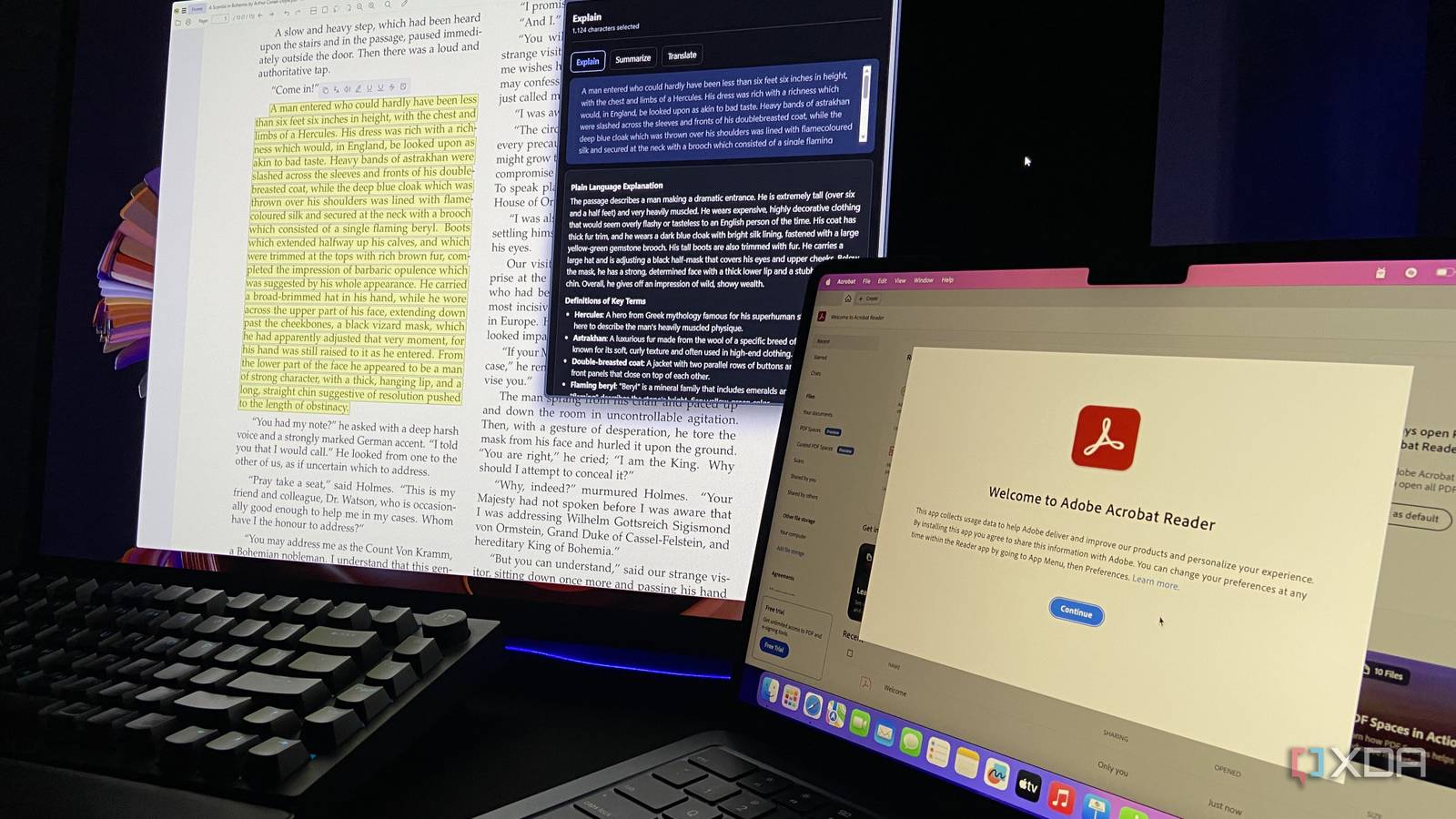
Published Nov 14, 2026, 5:30 PM EST Abhinav pivoted from a career in banking to pursue his first love in writing. Even while working full-time, he continued contributing as an editor-at-large, a role he has held for more than 7 years. A lifelong tech enthusiast who has built three gaming and productivity powerhouse PCs since 2018, his passion for technology keeps him closely following the semiconductor industry, from NVIDIA and AMD to ARM. His MSc dissertation explored how artificial intelligence will reshape the future of work, reflecting his curiosity about the wider social impact of emerging technologies. Since 2024, Adobe has put AI at the center of its product offering when it comes to Acrobat. You can ask a PDF a question, get a summary of it, and click through to the exact page the answer came from using its AI Assistant, which Adobe bundles into Acrobat Studio at a rather preposterous price of $24.99 a month, about $5 more than Acrobat Pro. For context, that's more than I pay for Claude Pro, for a chatbot that only talks about PDFs. So, I went and used my Claude Pro subscription, which costs me $5 less, to hook my local AI, which costs me nothing, into SumatraPDF, which is a free and open-source PDF reader. With nothing but the vision of a function and ten minutes of my time, I used Claude Code to write a small helper app that connects Qwen3.6 with SumatraPDF. Here's how any PDF I open on my PC can now answer questions about itself without a single byte of information leaving my PC. SumatraPDF has no plugins, but its settings file has two open doors Two settings built for other apps and web searches can feed a local AI easily SumatraPDF doesn't support plugins, but you can achieve a similar result with two of its advanced settings. The first of these is External Viewers, which is designed to let you open the PDF you are currently reading in another application, passing along the location of the PDF and the page number you're currently on. The second setting, which is Selection Handlers, allows you to pass any text you highlight in a PDF document to a website (SumatraPDF ships with options for Google and DeepL, but you can add your own for any website). Both of these settings are configured in a plain text file which can be opened from SumatraPDF via its Advanced Settings, so no compiling is needed. I've configured both of these to use a tiny helper of my own making. It uses a free library called PyMuPDF to extract the text from the PDF page-by-page and passes it to an instance of llama-server, which, on my setup, is running Qwen3.6-35B-A3B (at Unsloth's UD-IQ4_XS quant) with 64K of context, which is enough for the documents that I work with. Currently, I've got SumatraPDF configured such that Alt+1 opens up a chat about the entire PDF, and highlighting text and pressing Alt+2, Alt+3, or Alt+4 will get the highlighted text explained, summarized, or translated. The model's responses are generated in a browser tab, which pulls up whatever the default browser is on the system. For this test, I used the 3.7 pre-release of SumatraPDF, as the current stable build 3.6.1 has a notorious limit that only passes the first 1000 characters or so of any highlighted text. I quizzed my motherboard manual with it It now answers questions about itself, and brings citations along To test the setup, I used the manual for the motherboard in my own PC, the MSI B650M Gaming Plus Wi-Fi, downloaded from MSI itself. The PDF is 62 pages long and contains approximately 17K tokens of text, so it fits comfortably in the model's 64K context window, and the model reads the entire document rather than just a few pages. The first question I asked took 12.5 seconds to answer, but that was because the model had to read the whole 62-page document first. Every subsequent question was answered within 4 seconds, at a rate of about 69 tokens/second, because the model didn't have to re-read the document. Since everything I asked comes from a manual, the information and ground truth is easy to verify by just reading the manual myself. During my test, I asked the model five questions, to which the model gave the correct answer every time, citing the right page. Clicking the page number in the answer also takes you to the specific page it refers to in SumatraPDF, which is the distinctive feature that Adobe uses in its paid PDF assistant. It's the best at the questions a search box can't answer It reasons, admits what isn't there, and summarizes when asked to Probably my favorite answer was to whether using either of the M.2 slots disables any of the SATA ports on the motherboard. The model correctly said no, since both M.2 slots are connected to the CPU while the SATA ports are connected to the chipset, and cited page 18 for it, where the manual's spec table details exactly that. As a little fun experiment, I decided to ask whether the motherboard could spontaneously combust, and found that it was just as honest when an answer wasn't available. Qwen3.6 responded by stating that the manual doesn't mention that, and instead decided to point me to its overheating warnings. In another run, I decided to test its summarization feature, which had a few challenges, but none relating to the helper or the model itself. The key limitation was SumatraPDF's latest stable version, which only fed my model the first 1,000 or so characters of whatever I highlighted, so my first summary of a passage from A Scandal in Bohemia was cut halfway. On the 3.7 pre-release, the full 1,531 character selection went through. Question Model Response Verdict Citation The yellow EZ Debug LED stays lit and the PC won't boot. What's wrong? The memory isn't detected or has failed Correct Correct (Pages 43 and 29) Can I plug a 5V ARGB LED strip into the JRGB1 connector? No, it will damage the strip Correct Correct (Pages 43, 41 and 42) Does putting an SSD in either M.2 slot disable any SATA ports? No, both M.2 slots run from the CPU and the SATA ports from the chipset Correct Correct (Pages 18 and 33) What's the fastest memory speed, and the maximum total RAM? 7,200+ MT/s overclocked with one single-rank stick per channel, and 256GB Correct Correct (Page 17) Can I update the BIOS without a CPU installed? Yes, with the Flash BIOS button and a USB drive holding the BIOS file renamed to MSI.ROM Correct Correct (Page 51) My local AI kicks yet another subscription off the bank statement It took about ten minutes and a few lines of settings to give me a free, open-source PDF reader with the AI features that Adobe locks behind a $24.99 plan. This isn't the first example where local AI has made open-source tools better, or replaced the features paid apps have built their price on, and I'm willing to bet it won't be the last of its kind. Sumatra PDF SumatraPDF is a lightning-fast, minimalist, open-source PDF reader optimized for viewing documents, not editing. It is portable, low on system resources, and supports other formats like ePub and CBR.
I gave an open-source PDF reader a local AI instead of paying Adobe $25 a month to chat with my PDFs
Full Article
Original Source
Read the full article at Xda-developers →KhanList aggregates and links to publicly available news content. We do not host full articles from third-party sources. Always verify important information with original sources.