
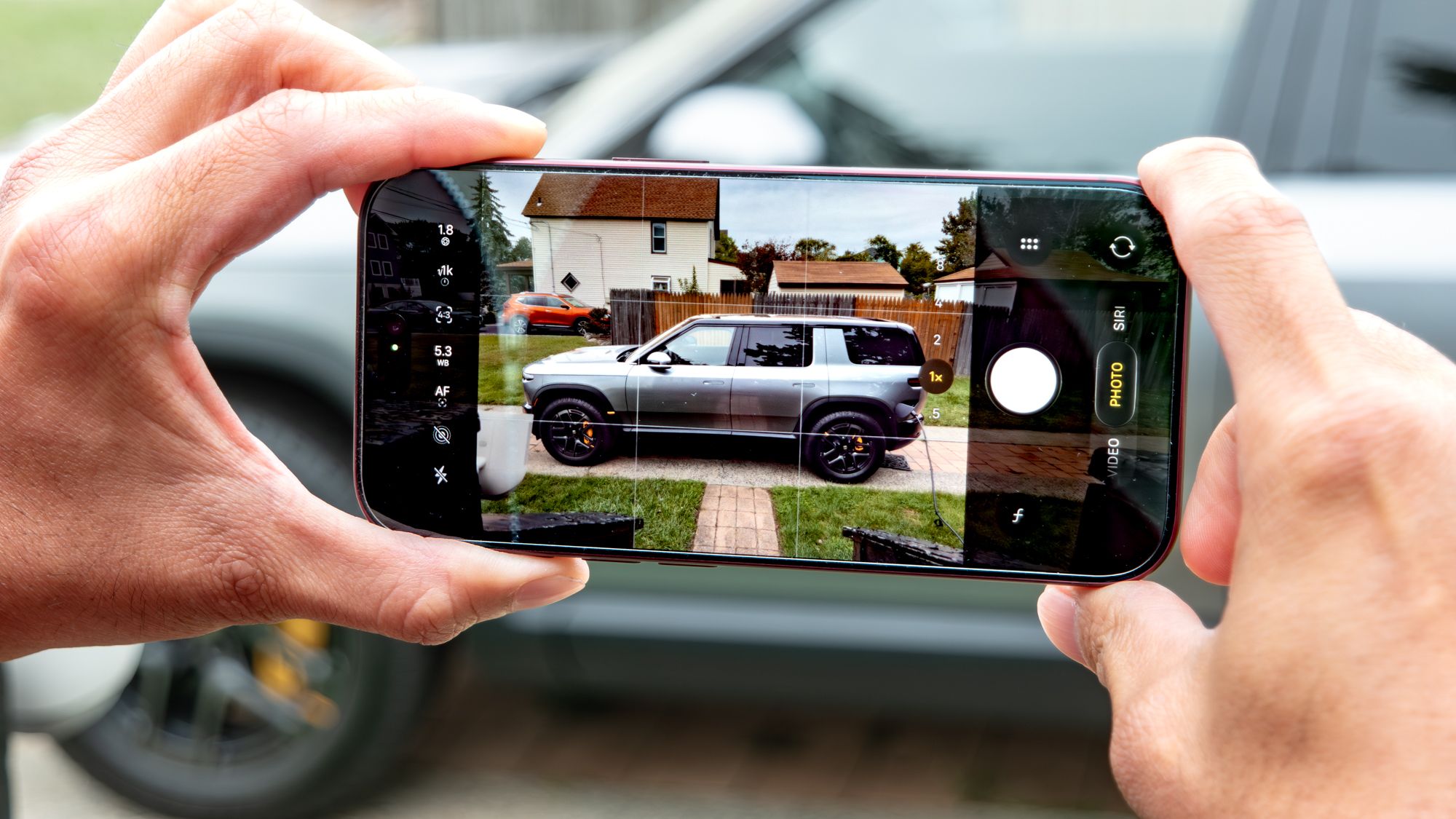
(Image credit: John Velasco / Tom's Guide) For the past couple of weeks, I’ve been putting all the iPhone 18 Pro (and 18 Pro Max) camera upgrades to work. While the variable aperture system has drawn plenty of attention — and rightfully so, given the natural depth of field it delivers — the bigger upgrade for me has been the introduction of new Pro Controls.I can’t tell you how long I’ve been asking for this. Apple has historically been reluctant to give users full manual control, but over the last few generations, it’s slowly been rolling out incremental features that prove it's actually listening. Even so, it wasn't until recently that I stumbled onto something that takes the feature to another level: the ability to fully customize the Pro Controls layout to match your exact shooting style.Whether you want shutter speed pinned front and center, or the focus slider positioned for precise fine-tuning, customizing this interface completely transforms the experience. Here’s how to do it.How to customize Pro Controls layout using the iPhone 18 Pro/Pro Max 1. Open the camera app, access Pro Controls Customizing the Pro Controls layout to keep your favorite tools within reach is surprisingly simple. Start by opening the Camera app, then press and hold any of the control icons located on the side opposite the shutter button.On a brand-new iPhone 18 Pro or 18 Pro Max, you’ll typically see the default icons for Live Photos and the LED flash — just long-press either one. 2. Make your selections You’ll now see an Add Photo Controls overlay displaying icons for every available manual setting. You can configure anywhere from two to eight controls at a time. Once you’ve picked what you need, simply drag and drop the icons into whatever order or layout works best for your shooting. Click Done when you're finished to save the layout. (Image credit: John Velasco / Tom's Guide)All of your selections will stay locked in the exact order you arranged them, making Pro Controls vastly more practical since you're no longer forced to constantly tap the six-dot icon to dig into settings. I love this level of customization because it gives me the flexibility to tweak key parameters on the fly, letting me refocus on framing and shooting instead of fumbling through menus.Best of all, this layout customization carries over seamlessly to video recording. While you’ll find familiar core adjustments like aperture, shutter speed, manual focus, and white balance, Apple also adds video-specific tools like Dual Capture, Action mode, and Adaptive — the latter designed for time-lapse recording to dynamically slow the frame rate when motion is detected. (Image credit: Future)Follow Tom's Guide on Google News and add us as a preferred source to get our up-to-date news, analysis, and reviews in your feeds. Make sure to click the Follow button!More from Tom's Guide Android president on Apple's iPhone Duo: 'I'm glad to see more people joining what is now the obvious party'Forget iPhone 18 Pro — 9 reasons to wait for the iPhone 20I finally unlinked my iPhone alarm from my ringer volume — here is where Apple hid it in iOS 27Sign up to the Tom's iGuide weekly newsletter with coverage on everything from product launches to software updates, this is your go-to source for the latest updates on all the best Apple content. John’s a senior editor covering phones for Tom’s Guide. He’s no stranger in this area having covered mobile phones and gadgets since 2008 when he started his career. On top of his editor duties, he’s a seasoned videographer being in front and behind the camera producing YouTube videos. Previously, he held editor roles with PhoneArena, Android Authority, Digital Trends, and SPY. Outside of tech, he enjoys producing mini documentaries and fun social clips for small businesses, enjoying the beach life at the Jersey Shore, and recently becoming a first time homeowner.
I found this hidden trick that makes Pro Controls on my iPhone 18 Pro even better — here's what it is
Full Article
Original Source
Read the full article at Tomsguide →KhanList aggregates and links to publicly available news content. We do not host full articles from third-party sources. Always verify important information with original sources.