
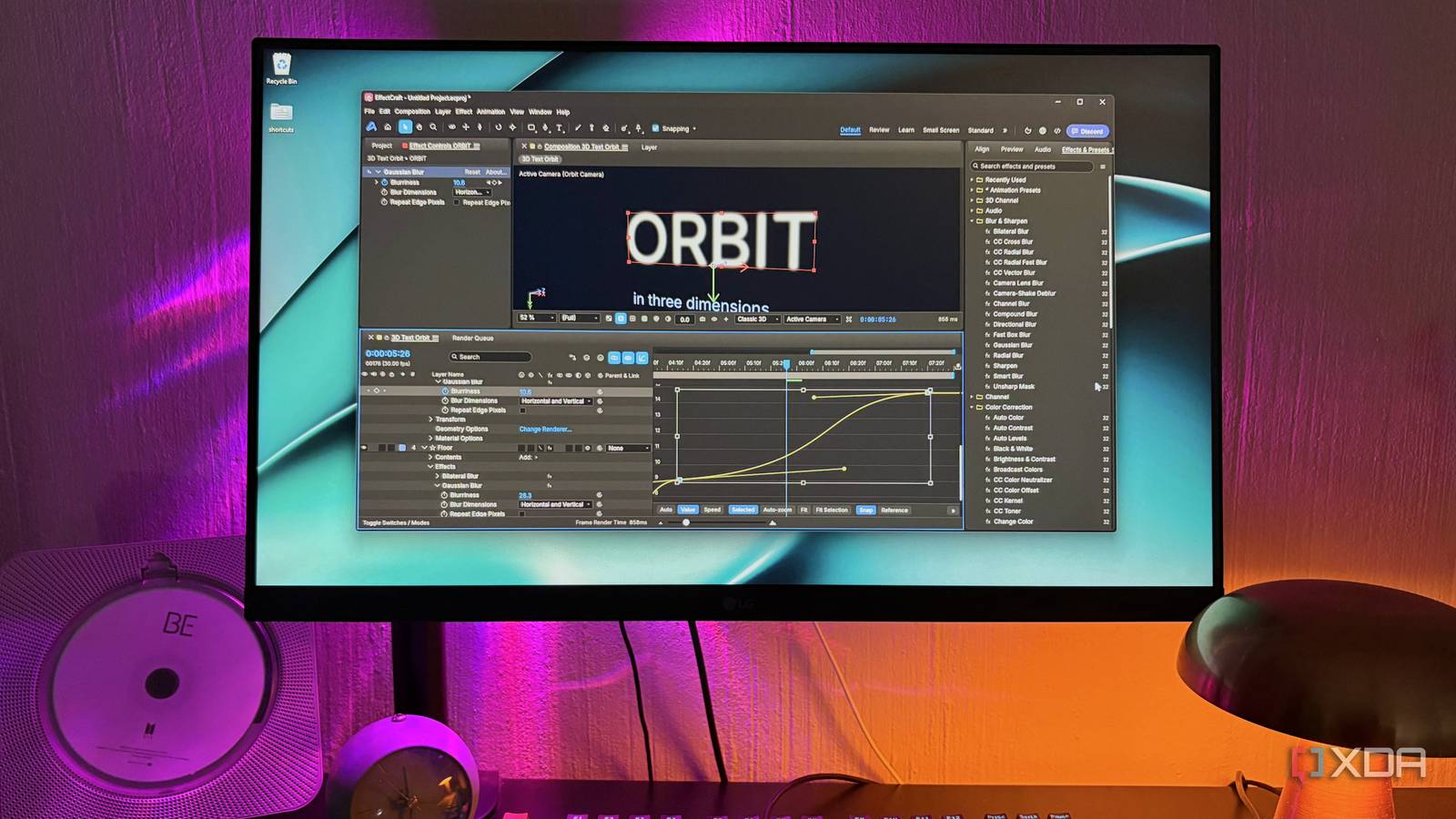
Published Oct 27, 2026, 12:30 PM EDT Nolen began their writing career in 2019, with three years dedicated to editing the Creative section at MakeUseOf. Their expertise lies at the crossroads of technology and creativity, covering areas like photography, video editing, and graphic design. Outside of work, you'll often find Nolen diving into a good book, writing their own stories, or playing video games. If you've ever tried replacing your Creative Cloud apps, you probably already know that After Effects is the hardest one to find a replacement for. Photoshop users can at least find a couple of stand-ins like GIMP, Photopea, or Affinity. There's also no shortage of free video editors in place of Premiere. But After Effects has always been the difficult one. Pikimov probably comes the closest, but it still leaves quite a bit to be desired. Enter EffectCraft, an After Effects clone part of the larger ArtCraft suite. It's barely a month old, built mostly with AI, but it's already making the rounds. I've been testing the new ArtCraft tools one-by-one, because there are many, and this is simply one I couldn't skip as someone who's still looking for a competent AE alternative after a year of ditching Adobe. EffectCraft is the After Effects of a 13-app open-source suite Built in 10 days, mostly by AI agents ArtCraft is Brandon Thomas's studio, a developer and previous CEO of storyteller.ai, and its Crafting Apps have grown into 13 free, open-source rebuilds of paid software, with EffectCraft being the one aimed at After Effects. Thomas used Claude Opus 5.5 to build them, and the whole suite is described as a clean-room build, meaning it's written from public docs and observing exactly how the Adobe tools behave rather than taking anything from Adobe's code. The Craft tools are pretty much mirrors of the software they aim to replicate, so it's a job well done. The EffectCraft repo is pretty candid about what the process was day to day. The first commit landed on 1 October, and just ten days later the project was at around 330,000 lines of Rust, reportedly written by about 4-8 agents running at the same time. The team grades itself to ensure it stays on track to reach parity with After Effects, and it's currently at 99% - though the docs admit that the checklist was written and scored by the same agents that built the features. Because of that, they re-measured it against After Effects 2026, which brought it down to about 91% of AE's features existing in some form, and only around 45% ready for someone doing paid client work. I'll admit this honesty does make me trust the project a bit more. Thomas did claim on Reddit that the suite would match Adobe's apps completely within a month, but he later softened that on Hacker News, saying it would get to 99% within a couple of months instead. So I'd take the timelines here a little loosely, but we can probably expect the suite to evolve pretty quickly either way. Animating the way After Effects taught me to The part of AE I'd judge any clone on first After Effects was the first "real" animation tool I used - I started out by editing motion design using Video Star and Alight Motion on my phone, and the editing community pointed me to Adobe soon after. I'd argue the whole reason to even get started with After Effects is for the movement you can create with it, so an alternative would have to match its keyframing and animation abilities to call itself an alternative. You set a value at one point in time, like a title sitting off the left edge, set another value a second later, and the app animates everything in between. After Effects has ruled motion design for decades largely because of how much control it gives you over that in-between part, and EffectCraft mirrors that setup almost entirely. Hold keyframes are there for freezing a value until the next key, for example, and Easy Ease, AE's one-click way of smoothing a key, is still on F9. All the shortcuts also carried over, like double-tapping U to show only the properties I'd changed. Where EffectCraft really shows its worth is the Graph Editor. Easing is how an animation speeds up and slows down between keyframes, and it's what makes a title slow down gradually as it lands instead of stopping dead, creating that natural or dreamy movement effect. The Graph Editor draws all of that as adjustable curves, either as a value graph showing the property changing or a speed graph showing how fast it's moving. EffectCraft has both, with handles on each key that bend the curve and a box for stretching a group of keys at once. Just like AE. Easing is also the one thing the team has checked directly against After Effects, comparing the values of eased animations at 168 points in time across both apps, and they actually matched. The Graph Editor itself still has open issues with jitter and clipped buttons, so it's not all smooth sailing yet, but again, this project is still in alpha so I'm giving a lot of grace here. It actually bundles an Ease Preset panel which is modeled on the paid easing plugins (like Flow for example) that some AE users often end up buying separately. I've never paid anything on top of my existing subscription so this was my first time getting a taste of these presets too. Familiar feature names everywhere But everything doesn't behave quite the same yet When you open the Effects & Presets panel, it's a little uncanny how similar it is. There are 306 built-in effects which actually intentionally mirror the same count After Effects ships with, and they use AE's names, parameter order, and defaults, down to the CC effects that any AE user will recognize. The catch is that nobody has compared the rendered results against After Effects yet, so an effect sharing a name doesn't promise it'll look the same. The presets, or rather the ready-made animations you drag onto text or shapes, are a little thin, with only a small fraction of the 620+ After Effects has. 3D is pretty capable for a tool this young. There are proper cameras with depth of field and lights that cast soft ray-traced shadows, and it can bring in 3D models as glTF or OBJ files, but not FBX or USD, which plenty of 3D workflows use. Plugins are probably the bigger problem for anyone who needs motion or VFX software professionally. Popular third-party add-ons like Trapcode for particles or Element 3D for 3D objects won't run here, and although EffectCraft has its own plugin system, there isn't anything built for it from outside the team. Color is also handled the AE way, with projects running at 8, 16 or 32 bits per channel (higher means smoother gradients and more room to push a grade), and the little 32 badge next to most effects in the list marks the ones that work at the highest setting. It also supports OCIO and ACES color management, the systems VFX pipelines use to keep colors consistent between apps, though the team admits its 32-bit blend modes don't match After Effects exactly yet. Color is always a bit of a guessing game for me because I don't perceive them exactly as they are, so this isn't quite the area I tinker with the most, but it's a reassurance that ArtCraft is serious about these apps. Getting your projects out is easy But getting old projects in is another story Getting old work into EffectCraft is where it starts to fall short. It can't open After Effects project files (.aep or .aepx), Motion Graphics templates or saved AE presets, so anything you built or bought for After Effects will have to stay in After Effects. Projects save as .ecproj files instead, which are plain JSON text you could technically open and read in any text editor. Lottie support was a nice surprise though. Lottie is a lightweight animation format used all over websites and apps, and After Effects still needs the Bodymovin or LottieFiles extension to export it, while EffectCraft imports and exports it out of the box. The Render Queue mirrors AE's as well, covering H.264, ProRes with alpha for transparent backgrounds, HEVC, AV1, WebM, EXR sequences and GIF, all encoded without FFmpeg. There's no hardware encoding though, so it can't hand exports to the GPU's dedicated video chip to speed them up, and the team admits its HEVC and AV1 files come out larger than a mature encoder would make them. I already knew this app before I tried it EffectCraft is truly a mirror of After Effects, and I never thought I'd see the day coming. I thought it was always going to be a struggle with node editors or tools that haven't quite caught up yet. Well, EffectCraft seems to have turned that assumption on its head. I still recommend checking out Pikimov if you're after a project that's a little more mature, but it's not quite as comprehensive as the ArtCraft tools are already showing themselves to be. I think it's the first free option that doesn't make me relearn how I animate. It's also only on version 0.17, and version 1 might be a whole different conversation, guess we'll have to wait and see. EffectCraft
I finally found a free, open-source Adobe After Effects clone, and it was built mostly with AI
Full Article
Original Source
Read the full article at Xda-developers →KhanList aggregates and links to publicly available news content. We do not host full articles from third-party sources. Always verify important information with original sources.