
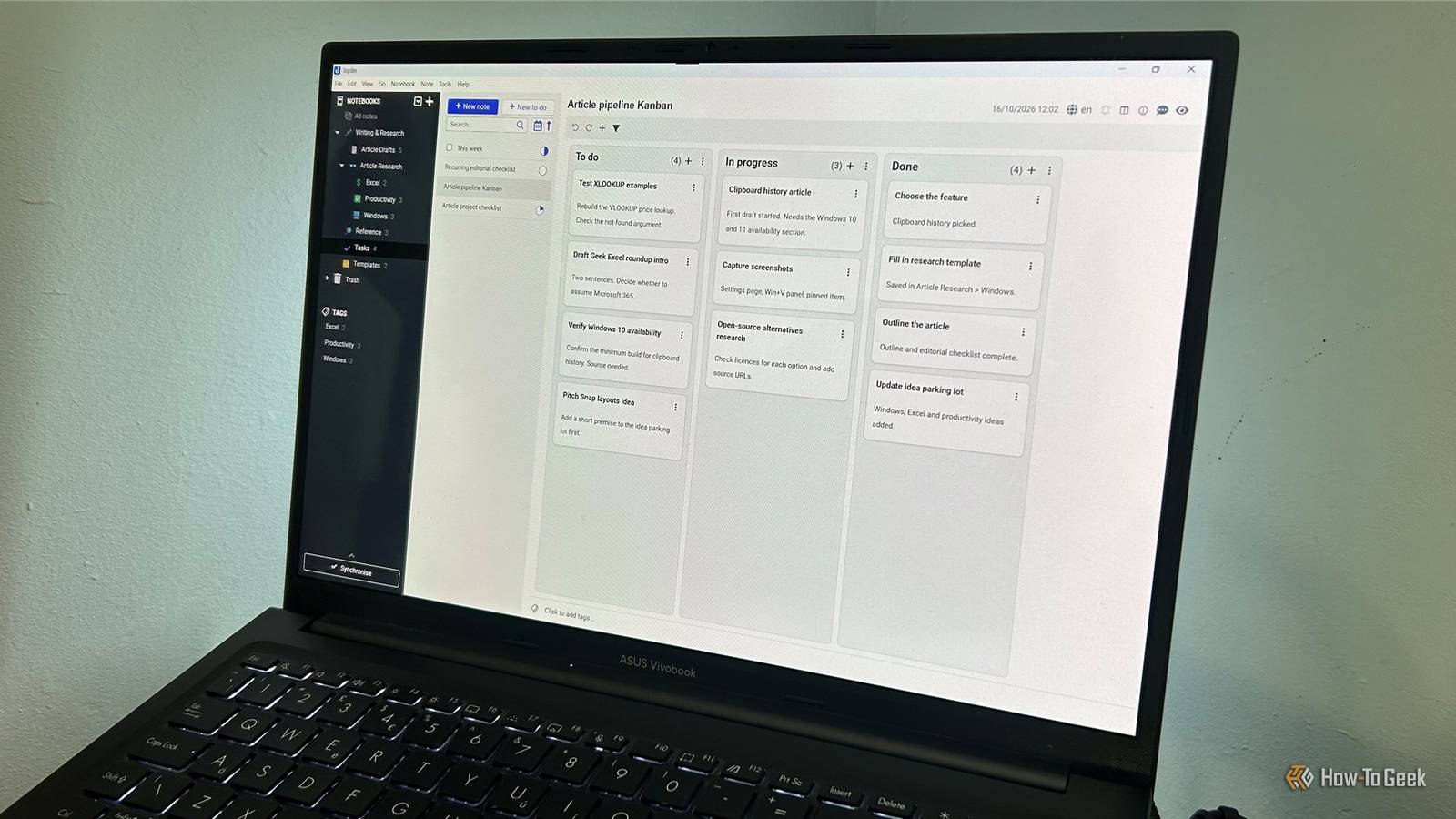
Published Oct 18, 2026, 10:30 AM EDT Tony Phillips is an experienced Microsoft Office user with a dual-honors degree in Linguistics and Hispanic Studies. Prior to starting with How-to Geek in January 2024, he worked as a document producer, data manager, and content creator for over ten years, and loves making spreadsheets and documents in his spare time. Tony is also an academic proofreader, experienced in reading, editing, and formatting over 3 million words of personal statements, resumes, reference letters, research proposals, and dissertations. Before joining How-To Geek, Tony formatted and wrote documents for legal firms, including contracts, Wills, and Powers of Attorney. Tony is obsessed with Microsoft Office! He will find any reason to create a spreadsheet, exploring ways to add complex formulas and discover new ways to make data tick. He also takes pride in producing Word documents that look the part. He has worked as a data manager in a secondary school in the UK and has years of experience in the classroom with Microsoft PowerPoint. He loves to encounter problems in Microsoft Office and use his expertise and legal-level training to find solutions. Outside of the Microsoft world, Tony is a keen dog owner and lover, football fan, astrophotographer, gardener, and golfer. Scope creep usually happens to projects, not note-taking apps. But when I switched from OneNote to open-source Joplin, it gradually took on more of my work. I'm not complaining. These days, I use it to write, organize, and keep everything in sync across my devices. Joplin has become part of my writing process Write now, transfer later I'm writing this very article in Joplin, and it's proving to be a comfortable place to work. I initially opened it to make research notes, but I found myself using the app to draft the whole piece. I can structure the article as I go, adding headings, lists, blockquotes, and code blocks, then switch between Markdown and the rendered view to check how the finished piece looks. I can also keep supporting material next to my writing, whether that's an image, an attached Word document, or a freehand drawing. And when a piece of work moves from an idea to an active project, I can turn its note into a to-do, set a deadline, and check it off when it's finished. That way, I can keep the original material and track the work needed to complete it in the same place. When it came to transferring my work to the CMS, Joplin's plugin directory made it easy to add the functionality I needed. I installed Copy as HTML in just a few clicks, then copied a note into the CMS to see how well the formatting transferred. Headings and bulleted lists came across intact, so I didn't have to rebuild the structure by hand. Joplin makes it easy to keep my notes organized Everything has its place I started organizing my research in an "Article Research" notebook, with sub-notebooks for Windows, Excel, and Productivity. I can expand this structure as new projects come along without having to rethink the whole system. Tags give me another way to organize things. I can right-click a note to assign an existing tag, or type a new one to add it to my collection. That means I can group related notes without having to keep everything in the same notebook. Finding things again is just as simple. A keyword search brings up relevant notes, and I can move between the results easily, even when several have similar titles. Searching for "Geek," for instance, brings up everything I'm working on for How-To Geek, regardless of which notebook it's filed in. I don't have to remember exactly where I put something to track it down. I also like how easy it is to keep my notes consistent. I can duplicate a note and use it as a starting point for another, keeping the same headings and layout instead of recreating them each time. For my Windows articles, I keep a template note with headings for the feature itself, Windows 10 and 11 availability, and pros and cons. Duplicating it means each new piece starts with the structure already in place. Joplin gives me flexibility without getting in my way My notes work anywhere Setting up synchronization was straightforward. I chose OneDrive as my sync target (though Joplin also supports options like Dropbox and Nextcloud), set it up on my desktop, then installed the Joplin iPhone app and repeated the process there. It couldn't have been easier. To test it, I checked an item off in a checklist on my phone, synchronized the desktop app, and the change appeared. I could keep working with the same notes across devices without manually copying updates between them. Joplin lets me export my notes in several formats, including HTML, PDF, Markdown, Markdown with front matter, and its own JEX and RAW formats. Having Markdown as a direct export option gives me another way to keep my notes accessible outside Joplin and use them in other tools. I can also tailor the app itself. Beyond Copy as HTML, I added a Kanban plugin called YesYouKan, then pasted the heading structure from an existing note into a new Kanban note. YesYouKan converted it into a Kanban board, with each H1 becoming a column (To do, In progress, Done) and each H2 a card. The keyboard shortcuts are easy to customize too. I can adjust the app to suit my workflow without changing how I organize my notes or adding features I won't use. Switching to Joplin is just the first step I switched to Joplin to replace OneNote, but I didn't expect to build so much of my workflow around it. As an open-source app, it lets you tailor it to the way you work, with plugins, export options, and shortcuts you can adjust as you go. And I'm not going back. Swapping OneNote for Joplin is one small way to start moving away from Microsoft 365, and if you're ready to go further, there are plenty of free, open-source alternatives to Microsoft 365 worth exploring.
I ditched OneNote for Joplin, and discovered it's much more than just a note-taking app
Full Article
Original Source
Read the full article at Howtogeek →KhanList aggregates and links to publicly available news content. We do not host full articles from third-party sources. Always verify important information with original sources.