
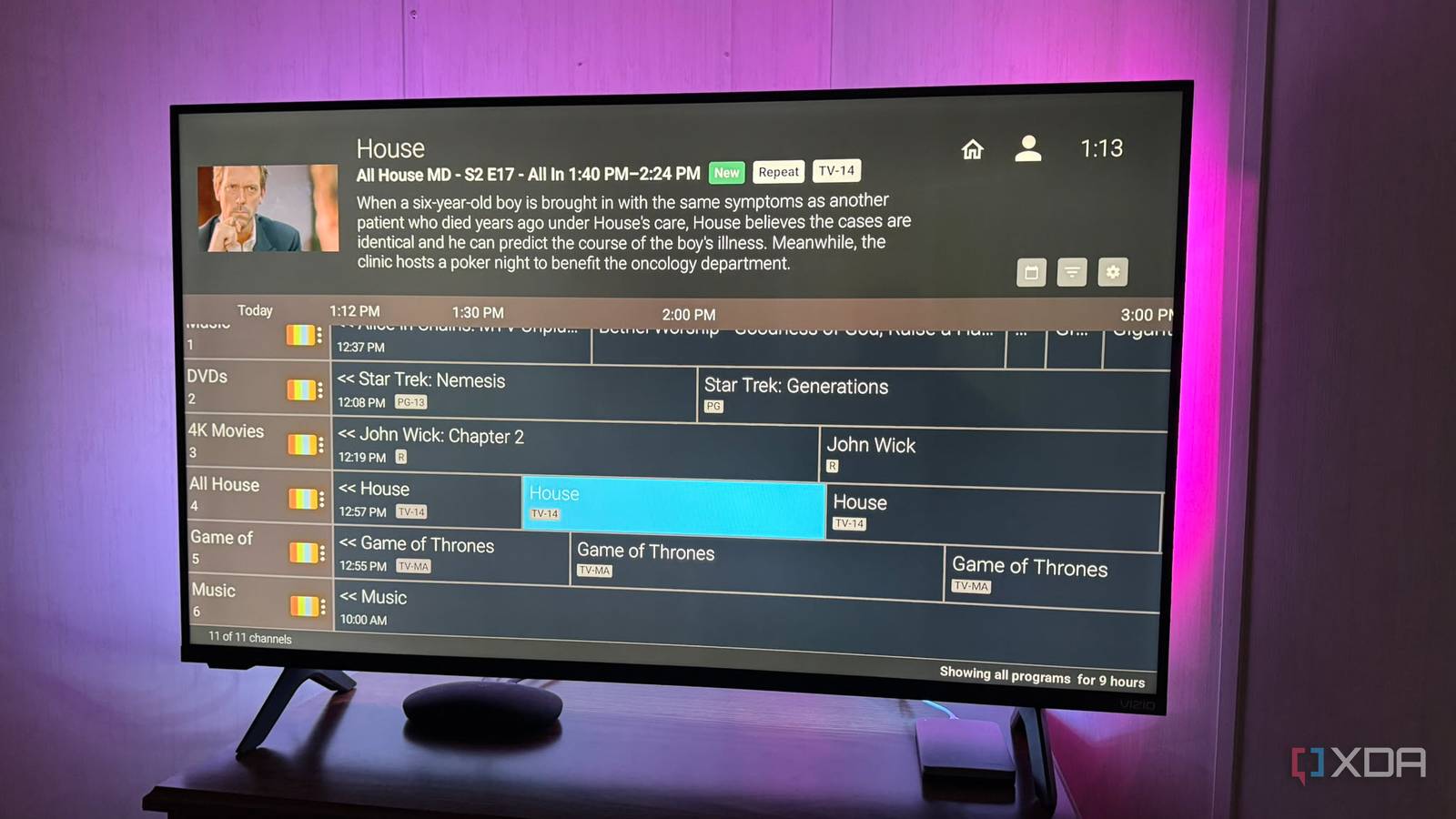
Published Oct 18, 2026, 3:00 PM EDT Based in rural Minnesota, Brian Burgess worked in IT for 10 years before finding his passion for writing about consumer technology. Brian earned his degree in computer and network technology in 2000. He held various IT positions, including help desk support, router installations for IBM, database administration, and other associate network administration roles. He's been a personal technology journalist for 18 years and has written thousands of articles about Microsoft products and services, Android, iOS, streaming, and more. He has written for notable tech sites including XDA, InformationWeek, How-To Geek, Byte, groovyPost, and others. When he is away from the keyboard, you will hear him playing guitar, working outdoors, and watching Star Trek. Live TV streaming services like Hulu Live, YouTube TV, and Sling offer cable-style channels, but they cost a lot. I subscribed to live TV services to get some Minnesota Vikings games, but I decided it wasn't worth it. I don't watch much other than live sports. So, I canceled the service and created commercial-free channels that stream the content I own. My local Fox or CBS station carries most of my local NFL team's games, so I hooked up a cheap antenna to a digital tuner and stream them via Jellyfin. Now I can enjoy the media I own in a live-TV environment and catch the big game on Sunday. I only deal with commercials when I watch OTA programming. Ditching live TV services I shouldn't be paying for commercials I have used different live TV streaming services over the years, including YouTube TV, Hulu Live, and Sling. I even had a PlayStation Vue subscription back when it was still around. The main reason is that I live in a rural area with shoddy over-the-air reception. Indoor digital antennas only give me three or four channels. My neighbors around the surrounding corn and soybean fields have rooftop or pole-mounted antennas, and they don't get much better reception either. I wanted cable TV channels without paying for cable, and at the time it was cheaper. I have had an on-again, off-again subscription to live TV services, mainly for local sports. However, I decided that $90-100 per month was too much to spend on the service for one game a week. Even with DVR (which deletes shows after a period of time) and commercial skipping, I don't really want to watch much of the live TV programming anyway. Since my cheap indoor antenna gives me most of the games during football season, and I wanted a commercial-free, live TV-like experience with my own media, I decided to create my own channels. Creating my own self-hosted channels There are many free and open-source apps and projects I discovered different ways to create my own commercial-free channels with the media I already own. I can add the channels to Plex or Jellyfin so I can view my self-created stations throughout the house. One open-source project that offers many options and customization for self-hosted channels is Ersatz TV. I can use it to configure channels specific to my content and add them to my Plex server. I also set up Tunarr to create my own media channels. It is also free and customizable, and a bit easier to set up and maintain. Like with Earsatz, I can create a channel with as much or as little content as I want. I like creating a channel dedicated to a specific show from my media collection. I may also create a channel for movies or shows in a specific genre, like fantasy, action, drama, or thriller. The beauty of both projects is that I am my own TV station manager and can create channels with content I actually want to watch. Another cool app I use with my Apple TV is Nostalgex, which provides an old-school-style channel guide for my self-hosted media on my screens. It's straightforward to set up from the tvOS app or by connecting remotely to Jellyfin. It's cool and has fun settings that let me tweak the guide. However, it doesn't have the customization ability of Tunarr or ErsatzTV, but I can add several channel packs, and it displays my media in a neat retro-style cable channel guide. Tunarr Commercial-free channels My media as a live TV replacement works After finding the projects to turn my self-hosted media into channels and adding my OTA antenna and tuner, I have ditched my Hulu Live subscription. Instead of waiting for a cable or broadcast channel to air something I want to watch, I have my own channels that are "airing" something I like. Plus, my commercial-free channels are airing 24/7, so I find something no matter what hour it is. I can still get most of the big games streamed to all the screens in my home. Plus, my channel guide always has something interesting. I don't need to surf aimlessly through stations (although I can) to find something to watch. I would rather take the time to rip Blu-ray discs, maintain a server, and create my own channels than spend money dealing with commercials and the risk of not being able to watch the movie or show I want. Ditching live TV streaming for my own channels Streaming live TV services can be beneficial, but it depends on what you want to watch and what you're used to. It's especially useful for sports, since major leagues constantly change where games air. For now, though, I can get most of the games I want to watch OTA, and I'd rather have the other channels as a collection of content I want to watch, all from a familiar TV-style guide.
I ditched live TV streaming and built my own commercial-free channels to save $90 a month
Full Article
Original Source
Read the full article at Xda-developers →KhanList aggregates and links to publicly available news content. We do not host full articles from third-party sources. Always verify important information with original sources.