
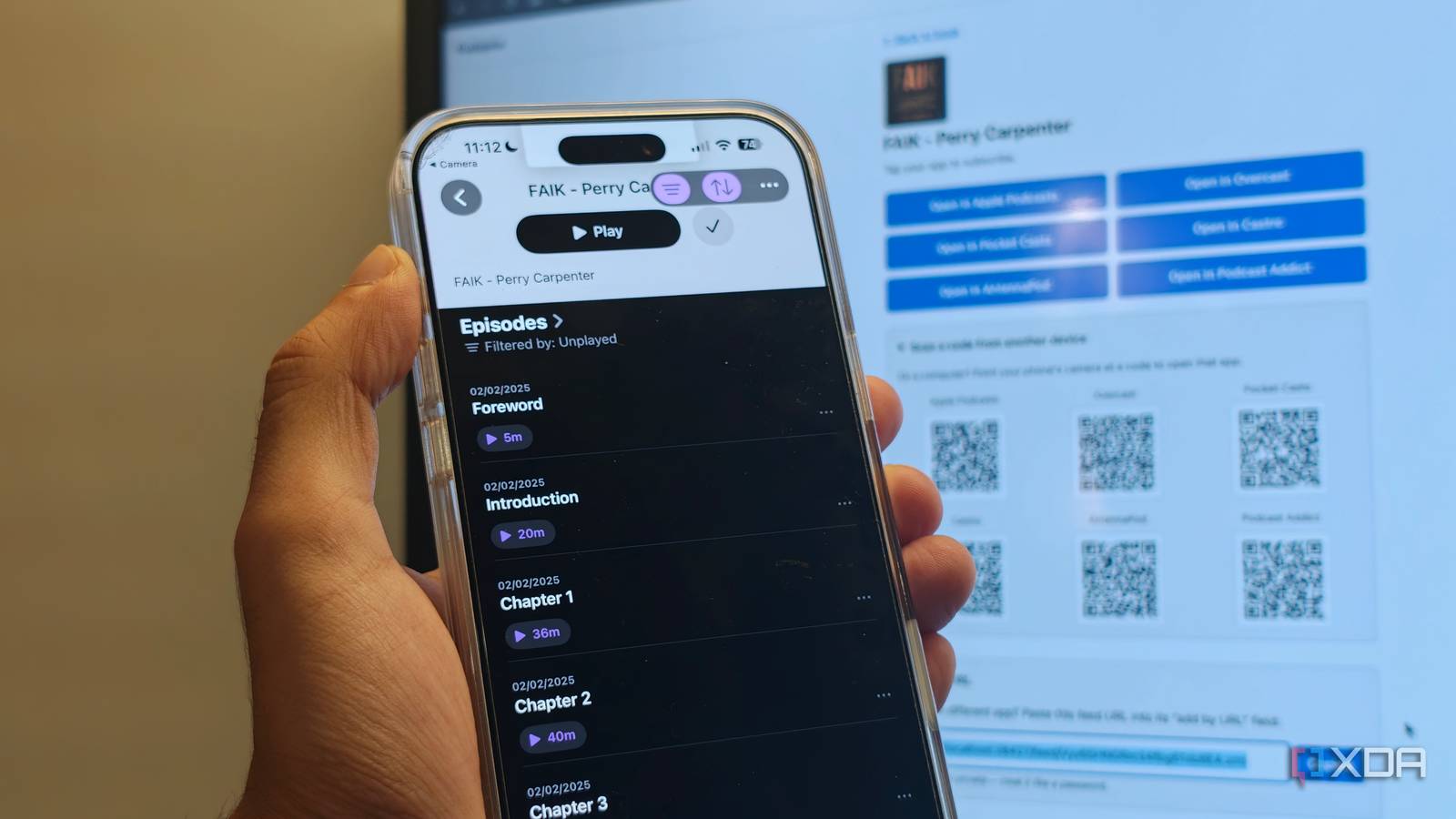
Published Aug 21, 2026, 7:30 AM EDT Dhruv Bhutani has been writing about consumer technology since 2008, offering deep insights into the personal technology landscape through features and opinion pieces. He writes for XDA-Developers, where he focuses on topics like productivity, networking, self-hosting, and more. Over the years, his work has also appeared in leading publications such as Android Police, Android Authority, CNET, PCMag, and more. Outside of his professional work, Dhruv is an avid fan of horror media spanning films and literature, enjoys fitness activities, collects vinyl records, and plays the guitar. I've tried getting into audiobooks plenty of times. However, looking at that 12-hour remaining ticker gives me anxiety, and let's just say that getting through them just hasn't happened for me. That said, audio as a medium isn't the problem. I listen to plenty of podcasts. For that matter, I listen to a fair few audio dramas too. So when I came across an open-source app that takes the podcast approach to solve the audiobook problem, I figured it would be right up my alley. Podspine takes any DRM-free audiobook, turns each book into its own RSS feed, and publishes each chapter as an individual podcast episode. I can then subscribe to the podcast, or well, audiobook, in any podcast app I use. And guess what, I'm actually making progress in my listening. Turning audiobooks into something I actually finish Episodes make long audiobooks manageable Most modern audiobooks already have support for chapters. The problem that Podspine solves is equal parts logistical and psychological. Instead of seeing an audiobook as a single enormous file running hours on end, I see it as a feed of easily digestible episodes. It's the same model that podcasts follow, to be fair. I can see which episodes I have finished, pick up where I left off, and move through chapters easily. If I have 20 minutes left, I just start a chapter instead of giving up, thinking that I'm not actually going to make a dent in the book. Podspine doesn't replace the audio or even convert it into a new format. It takes a much simpler approach instead. It reads the chapter markers already in supported audiobook files and exposes them through RSS. So, individual chapters become individual episodes; that's it. The best part is that it works with both MP3 and MP4 files, so you don't have to change your actual audiobooks. This works particularly well given how I consume long-form audio. I rarely have time to sit through an entire episode in one go. I usually have podcasts on while doing chores or at the gym. With the audiobook in my podcast app, it is integrated into the same setup I use every day for podcast listening. As an added benefit, I can cast this audio to my smart speaker of choice. Any podcast app can work as an audiobook player Download only the chapters you need I particularly like that Podspine doesn't lock you into a specific podcast app. Instead, it gives you a range of options like a feed URL, which means you can embed it into any standard RSS-compatible podcast client. Conversely, it'll also give you QR codes to load the feed directly into everything from Pocket Casts to Apple Podcasts, Overcast, and more. Even if your specific podcast app isn't listed here, the feed URL will likely work just fine, making it flexible enough to fit your workflow. Of course, it goes without saying that you retain full control of the files. The audiobook stays on your own server, and Podspine just builds a feed based on those titles. You don't need to upload these files to any other third-party server. Similarly, when within the podcast app, you can download these chapters as individual episodes. While most audiobook apps don't offer an easy way to bring your personal audiobook files into the mix, using your podcast app with Podspine makes it as easy as downloading music. There's a lot of value in that, especially when you're on the go and want to grab a few episodes before a flight. Modern podcast apps also let you precache additional episodes, and they can tap into Podspine to keep your listening queue ready instead of making you wait. Using an episode-based approach has benefits beyond just being easier to consume. If I'm listening to a technical book or a self-improvement book, I can immediately go back to a chapter that I found particularly interesting or wanted to revisit. Even if you've removed the episode from your podcast app, Podspine creates individually chapterized audio files, so you can download those extracted chapters without downloading an entire book. Similarly, this also means that you can keep just the chapters you want instead of wasting a lot more storage on a long audiobook. As I mentioned earlier, there's no quality loss here because Podspine doesn't re-encode audio. It just uses stream copy to make chapterized audio files for creating individual episodes. Audiobook listening apps are a dime a dozen, and I've not been looking for a better app. I've been looking for a better way to consume the audiobooks themselves. That's what Podspine solved for me. A long audiobook turned into a series of digestible chapters is, simply put, much easier to consume. It certainly helps that Podspine is incredibly easy to install. In fact, it works so well that I don't think I can go back to a standard audiobook app anymore. Podspine Podspine is an open-source, Docker-based software that turns your audiobook collection into a podcast.
I ditched audiobook apps for podcast feeds, and now I'm actually finishing books
Full Article
Original Source
Read the full article at Xda-developers →KhanList aggregates and links to publicly available news content. We do not host full articles from third-party sources. Always verify important information with original sources.