
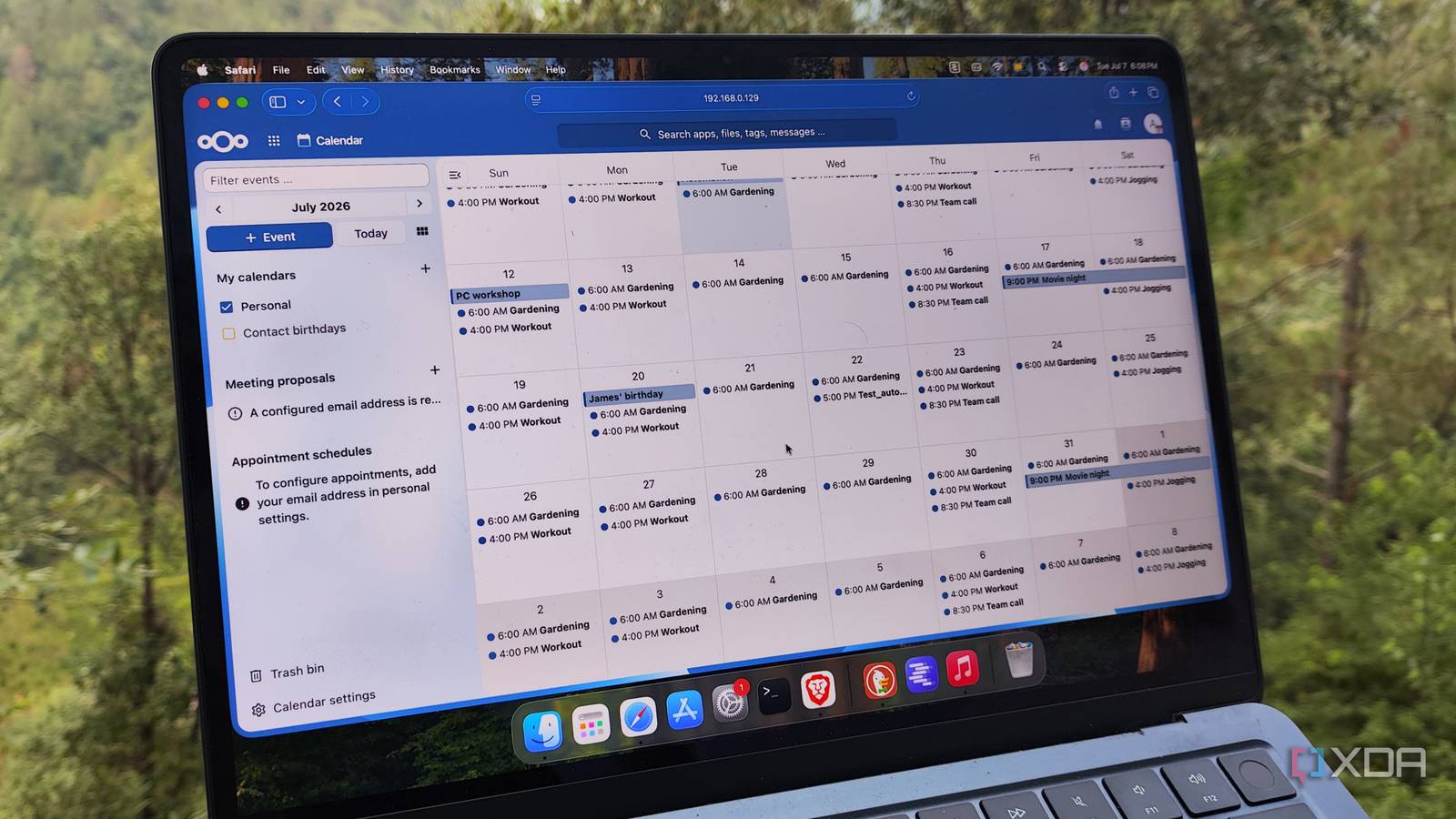
Published Aug 29, 2026, 8:00 AM EDT Ayush Pande is a PC hardware and gaming writer. When he's not working on a new article, you can find him with his head stuck inside a PC or tinkering with a server operating system. Besides computing, his interests include spending hours in long RPGs, yelling at his friends in co-op games, and practicing guitar. Ever since I realized the sheer potential of the tools within Nextcloud’s App Store, it has become an essential part of my self-hosted stack. Thanks to Collabora Office, I was able to edit conventional text documents, spreadsheets, and presentation slides directly from Nextcloud, while Tasks, Notes, and Collectives fill their own niche roles in my productivity toolkit. That said, Nextcloud Calendar was something I’d overlooked for the longest time, and I only began using it after I decided to ditch Google’s cloud-based Calendar for privacy issues. But after spending a few weeks managing my task schedule with it, I began looking into ways I could extend its utility. Well, the CalDAV integration turned out to be just the thing I was looking for, and now my Nextcloud Calendar events are responsible for triggering several automations on my Home Assistant hub. Nextcloud Calendar already manages my entire schedule It pulls plenty of events from other Nextcloud tools Considering the privacy-invasive nature of cloud platforms, I’ve started migrating as many productivity tools to my home servers. Seeing as how my calendar events describe my appointments, hobbies, as well as my whereabouts, the Calendar app within Nextcloud was precisely what I needed to avoid sending personal details to cloud platforms. However, what I didn’t realize was that it meshes well with the rest of the tools within Nextcloud. For example, I use Nextcloud’s Tasks tool as my primary to-do list builder. Since Tasks includes start and due date fields for my chores, Nextcloud adds them as regular ol’ events to the Calendar utility, thereby helping me track them alongside my daily schedule. Likewise, I use the Trello-eque Deck application to keep tabs on my work assignments. Just like Tasks, Nextcloud Calendar can pull my schedule from Deck, thereby helping me juggle several deadlines (and overdue job tasks) from a single UI. The Calendar app can even pull the birthdays of the close friends, co-workers, and family members I’ve added as my Nextcloud Contacts. Combine all that with the general schedule I’ve created on Nextcloud, and I’ve got plenty of events aggregated into Nextcloud Calendar – events that could very well serve as triggers for certain smart home automations. I’ve configured Home Assistant to pull events from Nextcloud Calendar That way, my calendar events can trigger my automation rules Since Home Assistant is quite a feature-heavy smart home management platform, my first instinct was to download the Calendar events from Nextcloud and upload them to the calendar that ships with HASS. While this method is fairly plausible, I’d have to manually update the events on HASS every time I make some modifications to Nextcloud Calendar… which happens almost every other day. Fortunately, Home Assistant has a CalDAV integration, which lets me sync my Nextcloud events with its calendar seamlessly. Configuring this integration was as simple as copying the Calendar URL from Nextcloud and entering the account credentials. Since Home Assistant treats the calendar events as regular ol’ entities, I can use them as the trigger conditions for my automation pipelines. For example, I’ve got an automation that automatically boots the projector, lights, and other devices in my living room every other Friday for my movie nights. Likewise, I’ve got persistent notifications that remind me to take out the trash every few days. The same holds true for regular home maintenance tasks, as HASS shuts down the associated devices and constantly pings me until my lazy self fixes them. Heck, I’ve even created constant notifications that get displayed on my ESP32 dashboard whenever I have overdue chores on my Nextcloud Calendar. The best part? This 2-way sync sends any events generated by Home Assistant to my Nextcloud Calendar, too... HASS can also send freshly-generated events to my Nextcloud hub So far, I’ve only mentioned the Nextcloud Calendar events that fire up my automation rules. But I’ve also got certain action rules that reads input from my sensors and use them to create new calendar events. Let’s say one of my IoT gadgets goes offline out of nowhere. Once HASS detects this problem, it creates a new event on my Personal calendar (the same one that syncs to Nextcloud), so I have a timeline detailing precisely when and where my smart devices went down – and these events get saved on my Nextcloud instance as well. But Home Assistant isn’t the only app I’ve paired with Nextcloud Besides all the cool tools within the Nextcloud app store, this personal cloud platform also supports integrations that let me connect it to different self-hosted services. There’s the Immich integration, which is great for viewing all the photos, snapshots, and videos on my FOSS image manager from my Nextcloud server. There’s one for Paperless-ngx, and I use it to send PDFs directly to my document archival hub, and although I only used DokuWiki for a short time, its Nextcloud integration let me embed my painstakingly-created notes into the latter’s UI. Nextcloud OS Windows, macOS, Linux Key highlights Self-hosted, open source iOS compatible Yes Android compatible Yes Desktop compatible Yes Nextcloud is a local cloud storage tool with all the features that you need and an equally powerful plugin store.
I connected Nextcloud to Home Assistant, and now my automations rely on my calendar events
Full Article
Original Source
Read the full article at Xda-developers →KhanList aggregates and links to publicly available news content. We do not host full articles from third-party sources. Always verify important information with original sources.