
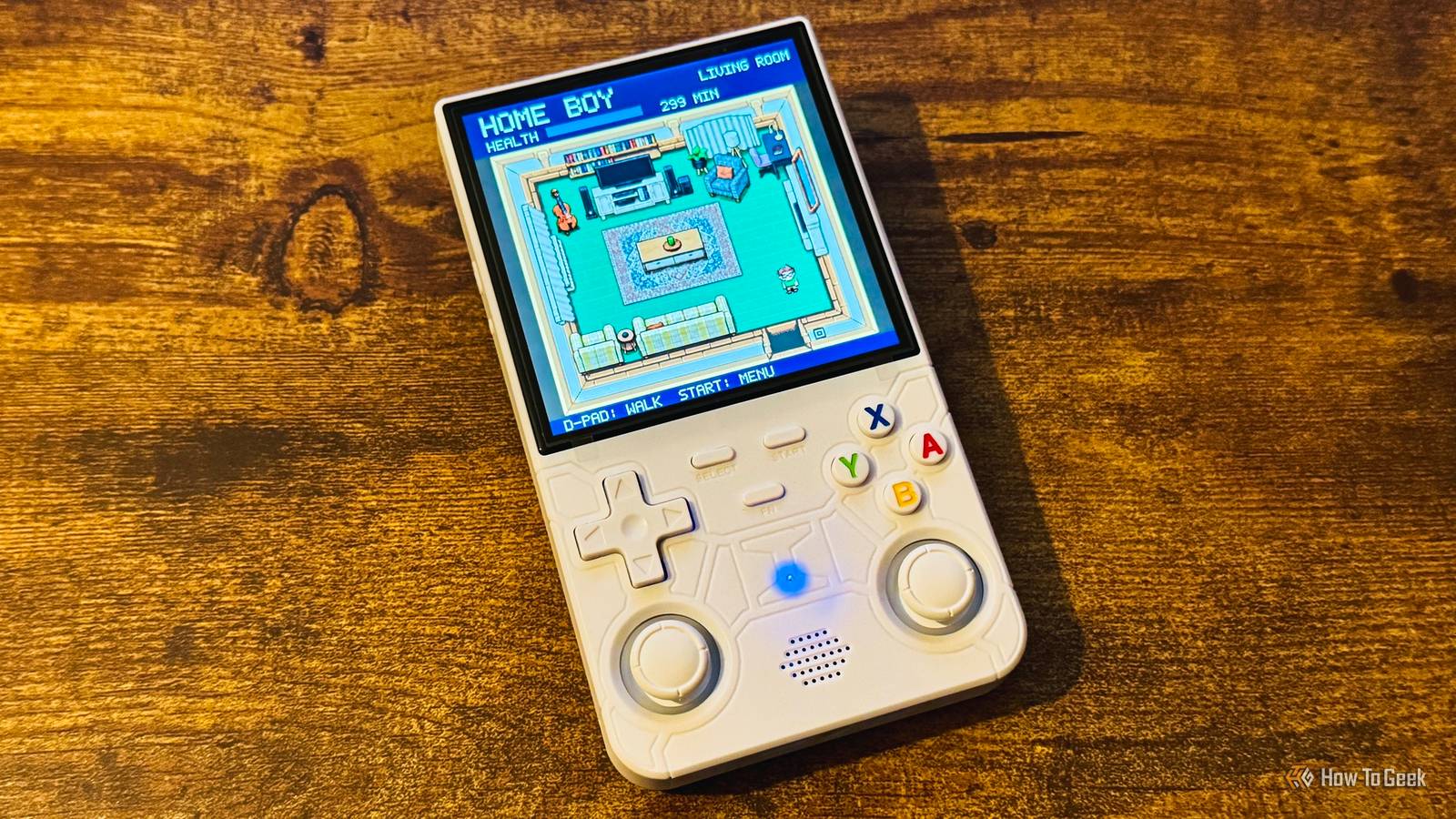
Published Oct 29, 2026, 8:30 AM EDT Adam has a degree in Engineering and has a life-long interest in technology. He has been writing for over a decade for various print and online publications, with a focus on consumer tech. He joined How-To Geek in 2024 while working at Pocket-lint. As well as being a long-term fan of Apple products, he also has a strong interest in smart home tech, running a Home Assistant server at home to automate all his smart home devices. He believes that the ideal smart home should work with minimal interaction from the user, with automations running as if by magic rather than requiring you to push buttons on a control panel. You can find more of his work on Muck Rack. I'm not a huge fan of smart home dashboards; I want my smart home to work as automatically as possible. However, when I had an idea for building a retro game version of my house that I could use to control my smart home, I knew I had to make it happen. A retro handheld turned into my next smart home project The games were only the beginning I'd been wanting to get an R36S retro gaming handheld ever since I first saw someone post about theirs online. It's a cheap gaming device in a similar form to an old Game Boy and can run emulators for multiple retro gaming platforms. The original R36S lacks built-in Wi-Fi, but the R36 Ultra has it. I'm a sucker for a completely unnecessary smart home project, and I thought if I bought the version with Wi-Fi, I should be able to hook it up to Home Assistant and use the handheld to control my smart home. Then I had an even better idea. I thought I might be able to make a retro version of my house that looked a bit like a classic Zelda game. I could then run around in the game, interacting with things like light switches to control the real smart home devices in my actual house. Once I'd had the idea, I immediately pulled the trigger and bought the R36 Ultra. AI helped turn the idea into a working game I came up with the concept, but Codex wrote the code Whatever your thoughts on vibe coding, it's clear that it can enable people to do things that they wouldn't necessarily have been able to do themselves. It's possible that, given enough time, I could have built a retro game in Python that did everything that I wanted, but it would have taken me a seriously long time. Using Codex, I was able to build it in just a couple of days. First, Codex tested whether the handheld could turn one of my lights in Home Assistant on and off, and once that proved successful, it got to work writing the code for my game. The idea was that I could explore my entire home, entering each room in my house by walking around the game, and interacting with things such as light switches, TVs, stereos, smart plugs, and more. These interactions would run real commands in Home Assistant to make my real home reflect what was happening in the game. Codex turned room photos into retro game artwork Fixing the mistakes was a frustrating process By far the hardest part of the whole process (for me, at least) was creating the game artwork. Codex could easily use its image generator to knock up a simple retro room, but I needed it to look like my home. I uploaded multiple photos of each room, and Codex generated room designs based on the images. The problem was that they often had major mistakes. Spotting the mistakes was easy enough, but fixing them was a lot harder. The top-down perspective of the game design meant that Codex had a really hard time understanding what "up" and "down" actually meant. Doors would end up coming out of walls, and cupboards would often end up on their sides. I had to go through a lot of prompts to get each room exactly how I wanted it. It was worth the effort, however. By the end of the laborious process, the rooms looked awesome. Home Assistant handles the real work in the background The game is effectively a glorified dashboard Wandering around a retro version of my own home is great, but that wasn't the purpose of the project. I wanted to be able to control my smart home, and that's exactly what I can do. The handheld runs the Python game and communicates with Home Assistant over Wi-Fi. By interacting with objects in the game, I can turn lights on and off, play music, turn on the electric blanket on my bed, power on the TV, select a streaming app, change the TV volume, turn up the heating, and more. My retro game is effectively a very cool and highly inefficient smart home dashboard. I say inefficient because if my character is in the living room, and I want to turn on the light in my home office, I have to walk my character out of the living room, through the hallway, up the stairs, along the upstairs hallway, into my home office, over to the light switch, and then press A to make the light turn on. It's definitely not the quickest way to turn on a light, but it may just be one of the coolest. I'm not sure where to take this project next. It would be good to try to give it some kind of real game aspect, where I can earn XP by keeping my smart home running smoothly. For now, however, I have the exact thing I envisaged, and I couldn't be happier. Sometimes the pointless projects are the most fun When I had the idea for this project, I knew that it wasn't going to be a practical way to control my smart home. I really didn't care, because the idea was too cool not to try. Smart home projects can be practical, but sometimes the pointless ones are the best.
I connected Home Assistant to a retro handheld, and now I control my smart home like it’s 1989
Full Article
Original Source
Read the full article at Howtogeek →KhanList aggregates and links to publicly available news content. We do not host full articles from third-party sources. Always verify important information with original sources.