
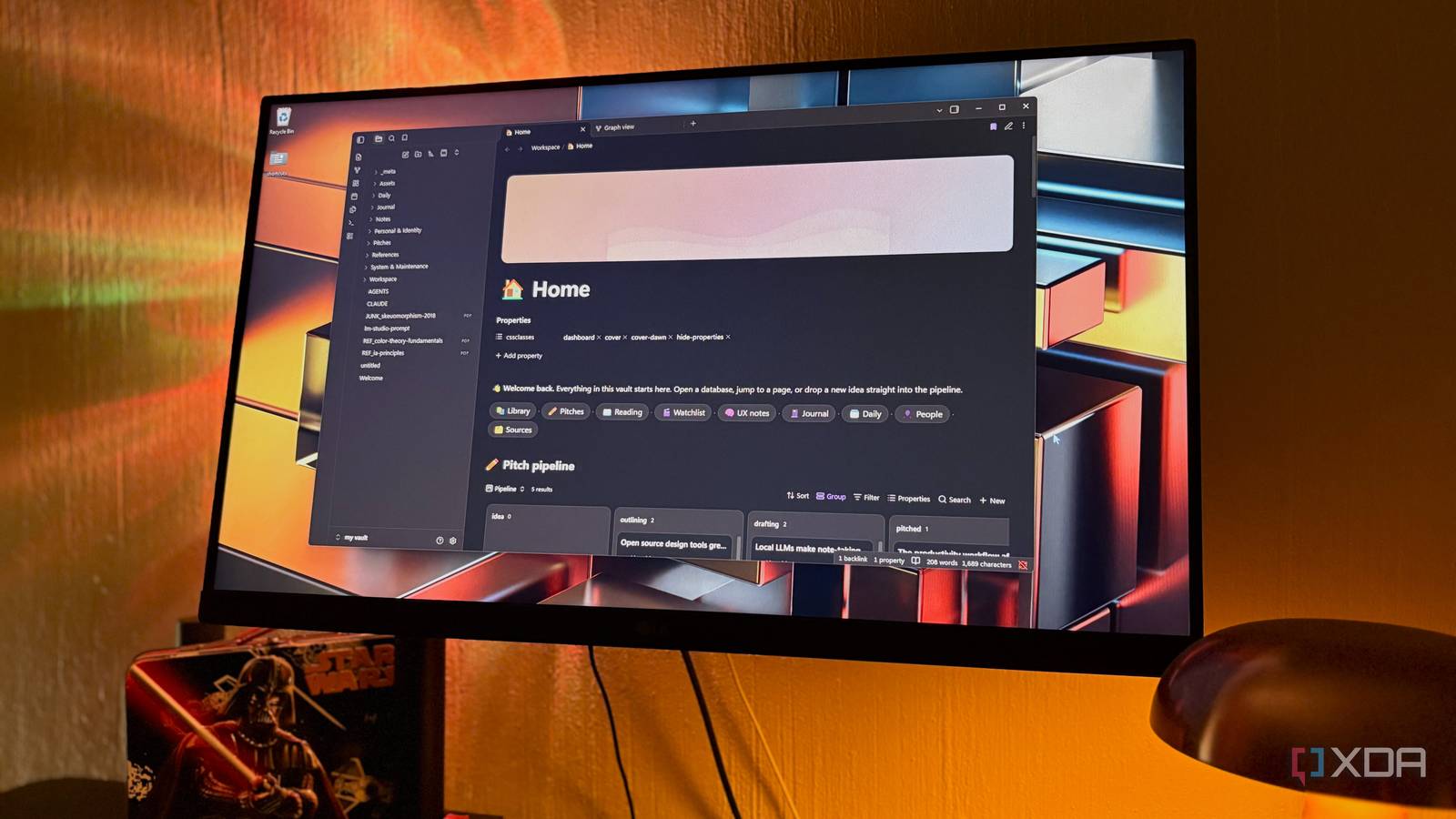
Published Nov 22, 2026, 4:00 PM EST Nolen began their writing career in 2019, with three years dedicated to editing the Creative section at MakeUseOf. Their expertise lies at the crossroads of technology and creativity, covering areas like photography, video editing, and graphic design. Outside of work, you'll often find Nolen diving into a good book, writing their own stories, or playing video games. No matter how many capable Notion alternatives you try, I think the same point can be made for most of them: that Notion usually has the nicer frontend. You open it and land on a home page with a pretty cover image and links to everything. That polish is a big reason people put up with it living in the cloud, and either accept the paywalled features or give in to the subscription. Obsidian sits on the complete opposite end of that. You own your notes since they're just plain Markdown stored in a regular folder on your own computer. There are also no surprise data policies or paywalls. Out of the box, though, Obsidian isn't everyone's cup of tea. I've gotten used to it and appreciate some of its quirks, but I can see why some don't. But its built-in features have grown a lot over the past year, so I wanted to see how much of Notion I could rebuild using only what ships with the app. And I think I came pretty close. Building a home page that works like Notion's What's the first thing you see when you think of Notion? A flashy dashboard page. Most Notion users build one eventually, you can even pay for some really stylish ones from the Marketplace. Most of them have linked database views that show slices of the workspace so you don't have to hop between a million pages to find something. Obsidian just reopens whatever tabs you had last, which is fine until the vault has a few hundred notes in it. In Obsidian, a home page is a regular note. Bases, Obsidian's built-in database feature, lets you embed any database view inside a note, and adding the view's name after a hash sign shows one specific view. That's basically Notion's linked views. For toggle blocks I used collapsible callouts, the colored boxes Obsidian already supports, so the areas I don't check every day remain hidden. The Notion look comes from one custom CSS snippet, a small style file you add to your vault's snippets folder and then switch on under Appearance > CSS snippets in Obsidian's settings. Every note can carry a cssclasses property, and the snippet's cover and layout styles only apply to notes with those classes, so the rest of the vault keeps its normal layout while the home page gets a gradient cover banner. The same snippet also gave me the emoji icons next to the titles and splits a callout into side-by-side columns. For example, giving my UX notes page its own blue cover is just two words in its properties. It's not a perfect copy; a snippet can't load images from the vault, so covers are color gradients rather than custom images. The icons also only show in the page title. Turning Bases into Notion-style databases Where Obsidian finally gets databases right Databases are another big reason why people stay in Notion, and you used to need third-party plugins to get databases in Obsidian until Bases came along. It's a core feature that turns the properties at the top of your notes (things like status, type, or rating) into database views you can filter with detailed rules. And the difference is that you don't need to create a database from scratch every time; Bases already sit on top of everything that's in your vault, and you just need to adjust the filters and views, which switch between table, cards, list, and kanban board. In my setup, one main database called Library covers the entire vault and most of what I need is in its views. Each view is just a saved set of filters, so the same database can show a reading list and a recently edited table without needing me to duplicate the same notes. Those views then get embedded on the home page and on smaller category pages, similar to how you'd drop linked views onto a Notion dashboard. For example, my Books page is a cover banner with one embedded board underneath, where books sit in to read, reading, and finished columns. Dragging a card into another column updates the status property inside that book's note. This is pretty close to how a Notion board behaves too. Formulas handle the little Notion extras. One of mine turns each status into an icon, and another one counts the days since a note was last edited, which is handy for spotting stuff I've abandoned. Why my Notion copy loads faster than Notion I'm not waiting on a server Beyond the privacy gains, another benefit to this setup is the speed. Because everything is just in a regular folder on my drive, I'm not waiting on Notion's servers to load all my data every time I open the app. Notion's own engineering blog has posts about years of work just to make pages load faster, since every page gets built from blocks fetched off its servers. I haven't measured this myself but I can definitely feel the difference in load time with this setup in Obsidian. Offline use is another win. Notion's offline mode works per device, and free users have to download the pages they want ahead of time; paid plans also automatically download recently visited and favorited pages. Obsidian doesn't even have an offline mode to think about because it's a given. The only catch is that this speed only lives on one device, so getting the same vault onto a phone, for example, would require paying for Obsidian Sync or setting up your own syncing. There's also no real-time collaboration like with Notion, so this setup isn't exactly for shared team workspaces. Rebuilding Notion without downloading anything I probably could have taken the aesthetic and functionality up a few notches with some community plugins, but I'm not really a fan of bloating Obsidian with plugins and prefer to keep mine minimal. Thanks to one custom CSS snippet and the core features Obsidian already has, I still ended up with a home page that looks and works a lot like Notion's. Obsidian OS Windows, macOS, Linux, iOS, iPadOS, Android Individual pricing Free normally; $4/month for Obsidian Sync
I built my own Notion inside Obsidian, and it's faster than the real thing
Full Article
Original Source
Read the full article at Xda-developers →KhanList aggregates and links to publicly available news content. We do not host full articles from third-party sources. Always verify important information with original sources.