
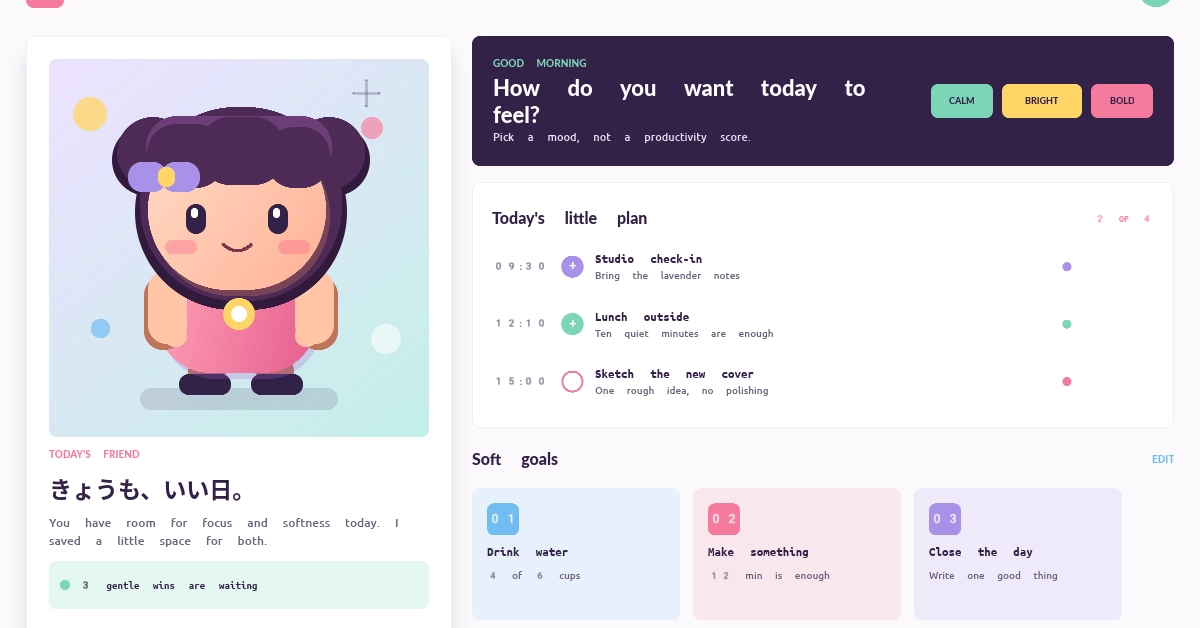
Native GUI demos often look like settings panels, administrative dashboards, or collections of standard controls. Those examples are useful, but they leave another question unanswered: can the same native UI foundation express a playful, consumer-facing visual language? Clay Board Style System v0.5.0 includes a new Kawaii Companion demo built to explore that question. It renders a complete daily-companion concept in an SDL3 window with a soft color palette, mixed Japanese and English text, cards, progress indicators, and a two-head-tall character drawn directly through retained Canvas commands. There is no browser or WebView behind this screen, and the character is not a PNG, SVG, or 3D model. The demo is assembled from the same public Box, Text, Canvas, Style, layout, and retained-rendering primitives intended for ordinary CBSS applications. Clay Board Style System is abbreviated as CBSS throughout the rest of this article. Why visual range matters in native GUI development A UI toolkit can support rows, columns, text, borders, and input controls while still making every application look structurally similar. That is enough for many tools, but creative applications and consumer-facing desktop software also need control over composition, typography, color, illustration, spacing, and visual hierarchy. The Kawaii Companion demo is therefore not mainly a test of whether CBSS can draw rounded rectangles. It tests whether its existing primitives can be composed into a coherent visual system that feels different from a conventional native GUI demo. The screen combines: a two-column application layout built from retained Box nodes; Japanese and English text shaped through the configured text engine and font fallbacks; cards, borders, shadows, gradients, spacing, and rounded geometry expressed through Style values; a character illustration produced from Canvas drawing commands rather than an imported character asset; several visually distinct sections that still share one palette and typography system. This is important for CBSS because the project aims to provide reusable presentation primitives, not a fixed collection of applications that all inherit one visual identity. Building a kawaii desktop UI without HTML or a WebView The authoring model is CSS-inspired, but CBSS is not a browser CSS implementation. The demo creates retained nodes and typed style values in Nim. CBSS then resolves style, computes layout, prepares text and paint data, and sends the result through its SDL3 backend. Nim application -> retained Box, Text, and Canvas nodes -> typed CBSS Style declarations -> style resolution, layout, text, and paint -> SDL3 backend -> native desktop window Enter fullscreen mode Exit fullscreen mode For example, the left companion panel is a normal Box with layout and visual declarations: let companion = ui.box(uiStyle([ width(426), height(632), padding(23), gap(11), flexDirection(fdColumn), decl("background-color", colorValue(white)), borderRadius(8), borderWidth(1), decl("border-color", colorValue(rgba(0.31, 0.20, 0.38, 0.08))), decl("box-shadow", shadowValue( px(0), px(16), some(px(34)), some(px(-18)), some(rgba(0.30, 0.18, 0.40, 0.24)) )) ]), parent = some(main)) Enter fullscreen mode Exit fullscreen mode Names such as padding, gap, flexDirection, background-color, and box-shadow make the intent familiar to web developers. Internally, however, these declarations feed CBSS's retained native UI pipeline rather than a DOM and browser rendering engine. Drawing the character with retained Canvas commands The character is the most immediately visible part of the screenshot, but it does not require a separate illustration file. The demo constructs a Canvas2D, records drawing commands, and mounts that canvas into the retained UI tree: let mascot = newCanvas2D() mascot.drawMascot() discard ui.canvas( mascot, uiStyle([width(380), height(378)]), parent = some(companion), code = "daily-companion-character" ) Enter fullscreen mode Exit fullscreen mode drawMascot layers rounded shapes, lines, a quadratic path, solid fills, and Oklab-interpolated linear gradients. The face, hair, clothing, highlights, shadow, and background decorations are all described in code. The result remains a 2D retained drawing; the sense of depth comes from layering, color, and highlights rather than a 3D asset pipeline. This does not mean every application should generate all artwork procedurally. It shows that custom visual elements can live beside styled layout and text without requiring a separate rendering model for each component. Mixed Japanese and English typography in a native UI The screenshot also includes きょうも、いい日。 alongside English headings and supporting text. The demo configures the CBSS text path with font fallbacks before building the interface: var fonts = initFontRegistry() fonts.addFallbackFamily("Noto Sans") fonts.addFallbackFamily("Noto Sans CJK JP") var cosmic = initCosmicTextEngine(fonts) ui.configureTextLayout(cosmic.textEngine(), fonts) Enter fullscreen mode Exit fullscreen mode This is a small detail visually, but an important application-level test. A styled layout is not convincing if its text path works only for a narrow set of Latin demo strings. The Kawaii Companion screen exercises mixed-script shaping and fallback inside the same retained layout. Run the Kawaii Companion demo with Nim and SDL3 The complete source is included in the v0.5.0 tag: git clone https://github.com/puffball1567/clay-board-style-system.git cd clay-board-style-system git checkout v0.5.0 nimble setupBundled nimble kawaiiCompanionDemo Enter fullscreen mode Exit fullscreen mode The current package requires Nim 2.2 or newer. Rust and Cargo are also needed to build the native text and image bridges. Linux x86_64 with SDL3 is the Tier 1 runtime target; the portable test suite also covers Windows x86_64 and macOS arm64, while their complete native runtime paths still need broader contributor validation. The full example is available in examples/kawaii_companion_demo.nim. A native UI should not decide the personality of the application The main result of this demo is not that CBSS has a built-in “kawaii theme.” It does not. The result is that application code can construct this visual language from general-purpose native layout, text, Canvas, and style primitives. Native GUI development should not force every application toward the same visual personality. Kawaii Companion is one more test of whether CBSS can provide a familiar, expressive authoring model while remaining a native UI system rather than embedding a browser. Clay Board Style System v0.5.0 Kawaii Companion demo source Project repository
I Built a Kawaii Native GUI with Nim and SDL3
Full Article
Original Source
Read the full article at Dev →KhanList aggregates and links to publicly available news content. We do not host full articles from third-party sources. Always verify important information with original sources.