
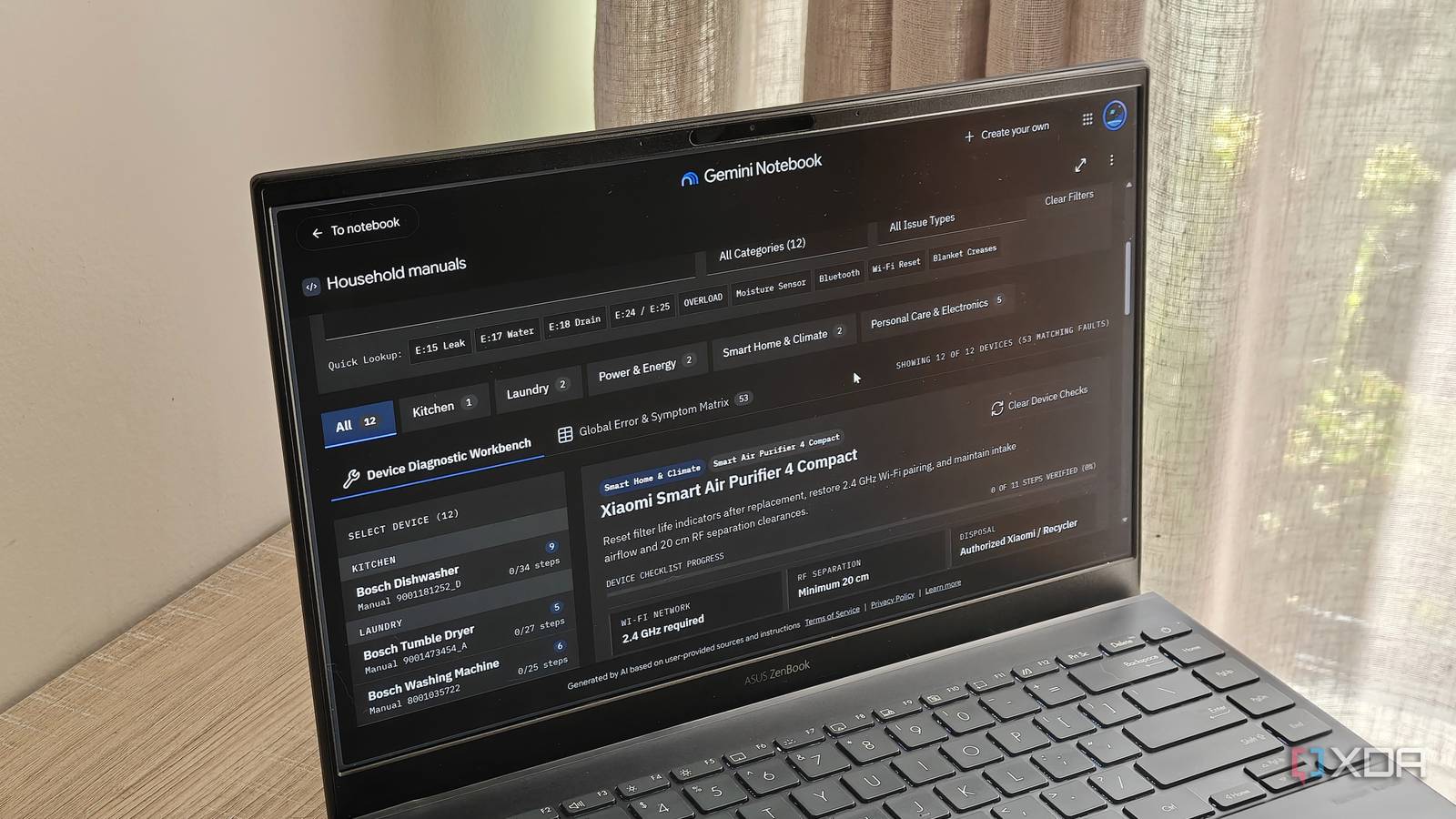
Published Nov 28, 2026, 7:00 PM EST Megan is a Software Writer at XDA Developers who has been writing about consumer technology since 2016. With a postgraduate degree in New Media journalism, she has always been passionate about diving deep into topics and writing about them in a way that makes them easier to understand for everyday consumers. She runs her own blog called Tech Valkyrie and has contributed to Tom's Guide and Android Authority. She also worked at MakeUseOf as a Lead Editor. In her spare time she plays video games and geeks out about the latest tech. When I first started using Gemini Notebook, then known as NotebookLM, I never imagined that I would one day be able to create small websites with the platform. And yet, now that the feature has arrived, I can't get enough of it. I decided to turn one of my most useful notebooks — one that includes all my appliance and device manuals — into a website using the service. And now I have an interactive dashboard that lets me easily troubleshoot my devices. Gemini Notebook is the perfect hub for your manuals It creates your own support desk Uploading your device manuals to Gemini Notebook may not seem like the most intuitive use for the platform, but it actually works out well. It lets you set your device and appliance manuals as sources, then use natural-language chat to ask about problems and troubleshoot your items. The process of uploading your manuals is pretty easy, thanks to the prevalence of digital copies online. I used manufacturer websites and device manual libraries to source PDFs for my household manuals. I could then query any issues I was facing. In fact, I discovered that I hadn't been following proper upkeep for my tumble dryer, which is why it wasn't drying my laundry consistently. Gemini Notebook also gave me tips on how to lower the electricity usage of the appliance. It also helped me remember the various button functions for my devices like my gimbal and my headphones. I could also check specs information for different devices to make sure I had the right information. Overall, it significantly cut down my troubleshooting time. I could simply ask the AI a question, and it would pull the information from my manuals, rather than having to thumb through the physical manuals myself. So when Gemini Notebook introduced the ability to create a website, I wondered how this new feature could further empower my troubleshooting hub. I easily generated a site from my uploaded manuals using a new Gemini Notebook feature Simply tell the AI to make you a site Making a site from notebooks is incredibly easy. All you have to do is ask Gemini Notebook to "make me a site" in the notebook chat. The AI then generates a website as an artifact you can access once it's complete. Your prompt can also include more details about what you want the site to accomplish, but Gemini Notebook does some interesting things when left to its own devices. I simply asked it to "Make me a site that allows me to troubleshoot different devices and appliances." The initial site included a pretty comprehensive dashboard. I could select a device or appliance, check important specs, and choose from common errors for the device. It also had a section where I could view how to reboot or reset devices like my smart fan and air purifier. Near the bottom, there were also rules to prevent critical damage or safety accidents with the devices. I also had a manual care checklist which included tasks related to the regular maintenance of my devices. While the site was comprehensive, it was missing a few things. Two appliances were listed as not being included in the source pack, but their manuals were among the sources. I also noticed that the common errors didn't cover the scenarios I encountered when using my devices. So I created another site with a more specific prompt to see what Gemini Notebook would generate. With a bit of tweaking, I got a useful troubleshooting site I couldn't get visuals, though I wanted to focus on getting information more quickly from the website so that it would provide additional benefits compared to using Gemini Notebook's chat interface. So I got the AI to focus more on the troubleshooting side of things. I also wanted it to include information from the sources where it said the source pack was not available. So, for the second site I generated, I added the following prompt: "I want you to add the most common issues for each appliance to the troubleshooting guide. Populate the guides for the devices where manual excerpts are not available using the sources." The site it created was more focused on the troubleshooting side of things, including providing common maintenance steps. My devices and appliances were split into separate categories. Each device had a tab for Diagnostics & Error Codes; Maintenance & Care; and Controls, LEDs & Safety. These tabs included checklists for troubleshooting and maintenance tasks. This made it easier to track and scroll through different errors and tasks without getting overwhelmed. What I particularly like about the summaries is that I can scroll through potential errors or issues I may encounter in the future. This covers a use case that I wouldn't have thought of without the website. I noticed that some of the information was based on things I had asked in the AI chat before. For example, I had asked about the button mapping for my headphones in the past. This was included in one of the tabs for my devices. One thing I did miss though, was visuals. The sites I've generated over the past few days may include a graph or simple visualization, but no images or illustrations. I noticed this when I specifically tried to generate a website with images of exercises. This feature would be helpful for depicting buttons and device icons. In my experience, if you try to generate a site with images, the AI tends to just create blank spaces. Gemini Notebook's website pleasantly surprised me My prompts for my site in Gemini Notebook were pretty simple, but the AI took them and ran with them. It provided useful elements I hadn't asked for that proved really handy. While I would like to see the visual capabilities expand, especially considering what Gemini Notebook can do when it comes to slide decks, I'm really impressed by what I've seen so far.
I asked Gemini Notebook to make a site, and it built my home's device troubleshooting hub
Full Article
Original Source
Read the full article at Xda-developers →KhanList aggregates and links to publicly available news content. We do not host full articles from third-party sources. Always verify important information with original sources.