
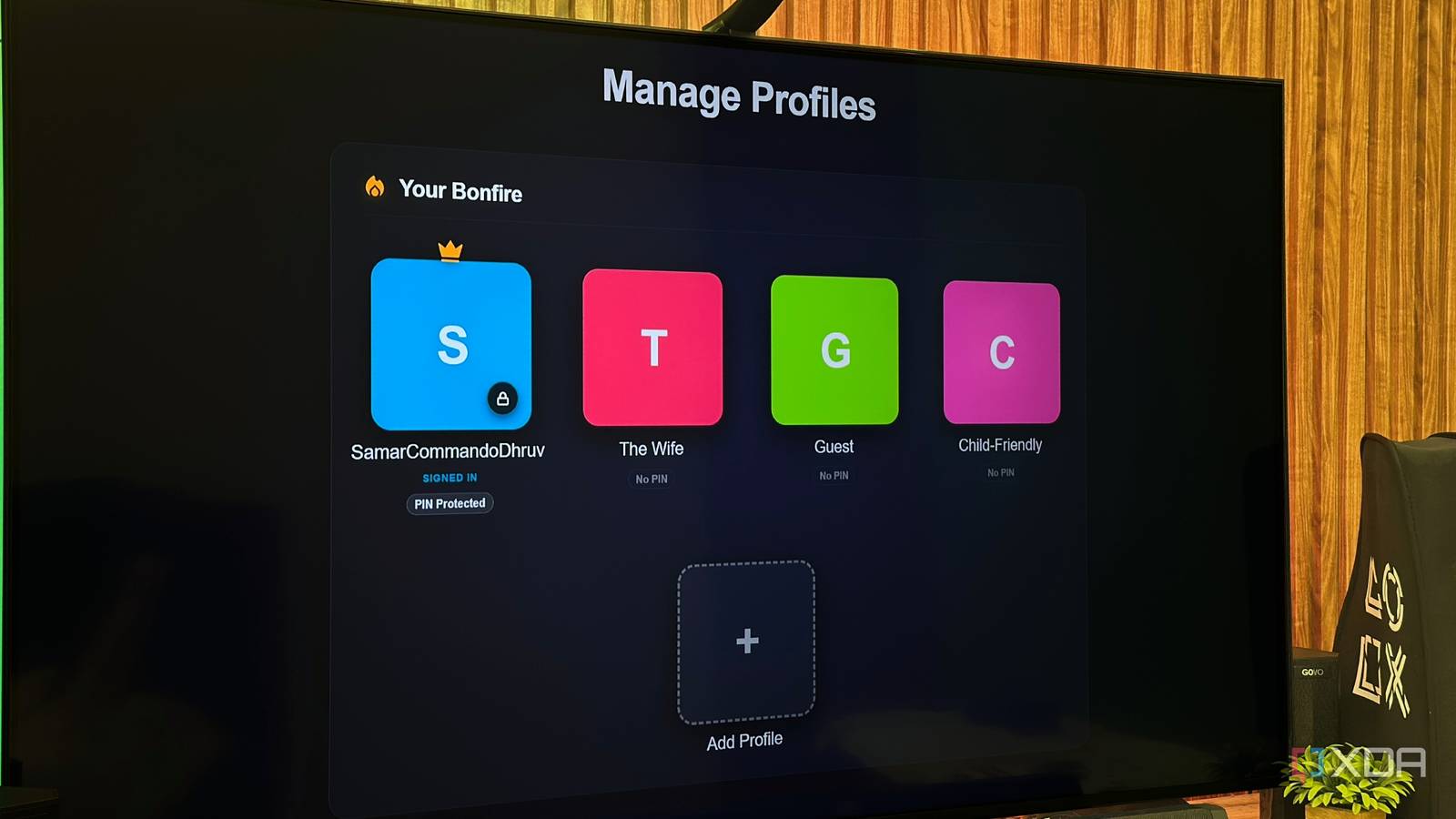
Published Sep 6, 2026, 11:30 AM EDT Gaming has been Samarveer’s greatest passion, and the Literature graduate in him takes immense joy in dissecting games for their themes, messages, and impact. Samarveer holds a deep appreciation of gaming, and considers the platform to be the most immersive and impactful across all media. He can be found engaging with gaming communities online, always ready to debate the finer points of ray tracing or itching to write an 8-page collegiate thesis on any game that impacts him emotionally. I've spent enough time with Jellyfin to know that its biggest strengths can sometimes come with tiny annoyances. It gives me the freedom to build my own Netflix, keep my media on my own hardware, and control practically everything about the experience. But there has always been one glaringly obvious omission when multiple people use the same server: profiles. Naturally, I decided to fix that myself, and it took exactly one plugin. I installed it mostly out of curiosity, expecting another clever Jellyfin addition that sounds better on paper than it actually feels in practice. However, the first screen I saw after setting it up made me stop and think why Jellyfin wasn't doing this already. Jellyfin has always been missing one obvious thing Sharing a server shouldn't mean sharing your identity For everything Jellyfin gets right, profiles have always felt like an omission to me. If one server is shared by a household, everyone becomes the same person on paper. I have had to see my Continue Watching row become a noticeboard with shows and movies my wife and friends left in the middle, all while my own watched episodes disappeared into somebody else's history. Clearly, the solution has always been to separate Jellyfin users on the same account, but that introduces friction when you try doing it the traditional way. Switching accounts is far less elegant than choosing a profile when the server is being used like a streaming service. Netflix clearly understood this concept years ago: users don't always need separate accounts, but they definitely need separate spaces. Profiles aren't merely cosmetic, either. Each person should have their own viewing history, resume positions, library access, and restrictions without turning television into an account-management exercise. After messing around with hundreds of plugins on my Jellyfin server and finally settling on a handful, I now needed a plugin for profiles within the same account. I came across AHouseOfBards' JellyProfiles plugin while looking for ways to make my server more household-friendly, and the premise caught my attention. It promised to tackle this annoyance, so I installed it to see whether it had been delivered, or whether I had found another Jellyfin rabbit hole. One plugin alone made all my Jellyfin users happy My media server finally has a "Who's Watching?" screen Installing Netflix-like profiles on Jellyfin wasn't too tough at all — I simply added the right repository to my server, created a profile for everyone using it, and that was it. Anyone who logs in to my server is now greeted by a "Who's Watching?" screen with all the available profiles to choose from. There's my profile, another for my wife, another for my guests, and two more for my friends. The JellyProfiles plugin only supports up to five profiles per Jellyfin account. These aren't just five names slapped onto the same account — each profile comes with its own viewing activity, while the server can apply different library access, parental restrictions, tags, PIN protection, and other controls depending on who's using it. Furthermore, as the server admin, this plugin lets me decide exactly which profile has access to which library on my server, allowing me to restrict the Guest Profile from accessing the home videos and photos I host. The switching itself is pretty nifty, since I don't have to sign out of Jellyfin, choose another account, and log in again. Now, everyone shares the same digital sofa with separate profile experiences. Technically, this does sound like a small change, but seeing that screen on a Jellyfin installation I've been accustomed to using in a very particular way made the difference immediately obvious. My server now feels like something my entire household can actually use with zero friction, while everyone gets their own tailor-made experience. This is about as close to Netflix as Jellyfin gets The small change that makes a surprisingly big difference After actually using the profiles, I think the biggest win is how little they interfere with everything that makes Jellyfin worth using. I'm not replacing my server, rebuilding my library, or handing control of my media back to some streaming giant. All the users on my server now have their own corner of the experience. My viewing history stays mine, and every user remains happy. A guest doesn't need to wander through everything I have ever watched or see my playback reports if they just want to watch something quickly that I'm hosting on my media server. This plugin has removed the exact kind of low-level annoyance that makes shared streaming accounts irritating. I am using the JellyProfiles plugin with a native Windows 11 installation of Jellyfin Server. Other installations may require additional permissions to modify Jellyfin's index.html file. There are caveats, though. This plugin works in desktop and mobile browsers and is also compatible with the official Jellyfin iOS and Android apps, as well as Jellyfin Media Player on Windows, macOS, and Linux. It's even supported on LG webOS, but it doesn't work with Jellyfin on Android TV or Google TV, since it's a native app rather than a web client in a frame. Depending on where you're watching, you may still encounter limitations that aren't present in the web interface. As a practical upgrade, though, Bonfire is difficult to dismiss. My Jellyfin server has borrowed one of Netflix's better ideas and borrowed it well. After using it, going back to one giant communal profile will feel jarring, to say the very least, as if I gave everyone their own toiletry kit but am still making them share the same toothbrush. Jellyfin iOS compatible Yes Android compatible Yes Desktop compatible Yes Jellyfin is one of the best Plex alternatives you can get, and that's thanks to its open-source nature and powerful set of features. There are apps for basically every platform and it's completely free to run your very own server. My plugin collection has matured and given Jellyfin immense polish Bonfire isn't even the plugin that made me appreciate my Jellyfin setup the most. After months of tinkering, adding little improvements and finding solutions to problems I didn't even realize I had, my plugin collection has finally started to feel less like a collection of experiments and more like a genuinely polished media platform. That is what makes Jellyfin so satisfying to use now. The core software gives me the foundation, but these community-made additions keep filling in the little gaps that separate a functional media server from something I actually enjoy using every day. And somewhere along the way, I stopped thinking about what Jellyfin was missing and started noticing how much better my Jellyfin server had become.
I added Netflix-like profiles to my Jellyfin server, and it solved years of shared-server frustration
Full Article
Original Source
Read the full article at Xda-developers →KhanList aggregates and links to publicly available news content. We do not host full articles from third-party sources. Always verify important information with original sources.