
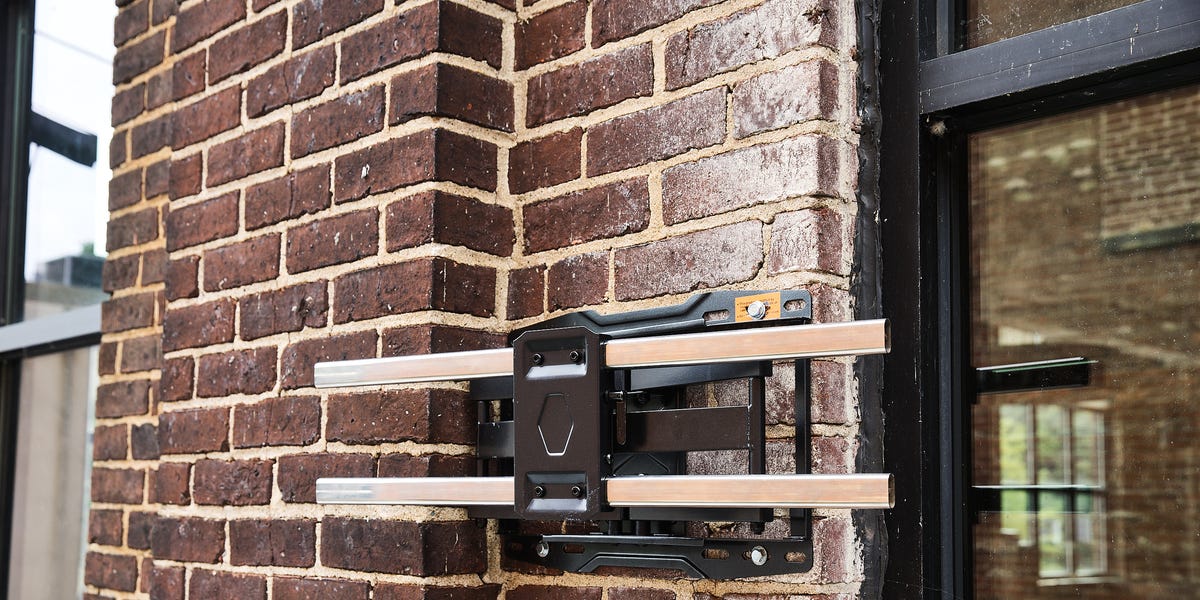
3 min readAs outdoor TVs become more popular (and common), we’re fielding more and more inquiries about how to hang them. And that’s understandable—you’ve just potentially spent thousands on your new TV and don’t want to risk it falling off the wall. I have good news if you have a masonry wall (one made of brick, concrete, or natural stone): It can be very easy to securely mount your new TV, even more so than if you have wood-framed walls.Unlike those, where you need to find studs to anchor fasteners to, you can anchor your TV mount in concrete almost anywhere. This is because the entire wall is a structural support, which gives you greater flexibility. With just a few tools, you can hang your TV up in under an hour.The ProjectSelecting the right location might actually be the part of the project you’ll fret most about. Try to find a spot where there is a good line of sight from where you’ll be viewing the TV. The trick in doing that is predicting where the sun might reflect off the screen—or backlight it. Also consider if or how the mount articulates or extends.While outdoor TVs are designed for use outside, they’re not all built with the same protection from water intrusion. Any outdoor TV can be mounted under a covered patio, deck, or porch. But some are fully waterproof, so you can mount them in locations exposed to full rain, while others are only protected from splashes of water and will be best under cover. So know the limitations of your outdoor TV when selecting where to put it. Lastly, select an outdoor TV mount designed for the size and weight of your TV.Total project time: ~1 hourInstalling the TV mount: <30 minutesHanging the TV: <30 minutesTotal cost: $75 to $200, depending on sizeWhat You’ll NeedAs far as tools go, the only special one you’ll need is a rotary hammer drill, which differs from a basic drill with a hammer function. While you can use either type of drill, virtually any rotary hammer drill will be much faster and create cleaner, more accurate holes.Most outdoor TV mounts include the hardware you’ll need, but I often find it is inadequate or of dubious integrity—i.e., cheap and flimsy. And some mounts, like the one I bought, don’t come with anchors for masonry walls. So, I purchased proper 5/16 x 2-inch Cobra Masonry Anchors, with each individual anchor capable of supporting more than 200 pounds. With four required, that’s more than enough for a 65-inch TV.Here’s the full list of tools and materials:Rotary hammer drill, or drill with a hammer functionRotary hammer drill bitLevelHammerWrenches to tighten lag bolts5/16 x 2-inch Cobra Masonry AnchorsSharpie, or other permanent markerOutdoor TV mountHow to Do ItStep 1: Mark the LocationTrevor RaabUse the mount to position the holes in the brick face, making sure to keep the template level.Determine where you want to mount the TV and use the template that came with it to mark where to drill the holes. Make sure the mounting holes are in the face of the bricks, stone, or concrete block. Mortar is weaker than the harder materials that make up the wall, and anchors can expand and fracture mortar when the lags are tightened down. Use the level to keep the template level while positioning, then mark the location of the anchors. I typically use a Sharpie permanent marker because it’s easy to see on a variety of surfaces.Step 2: Drill the HolesTrevor RaabDrill the holes where you’ve marked, keeping the drill level and perpendicular to to the wall.Verify you’re using the right size drill bit for the anchors you’re installing—ours needed a 1/2-inch hole. Drill all four holes, making sure to keep the drill bit level and perpendicular to the wall as you drill, which will ensure the anchors, and thus the lags, go in straight.Step 3: Tap Anchors Into HolesTrevor RaabUse a hammer to tap the anchors in until they’re flush with the wall surface.Insert the anchors into the holes, using a hammer to gently tap them in until they’re flush with the face of the wall.Step 4: Install the TV MountTrevor RaabLine up the TV mount holes with the anchors, insert the lag bolts, and tighten them with a wrench.Align the holes in the TV mount with the anchors and thread the lag bolts into the anchors by hand. Once started, use a wrench to tighten them down. Run each of them in until they’re snug, and then tighten another quarter to half turn.That’s all there is to it. The only thing left to do is install the mount-specific brackets on the back of your TV and hang it on the mount using the included hardware, following the manufacturer’s instructions.Brad Ford has spent most of his life using tools to fix, build, or make things. Growing up he worked on a farm, where he learned to weld, repair, and paint equipment. From the farm he went to work at a classic car dealer, repairing and servicing Rolls Royces, Bentleys, and Jaguars. Today, when he's not testing tools or writing for Popular Mechanics, he's busy keeping up with the projects at his old farmhouse in eastern Pennsylvania.
How to Mount an Outdoor TV on Brick In Less Than an Hour
Full Article
Original Source
Read the full article at Popularmechanics →KhanList aggregates and links to publicly available news content. We do not host full articles from third-party sources. Always verify important information with original sources.