
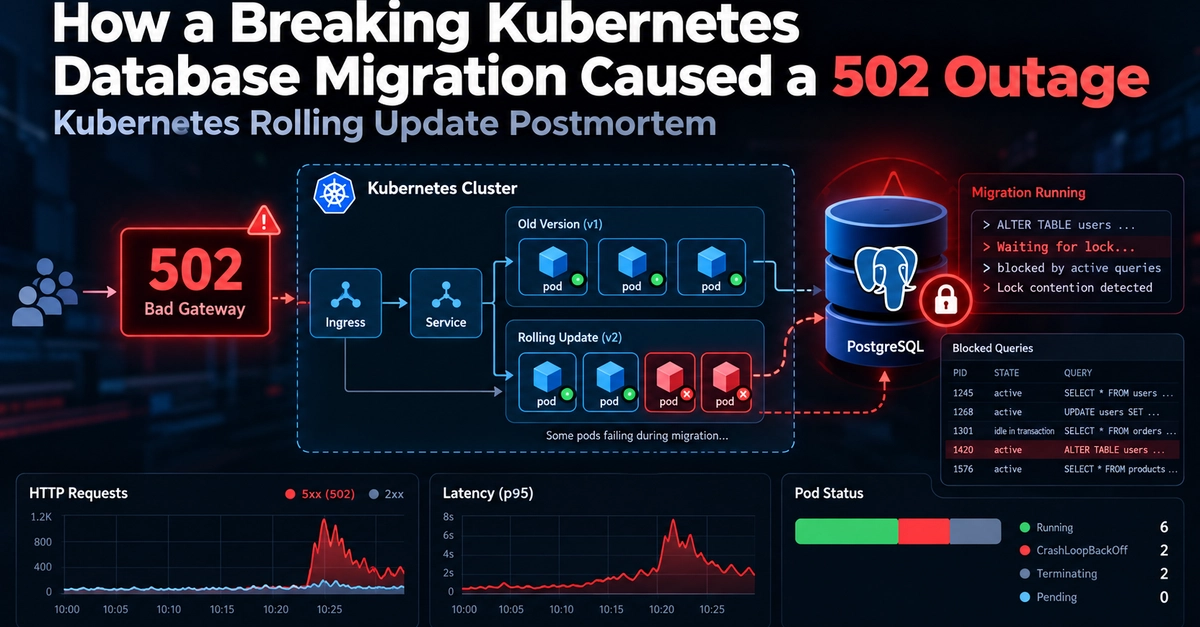
Originally published on Naveed Ahmed's Engineering Blog. A routine Kubernetes rolling update. A breaking PostgreSQL schema migration. And suddenly, a production API starts returning 502 Bad Gateway errors. At 2:15 AM, an automated CI/CD deployment triggered what should have been a normal application update. Instead, database queries started blocking, API latency increased, and PostgreSQL connections became exhausted. The incident lasted around 24 minutes. The real problem wasn't Kubernetes itself. It was a database migration that wasn't compatible with the old and new application versions running simultaneously. Here's what happened and how to prevent it. 1. What Went Wrong During the Kubernetes Rolling Update? Kubernetes rolling updates gradually replace old application pods with new ones. During deployment, both versions can run at the same time. Kubernetes Rolling Update Application v1 (Old Pods) + Application v2 (New Pods) | v Shared PostgreSQL Database Enter fullscreen mode Exit fullscreen mode In this case, the deployment included a destructive database migration that removed a column still required by the older application pods. Those pods continued querying the deleted column, causing database errors. Key lesson: A Kubernetes rolling update doesn't guarantee zero downtime if your database schema isn't backward-compatible. 2. How PostgreSQL Lock Contention Caused 502 Errors The schema migration also introduced PostgreSQL lock contention. Operations such as dropping a column require an ACCESS EXCLUSIVE lock. For example: ALTER TABLE users DROP COLUMN full_name; Enter fullscreen mode Exit fullscreen mode If existing transactions hold conflicting locks, the migration must wait. New queries can then queue behind the waiting migration, causing a cascade: Schema Migration ↓ Exclusive Lock Wait ↓ Blocked Database Queries ↓ Connection Pool Exhaustion ↓ Application Timeouts ↓ HTTP 502 / 5xx Errors Enter fullscreen mode Exit fullscreen mode This explains why a database migration can disrupt API traffic even when Kubernetes pods appear to be running. To investigate blocked PostgreSQL sessions: SELECT pid, query, wait_event_type, wait_event, pg_blocking_pids(pid) AS blocking_pids FROM pg_stat_activity WHERE cardinality(pg_blocking_pids(pid)) > 0; Enter fullscreen mode Exit fullscreen mode This helps identify queries waiting on other database sessions. 3. Why the Kubernetes Rollback Failed Rolling back the application doesn't automatically reverse database schema changes. For example: kubectl rollout undo deployment/api Enter fullscreen mode Exit fullscreen mode This restores the previous Deployment revision, but it doesn't restore deleted PostgreSQL columns. If the older application still depends on the removed schema, errors can continue even after the rollback. Key lesson: Application rollback and database rollback are separate operations. Both need a compatible recovery strategy. 4. The Solution: Expand and Contract Database Migrations The safer approach is to introduce database schema changes gradually. Phase 1: Expand Add the new schema without removing existing columns. ALTER TABLE users ADD COLUMN display_name TEXT; Enter fullscreen mode Exit fullscreen mode Phase 2: Migrate Deploy compatible application code and backfill existing data. For large tables, use controlled batches rather than one massive transaction. Phase 3: Switch Update application reads and writes to use the new schema. Verify data consistency and wait until older application versions are no longer serving traffic. Phase 4: Contract Remove the old column in a later deployment. ALTER TABLE users DROP COLUMN full_name; Enter fullscreen mode Exit fullscreen mode This approach helps avoid breaking application compatibility during Kubernetes rolling updates. Destructive DDL can still require careful lock management. 5. Production Best Practices A few safeguards can reduce the risk of database migration outages: Use backward-compatible schema changes. Run database migrations through a controlled CI/CD step or Kubernetes Job. Avoid running migrations independently from every application pod. Configure appropriate PostgreSQL lock_timeout values. Monitor database connections, lock waits, API latency, and HTTP 5xx errors. Test rollback compatibility before production releases. For example, a bounded lock wait can prevent migrations from waiting indefinitely: SET lock_timeout = '5s'; Enter fullscreen mode Exit fullscreen mode Choose timeout values based on your workload and migration strategy. Read the Complete Kubernetes Database Migration Postmortem In the full article, I break down: The 24-minute production outage timeline Kubernetes rolling update failure PostgreSQL AccessExclusiveLock contention Database connection pool exhaustion Why the rollback didn't restore service Expand and Contract migration strategies Production troubleshooting and prevention Read the Full Kubernetes Database Migration 502 Outage Postmortem Final Thoughts Kubernetes rolling updates can keep applications available during deployments, but they can't protect you from incompatible database changes. The biggest lesson from this incident is simple: Your database schema must support both old and new application versions during a rolling deployment. Have you experienced database migration failures during Kubernetes deployments? How does your team handle zero-downtime schema changes? Share your experience in the comments. Written by Naveed Ahmed — Lead DevOps & Platform Architect 🌐 Engineering Blog | 🐙 GitHub | 💼 LinkedIn 🛠️ SRE Interview Scenarios | ☸️ Kubernetes Mastery
How a Kubernetes Database Migration Caused a 502 Production Outage
Full Article
Original Source
Read the full article at Dev →KhanList aggregates and links to publicly available news content. We do not host full articles from third-party sources. Always verify important information with original sources.