
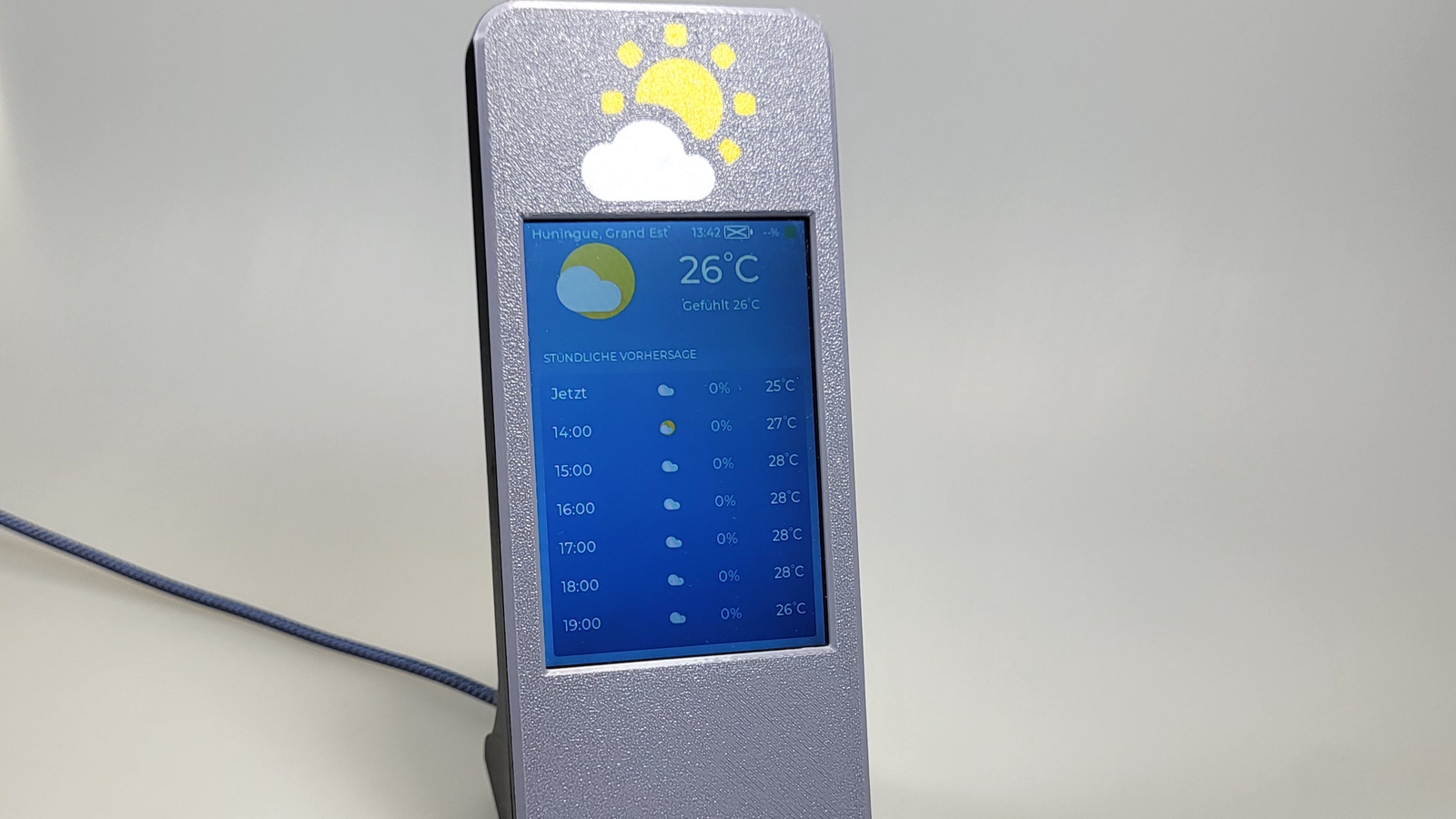
Published Oct 17, 2026, 6:30 PM EDT Adam has a degree in Engineering and has a life-long interest in technology. He has been writing for over a decade for various print and online publications, with a focus on consumer tech. He joined How-To Geek in 2024 while working at Pocket-lint. As well as being a long-term fan of Apple products, he also has a strong interest in smart home tech, running a Home Assistant server at home to automate all his smart home devices. He believes that the ideal smart home should work with minimal interaction from the user, with automations running as if by magic rather than requiring you to push buttons on a control panel. You can find more of his work on Muck Rack. The great thing about ESP32 projects is that often someone else has done all the hard work for you. For example, if you've always wanted a desktop weather display that can tell when you're in the room, then this project can provide everything you need to build your own. A weather display that knows when you're nearby There's no point showing weather data to an empty room It's always good to keep track of the weather. Deciding what to wear when I go out is a daily challenge, and knowing the current weather conditions makes it much easier. With an ESP32, you can build your own desktop weather display. The display can show useful information, such as the local weather conditions, the hourly and daily forecasts, the current time, and more. By using a touchscreen display, you can swipe through different screens to access additional weather information. The beauty of having a desktop weather display is that you can see the weather at a glance. You don't need to pull out your phone, unlock it, and open the relevant app; all the information is right there in front of you. The downside of this setup is that it requires the screen to always be on whenever you want to look at it. Since a weather display can't read your mind, the simplest solution is to just leave it on 24/7, but that's hardly efficient. A clever solution is to add an mmWave presence sensor to the weather display. This device can tell when someone is in the room, so that the display is always on when someone is there to look at it but can turn off when no one is around. An ESP32 powers the weather display Most of the hardware comes on a single board If you don't want to build your own desktop weather display from scratch, you can build one following the example of a Reddit user. They posted multiple images of their project, which is built around a Freenove FNK0103S board. This board includes an ESP32-WROOM-32E chip as the brains, as well as a 4-inch LCD touchscreen display. Since the ESP32 and the display are integrated into the board, there's very little additional wiring involved. The mmWave sensor does need to be connected, and to make room inside the enclosure, the creator de-soldered the preinstalled pin header from the radar module and replaced it with a 90-degree header instead. The total cost of the parts to build your own desktop weather display was estimated to be around $50 all in, although you may be able to do it for less depending on the parts you can source or already have on hand. Radar makes the weather display smarter than a motion sensor would It knows you're there even if you're standing still The smartest part of the build is the mmWave sensor that's built into the enclosure. This can detect someone several meters away under optimal conditions, although your results may vary. An mmWave sensor is superior to a motion sensor in this case, because a desktop weather display needs to know if someone is sitting at the desk, even if they're keeping relatively still. A motion sensor can only detect motion, so the screen would only be visible if someone was constantly moving. With an mmWave sensor, even if you're sitting at your desk, your presence will be detected, and the screen will stay on. It's after no presence has been detected for a period that the LCD backlight is switched off. Once you return to the detection zone, the display will illuminate again without you having to lift a finger. You can use the open-source software to build your own The files for the 3D-printed enclosure are also available Credit: Damov The software works by retrieving weather information from the Open-Meteo weather API over Wi-Fi. You can use the touchscreen to set up Wi-Fi, set your location, choose your language, and select your temperature format of choice. The creator has made the firmware available, so you don't need to write anything yourself. It's written in Rust using ESP-IDF, a development framework for ESP32 devices, so it's a little different from a typical ESPHome setup. The GitHub repository contains the firmware source and full assembly instructions, including the relevant wiring information. There are also files for the 3D-printable enclosure, so you have everything you need to build the finished product. Of course, you don't need to build this exact project. There's nothing to stop you creating something similar of your own in whatever manner you choose. You could use a Cheap Yellow Display to show weather data from Home Assistant via ESPHome, and even use a separate sensor you already own to handle the presence detection. A simple sensor can make a big difference This weather display is a perfect example of how adding a sensor to your design can make your project even better. You don't need an always-on display for a desktop weather device; you just need it to be on when you're there to see it.
How a $5 radar sensor turns an ESP32 into a weather display that wakes when you walk up
Full Article
Original Source
Read the full article at Howtogeek →KhanList aggregates and links to publicly available news content. We do not host full articles from third-party sources. Always verify important information with original sources.