
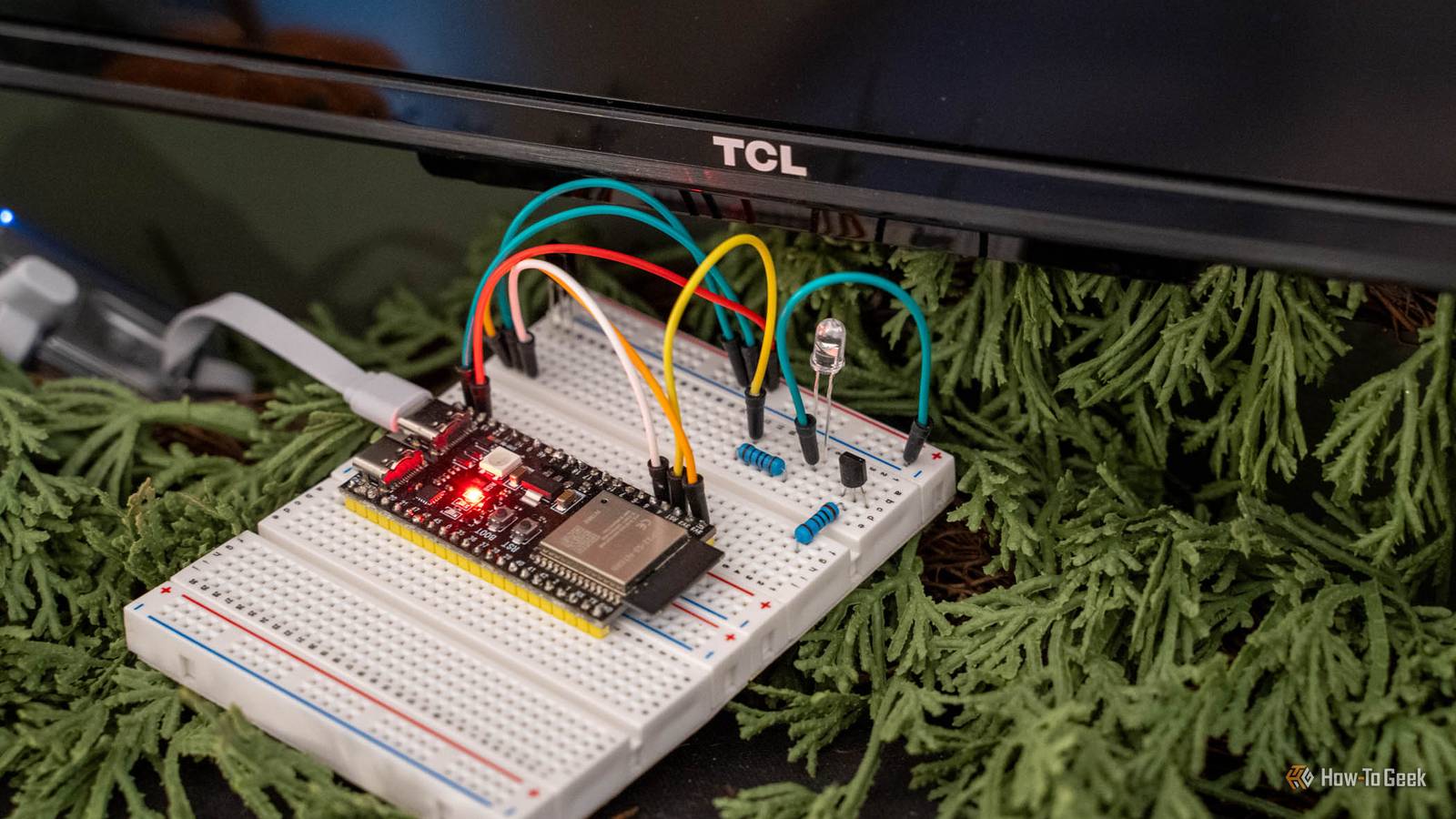
Published Nov 4, 2026, 11:00 AM EST Patrick Campanale has been in the tech space for well over a decade, specializing in PC/gaming news and reviews, as well as maker-focused products to build small businesses. With a start in technology back in 2010 surrounding the Palm/webOS ecosystem, Patrick spent his formative years developing mobile applications as well as blogging for various publications, eventually leading to starting his own website in 2014. After running a technology blog for a few years, he stepped out of that role and into the world of high-end custom PC manufacturing and building, with a focus on YouTube video production and overclocking. Then, in 2017, Patrick joined the 9to5Toys team as an editor/writer/reviewer with over 14,000 articles being published during his time there, ranging from deals and roundups to in-depth reviews on the latest technology, video games, 3D printers, and more. In his free time, Patrick loves to create projects from wood using various robots and methods, including leveraging the technologies of CNCs and lasers. If Patrick isn't working on a computer or playing video games, he's likely in his 2-car garage workshop creating something unique. In addition to all this, Patrick is also the media director at his local church where he feels God has called him to serve, and he loves every minute of it. I got tired of my Apple TV not turning my TV on through CEC, and I really didn’t want to connect my TCL Fire TV to the internet. So, I decided to take things back a few decades and use an IR emitter in a new way—through Home Assistant. Now that Home Assistant has better infrared support, all it took was a $10 ESP32 board and a few small components, and my TV was smart without any internet access required. My TV doesn't need to be on the internet to be smart Infrared works without Wi-Fi, an account, or an app I hate all the tracking that’s in modern TVs. From watching what I’m watching to “customize the ad experience” to always-listening microphones and cameras to just plain spyware, it’s annoying. Most smart TVs these days can easily be added into Home Assistant in one way or another, which is fine for an internet-connected TV, but what if I don’t want my TV on the internet at all? What if I don’t want to try and rebuild the operating system that it’s running on? Home Assistant recently added support for infrared projects, which is a local one-way communication method that’s been used for decades. TV and soundbar remotes already use it, so why shouldn’t smart homes? So, with the goal in mind of controlling my TV through my smart home without connecting my TV to the internet, I set out to build a custom IR solution for cheap using an ESP32 and some components I already had on hand. Everything I needed cost less than $15 The ESP32-S3 is doing all the heavy lifting This entire project centers around the ESP32-S3 N16R8, which I purchased at the end of last year. It has 16MB of flash storage, 8MB of octal PSRAM, and all the I/O I need for projects like this. I picked up a 3-pack for $20 after tax on Amazon, making each board under $7. This already gave me a cheap start to building my own ESP32-powered Home Assistant board, but the rest of the gear was even cheaper. I grabbed the IR learning module (SL838 IR receiver) from an Arduino kit I got around the same time last year, which that kit also included the resistor and breadboard I would need for the project. The only thing I had left to buy was the IR emitter, which I picked up a bag of them on Amazon for around $6. All-in, this project costs under $25 buying the parts separately. If I counted the individual component cost instead of the bulk component cost, it would probably be under $10. And that’s exactly what I was hoping for—a dirt cheap solution to an annoying problem that I wanted to solve. The brain of this entire project is the ESP32, and it would work with almost any ESP32 you have on hand. I started out with more complicated wiring, which included a transistor and extra resistors to help boost the power of the IR LED. But, I couldn’t get that version to work. It was probably my wiring as I’m still learning how to work with microprocessors and circuitry. However, a simpler circuit, which just includes the LED and one 100Ω resistor, worked perfectly! It didn’t have a ton of range, but it did work. More on that in a bit. 3-pack ESP32-S3 N16R8 This 3-pack of ESP32-S3 N16R8 microcontrollers are perfect for your DIY projects. Being the N16R8 models, there's enough memory and storage to run projects using platforms like MicroPython instead of having to rely on just straight C coding. Also, the breadboard pins are included in the package, though you will have to solder them on. Teaching it my remotes was the fun part ESPHome decodes every button press for you Once I had everything ready to go, I flashed the ESP32 with ESPHome. This was pretty simple through the ESPHome web flasher and took just a few minutes. Then, once it was flashed, I opened up Home Assistant, navigated to the ESPHome Device Builder, and adopted it into Home Assistant. Now, once I had everything wired up (like the picture above), I was able to start teaching Home Assistant what each button did. I simply aimed my controller at the SL838 IR receiver with the log open in Home Assistant and watched for the output whenever I hit a button. I then took the output from the log, fed it into Claude to clean it up, and told Claude what button I pressed. Then, Claude took the jumbled output from the console and formatted it in YAML for me to insert into the ESPHome config. This was how I built out the entire setup. I programmed my soundbar’s volume up, down, and power buttons, as well as my TV’s power button and up/down/left/right/click. Having all these buttons available means I can basically use my TV through Home Assistant without ever having to grab for the remote. Now my TV answer to Home Assistant I just can't expect it to know whether the TV is actually on My whole goal was to be able to make my TV turn on when I say, “Hey Siri, watch TV.” That’s an automation I already use to change the lighting in my living room and I would love for it to turn the TV on for me—and now it can. The one downside to an IR-based setup like this is that Home Assistant doesn’t know whether the TV answered or not, or what state it currently is in. So, if the TV is already on and I trigger the power button in Home Assistant, it’ll shut it off. This is a bit annoying, but I can live with it. Since I’m not using the transistor to boost the output of the LED, I have the ESP32 sitting under the TV behind my soundbar. I know that means I can’t control the soundbar, but that’s not the part I really want to automate. It’s the TV. You see, my Apple TV doesn’t always turn the TV on through CEC, so I have to either dig out the remote or walk up to the TV and hit the power button. With this setup, I don’t have to. I can just use Home Assistant to turn the TV on and it uses IR to trigger it, without having to connect the TV to Wi-Fi. Automating my TV might not be groundbreaking, but it lets me take hold of my privacy and still enjoy a modern convenience At the end of the day, having a TV that I can turn on with my phone isn’t “new.” We’ve been able to do that with TVs for over a decade now. But, being able to do it without having my TV on the internet in this way is new…unless you consider that phones used to have IR emitters built into them. Regardless, I love that my TV is now inside of Home Assistant without having to be on the internet. It only took me a few hours to get everything set up (mostly because of the wiring and troubleshooting the transistor that I eventually just bypassed), and now it can sit behind the soundbar and work silently for me.
Home Assistant speaks infrared now, and this $10 ESP32 is all it needs
Full Article
Original Source
Read the full article at Howtogeek →KhanList aggregates and links to publicly available news content. We do not host full articles from third-party sources. Always verify important information with original sources.