
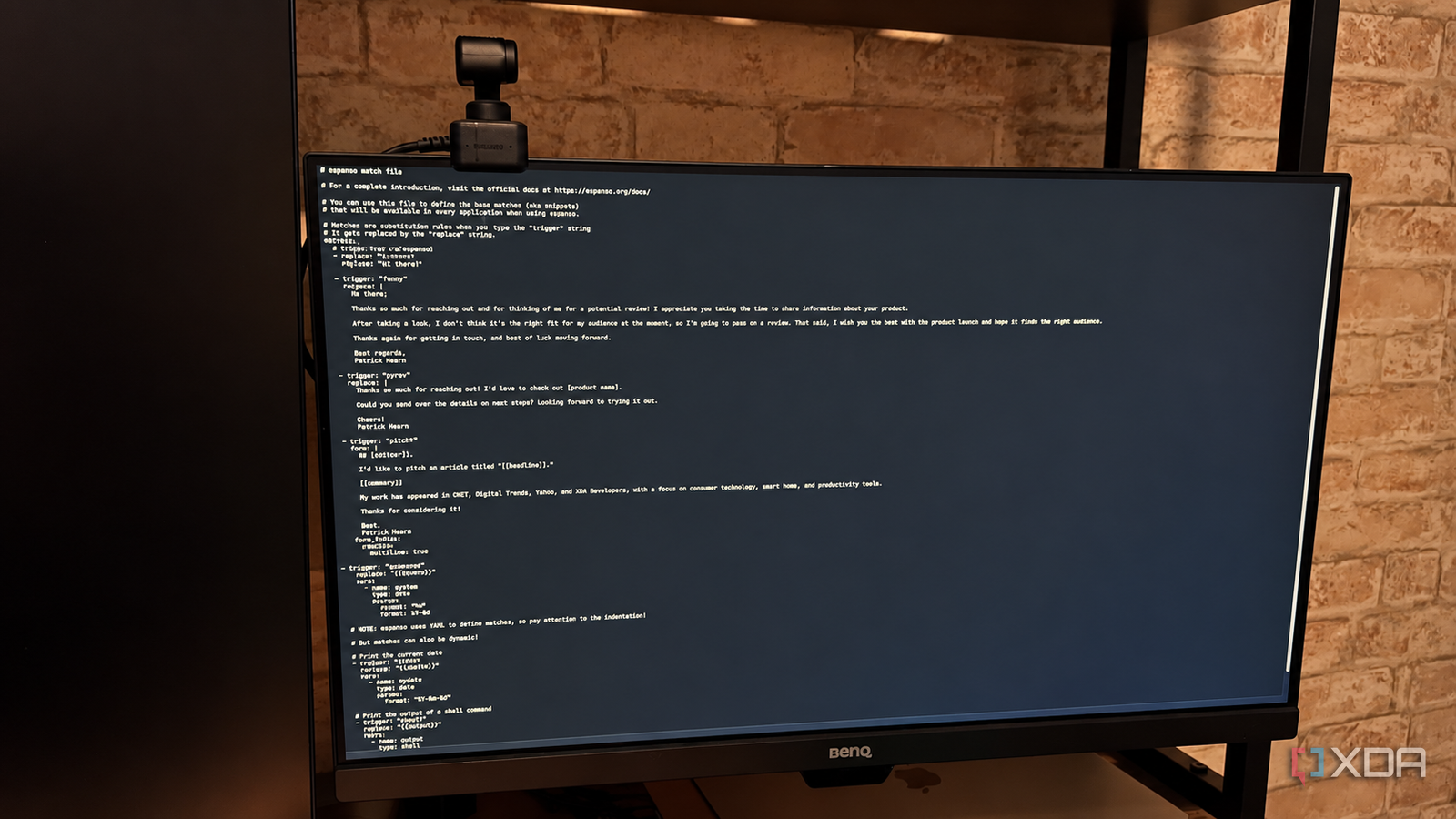
Published Oct 4, 2026, 7:01 PM EDT Patrick is a seasoned writer with more than a decade of experience, specializing in any and all things tech. His work has been featured on platforms like CNET, Yahoo, Xfinity, and many other outlets. When not typing away, he can be found with his nose in a book. A large portion of my workday is spent responding to messages, emails, and typing out the same information over and over again. There are some parts of my emails—especially the sections of pitches where I mention my previous publications—that don't change much regardless of who I'm speaking with, and that means I write that same finite combination of words over and over again throughout the week. Espanso helps me reduce the amount of work I have to do by filling in those sections for me. All I have to do is type a few keystrokes. Espanso replaces the repetition of my day A few characters can replace entire chunks of text With Espanso, I can set up triggers that eliminate the need for me to type something myself. For example, if I'm offered a product to review but it's not a great fit, I send a response turning down the offer and explaining why. It's several sentences, and it's something I have to type out multiple times a week. With Espanso, I can enter a colon followed by "nrev" and it becomes the following: Hi there,Thanks so much for reaching out and for thinking of me for a potential review! I appreciate you taking the time to share information about your product.After taking a look, I don’t think it’s the right fit for my audience at the moment, so I’m going to pass on a review. That said, I wish you the best with the product launch and hope it finds the right audience.Thanks again for getting in touch, and best of luck moving forward.Best regards,Patrick Hearn That's a lot of typing I don't have to do. Espanso handles far more than just simple phrase replacement; I can set up complicated templates, too. I'm sure you've also been in the position of having to copy and paste text from a note or something. It saves time without disrupting my workflow Shortcuts follow me between applications Before I started using Espanso, I had a text file with my most common responses written out so I could just copy and paste. While it was still faster than typing them out by hand, jumping between applications slowed me down. One of the great benefits of Espanso is that it isn't limited to just one app. It works system-wide, so I can take full advantage of all the replacement phrases I have without opening a text file in between. As someone who is easily distracted, reducing the number of interruptions has a compounding effect on my productivity and efficiency. Espanso has a lot of features that are often overlooked Dynamic content is one of its strongest perks Espanso supports fully-featured templates with dynamic content, but those features are often overlooked in favor of simpler text expansion. Dynamic content lets you create templates that can automatically fill in the date, time, the contents of your clipboard, and much more. For example, if you wanted to include tomorrow's date as part of a snippet, you might configure it like this: - trigger: ":tomorrow" replace: "{{mytime}}" vars: - name: mytime type: date params: format: "%x" offset: 86400 Espanso lists all the potential ways to use this in its documentation on its website. Of course, all of these shortcuts have to be configured ahead of time, but that's a small price to pay. I can set up whatever shortcuts I need one time, and then I can trigger them with the right shortcut input. And because Espanso uses specific key combinations to activate the triggers, I don't have to worry about a replacement happening by accident. It's highly unlikely that I'm going to type colon + nrev by accident. Building the shortcuts does take time If you don't repeat yourself a lot, Espanso might not be as useful I get a lot of utility out of Espanso, but that's specific to my field. While the average Joe could use it for an email signature, every email client I can think of already supports signatures. Why would you need Espanso for it? The app also requires a fair bit of maintenance. You need to regularly update outdated text, remember your trigger phrases, and more importantly, identify the phrases you use often enough to warrant the effort. The app is great for writers and coders, and it can even be set up to trigger macros. However, if the majority of your typing is chatting with friends, its utility might be a bit limited. Espanso's greatest strength is removing tiny, recurring keystrokes Espanso on its own isn't saving me hours each week, but it improves my overall productivity. The minutes it saves me when typing up emails add up, and I'm able to more quickly go through the daily barrage in my inbox. But when it comes to software, it's vital one considers an app that ticks all the boxes for their needs. For me, this is one fine example.
Espanso has saved me more time than any AI tool I've tried this year
Full Article
Original Source
Read the full article at Xda-developers →KhanList aggregates and links to publicly available news content. We do not host full articles from third-party sources. Always verify important information with original sources.