
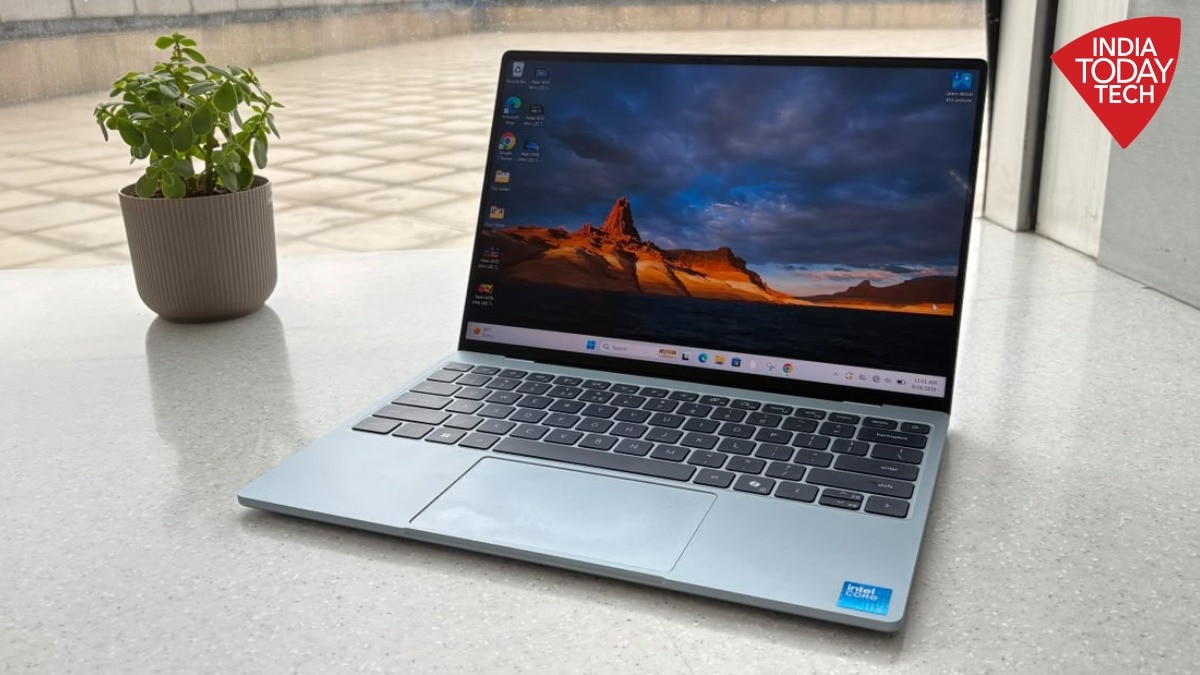
There are laptops that are portable, and then there is the Dell XPS 13. The first thing that struck me when I picked up this laptop was just how light it was. It is so compact that it almost feels like I am carrying a book or a tablet rather than a regular laptop.And that, I think, is the biggest reason to buy the XPS 13. But let's not get into the verdict just yet, because there are a few things you need to consider before making that point and taking out your wallet.First, a quick look at the specifications. The XPS 13 is 12.7mm thick and starts at 1kg. It comes with a 13.4-inch 2.5K touchscreen, up to 32GB LPDDR5X RAM and up to 1TB SSD storage. The laptop is powered by either a Series 3 Intel Core 5 or Core Ultra 7 processor, depending on the configuration. For this review, I used the Intel Core 5 320 variant with 8GB RAM and 512GB storage. And this machine gets the basics right. Of course, at this configuration, the XPS 13 is not trying to be everything for everyone. For example, that 8GB RAM makes it clear that this is a laptop for office work, and not for demanding video editing or something like that. But for readers who are looking for a compact machine — really compact — this one is just the right size and can get you through your daily hustle.The design is the biggest reason to like it As I mentioned at the start, the XPS 13 makes a very good first impression. On me it did. The laptop has a clean, minimal design, and the aluminium finish gives it the kind of premium feel you expect from the XPS range. The blue colour option you are seeing in this review is subtle rather than flashy. It looks classy without trying too hard. Now getting more fun colour options could have been a treat. But we are not complaining here.What I particularly like is how easy it is to carry. The laptop can simply slide into your tote, backpack or regular bag without adding much weight. It is so light and compact that carrying it around almost feels like carrying a book.And don't let the looks fool you, because the build does not feel fragile. The hinge is sturdy and does not have that flimsy feeling you sometimes get with ultra-thin laptops. The keyboard also feels tactile and solid, while the aluminium finish is easy to clean.There are, however, compromises.The biggest one is the port selection. The XPS 13 has just two USB-C ports. On the Core Ultra configuration, these are Thunderbolt 4 ports with DisplayPort 2.1 and Power Delivery support. That is fine if most of your accessories are wireless or USB-C, but if you regularly connect a pen drive, HDMI monitor or other peripherals, you will probably need an adapter or hub. Display is bright and vividThe XPS 13 comes with a 13.4-inch 2.5K LCD touchscreen with a 2560 x 1600 pixel resolution. It has a 30Hz to 120Hz variable refresh rate, 500 nits of typical brightness and 100 per cent DCI-P3 colour coverage. So, how is the experience, you ask? Good. The viewing experience is not as immersive as what you get from an OLED screen, but the LCD panel on this compact laptop is not falling short either. It is bright, colours look vibrant without appearing overly saturated, and the overall tone feels fairly natural. I used it for editing photos, watching movies, YouTube and regular work, and the screen performed well across all of these.It also supports 120Hz refresh rate, so everything feels smooth and snappy. Scrolling through websites feels fluid, and moving around Windows feels more responsive.There is some glare, though. It is not a deal-breaker, but if you have a strong light source or a window directly behind you, the reflections can become quite noticeable. The brightness is good enough to keep the screen visible even in well-lit surroundings, but if you are working with a strong light source behind you, you may still have to adjust the laptop's position.And then there is the touchscreen. I did not expect to use it much, but I ended up using it more than I thought I would. Scrolling through articles, zooming into photos or quickly tapping something on the screen feels, the touchscreen actually came in handy.Not a power machine, but it will get your work doneThe XPS 13 is powered by Intel's Series 3 Core processors, with options including the Core 5 and Core Ultra 7. You can also choose between different memory and storage configurations, with up to 32GB RAM and 1TB storage available. The laptop I used for this review came with Intel Core 5 320, 8GB RAM and 512GB storage. And if we talk about this particular variant, it is good enough for regular work. I used it for browsing, writing, work in my office CMS, streaming and other everyday tasks, and I did not notice any major lag.But once you start doing more demanding work, you can feel the limitations of this configuration. Heavy photo or video editing, intensive AI tasks or simply having too many things running at once are not really what this 8GB variant is made for. You do have the option to go for higher specifications, but that also means spending more.If you compare the base variant with Apple's MacBook Neo, the XPS 13 falls a little behind in performance. Apple's chipset is better optimised for the hardware and software, which gives the MacBook Neo an edge, especially when you start pushing it harder.But don't look at the XPS 13 as a powerhouse. This is a compact laptop designed more around portability and everyday productivity than raw power, and it delivers well in that space. In fact, the 8GB variant also makes sense for students and users who primarily need a lightweight machine for browsing, writing, online classes, office work and getting the basics done. You can see the benchmark results here, which will give you a better idea of how the XPS 13 performs. Dell XPS 13 (2026) Benchmarks The keyboard, touchpad and speakersAs for the keyboard, the keys are tactile, smooth and slightly raised, unlike the zero-lattice keyboard on the XPS 16. I spend a lot of time typing, and I did not face any issues during longer writing sessions. The keys feel comfortable and responsive, and I found myself getting used to them quite quickly.The glass touchpad is smooth as well. Gestures work properly, the tracking is accurate and I did not run into any major palm-rejection issues.If you have read my full review of the XPS 16, you would know that I was impressed with its speakers. The smaller XPS 13 does not let you down either. It has a quad-speaker setup with 8W peak output and Dolby Atmos support. The speakers are loud and clear, and more than good enough for casual streaming sessions. Whether I was watching YouTube, listening to music while working or watching a movie, I never felt the need to connect another Bluetooth speaker for audio.Battery life is a big winBattery life is one of the things I really liked about the XPS 13.Despite being such a small machine, it packs a 52Wh battery, and Dell claims up to 17 hours of streaming. In my regular use, I managed around 6 to 7 hours of work while still having roughly 30 per cent battery remaining. That means it almost got me through my entire work shift, and I was impressed. Charging is quick too. I was able to get the laptop fully charged in around an hour. Dell includes a 65W USB-C GaN charger with the laptop. I did not notice any major thermal issues during my use. The laptop remained comfortable during regular work, which is another plus when you are using it as an everyday machine.Dell XPS 13 (2026) final verdict: Who should buy it?The Dell XPS 13 is an easy recommendation from us for anyone looking for a Windows laptop that is portable, premium and gets the job done.It is light and compact without feeling cheap. The display is good, the keyboard is comfortable, the speakers are loud, and the battery can almost get you through a full work shift. The Intel Core 5 chip is also capable enough for regular everyday work. For students and professionals who want a laptop they can easily carry around, the XPS 13 makes a lot of sense.But there are a few things to keep in mind. This is not a powerhouse, and heavy AI work or too much multitasking can push its limits. The two USB-C ports are another compromise. If portability is your priority, the XPS 13 is an easy and, in fact, really good option as a Windows machine. If you need more power, I would recommend looking at a higher RAM configuration or a more powerful laptop.- Ends
Dell XPS 13 (2026) review: Compact, light and made for everyday work
Full Article
Original Source
Read the full article at Indiatoday →KhanList aggregates and links to publicly available news content. We do not host full articles from third-party sources. Always verify important information with original sources.