
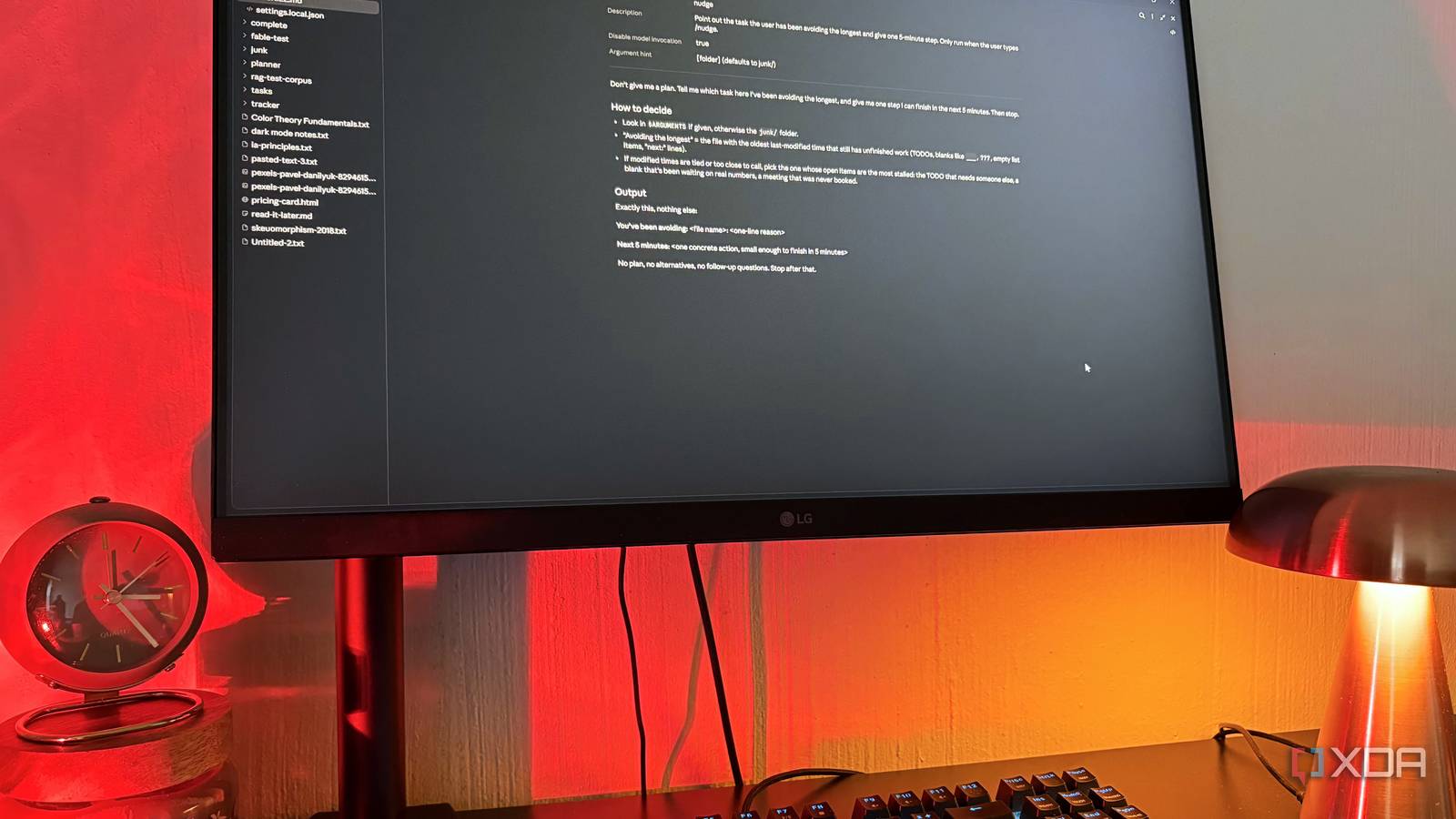
Published Sep 29, 2026, 5:30 PM EDT Nolen began their writing career in 2019, with three years dedicated to editing the Creative section at MakeUseOf. Their expertise lies at the crossroads of technology and creativity, covering areas like photography, video editing, and graphic design. Outside of work, you'll often find Nolen diving into a good book, writing their own stories, or playing video games. Procrastination is one of the problems that the productivity world seems to keep throwing software at, promising to fix your life for good. To-do apps and planners have been at this for years, and now AI assistants are in on it too, with many happy to schedule your entire week for you. You might have already come across one or two tools that genuinely helped manage your time and track your productivity - most of these tools have something good to offer, and there's something out there for everyone. The problem is there are just so many to keep track of that the tools become yet another thing to procrastinate on, and AI assistants often inflate the issue by giving you a breakdown with a million steps in an attempt to seem helpful. But I've managed to reel my AI back in with one simple instruction. Want to stay in the loop with the latest in AI? The XDA AI Insider newsletter drops weekly with deep dives, tool recommendations, and hands-on coverage you won't find anywhere else on the site. Subscribe by modifying your newsletter preferences! AI assistants can make procrastination worse A 12-step plan only feels productive, until it isn't Ask Claude to help you start pretty much anything and you'll get a plan back, usually with headers and a checklist that has its own smaller checklists underneath. It feels productive for about two minutes, and then I just close the tab because now the task looks bigger than it did before I asked. A lot of it is just how models are tuned. Anthropic's prompting docs for Opus 5 point out that its default responses run longer than earlier Opus models did. My first instinct was to drop the effort setting, which didn't really change anything, and the docs actually explain why. Effort changes how much the model thinks before it answers, and turning it down won't reliably make its responses shorter, more concise, or get to the point. This leaves you with instructions as your only option to reel it in. There's also the bigger issue that Claude only knows about whatever you bring to it, and I'm rarely going to bring the thing I'm avoiding - that's sort of the whole point of procrastination. What I needed was something that wouldn't plan anything and would go looking for that task by itself, without me pointing at it first. Breaking down the instruction that got Claude to help me stop procrastinating Every sentence is there to shut down a habit The instruction itself is short and simple: "Don't give me a plan. Tell me which task here I've been avoiding the longest, and give me one step I can finish in the next 5 minutes. Then stop." The first sentence goes after the default behavior, but it probably wouldn't hold up alone, since Anthropic's prompting guidance notes Claude does better with a description of what you want than a list of what you don't - so it needs the rest of the instruction to actually work. The second sentence gives it a job. "Avoiding the longest" makes Claude go and find the answer rather than wait for me to name something I'd obviously never name myself. And it has to work that out from whatever it can see inside the folder, which means it's going to look for stuff that's been sitting half-completed. Sometimes file dates can be misleading, so I add a little caveat to ignore that file data and Claude defaults to ranking importance based on what's actually in the file. The 5-minute step works as a stopping condition, which lines up with Anthropic's Opus 5.5 advice to spell out what done looks like and when to stop. "Then stop" plays into how literally newer Claude models take instructions, and I locked the output to a couple of lines too. Where the instruction lives And which version of Claude reads it best Claude Code has a feature called skills, which are instruction files it can load when a task seems relevant, or when you call one by name. I set up a skill for this instruction and it's called "nudge", and setting disable-model-invocation to true stops Claude from loading it on its own, so it only runs when I type /nudge. I also have a "junk" folder now where all my half-baked ideas and half-finished tasks go to live, so basically every side project, priority project I've been putting off, and anything I'm still actively learning. And this skill looks at this folder by default. I did consider a CLAUDE.md instead, but that gets read at the start of every session in the folder, and I didn't want every conversation opening with a guilt trip. Regular Claude Chat gets my life admin. I put the same instruction in some of my Project instructions where I keep things like therapy progress, workouts, goals, and so on. There are no file dates in a chat, so it works from what I've uploaded and told it, and it still lands on whatever I keep skipping. Pasting it from a notes file works too. I ran the identical /nudge on Opus 5.5 and Sonnet 5.5, both at medium effort. Both picked the same file and step, then stopped where they were told to. Opus read all seven files one by one, while Sonnet searched the folder and ran a single command. I'd say Sonnet 5.5 is probably what I'll keep using for this because it seems to suit tasks with a clear spec and a way to check the result, which this whole instruction basically is. Opus 5.5 is a safe pick too, with cloud storage company Box, one of Anthropic's early testers, reporting answers that were 40% less verbose than Opus 5 with no accuracy loss. I reckon Opus 5's default length would fight the instruction, and Haiku would probably follow the format but be worse at judging what's most avoided. Medium effort seems like plenty either way. It doesn't make me more productive, it just helps me start My junk folder isn't going to get any smaller any time soon, but it's not supposed to. The difference is that I actually open it now because I know I'll get one small, manageable thing back instead of an entire plan with a million components. It's already helped me set up one meeting I've been avoiding, do one audit of something important, and fact-check some details of one of my short stories.
Claude finally got me to stop procrastinating, and it only took one instruction
Full Article
Original Source
Read the full article at Xda-developers →KhanList aggregates and links to publicly available news content. We do not host full articles from third-party sources. Always verify important information with original sources.