
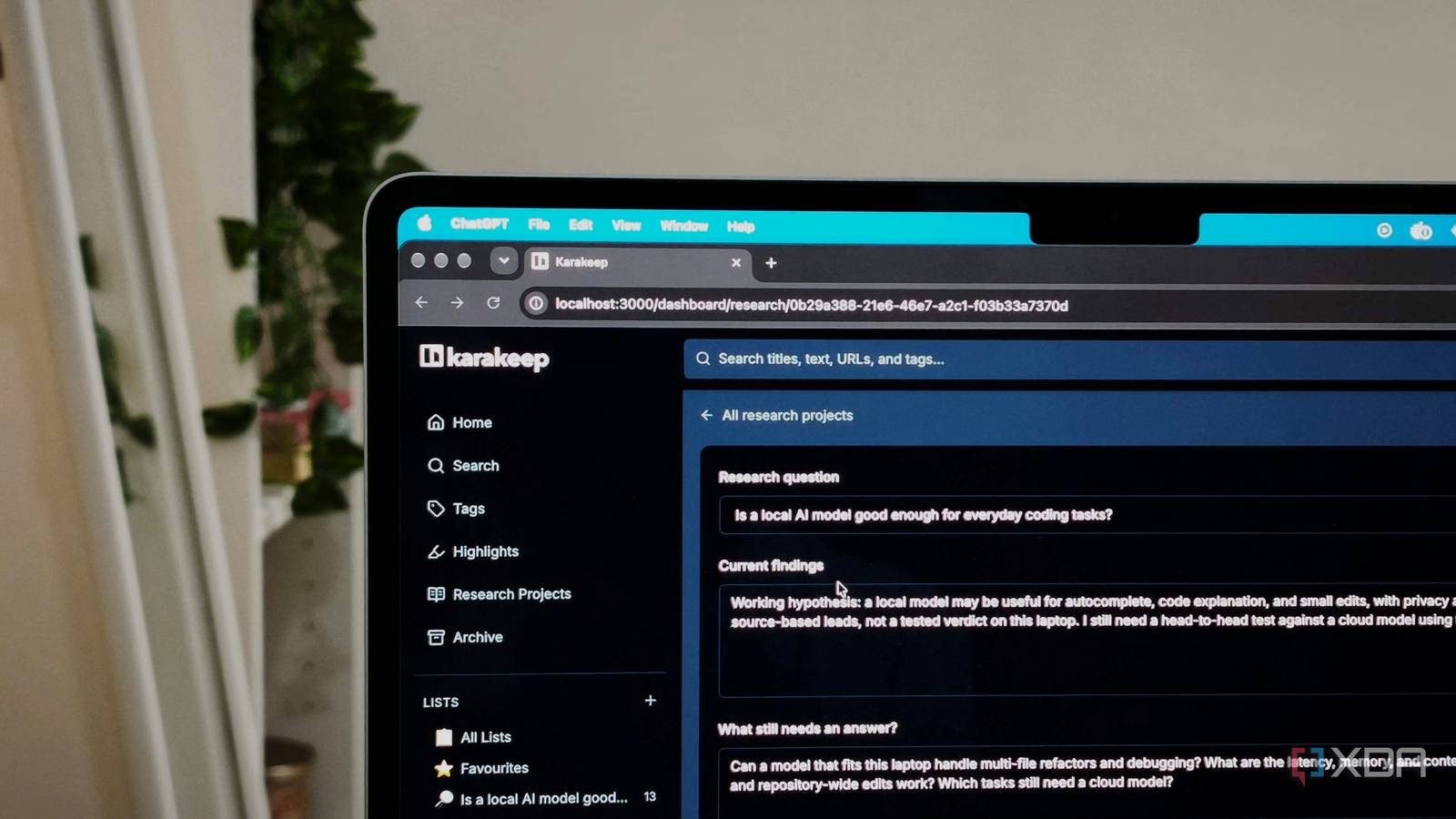
Published Sep 28, 2026, 6:00 PM EDT Anurag is an experienced journalist and author who’s been covering tech for the past 5 years, with a focus on Windows, Android, and Apple. He’s written for sites like Android Police, Neowin, Dexerto, and MakeTechEasier. Anurag’s always pumped about tech and loves getting his hands on the latest gadgets. When he's not procrastinating, you’ll probably find him catching the newest movies in theaters or scrolling through Twitter from his bed. Karakeep is one of the apps I use every day, and I’ve wanted to add a few things to it for years. I wanted to keep sources, notes, and highlights together around a story, ask questions about what I’ve saved, and compare articles that answer the same question differently. Having all that inside the app where I already save everything makes so much sense. I recently asked Claude Code to add those features to Karakeep, and I now have a version with five extras built around my research needs. Along with projects, questions, and source comparisons, it connects saved items through the people and companies they mention and brings back older bookmarks when they’re relevant to my current research. The experience has been a lot better with those features in place. My research now has a place in Karakeep Everything I’m looking into stays together When I’m researching a topic, I want to keep track of more than the links I’ve saved. There’s the question I’m trying to answer, the notes I’ve made, and specific passages that are relevant. I wanted somewhere in Karakeep to keep those things together, with enough context to understand where the research stands when I come back to it. I asked Claude Code to add a Research Projects section that lets me group bookmarks, notes, highlights, and sources around a specific story. For instance, instead of collecting everything under a broad topic like local AI, I can create a project around whether a local model is good enough for everyday coding tasks. That project could include documentation, reviews, my own notes, and passages highlighted in saved articles. The summary gives me somewhere to describe the current findings and what still needs an answer. I can update it as the research develops and use the status to distinguish work that’s ongoing from stories I’ve finished. I can ask questions and compare the answers I can ask questions, then check the sources If I’ve saved several reviews of a laptop, I want to be able to ask what they say about its battery life without opening each review and hunting through it. The information is already in my bookmarks, and I wanted Karakeep to help me find it. I asked Claude Code to add Ask My Library, which lets me ask questions across everything I’ve saved. The answers include citations linking directly to the supporting bookmarks or passages, so I can check where a detail came from and read more if I need to. The same feature works for questions about saved recipes, travel guides, tutorials, or anything else in the collection. I also added source comparison because getting an answer from several bookmarks doesn’t necessarily mean those bookmarks agree. I can select multiple articles and have Karakeep identify shared points, conflicting claims, different numbers, and information that only one source includes. With laptop reviews, for example, that could help me spot different battery-life results or a complaint that appears in only one review. Older bookmarks become useful again Even the ones I forgot saving I also had Claude Code add automatic entity extraction, which identifies the people, companies, products, and places mentioned in saved items. I can click an entity to see everything I've collected about it. For example, Apple can appear in articles saved for several different stories, giving me a way to bring those sources together without organizing each story around the company itself. I can save a product review for one project and an interview with its founder for another. Both contain information about the same company, even though I saved them for different reasons. Opening that company’s entity page brings those items into the same view. This also works for individual products, people, and places, so I can explore those connections across the collection. I also wanted older material to come back when it’s relevant to something I’m currently saving or researching. That’s what Smart Resurfacing adds. For example, if I’m saving information about a place I want to visit, it can bring back an older travel guide about that destination. Claude Code got it done in under an hour Claude Code didn’t struggle with building any of these features, and the whole thing took around 30 to 45 minutes using Opus 5.5. Since Karakeep is open source and supports self-hosting, I had no difficulty forking it, adding the features, and running my modified version on my device. I considered using Fable, but the less expensive Opus 5.5 handled everything. Its token pricing is lower than Fable’s, although I still exceeded the included usage limit on my $100-a-month Max plan during the build.
Claude Code built the features I've been asking for in my favorite app, and it took 30 minutes
Full Article
Original Source
Read the full article at Xda-developers →KhanList aggregates and links to publicly available news content. We do not host full articles from third-party sources. Always verify important information with original sources.