
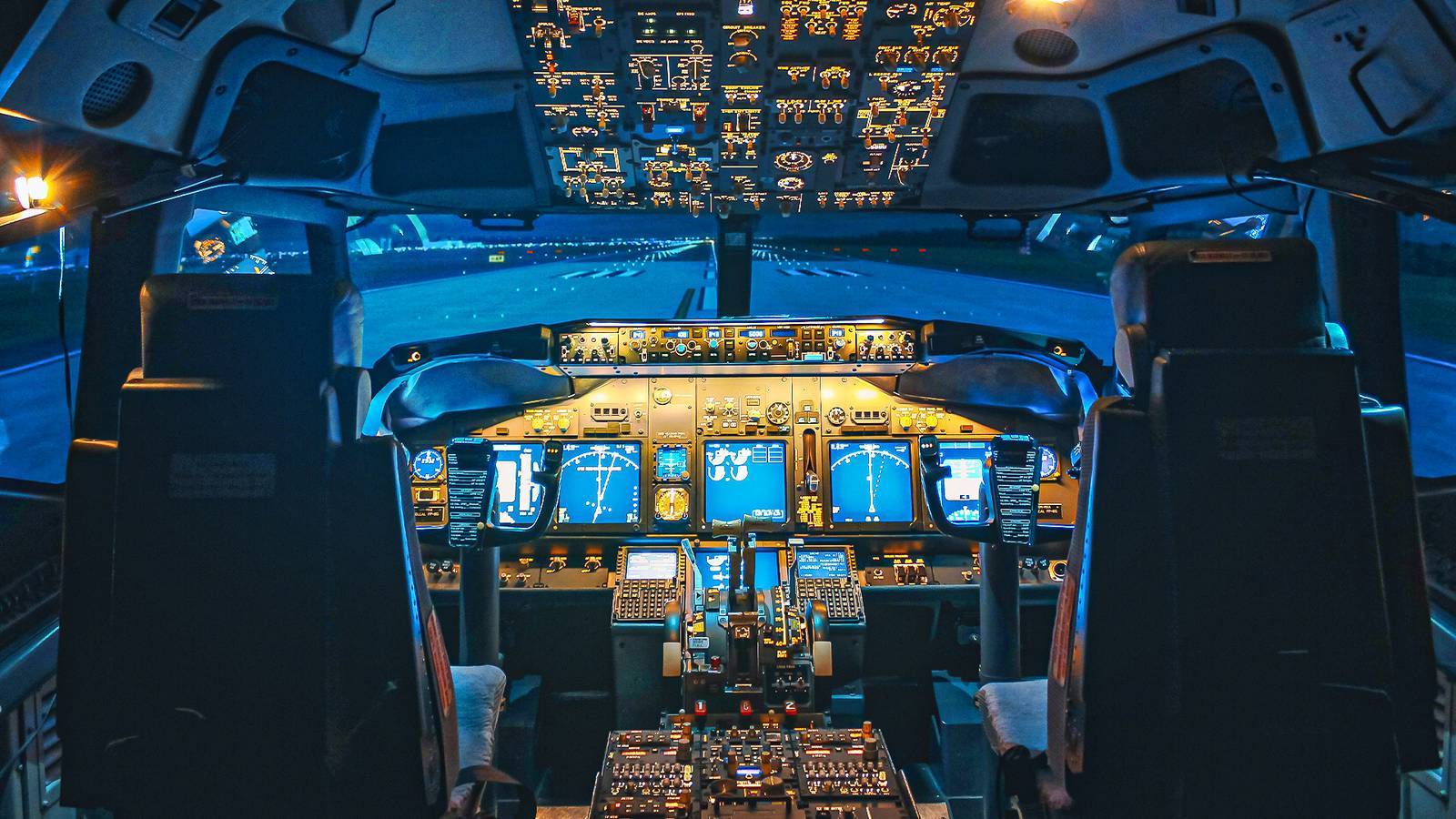
Microsoft Flight Simulator cannot fully train someone to fly a Boeing 737 or an Airbus A320 on its own, but its impressively authentic geography, weather, and avionics have made it a popular pilot training tool to supplement many levels of flight school. Although a home setup lacks the motion feedback and entire flight deck of a certified airline simulator, MSFS' high-fidelity interface, physics, plane attributes, and environment provide users with a realistic cockpit atmosphere. MSFS simulates airflow across hundreds of airframe points, whereas third-party add-ons recreate Garmin G1000 glass cockpits, navigation radios, and aircraft flight management systems down to individual electrical circuits. Its combination of great system accuracy and little tactile input makes home simulation ideal for instrument flight instruction. Student pilots and hobbyists can even integrate their desktop sim with virtual air traffic control to practice instrument scans and radio calls from home, saving money on aircraft rentals and instructor hours. Fuel costs, aircraft rental fees, and safety hazards are eliminated while practicing at home, providing aspiring pilots with a limitless number of opportunities to grasp ideas in a safe setting. While flying with an instructor, students can repeat a navigation exercise or reset an approach without worrying about running out of time or money on aviation fuel. A student pilot who intends to fly an A320 or 737 in the future can also learn airline standard operating procedures by practicing with high-fidelity add-ons at home. Balancing Hardware Limits With Procedural Discipline Credit: Microsoft When aspiring pilots practice with real procedures, disciplined home simulation offers significant educational and financial benefits. A single upfront purchase of home software allows students to practice endlessly without fuel or maintenance fees, accelerating progress for instrument students practicing approaches and beginners learning switch layouts months before their first flight. Basic training aircraft and flight instructors can cost up to $200 per hour. While casual, unguided play can encourage staring at cockpit screens rather than watching outside for traffic and the horizon in trainers like the Cessna 172 or Piper Archer, following real-world checklists and using virtual reality or emerging mixed-reality interfaces that align virtual switches with physical cockpit mockups reinforce accurate visual scanning and spatial awareness. While bridging the physical gap to actual aircraft, well-considered hardware selections further improve the training value of home installations. While real flight controls become heavier as airspeed increases and airline emergencies, like an engine failure on a Boeing 737 MAX 8 at takeoff decision speed, require 80 pounds (36 kilograms) of rudder pressure to keep the jet straight, standard desktop yokes rely on simple springs with constant tension. Pairing force-feedback controls with immersive headsets creates realistic scan patterns and cockpit familiarity before boarding an aircraft, even if light plastic pedals cannot match that heavy resistance. Within clear regulatory guidelines, home software serves as a productive complement to accredited flight instruction. Although personal computer hours do not count toward a commercial pilot license or airline transport rating, because the Federal Aviation Administration requires certified training devices to feature enclosed cockpits, physical switches, and tested aerodynamic software, arriving at the airport with established procedural knowledge, which allows flight students to focus paid aircraft hours on better handling and maneuver practice. Flight Deck Mastery And Risk-Free Practice At Home Credit: Microsoft You cannot learn to fly a commercial jet using Microsoft Flight Simulator alone, because aviation regulators prohibit logging personal computer hours toward official pilot certificates, and home setups lack the physical motion and control feedback of Level D sims. What you can do at home is master the exact layout of a Boeing 737, like PMDG offers, or an Airbus A320 cockpit, as Fenix made, rehearse standard checklists, and build deep familiarity with how the aircraft systems interact and behave. Practicing 'switchology' and flight computer use removes the early confusion of an unfamiliar flight deck, so students are not held back by basic button-hunting in formal training. When a licensed pilot advances toward complex, multi-engine, or transport-category ratings, or during instrument training, this type of preparation becomes extremely beneficial. Trainees arrive already familiar with the cockpit environment and operating logic, saving costly simulator or instructor time spent recalling switch locations or automation mode responses. Long before your first actual flight, a complicated aircraft flight deck becomes a familiar workspace thanks to a solid baseline that helps you learn advanced flying skills faster, perform better during assessments, and reach career milestones with greater confidence. Boeing Versus Airbus In Digital Translation Credit: Fenix Simulations The real differences between flying the Airbus A320 lineup and the Boeing 737 family show up inside the cockpit in MSFS, not on the ramp. When you load a 737 Next Generation or 737 MAX add-on, you enter a traditional flight deck with physical trim wheels that spin noisily next to your knee, manual control yokes, and overhead panels full of toggle switches you must operate manually. A side-mounted joystick, push-button overhead panels, and intelligent fly-by-wire computers automatically trim the aircraft and prevent you from banking or tilting too far. Making the switch to an Airbus A320ceo or A320neo is like stepping into a fully automated digital workstation. In Microsoft Flight Simulator, switching between a Boeing 737 and an Airbus A320 allows users to fly an airliner from your desk in two entirely different ways. In the 737, pilots use a center yoke, flip rows of mechanical toggle switches on the overhead panel, and watch the trim wheels beside your seat spin to change pitch. Moving to the A320 feels like entering a modern digital workspace, where you steer with a side-mounted joystick, tap illuminated push-buttons that remain dark when everything is normal, and let the fly-by-wire computers trim the jet and keep sim pilots from banking or pitching beyond safe limits. Rehearsing Complex Airspace And Airline Ops Tempo Credit: Microsoft High-quality third-party add-ons capture the day-to-day cockpit differences, even down to the slightest button click or computer menu. You'll see firsthand how Boeing expects pilots to be hands-on with manual thrust changes and step-by-step checklist routines, whereas Airbus automates common duties using flight guidance modes and centralized electronic warning screens. Exploring both flight decks at home offers students and aviation enthusiasts a pleasant, low-cost way to learn two distinct cockpit philosophies without leaving their seats. Beyond the cockpit switches, the simulator's realistic airport layouts and intricate global landscape allow you to practice flying both aircraft in crowded, realistic airspace. Users can load up complicated hubs like New York JFK, London Heathrow, or Tokyo Haneda to learn about standard instrument departure paths, runway markings, and complex taxiway layouts. Student pilots and hobbyists can gain a good understanding of how a Boeing and an Airbus handle cockpit workload during taxi, takeoff, and climb by practicing these ground and departure routines at home. Comparing both aircraft families side by side on your home computer also highlights how two different design philosophies tackle the exact same airline routes. While Boeing relies on pilots to stay closely involved with manual thrust and trim adjustments during phase changes, Airbus automates much of the routine workload through flight guidance modes and centralized electronic warning screens. Exploring both cockpits in the simulator lets you experience how each manufacturer approaches automation, navigation, and pilot workload, helping you understand why airline crews train so differently for each jet. A home flight simulator transforms abstract concepts into something you can see, test, and comprehend in real time for anyone studying professional aviation and aerospace. Entering a virtual Boeing 737 or Airbus A320 lets you see how the aircraft behaves step by step when a written explanation of a complicated procedure, flight maneuver, or aerodynamic idea seems unclear on paper. In contrast to a commercial full-motion simulator that charges hundreds of dollars per hour and adheres to a rigid curriculum, your own setup allows you the flexibility to stop, go back, and try new things anytime you feel curious. Pushing Airliners To The Limit In A Safe Sandbox Credit: Fenix Simulations Enjoying the freedom to experiment, test ideas, and push buttons at home is one of the best ways to bring aviation studies to life, as long as you use it as a visual sandbox for learning how the systems think rather than a substitute for feeling a real airplane fly. You can try a steep approach, shut off a hydraulic system, or start an engine fire at takeoff speed to see how the flight computers and control surfaces respond. This can make complex study topics understandable in a straightforward, free, and genuinely enjoyable way. In ways no actual pilot would ever take, home simulation lets students and aviation enthusiasts explore the limits of an airliner's performance envelope outside scheduled study sessions. Load a Boeing 737 MAX or Airbus A320neo to maximum weight, simulate a strong crosswind, then land on a short mountain runway to evaluate how the brakes and spoilers handle the energy. MSFS also allows for insane, impossible stunts like max-performance vertical climbs or forceful low-altitude twists to see what happens when you go beyond real-world boundaries. Experimenting this way develops curiosity into real insight about energy management, stall speeds, and why airline operating restrictions exist in the first place. While you test those ideas, it's helpful to remember where the screen ends, and actual flight begins. The physical seat-of-the-pants feedback of a genuine jet, such as the forceful pushback on the rudder pedals after an engine failure, the heavy airframe shudder prior to a stall, or actual G-forces pressing you into your seat, cannot be replicated. During a simulated malfunction, a desktop simulator performs a fantastic job of displaying warning lights, Master Caution bells, and flight manual numbers. This also helps develop mental habits for seeing problems early.
Can Microsoft Flight Simulator Really Teach You To Fly A Boeing 737 Or An Airbus A320?
Full Article
Original Source
Read the full article at Simpleflying →KhanList aggregates and links to publicly available news content. We do not host full articles from third-party sources. Always verify important information with original sources.