
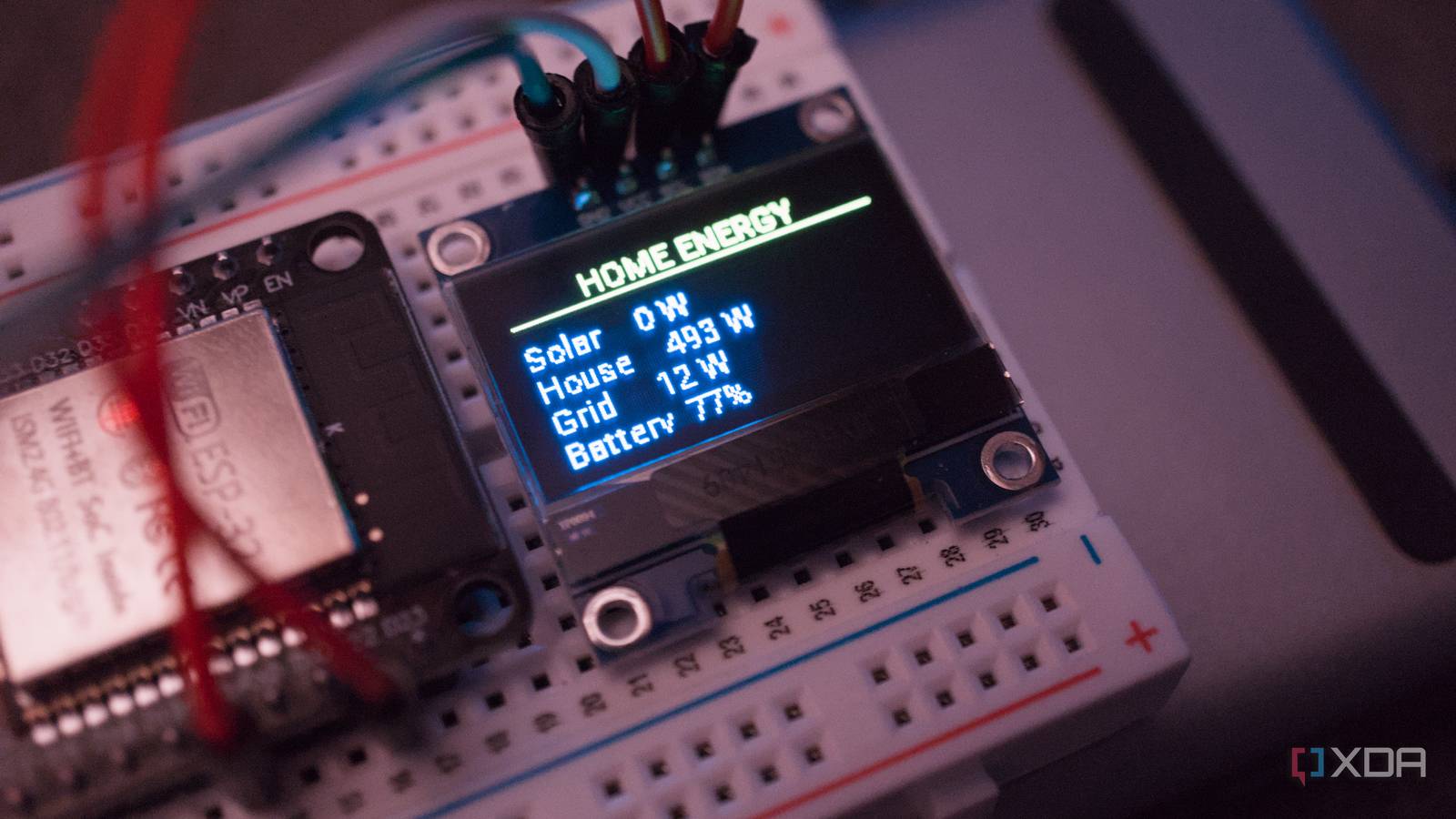
Published Sep 20, 2026, 2:30 PM EDT Richard is the PC Hardware Lead at XDA and has been covering the technology industry for almost two decades. He's been building PCs since young, and when not creating content, you can often find him inside a chassis somewhere. The best thing about replacing my Home Assistant dashboard with a 1-inch ESP32 display wasn’t the hardware, it was changing how I was exposed to data shared by my smart home. I love having a monitor dedicated to the status of my home lab, smart home, power usage, and service uptime. It's like I'm running my very own data center, but it's a little overkill and after a few selective comments from my spouse, it was time to downsize the reporting. Home Assistant can provide too much data Especially when it's kitted out with Zigbee, energy, and other integrations It's easy to go all-out with the smart home, so much so that running a heavily configured Home Assistant install feels like you have the most capable house on the planet. I've gone from absolutely despising the very notion of the smart bulb to having a fair chunk of technology within the home controlled by a single centralized platform. I've migrated from walled ecosystems to an open foundation that lets me spend money smarter and make the most of everything. Because not every appliance within the home needs to be smart. The TV can remain disconnected from the outside world. Your washing machine doesn't need to communicate with the cloud for you to clean laundry each week, but it's cool to experiment with a few projects. I enjoyed making a "dumb" (some would say normal) washing machine slightly more intelligent by allowing me to report on power usage to have a Home Assistant integration work out which program is being used. That's pretty neat, taking something that doesn't offer much with full cloud capabilities, but can still provide insight to what program is running and when it's finished. With just a smart plug and a few minutes of free time, you can have your washing machine report directly to your smartphone when a program has completed. Smart stuff indeed! But it's an indicator to just how accessible this has all become. Home Assistant used to demand much more comfort with YAML and manual configuration than it does today. Now, just about anyone can access and install Home Assistant, download one of thousands of available community scripts, and create the ultimate smart home. But it can prove challenging to parse through all the data one can receive from such an established base of operations. Take the energy dashboard as a prime example of this. It can be used to track how much power the house draws from the grid, which is simple enough if connected to your utilities account. But add a solar PV array, some battery storage, and algorithms for controlling the system to maximize savings and it becomes a numbers game. Using a smaller display complicates things But in a good way, to focus on data that really matters My default Home Assistant dashboard has a few cards, but it's mostly focused on the Alarmo home alarm system (I want to cover this soon, taking advantage of a single light switch socket and a few DIY devices) and power management through our EcoFlow PowerOcean inverter. As I just alluded to, I control and manage everything regarding this system right through Home Assistant. Using an integration and some smart scripting to calculate precisely how much battery storage we need to have in the morning to last the day, I can maximize our solar generation. Taking export pricing for the following day, using predicted solar generation forecasts and weather reports, as well as how much power our house is expected to use, Home Assistant automations will work to control the battery charging schedule for the off-peak section of the night (00:30 - 05:30). For instance, it's fairly sunny today and we're currently exporting surplus solar generation, but our battery was only charged up to 60% to ensure we have enough and just in case some clouds decided to rain on the parade. The data is addictive for me to look at. I found myself checking numbers through the day. It's a welcome sight to see just how much money is being saved. Owning an English cottage, we use a lot of electricity, around 30 kWh on average each day. Our water is electric. Our heating is electric. Our vehicles are electric. It's great for being off fossil fuels but it does mean we need to be smart about how we use electricity. Prior to the solar array and batteries, our monthly utility bill was around $500 per month. This has dropped to around $200 per month, which is a substantial savings though that was using the EcoFlow "AI" to manage everything. I've since disabled that and built out the Home Assistant platform to manage it all, which I believe will provide better returns and have already seen it manage the daily charge requirements better. To display all this data to keep me feeling satisfied, I relied on my phone, a monitor running a view of the Home Assistant data, and that was that. Enter the ESP32 and its quirks Credit: Major-Nebula1743 But there's a point where you have too much data to get through. That's why I'm always concious about how much screen time I have on my phone. It's important to strike a balance between taking in data from external sources and focusing on living. That's especially true for smartphone apps like the official Home Assistant offering on iOS and Android. On one hand it's great to have access to your smart home from anywhere, thanks to your trusty companion, but there's also something about have too much access to everything. The ESP32 is a marvel of technology. It packs a hefty punch in an incredibly small footprint. This makes it perfect for reporting on specifics, such as network traffic through OPNSense, or even how much generation we're seeing from today's sun. One would assume having the smaller screen size would impact what could be displayed, but it actually makes it notably more efficient in relaying data and allowing me to parse through it. Instead of overloading the entire screen with numbers, the ESP32-connected panel cycles through pages and each can be dedicated to a single stat. Here's what I started with, jsut displaying power generation: esphome: name: esp32 friendly_name: ESP32esp32: variant: esp32 framework: type: esp-idflogger: level: INFOapi: id: api_server homeassistant_states: true encryption: key: !secret api_keyota: - platform: esphomewifi: ssid: !secret wifi_ssid password: !secret wifi_password ap: ssid: ESP32 Fallback Hotspot password: !secret esp32_fallback_passwordcaptive_portal:i2c: - id: i2c_1 scl: 22 sda: 21font: - file: "gfonts://Roboto" id: font_small size: 11 - file: "gfonts://Roboto" id: font_medium size: 14sensor: # Our current solar output - platform: homeassistant id: solar_power entity_id: sensor.ecoflow_powerocean_solar_power internal: true # If we're importing/exporting to the grid - platform: homeassistant id: grid_power entity_id: sensor.ecoflow_powerocean_grid_import_power internal: true # How much the house is pulling - platform: homeassistant id: house_power entity_id: sensor.ecoflow_powerocean_grid_phase_a_active_power internal: true # Battery SoC for two packs - platform: homeassistant id: battery_soc entity_id: sensor.ecoflow_powerocean_battery_soc internal: truedisplay: - platform: ssd1306_i2c id: display_ssd1306_i2c_1 i2c_id: i2c_1 model: SSD1306_128X64 update_interval: 1s lambda: |- // Header it.print( 64, 0, id(font_small), TextAlign::TOP_CENTER, "HOME ENERGY" ); it.line(0, 13, 127, 13); if (id(solar_power).has_state()) { float watts = id(solar_power).state; if (fabsf(watts) >= 1000.0f) { it.printf( 0, 17, id(font_small), "Solar %.2f kW", watts / 1000.0f ); } else { it.printf( 0, 17, id(font_small), "Solar %.0f W", watts ); } } else { it.print( 0, 17, id(font_small), "Solar --" ); } if (id(house_power).has_state()) { float watts = id(house_power).state; if (fabsf(watts) >= 1000.0f) { it.printf( 0, 29, id(font_small), "House %.2f kW", watts / 1000.0f ); } else { it.printf( 0, 29, id(font_small), "House %.0f W", watts ); } } else { it.print( 0, 29, id(font_small), "House --" ); } if (id(grid_power).has_state()) { float watts = id(grid_power).state; if (fabsf(watts) >= 1000.0f) { it.printf( 0, 41, id(font_small), "Grid %.2f kW", watts / 1000.0f ); } else { it.printf( 0, 41, id(font_small), "Grid %.0f W", watts ); } } else { it.print( 0, 41, id(font_small), "Grid --" ); } if (id(battery_soc).has_state()) { it.printf( 0, 53, id(font_small), "Battery %.0f%%", id(battery_soc).state ); } else { it.print( 0, 53, id(font_small), "Battery --" ); } Apologies for the above code snippet, but it seems I'm not the only one who despises working with YAML. Not because it's difficult, but I just don't enjoy having to get the precise number of indents right per row. My strengths rest with PHP, SQL, and Javascript, and while I like to keep my code legible and easy to parse with indentation and commenting, it can become too much when just one space is all that separates something from working to outright causing a fuss in the logs. That's YAML to me. What the above ESP32 config does is display current solar generation, grid import/export status, total house draw, and how much charge is available in the two 5 kWh battery modules. The end result is a small energy dashboard that can provide insight to how our energy demands are being met. everyone can glance at it and understand what's being shown to them, whereas Home Assistant's energy dashboard can feel overwhelming for those who have never laid eyes on the platform before. Think big but keep it small Try and consolidate as much as you can. That's the mantra I live by now for not just the smart home and Home Assistant, but everything else in life. We moved to the countryside to enjoy a quieter life with more meaningful interactions with fellow villagers (this word always reminds me of Age of Empires). I bought a cheap pickup EV to handle home improvements and waste transport. I spend as little as I can and make use with as much as we already own. And I'm proud of this being a notion XDA pushes as a whole. I prefer using an ESP32 display for various insights to the home lab and wider smart home because it's better than continuously checking my phone, can be set up just about anywhere, and is small enough to go unnoticed if you're not interested in stats.
Building an ESP32 Home Assistant display taught me what data actually matters (and stopped me from checking my phone as much)
Full Article
Original Source
Read the full article at Xda-developers →KhanList aggregates and links to publicly available news content. We do not host full articles from third-party sources. Always verify important information with original sources.