
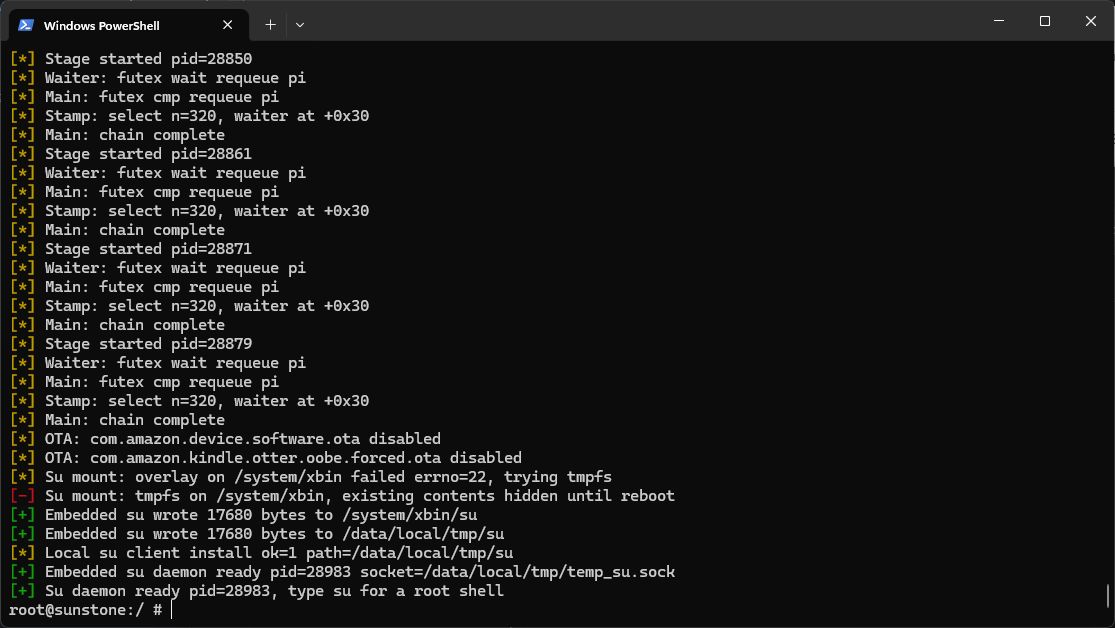
Disclosure: Some links on this page are monetized by the Skimlinks, Amazon, Rakuten Advertising, and eBay, affiliate programs, and Liliputing may earn a commission if you make a purchase after clicking on those links. All prices are subject to change, and this article only reflects the prices available at time of publication.Amazon’s Fire Tablets ship with a modified version of Android called Fire OS. That means that while the underlying operating system is based on Android, they have a custom user interface, app store, and other features that are tightly tied to Amazon’s apps and services.Folks have been hacking Amazon Fire tablets for years by doing things like installing the Google Play Store, disabling lock screen ads, and installing custom home screen launcher apps. But since Amazon usually locks things down pretty tightly, it’s been a while since I’ve seen any methods for rooting the tablet or installing custom ROMs to replace Fire OS. Now there’s a new method for gaining some more control over the Amazon Fire Max 11 (2023) though.This month Xda-developers member Rortiz2 published instructions explaining how to “spawn a temporary root shell for quick access.” This is not quite the same thing as gaining full root access to the tablet, but it does let you make some system-level changes that Amazon probably wouldn’t approve of.In a nutshell, users can connect a Fire Max 11 tablet running certain versions of Fire OS 8.3 with a Linux 5.10 kernel to PC and run a command-line tool that leverages a security vulnerability to open a root shell prompt.*Once the shell is active, you can use it to do things like disable the stock Amazon launcher application… although before you do that you’ll want to make sure that you’ve installed a 3rd-party launcher app, or you won’t be able to access your tablet’s home screen at all. Just keep in mind that while installing an alternate launcher might make a Fire tablet look more like a model running stock Android software, some apps and services found on most Android devices will still be missing, so some apps might still not work.The exploit also automatically disables over-the-air updates to prevent a future security update from patching the vulnerability and/or restoring the Amazon launcher. But you can manually reenable updates if that’s something you want to do.But Rortiz2 notes that while you can open a root shell, the tablet itself isn’t rooted by this exploit. That means that Android apps that rely on root access won’t work, and if you try to use the root shell to make other modifications to protected system files or partitions, there’s a high chance that you brick the tablet (leave it in an unbootable state).You can find more details, plus instructions for leveraging the exploit, at the xda-developers forum.*The same exploit could theoretically be used to gain root shell access on other Amazon tablets with the same Linux kernel, but Rortiz2 says it would need to be adapted and tested on each device, so you probably shouldn’t try it on a different tablet until/unless it’s been confirmed to work on your device.
Amazon Fire Max 11 hack: Use a root shell to disable the home screen
Full Article
Original Source
Read the full article at Liliputing →KhanList aggregates and links to publicly available news content. We do not host full articles from third-party sources. Always verify important information with original sources.